
Skip to content
Learn MikuMikuDance – MMD Tutorials – Free 3D Animation Software

Learn MikuMikuDance – MMD Tutorials – Free 3D Animation Software

Download Free Animation Software – Let's Learn How to Do Everything!

  • Step-by-Step MMD instructions
  • DOWNLOADS
  • Troubleshoot, Fix MMD
  • Site Contents
  • Reggie Replies Q&A
  • Homework!
  • What IS MMD?
    • Download MikuMikuDance Newest Latest Version of MMD
  • “HOW TO”
    • Raycast RAY-MMD Effect Tutorials
  • BONUS PAGES
    • Why convert PMD models to PMX?
  • HALL of CHAMPIONS
  • Tutorial Categories
  • About
    • Privacy Policy
  • Toggle search form
  • Crazy Animation Creation yields fun video and good practice! "the making of" my video
  • Keep the Center-Bone when adding Mother-Bone to an older model MMD Tutorials
  • My latest Halloween video is a Scream! "the making of" my video
  • The Making of: Sleepover Gone Wrong (REMAKE) "the making of" my video
  • Creating a new model using Piron's base and a great new T-shirt! MMD 7.39 PMDE
    Adding Parts in PMDEditor is Easier than you think! MMD 7.39 NOKO2
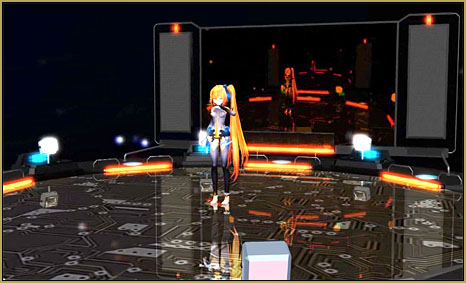
  • The New LearnMMD Stage "in action"!
    LearnMMD Auditorium Stage Announced Ready for Download Downloading New Models
  • With some practice, Rin can dance the sample dance as well as Miku!
    There Can Be Frame Data Ghosts remaining after Deletion Making Smooth Motions
  • MMD Outside Parent Setting Enables Bone Connecting Animation Shortcuts

LearnMMD Auditorium Stage now includes 19 Colors of Drapes!

Posted on March 12, 2012November 21, 2016 By Reggie_Dentmore No Comments on LearnMMD Auditorium Stage now includes 19 Colors of Drapes!

The LearnMMD Auditorium Stage now has more drapes for more color options!

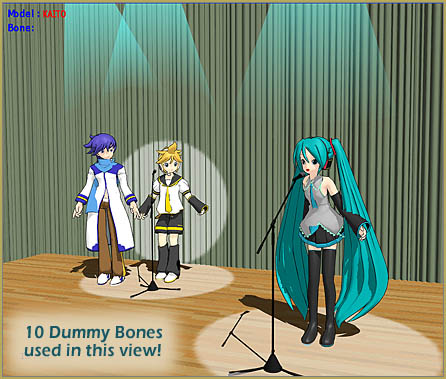
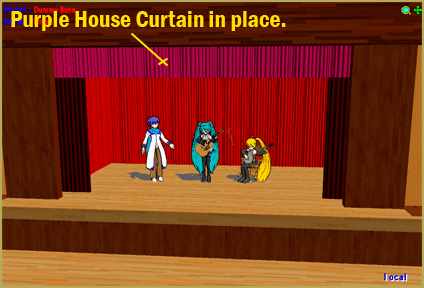
Download the Auditorium Stage and see the many colors of stage dressing drapes that are included. There are 19 colors … allowing for “setting the mood” you desire. The colors make this nice auditorium stage even more versatile. Choose any of the drapes to be the main stage curtain. Attach it to a dummy bone so you can control it’s position. Use multiples of the same color to redecorate the entire stage:
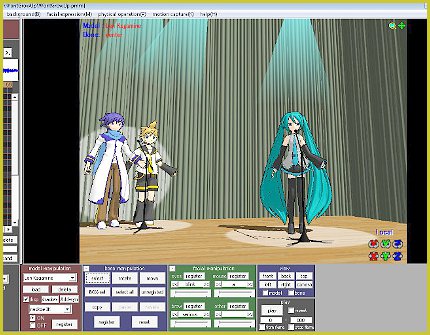
The LearnMMD Stage is now even better ... with lots of colors!

You May Want To FIX the LearnMMD Stage:

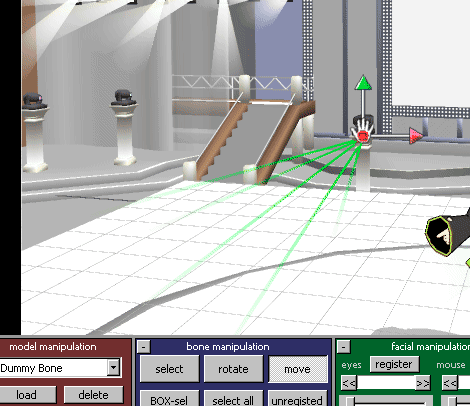
When you download the LearnMMD Stage, you will want to mount it to a dummy bone. When mounted to the Ground, the stage floor may be a hair above ZERO on the Y axis. If so, … mount it to a dummy bone and use the Numeric Input in the EDIT Menu and set Y to an altitude of -.2 (minus point two) … and it will be perfect.


– SEE BELOW for MORE MMD TUTORIALS…


— — —


– _ — –


Visit the LearnMMD.com Homepage! Plenty of Mikumikudance instruction and info!

More MMD Tutorials...

Download Reggie's Cafeteria Table and Chair accessory!

My school scene needs a cafeteria table and chair accessory. Where can I download an ...read more

Download Reggie's MMD DeckPanel when you just need a place to sit or stand!

How can I use Reggie's MMD Deckpanel accessory for my MikuMikudance animation? My motion starts ...read more

MMD Project Source YouTube's Baster037 provides links!

What's a good MMD project source for motions, models and stages? Where can I download ...read more

A better MMD followcam in PMXE with physics and IK bones

How can I control the camera in MMD? How can I make an MMD followcam?  ...read more

Delete Miku and Learn About the Sample Dance Stage Lights

How do I use the stage lights. Use Dummy Bones to move the stage lights. ...read more

LearnMMD Stage Lit with AutoLuminous Lights

How do I light the Lights on the LearnMMD Stage? Where can I download the ...read more

Dummy Bones, New Stage Accessory Tags:learnmmd, mikumikudance, stage accessory

Post navigation

Previous Post: Dummy Bones Hold Accessories in MikuMikuDance
Next Post: MMD Mother Bones Allow Easy Dancer Model Movement From Stage Center

Related Posts

  • Adding & Working the Stage Lights with Dummy Bones MMD MikuMikuDance Dummy Bones
  • Get the LearnMMDMmetronome. It is a real help!
    LearnMMD’s METRONOME is Ready to Download! Animation Lag
  • Assemble your stages from .x type components Accessory Manipulation/Adjust
  • MMD Dummy Bones may be your most important models! Dummy Bones
  • Use Accessory Manipulation Panel Settings to Position Props Accessory Manipulation/Adjust
  • Download Reggie’s Cafeteria Table and Chair accessory! New Stage Accessory

More Related Articles

Get the LearnMMDMmetronome. It is a real help! LearnMMD’s METRONOME is Ready to Download! Animation Lag
Move the house curtains into place using Dummy Bones. House Curtains now included in the Auditorium Stage Download New Stage Accessory
Use Accessory Manipulation Panel Settings to Position Props Accessory Manipulation/Adjust
Dummy Bones Hold Accessories in MikuMikuDance Dummy Bones
Download Reggie’s MMD DeckPanel when you just need a place to sit or stand! Make your own Accessories
Delete Miku and Learn About the Sample Dance Stage Lights Dummy Bones

Leave a Reply Cancel reply

Your email address will not be published. Required fields are marked *

Download the latest version of MikuMikuDance!
See the MMD Step-by-Step instructions page!
Learn how to make your own MMD motions!
LearnMMD.com
  • Sexiest MMD Model Dance Motion you can Download "the making of" my video
  • MME PowerShader effect rivals Ray-MMD Raycast image enhancements MMD Tutorials
  • Get the LearnMMDMmetronome. It is a real help!
    LearnMMD’s METRONOME is Ready to Download! Animation Lag
  • Creating Hand IK Bones with the IKMakerX PMXE plugin Bones
  • YouTube Audio Library supplies Free music Copyrighted Music
  • LearnMMD.com _ MikuMikuDance MMD Tutorials
    Almost Photo-realistic renders in MMD using Shaders and Effects Advanced Shader Technique
  • Starting-out Using MMD starts you on a learning path.
    Starting-out Using MMD Reader discovers missing elements. MMD Basics
  • LearnMMD.com _ MikuMikuDance MMD Tutorials
    No need to “re-download” again and again… Random Thoughts & Visions

Copyright © 2022 Learn MikuMikuDance – MMD Tutorials – Free 3D Animation Software and Instructions..

Powered by PressBook Premium theme

Go to mobile version