



Skip to content
Learn MikuMikuDance – MMD Tutorials – Free 3D Animation Software

Learn MikuMikuDance – MMD Tutorials – Free 3D Animation Software

Download Free Animation Software – Let's Learn How to Do Everything!

  • Step-by-Step MMD instructions
  • DOWNLOADS
  • Troubleshoot, Fix MMD
  • Site Contents
  • Reggie Replies Q&A
  • Homework!
  • What IS MMD?
    • Download MikuMikuDance Newest Latest Version of MMD
  • “HOW TO”
    • Raycast RAY-MMD Effect Tutorials
  • BONUS PAGES
    • Why convert PMD models to PMX?
  • HALL of CHAMPIONS
  • Tutorial Categories
  • About
    • Privacy Policy
  • Toggle search form
  • Creating Black Model Silhouettes in MikuMikuDance ARIZONA
  • Halloween Costume TDA Miku on LearnMMD.com
    Download Halloween Costume TDA Miku edit by dA’s Shiro-NekoVocaloid "the making of" my video
  • YouTube Audio Library supplies Free music Copyrighted Music
  • MMD Model Noodle smiles while carrying the weight of the modern world on her shoulders!
    Download MMD Model NOODLE by vasilnatalie Downloading New Models
  • Miku wishes for a peaceful birthday!
    Happy Birthday Miku! ARIZONA
  • LearnMMD Auditorium Stage now includes 19 Colors of Drapes! Dummy Bones
  • How to make AutoLuminous work on a PMX Model AutoLuminous MME / PMDE
  • MME Collapse Effect requires PMDE model edit Collapse Effect

Category: 4k video

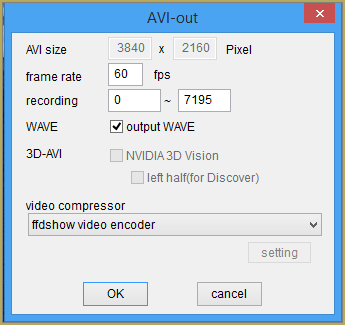
Rendering in 4K video at 60FPS with MMD

Rendering in 4K video at 60FPS with MMD

How do I render in 4K in MMD? What settings should I use when rendering in 4K in MikuMikuDance? What are the hardware requirements to render in 4K? Hey readers of LearnMMD it is parkeerwacht again! I haven’t posted on the site in a bit because I haven’t had much time to spend on MMD…

Read More “Rendering in 4K video at 60FPS with MMD” »

4k video
  • Change the Edge Line Color and Shadowing of your Models KibaSan
  • Mouthing words requires sudden motions without drifting in MikuMikudance 7.39
    Short sharp sudden motions require MikuMikudance skill Making Smooth Motions
  • You can enlarge or reduce and Accessory by adjusting the Si value in MikuMikuDance.
    Use Accessory Manipulation fields to position/adjust Accessories Accessory Manipulation/Adjust
  • You cannot use Box-Sel to select a portion of a model. You must selectthe entire MMD model.
    BOX-sel lets you select an entire model in MikuMikuDance ARIZONA
  • Learn to Edit MMD Effects by Editing Raycast Materials Bandages
  • Applause for Miku!
    MikuMikuDance turns Six. ARIZONA
  • MikuMikuDance Unbridled Creativity Starts with an Empty GUI MMD Basics
  • Rediscover your old MMD animations... Love them again!
    Rediscover your old MMD Animations: Love them again! "the making of" my video

Copyright © 2022 Learn MikuMikuDance – MMD Tutorials – Free 3D Animation Software and Instructions..

Powered by PressBook Premium theme