


Skip to content
Learn MikuMikuDance – MMD Tutorials – Free 3D Animation Software

Learn MikuMikuDance – MMD Tutorials – Free 3D Animation Software

Download Free Animation Software – Let's Learn How to Do Everything!

  • Step-by-Step MMD instructions
  • DOWNLOADS
  • Troubleshoot, Fix MMD
  • Site Contents
  • Reggie Replies Q&A
  • Homework!
  • What IS MMD?
    • Download MikuMikuDance Newest Latest Version of MMD
  • “HOW TO”
    • Raycast RAY-MMD Effect Tutorials
  • BONUS PAGES
    • Why convert PMD models to PMX?
  • HALL of CHAMPIONS
  • Tutorial Categories
  • About
    • Privacy Policy
  • Toggle search form
  • MMD model 1052C China Qipao Miku download
    Introducing MMD model 1052C China Qipao Miku "the making of" my video
  • DropShadow_dual Creates Two DropShadow Effects at Once! Chestnutscoop
  • MMD Project Source YouTube’s Baster037 provides links! Animation Resource
  • About changing models skirts using PMD Editor PMXE KillerBeer
  • REM Hatsune Miku 10th model links on LearnMMD.com
    Reintroducing cute REM Hatsune Miku 10th in Hello, how are you? "the making of" my video
  • Happy Birthday Miku (16 Again) … Miku’s Birthday Intro to MikuMikuDance
  • Customize the MMD interface: Change the colors of the GUI Fia Phoenix
  • Make Chibi Models for MikuMikuDance! Adjust PMD Model Size

Category: CameraSmoother Tool

MMD CameraSmoother Tool smooths camera motions!

MMD CameraSmoother Tool smooths camera motions!

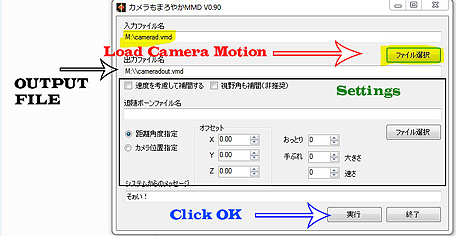
How do I use the MMD CameraSmoother Tool? Where can I get the free CameraSmoother Tool for MMD? How can I create smooth camera motions without dealing with interpolation curves? MMD CameraSmoother Tool smooths camera motions! Making smooth camera motions has just gotten a lot easier with this new tool. With a few simple clicks…

Read More “MMD CameraSmoother Tool smooths camera motions!” »

CameraSmoother Tool
  • LearnMMD.com's Video Dojo Expo FIVE
    Beach-side Pool-side “Hot August Nights” – Video Dojo Expo FIVE CONTESTS
  • Change the Edge Line Color and Shadowing of your Models KibaSan
  • Use M4Layer Effect to add multiple effects onto your MMD model.
    Apply Multiple Effects on an Entire MMD Model Using M4Layer Effect M4Layer Effect
  • The MME Otome effect adds a fantasy cloud of bubbles and sparkles.
    Otome effect yields bubble and sparkle psychedelia Otome
  • A MikuMikuDance Beginner’s Easy First Dance Intro to MikuMikuDance
  • An MMD Walking Motion: Creating it is easy! LoverOfVocaloid
  • Make your own stage for MikuMikuDance using SketchUp Models Google SketchUp and MMD
  • You Are My Senpai MMD Meme Project Download MMD Memes

Copyright © 2022 Learn MikuMikuDance – MMD Tutorials – Free 3D Animation Software and Instructions..

Powered by PressBook Premium theme