
Skip to content
Learn MikuMikuDance – MMD Tutorials – Free 3D Animation Software

Learn MikuMikuDance – MMD Tutorials – Free 3D Animation Software

Download Free Animation Software – Let's Learn How to Do Everything!

  • Step-by-Step MMD instructions
  • DOWNLOADS
  • Troubleshoot, Fix MMD
  • Site Contents
  • Reggie Replies Q&A
  • Homework!
  • What IS MMD?
    • Download MikuMikuDance Newest Latest Version of MMD
  • “HOW TO”
    • Raycast RAY-MMD Effect Tutorials
  • BONUS PAGES
    • Why convert PMD models to PMX?
  • HALL of CHAMPIONS
  • Tutorial Categories
  • About
    • Privacy Policy
  • Toggle search form
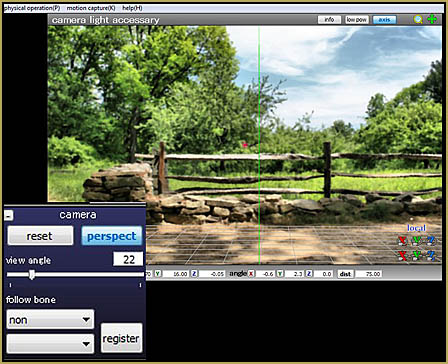
  • "Say cheese!" Setting up the camera moves in MMD 7.39 takes some thought. Credits: MMD Little Town by Harner Productions, Chibi Miku Yamato Style 1.35 by Koshitsuki, Chibi NC DT SeeU by HousekineMinto, Video Camera by Dark Konata
    Camera Motion Instructions 1 – MMD Basics ARIZONA
  • Chimera Teto Emerging into the Light.
    Looking Good with the MME Mirror Water Effect in MMD ARIZONA
  • Oomary’s guide to mastering MMD Hair Physics Fixing Broken Models
  • Most important MikuMikuDance instruction: Track your sources! Keep the Faith-MMD Credits/Sharing
  • Strong Soundtrack Offers 3-D Animation Shortcuts! "the making of" my video
  • New “LearnMMD Wars” Video Posted to YouTube! Google SketchUp and MMD
  • How to Switch Models and Stages in MikuMikuDance Accessory Manipulation/Adjust
  • About changing models skirts using PMD Editor PMXE KillerBeer

Set MMD Widescreen Screen Size balance Size VS Quality

Posted on April 7, 2016 By Reggie_Dentmore 3 Comments on Set MMD Widescreen Screen Size balance Size VS Quality

A Feature Article by Reggie Dentmore on LearnMMD.comWhat screen size should I use for Widescreen in MMD? How do I set the screen size in MikuMikuDance? What screen size does YouTube recommend?

Widescreen!
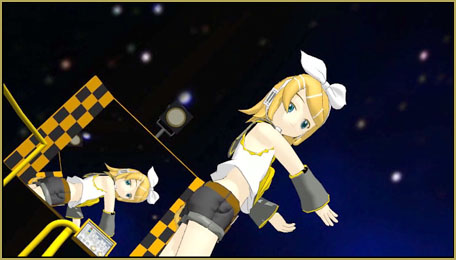
Widescreen is what most MMDers are lookiing for, these days... Set the screen size for the best balance of quality VS file size.

Most people enjoy a screen dimension of 16×9 “Widescreen”… could be 1600 x 900 pixels… but that’d be too large for me… my file size would be huge! For this project, I went to the View tab and set my Screen Size at 640×360… so that, at only 360p, I will get a nice image at Widescreen and a small file size for an easy upload and download speed.
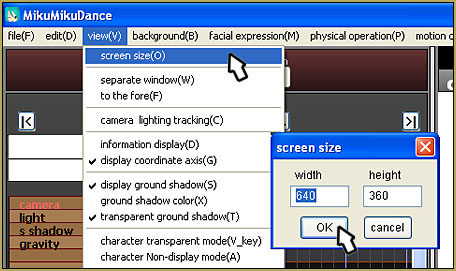
File... Screen Size... and enter your numbers. Go widescreen!

YouTube has a few recommended sizes… the larger you make it, the larger, more huge, your final AVI movie file will be.

1080p:   1920×1080
720p:   1280×720
480p:   854×480
360p:   640×360
240p:   426×240

Also under the View menu, at the bottom, set your Frames per Second, FPS, at 30 Max. to guarantee that 30 fps.

Enjoy MikuMikuDance!


– SEE BELOW for MORE MMD TUTORIALS…


— — —


– _ — –


Visit the LearnMMD.com Homepage! Plenty of Mikumikudance instruction and info!

More MMD Tutorials...

Reader asks how to create MMD artwork... stuff like posing, camerawork?

A reader asks... Is there a tutorial on how to create MMD artwork, like those you ...read more

Learn MikuMikuDance in Small Steps! New LearnMMD Video Series

Learn MikuMikuDance in Small Steps. Where can I find easy-to-follow MMD instructions on YouTube? How ...read more

Apply Multiple Effects on an Entire MMD Model Using M4Layer Effect

How can I apply multiple effects to an MMD model? Can I use more than ...read more

MMD Plugin Manager... I Found a Treasure!

What sorts of MMD Plugins are there? MMD Plugin Manager? MMD Plugins. Plugin MMD. More ...read more

2023: Hatsune Miku is 16 Years Old by design and in reality!

Finally, in 2023, Hatsune Miku is 16 years old! When did Miku make her first ...read more

SEARCH LearnMMD.com... it's Easy!

Search LearnMMD.com to find your answers! With the posting of this article, LearnMMD.com has 758 tutorials ...read more

MMD Basics, MMD Tutorials, Nuts & Bolts Tags:Screen Size

Post navigation

Previous Post: How to resize PMD models (and what to do when they don’t)
Next Post: Saved Poses get your MMD Animation Started!

Related Posts

  • An MMD town stage: Making Kerorin Town Great Again – Part1 MMD Stages
  • How to Use the Squash and Stretch Effect for MMD. ARIZONA
  • The Power of Beamman’s Post Movie Effect Beamman's Post Movie effect
  • Rules for Common MMD Models
    Rules of Common MMD Models and How to NOT Break Them Keep the Faith-MMD Credits/Sharing
  • Hitogata Brings Face Tracking to MMD Animation Resource
  • MME FishEye Lens effect also gives nice scene transitions!
    MMD MME Fisheye Lens effect offers Scene Transitions & Cropping Fisheye Lens effect

More Related Articles

Make MMD Background AVI using WAV and AviUtl Make MMD Background AVI Using AviUtl WMV Files "the making of" my video
Try Reggie’s Evil Eye Effect for an Anime-style effect MMD Tutorials
Adjust the Shadows in MikuMikuDance KillerBeer
Making stages/accessories for MMD using Sketchup Google SketchUp and MMD
Beamman’s BeamCharge MME Effect Beamman's BeamCharge
Running MikuMikuDance in Linux using Wine and DXVK Linux running MMD

Comments (3) on “Set MMD Widescreen Screen Size balance Size VS Quality”

  1. Sey says:
    June 12, 2020 at 7:48 am

    I have a question:

    How to know the time when the video stop playing (finish playing video) base on Frame Manipulation? When I render the video, it always occur the same issue: not enough the real time playing, it should stop at 1:56s, but I render it, it stop at 57s. How to fix it?

    Reply
    1. Reggie_Dentmore says:
      June 12, 2020 at 8:14 am

      Do you have the proper frame-count showing under the PLAY button… 0 to 3480(or whatever)? … and when you Render to AVI, does the info box show you the full frame-count… 0 to 3480?

      Reply
  2. parkeerwacht says:
    April 14, 2016 at 9:32 am

    There more supported resolutions, allthough the ones listed in the post are the most common. You can also use: 2560×1440 for 1440p (2K) Videos. You can use 3840×2160 for 2160p Video (4K)
    I don’t really recommend using them since to render at those resolutions is very resource hungry for your system. I only reccomend rendering in 1440p with a decent computer that is designed for a good load. When it comes to 4K you need a very powerfull computer if you want to process it without it taking an entire day to render. Also if your PC is to slow for a resolution and/or codec it may crash your MMD, or even make your entire PC hang and give you a blue screen of death (Crash screen).

    Reply

Leave a Reply Cancel reply

Your email address will not be published. Required fields are marked *

Download the latest version of MikuMikuDance!
See the MMD Step-by-Step instructions page!
Learn how to make your own MMD motions!
LearnMMD.com
  • A brightly colored .sph sphere file replaced the common gray one with brilliant results! MMD 7.39
    Alter Sphere Files for a quick color change in MMD Reggie Dentmore
  • Stationary Motion Creation rights and wrongs Creating Motions
  • Modifying model texture color compensates Raycast color desaturation MMD Tutorials
  • Download these 1052C-Re0710 MMD Models and enjoy!
    Download Early Miku 1052C-Re0710 MMD Models from 2010! Downloading New Models
  • Making a Long Video Animation in MMD 7.39 Can Be Done! CONTESTS
  • Recommended Software Library for MMDers Animation Shortcuts
  • Translate Romaji for better English translations Navigating Japanese Pages
  • Ray-MMD LED widget replaces MMD screen capture widget Add Background Pictures and AVI

Copyright © 2022 Learn MikuMikuDance – MMD Tutorials – Free 3D Animation Software and Instructions..

Powered by PressBook Premium theme

Go to mobile version