





Skip to content
Learn MikuMikuDance – MMD Tutorials – Free 3D Animation Software

Learn MikuMikuDance – MMD Tutorials – Free 3D Animation Software

Download Free Animation Software – Let's Learn How to Do Everything!

  • Step-by-Step MMD instructions
  • DOWNLOADS
  • Troubleshoot, Fix MMD
  • Site Contents
  • Reggie Replies Q&A
  • Homework!
  • What IS MMD?
    • Download MikuMikuDance Newest Latest Version of MMD
  • “HOW TO”
    • Raycast RAY-MMD Effect Tutorials
  • BONUS PAGES
    • Why convert PMD models to PMX?
  • HALL of CHAMPIONS
  • Tutorial Categories
  • About
    • Privacy Policy
  • Toggle search form
  • [MMM] MikuMikuMoving Text Engine Tutorial Video MMM Text Engine
  • create credible characters for your projects
    How to create credible characters for your projects. MMD Tutorials
  • MMD 8.06 Low Power button allows you to Multi-task MMD Basics
  • A girl named Miku Hatsune… Random Thoughts & Visions
  • Rin is excited about the MomiCup
    How to enter The MomiCup and other YouTube MMD Contests and Parties. ARIZONA
  • Cry Baby Motion DL featured image
    Free MMD Cry Baby Motion DL from DA’s Smol-Hooman "the making of" my video
  • Export Import MMD Models Using Blender and PMXE Blender
  • The Making of “Boum Boum Boum”: Everything is More Sophisticated in French "the making of" my video
Go to my DOWNLOADS PAGE to get your free Cropping/Transition Panel!

New Cropping-Transition Panel Ready to Download!

Posted on January 16, 2012March 31, 2016 By Reggie_Dentmore 2 Comments on New Cropping-Transition Panel Ready to Download!

New Cropping/Transition Panel Ready to Download!

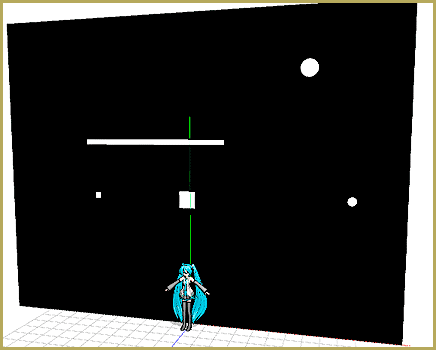
I created this 3D Panel to create transitions and allow small cropped areas in my animations. DOWNLOAD THE PANEL, attach it to a dummy bone, and try it out! See this video, once, and you will know how to use it:

I created the Panel in Google Sketchup using the 3D-RAD plugin within Sketchup. The Panel is RED on one side and BLACK on the other. Whirl it around using the dummy bone to position the panel where you want it.
Go to my DOWNLOADS PAGE to get your free Cropping/Transition Panel!

This panel will have many applications and I look forward to playing with it. Go to my DOWNLOADS PAGE and get yours now!


– SEE BELOW for MORE MMD TUTORIALS…


— — —


– _ — –


Visit the LearnMMD.com Homepage! Plenty of Mikumikudance instruction and info!

Transition Panel (it's not an effect)

Post navigation

Previous Post: New MMD Rocking Chair Accessory Ready to Download
Next Post: MMD Crashes when Rendering to AVI

Comments (2) on “New Cropping-Transition Panel Ready to Download!”

  1. ltonGlify says:
    December 23, 2018 at 2:09 pm

    I am ltonser. I need help. What can i do it?

    Reply
    1. KillerBeer says:
      December 23, 2018 at 2:21 pm

      You can start with explaining yourself.

      Reply

Leave a Reply Cancel reply

Your email address will not be published. Required fields are marked *

Download the latest version of MikuMikuDance!
See the MMD Step-by-Step instructions page!
Learn how to make your own MMD motions!
LearnMMD.com
  • Load Camera Motion Data VMD files using the File Menu in MMD ARIZONA
  • MMD Lip-sync is fun to do... just do it!
    MMD Lip-sync is fun to do… just do it! Animation Shortcuts
  • Graphic Design Skills enhance MMD Pictures MMD Basics
  • Windows 11 S Mode can be swicthed off.
    Windows 11 S Mode: The app you’re trying to install isn’t a Microsoft verified app. Troubleshooting MMD
  • You cannot use Box-Sel to select a portion of a model. You must selectthe entire MMD model.
    BOX-sel lets you select an entire model in MikuMikuDance ARIZONA
  • Physical Operations Tab in MikuMikuDance 7.39 Menu Options MENU Option Descriptions
  • create credible characters for your projects
    How to create credible characters for your projects. MMD Tutorials
  • Video Dojo Expo 2 Champion: Turquoise Narcotic Video Dojo Champions

Copyright © 2022 Learn MikuMikuDance – MMD Tutorials – Free 3D Animation Software and Instructions..

Powered by PressBook Premium theme

Go to mobile version