
Skip to content
Learn MikuMikuDance – MMD Tutorials – Free 3D Animation Software

Learn MikuMikuDance – MMD Tutorials – Free 3D Animation Software

Download Free Animation Software – Let's Learn How to Do Everything!

  • Step-by-Step MMD instructions
  • DOWNLOADS
  • Troubleshoot, Fix MMD
  • Site Contents
  • Reggie Replies Q&A
  • Homework!
  • What IS MMD?
    • Download MikuMikuDance Newest Latest Version of MMD
  • “HOW TO”
    • Raycast RAY-MMD Effect Tutorials
  • BONUS PAGES
    • Why convert PMD models to PMX?
  • HALL of CHAMPIONS
  • Tutorial Categories
  • About
    • Privacy Policy
  • Toggle search form
  • Written Credits aid YouTube MMDer search results Keep the Faith-MMD Credits/Sharing
  • Teto replies!
    Fixing white models and accessories that don’t follow in PMXE Bandages
  • Pose MMD Models Naturally Using Reference Pictures Bones
  • Making it Personal MMD MMD Basics
  • Sometimes you need a “motion scratchpad” while animating in MMD Animation Shortcuts
  • The FILE Menu Options MENU Option Descriptions
  • Use Proper MMD Etiquette When Using New Models and Accessories Downloading New Models
  • PMXE Plugin adds Arm IK bone
    PMXE Plugin adds Arm IK bones allowing automatic MMD model interaction Animation Shortcuts
Squash and Stretch Ball

The 12 Principles of Animation for MikuMikuDance.

Posted on February 26, 2015July 24, 2015 By Arizona No Comments on The 12 Principles of Animation for MikuMikuDance.

What are the 12 principles of animation? What is squash and stretch in animation? Does MMDA Feature Article by contributor ARIZONA on LearnMMD.com allow for squash and stretch animation? How do you use squash and stretch in MikuMikuDance?

12 Rules for Good Animation.

Squash and stretch is the first of a dozen articles about the 12 Principles of Animation.  First codified in the 1930’s by Walt Disney Studios, the 12 Principles of Animation were listed as guidelines for their junior animators. They address issues of believability, appeal, and storytelling. These principles were made “public” in the highly acclaimed book The Illusion of Life: Disney Animation by Frank Thomas and Ollie Johnston (ISBN-10: 0786860707 or ISBN-13: 978-0786860708). Mind you, that these principles were created for pen and ink animation, that doesn’t mean that we can’t apply some of them to MikuMikuDance.
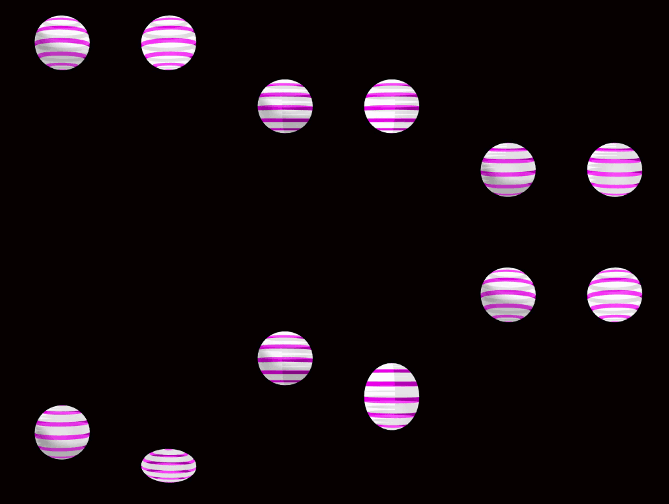
Squash and Stretch makes the ball have weight!Squash and stretch is a graphical (animated) representation of weight, rigidity and volume. The most famous example of squash and stretch is a bouncing ball. A rubber ball falls; hits the ground squashes itself; then recoils up; stretches out, and then reverts itself back to normal shape.  I applied it to the animated GIF.

You have to remember that everything in animation is weightless and animators have to create the illusion of weight. Squash and stretch allows you to create this illusion by manipulating the character’s body. So, whenever you are animating, think about the muscles you would use to accomplish this illusion.  Smiling is a good example of this, as you smile your cheeks will squash up into a tight mass and your lips will stretch open to reveal your teeth (You’re smiling now. Don’t deny it).

Squashing and Stretching Your Limits.

Another illustrative point is a principal you probably studied in your health classes-muscle recruitment also called motor unit recruitment. Place your favorite arm on a table and make a loose fist. Now, slowly, make your fist tighter.  Notice how the rest of your hand and your forearm are now recruited in this effort. Take note of how some of these muscles are stretching and some are contracting. If you make your fist as tight as you can, then the muscles of the upper arm and shoulder join this squash and stretch party.

Another concept in Squash and Stretch is rigidity. Rigidity can be defined as “How much ‘give’ is inherent in the base material of what’s being animated.” Basically, a tennis ball will have less rigidity than a 16-pound (7.260 kilogram) shot put;  both will bounce and roll, but a shot put will not squash and stretch.

Using squash and stretch on something that has little or no rigidity can be a funny effect. If I were to animate dropping that same shot put and have it ricochet around a room, then that would make a great gag. So an aesthetic choice you would need to make, in advance, is “How realistic do I want to make the film?”

Another thing to keep in mind is that whatever you’re animating; its volume will be constant.  An example of this is to replace the rubber ball with a water balloon.  If I take a 1 quart (946.353 milliliters) balloon and fill it with ½ quarts (473.176 milliliters) of water, no matter what I do to this water balloon its volume will not change.

Now that we know all know a little more about squash and stretch. I hope you will start looking for it in real life and in the television programs you watch and applying it to your own animations. You should always want to stretch out your abilities as an MMD-er.

Have fun with this.

Sources:

Beach ball by Bolloz111

Effects:

Squash and Stretch by 豊作P


– SEE BELOW for MORE MMD TUTORIALS…


— — —


– _ — –


Visit the LearnMMD.com Homepage! Plenty of Mikumikudance instruction and info!

More MMD Tutorials...

Enjoy the "camera Angles WEIRD in Anime" meme...

Enjoy the "camera Angles WEIRD in Anime" meme... This image is from The Slayers - NEXT, ...read more

Reader asks how to create MMD artwork... stuff like posing, camerawork?

A reader asks... Is there a tutorial on how to create MMD artwork, like those you ...read more

Learn MikuMikuDance in Small Steps! New LearnMMD Video Series

Learn MikuMikuDance in Small Steps. Where can I find easy-to-follow MMD instructions on YouTube? How ...read more

Apply Multiple Effects on an Entire MMD Model Using M4Layer Effect

How can I apply multiple effects to an MMD model? Can I use more than ...read more

MMD Plugin Manager... I Found a Treasure!

What sorts of MMD Plugins are there? MMD Plugin Manager? MMD Plugins. Plugin MMD. More ...read more

2025: Hatsune Miku is 18... but she is designed to be always 16 Years old, by design and in reality!

Finally, in 2023, Hatsune Miku is 16 years old! but in August of 2025, she ...read more

ARIZONA, MMD Tutorials, Squash and Stretch, The 12 Principles of Animation

Post navigation

Previous Post: About changing models skirts using PMD Editor PMXE
Next Post: Fix MikuMikuDance Missing DLL and Side-by-Side Configuration Errors

Related Posts

  • Sexiest MMD Model Dance Motion you can Download "the making of" my video
  • An MMD town stage: Making Kerorin Town Great Again – Part 3 MMD Stages
  • Beamman’s Water v5 Effect needs Editing before you can use it! Beamman's Water v5
  • Free Download MikuMikuDance MMD
    Download MikuMikuDance Easily make YouTube MMD Music Videos MMD Basics
  • You cannot use Box-Sel to select a portion of a model. You must selectthe entire MMD model.
    BOX-sel lets you select an entire model in MikuMikuDance ARIZONA
  • Build your own stage for MMD using Blender 2.69 Blender

More Related Articles

"Gothic Teto" by Nigamon and "Mouse Cursor" by SachiShirakawa Collecting MMD Models, Music and Accessories for Beginners ARIZONA
The Croquis Effect. How to Use the Croquis Effect in MikuMikuDance ARIZONA
MMD vs MMM Bullwood
MME effect Kamitachi – Night breeze silhouette shader of Kama Kamitachi - Silhouette
LearnMMD Stage Lit with AutoLuminous Lights MMD Tutorials
Make Custom MMD Models using Downloaded Parts BigPerryman

Leave a Reply Cancel reply

Your email address will not be published. Required fields are marked *

Download the latest version of MikuMikuDance!
See the MMD Step-by-Step instructions page!
Learn how to make your own MMD motions!
LearnMMD.com
  • Using the right codec when Rendering to AVI in MMD HD Videos in MMD
  • Here is the plan for the ball tossing motion in MikuMikuDance 7.39
    “Bonk goes the Miku” new video using Accessories created in SketchUp Google SketchUp and MMD
  • Applause for Miku!
    MikuMikuDance turns Six. ARIZONA
  • VPVP MMD Training video offers MMD instructions videos.
    VPVP page offers basic MMD instructions videos MMD Basics
  • Making POV Camera Shots in MikuMikuDance ARIZONA
  • MMD Light Manipulation Panel helps set the mood Global Lighting
  • Make a Music Video with MMD and Learn to Use MMD "the making of" my video
  • New to MikuMikuDance? LearnMMD is The Instruction Manual for MMD! MMD Tutorials

Copyright © 2022 Learn MikuMikuDance – MMD Tutorials – Free 3D Animation Software and Instructions..

Powered by PressBook Premium theme

Go to mobile version