
Skip to content
Learn MikuMikuDance – MMD Tutorials – Free 3D Animation Software

Learn MikuMikuDance – MMD Tutorials – Free 3D Animation Software

Download Free Animation Software – Let's Learn How to Do Everything!

  • Step-by-Step MMD instructions
  • DOWNLOADS
  • Troubleshoot, Fix MMD
  • Site Contents
  • Reggie Replies Q&A
  • Homework!
  • What IS MMD?
    • Download MikuMikuDance Newest Latest Version of MMD
  • “HOW TO”
    • Raycast RAY-MMD Effect Tutorials
  • BONUS PAGES
    • Why convert PMD models to PMX?
  • HALL of CHAMPIONS
  • Tutorial Categories
  • About
    • Privacy Policy
  • Toggle search form
  • Professionally made models FOUND! Downloading New Models
  • Let your new MIKU do the Sample Dance!
    Downloading Japanese Models Can Scramble File Names Downloading New Models
  • My Top 6 Favorite Miku Models! GloriaTheAnimator
  • Using the OP function in an animation MMD Tutorials
  • LearnMMD's Video Dojo EXPO Champions!
    WINNERS of Video Dojo 1 – The FIRST Champions! CONTESTS
  • The MMD Pity Partry motion is free to download!
    MiyukiOhayashi’s Pity Party motion download includes WAV "the making of" my video
  • With some practice, Rin can dance the sample dance as well as Miku!
    There Can Be Frame Data Ghosts remaining after Deletion Making Smooth Motions
  • Ray-MMD environment controls create MMD dreamscape MMD Tutorials
Add interest to you choreography by moving/rotating models with Mother Bones.

Add Interest: Place Multiple Models Onstage Using Mother Bones

Posted on March 22, 2012August 1, 2015 By Arizona No Comments on Add Interest: Place Multiple Models Onstage Using Mother Bones

What’s a Mother Bone in MikuMikuDance? How do you use a mother bone in MMD? Use Mother Bones to quickly position your models.A Feature Article by contributor ARIZONA on LearnMMD.com

Mother Bones can set your work apart!

Have you ever noticed that that a lot of the MMD videos have their models in a single line or a one-forward-one-back (zigzag) or flying-V formation? Some of that is the result of the motion data. The creator of the data set it up that way and that’s fantastic.  Creating good motion data is a VERY difficult undertaking, requiring lots of time, effort, an almost forensic attention to detail, and most of all: love. In videos made by noobs, most of that “face the front” is because the models are set and designed to face forward with little or no variance. They are totally dependent on the motion data. Add interest to you choreography by moving/rotating models with Mother Bones.
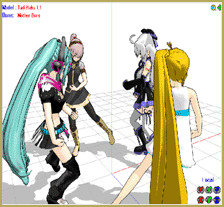
However, I would like use their motion data, honor their work, and still be able to put my own stamp on a video that I may want to make. Mother Bones (MB) allow me to personalize my videos.

Try this as a simple experiment:

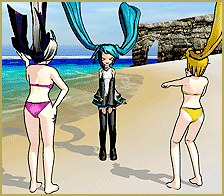
Load two models (with at least one of them with an MB).  Load the same motion data to both of them. Now on the model with the MB, click on the MB. Go to the Bone Manipulation field click Rotate. A green circle with a red vertical bar and a blue horizontal bar dissecting this circle should appear. Right click on the blue bar (it’ll turn yellow) and turn the model 180 degrees so it is facing toward the back and then register the new position. When you press the Play button everything works fine.  Left click on your mouse and drag a slow circular scan around them.  You can then see how much more visually interesting your tableau is now.Mother Bones allow Miku and her buddies to face different directiuons while using the same data.You now have options!
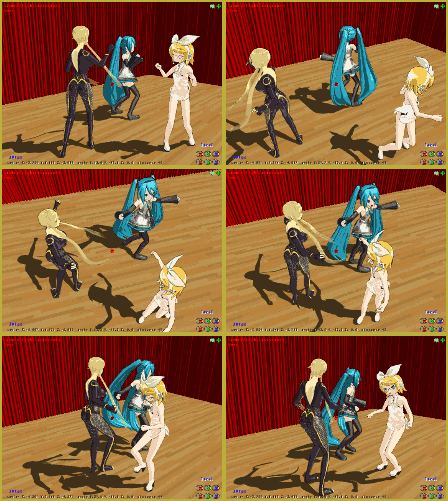
Imagine 3, 4, 5 (or however many more your system can handle) going in different directions! They could face each other, away from each other, in a circle, square, diamond, any polygon you can imagine. When I have tried this,   I can sometimes swear that it looks almost like ballet!  So even the camera motion you create (even a simple overhead shot)   is automatically elevated to a new level.

There is a caveat though. Some motion data won’t allow you ANY leeway … the models may snap back to their predetermined locations. So if you are having an inordinate amount of difficulty executing what you have in mind, it might not be you.

Have fun trying this out!


– SEE BELOW for MORE MMD TUTORIALS…


— — —


– _ — –


Visit the LearnMMD.com Homepage! Plenty of Mikumikudance instruction and info!

More MMD Tutorials...

Using the Fireworks Kai effect for MikuMikuDance.

  What is the Fireworks Kai effect? Where can I download the Fireworks Kai effect? How do ...read more

How to Use the L EdgeShader Effect for MikuMikuDance.

How do I download the L EdgeShader Ver1.00? How can I use those edge effects ...read more

Staging and the 12 Principles of Animation.

How do you use staging in MMD? What is the role of staging in the ...read more

Learnmmd.com hosts MMD Panel at San Japan 8 bit.

There was a MikuMikuDance Panel at San Japan 8 bit 2015. Two of our writers, ...read more

Anticipation is the Second Principle of Animation.

How do you use anticipation in MMD? Anticipation is the second of 12 rules of ...read more

How to Use The VelocityMap Effect for MikuMikuDance.

How do I use the VelocityMap effect? Where do I download the Velocitymap effect for ...read more

ARIZONA, Mother Bones Tags:beginner, learnmmd, mikumikudance, mother bone

Post navigation

Previous Post: MMD Mother Bones Allow Easy Dancer Model Movement From Stage Center
Next Post: Updated LearnMMD Metronome Instructions for Use

Related Posts

  • Load Camera Motion Data VMD files using the File Menu in MMD ARIZONA
  • Add a Motherbone for Easy Model Manipulation in MMD 7.39 Mother Bones
  • Dummy Bones allow you to customize your accessory manipulations!
    Using The Dummy Bone for MikuMikuDance Accessory Manipulation/Adjust
  • Use the Silhouette Effect to create White Silhouettes!
    Creating White Silhouette Models in MikuMikuEffects ARIZONA
  • The Rule of Thirds.
    Use the Rule of Thirds Effect to Create Camera Motion Data in MMD! ARIZONA
  • The Croquis Effect.
    How to Use the Croquis Effect in MikuMikuDance ARIZONA

More Related Articles

Luka Loves the Rainbow Ring Use MME Rainbow Ring Effect in MikuMikuDance ARIZONA
How to Use the Squash and Stretch Effect for MMD. ARIZONA
Fireworks Kai effect Using the Fireworks Kai effect for MikuMikuDance. ARIZONA
Staging and the 12 Principles of Animation. Accessory Manipulation/Adjust
Learnmmd.com hosts MMD Panel at San Japan 8 bit. ARIZONA
Select the Center Bone if your MMD Model Doesn’t Feel the Floor Bones

Leave a Reply Cancel reply

Your email address will not be published. Required fields are marked *

Download the latest version of MikuMikuDance!
See the MMD Step-by-Step instructions page!
Learn how to make your own MMD motions!
LearnMMD.com
  • How to tame unruly skirts: fix fluttering parts in MMD 9.xx+ Fixing Broken Models
  • "Gothic Teto" by Nigamon and "Mouse Cursor" by SachiShirakawa
    Collecting MMD Models, Music and Accessories for Beginners ARIZONA
  • MMD Fill Lights Part 1 (Half-Lambert Shader) Half-Lambert Shader
  • Chibi Miku and Baby Teto Love Dancing with the KeyScreen!
    Using the KeyScreen Effect in MikuMikuEffects (MME) ARIZONA
  • Using Beamman’s SoftSmoke Effect Beamman's Soft Smoke
  • See my new YouTube MMD video “She’s So Hot!” Making Soundtracks
  • LearnMMD.com _ MikuMikuDance MMD Tutorials
    DO NOT reduce AVI file sizes that go up to YouTube HD Videos in MMD
  • Congratulations Dolly Strawberry!
    Video Dojo Expo 2 Champion: Dolly Strawberry (MacaronTeaCupBaby) Video Dojo Champions

Copyright © 2022 Learn MikuMikuDance – MMD Tutorials – Free 3D Animation Software and Instructions..

Powered by PressBook Premium theme

Go to mobile version