
Skip to content
Learn MikuMikuDance – MMD Tutorials – Free 3D Animation Software

Learn MikuMikuDance – MMD Tutorials – Free 3D Animation Software

Download Free Animation Software – Let's Learn How to Do Everything!

  • Step-by-Step MMD instructions
  • DOWNLOADS
  • Troubleshoot, Fix MMD
  • Site Contents
  • Reggie Replies Q&A
  • Homework!
  • What IS MMD?
    • Download MikuMikuDance Newest Latest Version of MMD
  • “HOW TO”
    • Raycast RAY-MMD Effect Tutorials
  • BONUS PAGES
    • Why convert PMD models to PMX?
  • HALL of CHAMPIONS
  • Tutorial Categories
  • About
    • Privacy Policy
  • Toggle search form
  • Download Table Lamp Accessory ON and OFF Downloading New Models
  • Customize the MMD interface: Change the colors of the GUI Fia Phoenix
  • Use PMDE to Switch On the MME AutoLuminous effect in MMD AutoLuminous MME / PMDE
  • YouTube serves video playback quality to best suit your viewing-screen HD Videos in MMD
  • Ray-MMD demonstration of MMD ships
    Ray-MMD Demonstration “Battle stations … all hands on deck!!!” Battleship Models - MMD
  • Half-Lambert Shader.
    How to Use the Half-Lambert Shader in MMD Half-Lambert Shader
  • MMD Augmented Reality AR on Android Devices Random Thoughts & Visions
  • New MMD ACCESSORY MODE allows Easy Object Positioning Accessory Manipulation/Adjust

Updated LearnMMD Metronome Instructions for Use

Posted on March 25, 2012July 2, 2024 By Reggie_Dentmore 2 Comments on Updated LearnMMD Metronome Instructions for Use

How do you use the LearnMMD Metronome? What are the first steps when creating a new MikuMikuDance animation?Visit LearnMMD's Video Channel on YouTube: Videos by Reggie Dentmore.

Updated Instructions for using the LearnMMD Metronome …

I created the LearnMMD Metronome severalGet the LearnMMDMmetronome. It is a real help! months ago. I recently tried to use it and had to learn, again, how to use it, myself. I realized that, as of today, 48 enthusiasts have downloaded the metronome, and those new users might not be able to use it … and so might be frustrated and miss the value of it!
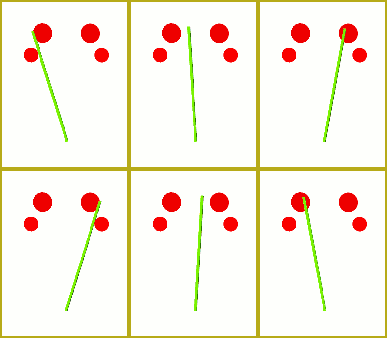
A new page featuring instructions for the leatnMMD metronome is now in place. Find it on the BONUS PAGES menu.


– SEE BELOW for MORE MMD TUTORIALS…


— — —


– _ — –


Visit the LearnMMD.com Homepage! Plenty of Mikumikudance instruction and info!

More MMD Tutorials...

Loading Background AVI Files into MMD (2021 Edition)

How do I load background AVI files into MMD?  What does it mean when MMD ...read more

Running MikuMikuDance in Linux using Wine and DXVK

How do I run MMD on Linux? Does MikuMikuDance run on Linux? How do I ...read more

How to subtitle MMD videos

How do I subtitle MMD videos? How do I make subtitles for my MMD videos? ...read more

Using the right codec when Rendering to AVI in MMD

What codecs do I use for rendering a video in MMD? What codec gives me ...read more

YouTube serves video playback quality to best suit your viewing-screen

What happens to your video after you've uploaded one to YouTube? YouTube serves video playback quality ...read more

Learn MMD Basics before jumping into a big project!

Learn MMD Basics before jumping into a big project! A reader wrote a comment... I tried to make ...read more

Metronome, Nuts & Bolts Tags:learnmmd, metronome, rhythm

Post navigation

Previous Post: Add Interest: Place Multiple Models Onstage Using Mother Bones
Next Post: WAV Files Make Your Music Play on MMD MikuMikuDance

Related Posts

  • How to Switch Models and Stages in MikuMikuDance Accessory Manipulation/Adjust
  • Using The Floor Light Art Effect in MMD. ARIZONA
  • Making Smooth Motions with MMD Making Smooth Motions
  • Load Camera Motion Data VMD files using the File Menu in MMD ARIZONA
  • Dummy Bones allow you to customize your accessory manipulations!
    Using The Dummy Bone for MikuMikuDance Accessory Manipulation/Adjust
  • Switch Models without Physics Glitches Accessory Manipulation/Adjust

More Related Articles

The SSAO effect adds depth of color and shadows for greater realism! MME MMD 7.39 Playing with MME – Using MORE cool MikuMikuEffects! Nuts & Bolts
Keyboard Shortcuts to the Menus Functions-Copy-Paste-Expand
Copy and Paste for Repetitive Motion in MikuMikuDance Functions-Copy-Paste-Expand
Everything is loaded and ready to "Play!" ... Happy Hands MMD Meme. Create an MMD Video using the “Happy Hands” Meme Making Videos - Rendering to AVI
Delete Miku and Learn About the Sample Dance Stage Lights Dummy Bones
Select the Center Bone if your MMD Model Doesn’t Feel the Floor Bones

Comments (2) on “Updated LearnMMD Metronome Instructions for Use”

  1. dragonfury25 says:
    December 16, 2012 at 1:08 am

    Um…the “LearnMMD Metronome Instructions” page link is broken. I get a 404 Error. O_O I tried to do as the instructions said in the ReadMe file and altho I managed to load the metronome, it only clicks once or twice before it stops (yes, I loaded music with it). Plus, there seems to be no way to actually move it once it’s been loaded. You can’t select all 3 bones (as a group) to move them together so you can put them elsewhere. Therefore…I’m confused…and a little frustrated with this accessory. :( Help plz!

    Reply
    1. Reggie_Dentmore says:
      December 16, 2012 at 9:42 am

      The link is fixed … hope that helps!

      Reply

Leave a Reply Cancel reply

Your email address will not be published. Required fields are marked *

Download the latest version of MikuMikuDance!
See the MMD Step-by-Step instructions page!
Learn how to make your own MMD motions!
LearnMMD.com
  • Download MMD Pokeball Accessory and Learn Accessory Manipulation Accessory Manipulation/Adjust
  • PMXEditor Quickly Edits MMD Model using Downloaded Parts BigPerryman
  • Make Custom MMD Models using Downloaded Parts BigPerryman
  • Make Smooth Animation Using Interpolation Curves Making Smooth Motions
  • Create MMD Abstract Art from Low-Res Videos! MMD Tutorials
  • LearnMMD.com's Video Dojo Expo FIVE
    Beach-side Pool-side “Hot August Nights” – Video Dojo Expo FIVE CONTESTS
  • Painted Table Accessory Download Available Now Downloading New Models
  • Miku virtual idol starts our Brave New World Random Thoughts & Visions

Copyright © 2022 Learn MikuMikuDance – MMD Tutorials – Free 3D Animation Software and Instructions..

Powered by PressBook Premium theme

Go to mobile version