
Skip to content
Learn MikuMikuDance – MMD Tutorials – Free 3D Animation Software

Learn MikuMikuDance – MMD Tutorials – Free 3D Animation Software

Download Free Animation Software – Let's Learn How to Do Everything!

  • Step-by-Step MMD instructions
  • DOWNLOADS
  • Troubleshoot, Fix MMD
  • Site Contents
  • Reggie Replies Q&A
  • Homework!
  • What IS MMD?
    • Download MikuMikuDance Newest Latest Version of MMD
  • “HOW TO”
    • Raycast RAY-MMD Effect Tutorials
  • BONUS PAGES
    • Why convert PMD models to PMX?
  • HALL of CHAMPIONS
  • Tutorial Categories
  • About
    • Privacy Policy
  • Toggle search form
  • Beamman’s BeamCharge MME Effect Beamman's BeamCharge
  • San Japan bow
    LearnMMD Hosts a Panel at San Japan! ARIZONA
  • What!
    How to Load Models, Motion, and Music Data into MikuMikuDance ARIZONA
  • Use 2D Background Images in MikuMikuDance Add Background Pictures and AVI
  • Export Import MMD Models Using Blender and PMXE Blender
  • Ray-MMD shading Mech-Girls!
    Ray-MMD Shading Mech Girls brings those beauties to life! MMD Tutorials
  • Select the Center Bone if your MMD Model Doesn’t Feel the Floor Bones
  • Using Beamman Particle-styled MME effects Beamman's AuraParticle
Fireworks Kai effect

Using the Fireworks Kai effect for MikuMikuDance.

Posted on July 7, 2016July 15, 2016 By Arizona No Comments on Using the Fireworks Kai effect for MikuMikuDance.


What is the Fireworks Kai effect? Where can I download the Fireworks Kai effect?A Feature Article by contributor ARIZONA on LearnMMD.com

How do I use the Fireworks Kai effect?

Using the Fireworks Kai effect for MikuMikuDance.

Fireworks Kai is a newer type of fireworks effect for MMD. I had written about using the Fireworks effect in 2012 the article is here: https://learnmmd.com/http:/learnmmd.com/using-the-fireworks-effect-in-mikumikudance-7-39/

You have to have a BowlRoll account and be logged in to download this effect. This seems to be a link to an acquaintance of Beamman (apparently, he initially created this effect but chose not to put it on his main page). The link is here:

https://bowlroll.net/file/71307

High Explosives.
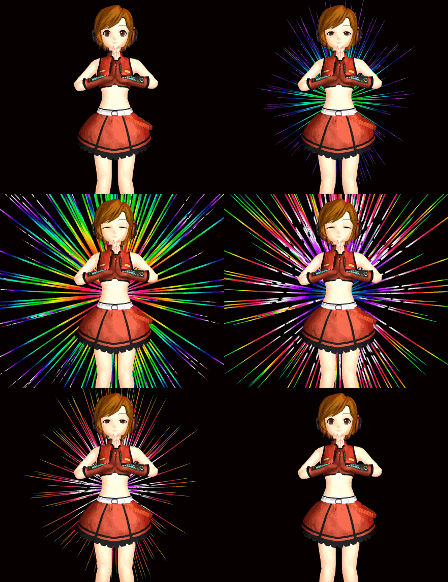
Fireworks Kai effectIf you are the other person who has read that article, you will recognize that the model is a classic red willow pattern burst. Notice I said model, this “effect” you load and treat like any of the models you have. You have to create motion data for this effect to work like how you want it. Alternatively, you might want to experiment with adding other effects to this model.

The Facial Manipulation Panel is where you would find all the controls for size, color, iridescence, and shape. I have created a little Fireworks Kai cheat sheet of each of the bones and their function for you here:

Bone 1 is a null bone which seems to have a null function.

Bone 2 changes the color of the burst as you move the slider.

Bone 3 creates an iridized color burst.

Bone 4 alters the burst to a flattened shape.

Bone 5 collapses the fire work like an umbrella to nothing.

Bone 6 also collapses the burst to nothing but it retains its willow pattern shape.

Bone 7 will fade the burst’s transparency from solid to invisible. Yet, it keeps its shape.

Bone 8 will change the size of the burst.

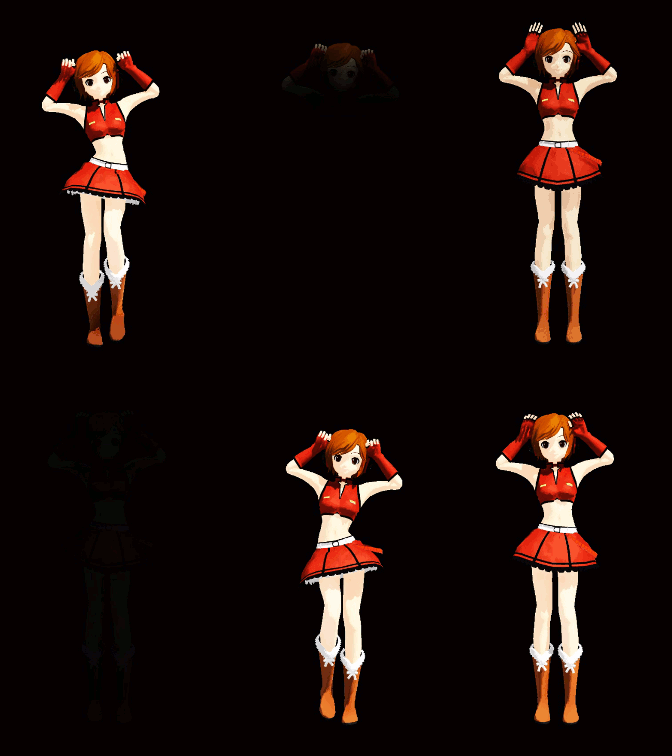
I originally wanted to write this for New Year’s Eve and Chinese New Year, yet as I played with this effect my mind kept racing with other uses for this. I hope you will think beyond the New Year and play with this effect. In the animated GIF, I chose to give Meiko Sakine a sense of divinity with the Fireworks Kai effect. I just used the 3, 4, and 5 sliders.

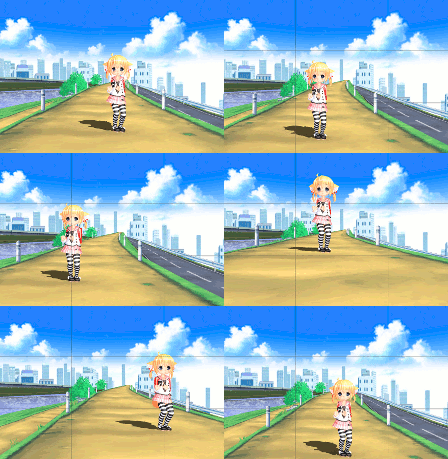
I have uploaded a video experiment to our YouTube channel. I have noticed the Howaito Gurin-Ko model has been getting more popular lately. I decided to join in on the fun. I tried different combinations in this video.

I want to take some time to wish for a safe and happy new year from all of us here at LMMD labs. May 2016 be a wonderful year for all of our fantastic readers. Just remember, that what effort you put into anything is directly proportional to what results you get.

Have fun with this.

TAMAYA!

Sources:

  • Default Meiko Sakine by Kio.
  • Fireworks Kai effect.
  • Adultshader.

– SEE BELOW for MORE MMD TUTORIALS…


— — —


– _ — –


Visit the LearnMMD.com Homepage! Plenty of Mikumikudance instruction and info!

More MMD Tutorials...

966_ Otogibanashi Toon "Fairy Tale" shader effect recolors your models

What is the 966_ Otogibanashi Toon shader? How can I recolor my models without using ...read more

ALMorphMaker Adds AutoLuminous Morphs to your Model!

What is the ALMorphMaker plugin? How can I put AutoLuminous morphs on a model? How can ...read more

DropShadow_dual Creates Two DropShadow Effects at Once!

Why can I only load one DropShadow effect at the same time? How does the ...read more

Editing Effect Textures Creates Brand New Effects!

Can editing effect textures change the look of my MME effects? What is an effect ...read more

LAT Model Shaders Create Stunning Scenes in MMD

Are there any LAT model shaders? How can I use shaders with LAT models? Do ...read more

MME PowerShader effect rivals Ray-MMD Raycast image enhancements

There is a MME shader available that can do some of the things that Ray-MMD ...read more

ARIZONA, Fireworks Kai effect, MME Effects Tutorials

Post navigation

Previous Post: Understanding Normals
Next Post: Making MMD Textures with Blender

Related Posts

  • Continuation of previous article's dispute!
    Beamman GSW Gauge for Game-like HP Health Points Display Beamman's GSW Gauge
  • Chrysanthemums are lovely with the Fireworks effect!
    Using the Fireworks Effect In MikuMikuDance ARIZONA
  • Use Center Position Bias to Move Models in MMD ARIZONA
  • Beamman’s MME SelfBurning Effect Sets your MMD models Ablaze! MME Effects Tutorials
  • ObjectLuminous Haku and Teto
    Using The ObjectLuminous Effect in MikuMikuDance Accessory Manipulation/Adjust
  • LearnMMD.com _ MikuMikuDance MMD Tutorials
    Almost Photo-realistic renders in MMD using Shaders and Effects Advanced Shader Technique

More Related Articles

Use Center Position Bias to Move Models in MMD ARIZONA
MikuMikuDance Tutorials MMD Tutorials on LearnMMD.com MMD Tutorials
MMD Starry Winds Effect Makes Amazing Night Time Scenes! MMD Tutorials
DropShadow_dual Creates Two DropShadow Effects at Once! Chestnutscoop
Motion is LOCAL, per the Model's orientation, or GOBAL, per the Program's Grid. (Meiko Sakine from MMD 7.39) Local and Global Mode Bone Movement MMD: Miku’s Mode Swings ARIZONA
How to Use the Squash and Stretch Effect for MMD. ARIZONA

Leave a Reply Cancel reply

Your email address will not be published. Required fields are marked *

Download the latest version of MikuMikuDance!
See the MMD Step-by-Step instructions page!
Learn how to make your own MMD motions!
LearnMMD.com
  • Download the latest version of MikuMikuDance - MMD 9.32
    NEW MMD 9.32 and 9.32×64… Latest version of MMD! Download MikuMikuDance
  • Fix MikuMikuDance Missing DLL and Side-by-Side Configuration Errors d3dx9_32.dll error
  • Quick-Start Basics of MMD to get you started! GloriaTheAnimator
  • An MMD town stage: Making Kerorin Town Great Again – Part 2 MMD Stages
  • Motion is LOCAL, per the Model's orientation, or GOBAL, per the Program's Grid. (Meiko Sakine from MMD 7.39)
    Local and Global Mode Bone Movement MMD: Miku’s Mode Swings ARIZONA
  • Let your MMD model breathe and move while standing still! Creating Motions
  • Using the AdultShader Effect In MikuMikuDance Adult Shader effect
  • Keep The Faith MMD
    Use proper MMD Etiquette when Downloading Models for MMD Intro to MikuMikuDance

Copyright © 2022 Learn MikuMikuDance – MMD Tutorials – Free 3D Animation Software and Instructions..

Powered by PressBook Premium theme

Go to mobile version