


How do you get a model to grip accessories better in MMD? How can you fine tune accessory manipulations in MikuMikuDance? How do you get things to spin in MMD DirectX9? What else can you do with Accessory Manipulation Panel in MikuMikuDance?
Get a Grip! More on Accessory Manipulation in MikuMikuDance
If you are an avid reader of LearnMMD, I hope you are now getting comfortable with using the dummy bone and the Accessory Manipulation Panel. If you’re thinking “What’s a dummy bone?” then you need to refer to some of the other articles in this site. Believe it or not, you can fine tune your accessory manipulations.
Helping Your Models Get a Grip.
 We authors here at the LearnMMD labs occasionally get help requests from our readers regarding their difficulties with MikuMikuDance. One such question was regarding how to get their model to grip their light saber better. Generally speaking, you want to attach hand-held accessories toward the bottom of the ring finger or the swearing finger. The Accessory Manipulation Panel (AMP) is where you do that. The default precision level is down to the ten-thousandths decimal place (that is for all six axes! See https://learnmmd.com/http:/learnmmd.com/use-accessory-manipulation-fields-to-positionadjust-accessories/ for more information). To quote one of my very gifted colleagues, Stella the Alchemist, “Decimals are your friends!” (https://learnmmd.com/http:/learnmmd.com/category/contributorsguest-authors/feature-articles-by-contributorauthor-stella-the-alchemist-on-learnmmd-com/ ). She further pointed out a common misconception that once an accessory is attached to the model, it cannot be manipulated any further. Yes, you can still make accessory manipulations after it is attached. We were able to help our reader and they happily went to save a galaxy far, far, away.
The Spin Cycle.
If you add a dummy bone to an accessory it is just as easy to manipulate. So why not manipulate an accessory, like a stage or a sky dome, in a different way? Why not have it rotate? This adds a unique visual element to your animation. The dummy bone and Accessory Manipulation Panel can be used for more than just helping your models grip accessories.
Try this experiment. Load some model, motion data, and .wav data files in MMD. Now add a stage or sky dome and attach a dummy bone to it and register that initial position in the Bone Manipulation Panel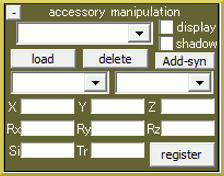 (BMP). Use the Frame Manipulation Panel (FMP) find the last frame of the data and add 15-30 to that number. This is yet another good habit for the new MMDer. Some motion data ends too abruptly and doing this gives you an extra bit of play time. Enter that number into the stop flame field in the play panel and 0 in the from flame field (love the Japanglish).
Make sure that dummy bone is displayed in the Model Manipulation Field (MMP). Go to the FMP and type 500 in the numeric field. Go to the BMP; click rotate and turn the dummy bone one-quarter turn and click register in the BMP. Repeat this for every 500 frames until you reach the end. Then press play. Your stage will turn while the animation runs. You can try this with different speeds.
Have fun with this.
Credits:
Model: Default Animasa Kaito.
Stationary Stars by Nanami (with Object Luminous Effect).
Wooden Mallet by TrackDancer.
I uploaded a version of this experiment to our YouTube Channel.
http://www.youtube.com/watch?v=Cvoru3UwAcA&feature=g-subs-u
Check it out and respond your version. We’d love to see it!
– SEE BELOW for MORE MMD TUTORIALS…
— — —
– _ — –


You Can Use PMD Editor.
This Is The Tutorial Link Where You Can Attach PMD Accessories:http://deadlyneurot0xin.deviantart.com/art/MMD-How-to-attach-accessories-216226637
Hope This Helps!
How do we attach PMD accessories? I don’t know how to attach a PMD fan to a model and can still open/close it…