

Skip to content
Learn MikuMikuDance – MMD Tutorials – Free 3D Animation Software

Learn MikuMikuDance – MMD Tutorials – Free 3D Animation Software

Download Free Animation Software – Let's Learn How to Do Everything!

  • Step-by-Step MMD instructions
  • DOWNLOADS
  • Troubleshoot, Fix MMD
  • Site Contents
  • Reggie Replies Q&A
  • Homework!
  • What IS MMD?
    • Download MikuMikuDance Newest Latest Version of MMD
  • “HOW TO”
    • Raycast RAY-MMD Effect Tutorials
  • BONUS PAGES
    • Why convert PMD models to PMX?
  • HALL of CHAMPIONS
  • Tutorial Categories
  • About
    • Privacy Policy
  • Toggle search form
  • Let’s Go Learn Hatsune Miku Model Names Downloading New Models
  • Speech Synthesizer gives MMD Models a voice! Making Soundtracks
  • MME ExcellentShadow2 effect smooths ugly Self-Shadows ExcellentShadow2
  • No Diamonds Appear in Frame Chart in MMD and How to Fix It Mae Blythe
  • Print a hard copy! Art is fleeting… especially NOW! MMD Tutorials
  • Troubleshoot MMD models– or anything else– with four techniques! Bandages
  • Painted Table Accessory Download Available Now Downloading New Models
  • LearnMMD.com: The Instruction Sheet you've been searching for!
    Use Google SketchUp to make DirectX Accessories in MMD Dummy Bones
Click to see the new Getting Started with MMD Video on YouTube!

Getting Started with MMD Video on YouTube!

Posted on December 12, 2012August 28, 2016 By Reggie_Dentmore No Comments on Getting Started with MMD Video on YouTube!

How do I start using MikuMikuDance? How do I get started Visit LearnMMD's Video Channel on YouTube: Videos by Reggie Dentmore.with MMD? Where can I download MMD, the latest version. What do I do first after I download MMD?

New “Getting Started with MMD” Video is up on YouTube!
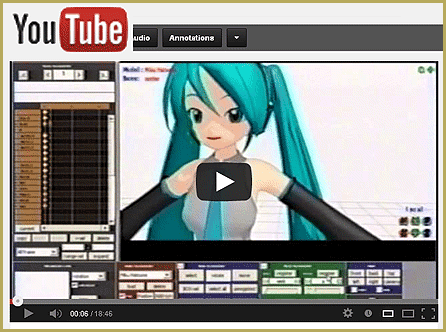
Click to see the new Getting Started with MMD Video on YouTube!

Comments and emails pour into LearnMMD from new MMDers looking for help. Many need answers for the most basic of questions. This new video by Reggie Dentmore attempts to show new users how to download MMD, the latest version of MMD, and what to do first as they get started with MMD.

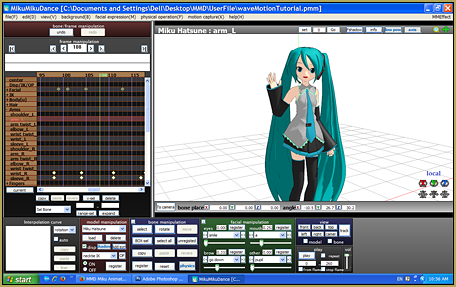
The first time a newbie opens MikuMikuDance, The new Getting Started with MMD video spends some time on the Sample Dances.he is confronted with an empty white stage … and no instructions. The usual pattern is to click around until he finds the Load button … loads Miku … and continues to click around until he gets tired of it.
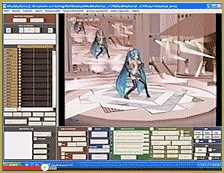
Reggie’s video introduces the new users to the idea of “bones” … selecting and moving the bones, registering bone positions … moving through the frames … using the camera … using the various controls to quickly change your view of the stage and your model … setting the frame speed … using the PLAY button and the various switches and windows surrounding it.

There is plenty more to teach … plenty of room for Volumes 2, 3, and 4 thru 10 … and more! If you are NEW to MMD or are thinking of trying it out, give this 19-minute video a watch.


– SEE BELOW for MORE MMD TUTORIALS…


— — —


– _ — –


Visit the LearnMMD.com Homepage! Plenty of Mikumikudance instruction and info!

More MMD Tutorials...

Use YouTube Video Analytics Attract Maintain Viewers

How can I use YouTube Video Analytics to learn how to make popular MMD videos? ...read more

Create 450-Frame MMD animation from scratch!

How do I create a 450-Frame MMD animation from scratch? How do I start making ...read more

No more boring MMD Camerawork - Keep it moving!

MMD Camerawork can be so boring. How can I add life to my MMD animations? ...read more

Open MikuMikuDance... just for the fun of it!

How do I do MMD? Do I have to know coding to do MikuMikuDance. Open ...read more

Ancient MMD Elektrika Motion Gets NEW Life!

Where can I download the old MMD Elektrika Motion? Can we still use old MMD ...read more

askY Dramatic Anime Style Sky Domes for MMD created by Meme

Where can I get a sunset skydome for my MMD animation? Dramatic Anime Style Sky ...read more

MMD Basics, MMD Tutorials, Reggie Dentmore

Post navigation

Previous Post: More on Accessory Manipulation in MikuMikuDance
Next Post: Using the AdultShader Effect In MikuMikuDance

Related Posts

  • MMD First Steps Make your own motions from scratch Making Smooth Motions
  • Keep The Faith MMD
    Growing Concerns Amongst Japanese MMDers Downloading New Models
  • Using the right codec when Rendering to AVI in MMD HD Videos in MMD
  • MME: Less is More… Select only those that you need. Cook Torrence effect
  • MME PowerShader effect rivals Ray-MMD Raycast image enhancements MMD Tutorials
  • o_ShaderCustomSet_v0_3 effect applies gentle color modification MMD Tutorials

More Related Articles

Finding Inspiration for your Animation MMD Basics
Cookiefun Channel Camera Crew Model Free Download Downloading New Models
Anticipation is the Second Principle of Animation. Anticipation
Japanese MMD mod allows Automatic Breathing action in MMD models MMD Tutorials
Make successful MMD YouTube videos MMD Basics
Understanding Normals Bandages

Leave a Reply Cancel reply

Your email address will not be published. Required fields are marked *

Download the latest version of MikuMikuDance!
See the MMD Step-by-Step instructions page!
Learn how to make your own MMD motions!
LearnMMD.com
  • Different MMD models react differently to pose and motion data MMD Basics
  • Getting Started with MMD MikuMikuDance Intro to MikuMikuDance
  • An MMD town stage: Making Kerorin Town Great Again – Part 3 MMD Stages
  • Miku Miku Dance: Life Changing! Random Thoughts & Visions
  • The MMD Physics Engine keeps Skirts from going through legs! MMD Basics
  • Tips for how to create complicated MMD dance motions.
    Making more complicated MMD dance motions – Some new notes… Making Smooth Motions
  • Get started with MMM – The Basics Kazuki Matsuoka
  • Creating a new model using Piron's base and a great new T-shirt! MMD 7.39 PMDE
    Adding Parts in PMDEditor is Easier than you think! MMD 7.39 NOKO2

Copyright © 2022 Learn MikuMikuDance – MMD Tutorials – Free 3D Animation Software and Instructions..

Powered by PressBook Premium theme

Go to mobile version