

Skip to content
Learn MikuMikuDance – MMD Tutorials – Free 3D Animation Software

Learn MikuMikuDance – MMD Tutorials – Free 3D Animation Software

Download Free Animation Software – Let's Learn How to Do Everything!

  • Step-by-Step MMD instructions
  • DOWNLOADS
  • Troubleshoot, Fix MMD
  • Site Contents
  • Reggie Replies Q&A
  • Homework!
  • What IS MMD?
    • Download MikuMikuDance Newest Latest Version of MMD
  • “HOW TO”
    • Raycast RAY-MMD Effect Tutorials
  • BONUS PAGES
    • Why convert PMD models to PMX?
  • HALL of CHAMPIONS
  • Tutorial Categories
  • About
    • Privacy Policy
  • Toggle search form
  • The Making of “Boum Boum Boum”: Everything is More Sophisticated in French "the making of" my video
  • ‘PROJECT: MikuMiku Movie!’ part 01: prepare the first scene! Fia Phoenix
  • VDE-3 Champion: Kazumi Video Dojo Champions
  • Adding captions in MMM MikuMikuMoving Bullwood
  • Free Download MikuMikuDance MMD
    Download the Latest Version of MikuMikuDance: MMD 9.32 Download MikuMikuDance
  • Rigging Models with Appends using PMXEditor Bandages
  • My new MMD Action Video was fun to make! "the making of" my video
  • MMD animation from Scratch “The Wind-up and the Pitch!” "the making of" my video
Go to my DOWNLOADS PAGE to get your free Cropping/Transition Panel!

New Cropping-Transition Panel Ready to Download!

Posted on January 16, 2012March 31, 2016 By Reggie_Dentmore 2 Comments on New Cropping-Transition Panel Ready to Download!

New Cropping/Transition Panel Ready to Download!

I created this 3D Panel to create transitions and allow small cropped areas in my animations. DOWNLOAD THE PANEL, attach it to a dummy bone, and try it out! See this video, once, and you will know how to use it:

I created the Panel in Google Sketchup using the 3D-RAD plugin within Sketchup. The Panel is RED on one side and BLACK on the other. Whirl it around using the dummy bone to position the panel where you want it.
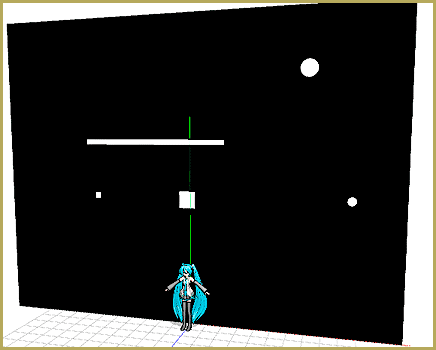
Go to my DOWNLOADS PAGE to get your free Cropping/Transition Panel!

This panel will have many applications and I look forward to playing with it. Go to my DOWNLOADS PAGE and get yours now!


– SEE BELOW for MORE MMD TUTORIALS…


— — —


– _ — –


Visit the LearnMMD.com Homepage! Plenty of Mikumikudance instruction and info!

Transition Panel (it's not an effect)

Post navigation

Previous Post: New MMD Rocking Chair Accessory Ready to Download
Next Post: MMD Crashes when Rendering to AVI

Comments (2) on “New Cropping-Transition Panel Ready to Download!”

  1. ltonGlify says:
    December 23, 2018 at 2:09 pm

    I am ltonser. I need help. What can i do it?

    Reply
    1. KillerBeer says:
      December 23, 2018 at 2:21 pm

      You can start with explaining yourself.

      Reply

Leave a Reply Cancel reply

Your email address will not be published. Required fields are marked *

Download the latest version of MikuMikuDance!
See the MMD Step-by-Step instructions page!
Learn how to make your own MMD motions!
LearnMMD.com
  • Use PMDE to Switch On the MME AutoLuminous effect in MMD AutoLuminous MME / PMDE
  • The K Lite Mega Codec Pack 995 – The Ultimate HD Video compressor! HD Videos in MMD
  • LearnMMD.com _ MikuMikuDance MMD Tutorials
    Almost Photo-realistic renders in MMD using Shaders and Effects Advanced Shader Technique
  • Proper Computer DPI Scaling Setup Stops Text Cut Off in PMXE Mae Blythe
  • Make Smooth Motions using Multiple Keyframes Animation Shortcuts
  • Professionally made models FOUND! Downloading New Models
  • Creating and Editing UV Morphs for MMD Models Bandages
  • Making MMD Models Complicated Task with much to know! Making Models

Copyright © 2022 Learn MikuMikuDance – MMD Tutorials – Free 3D Animation Software and Instructions..

Powered by PressBook Premium theme

Go to mobile version