

Skip to content
Learn MikuMikuDance – MMD Tutorials – Free 3D Animation Software

Learn MikuMikuDance – MMD Tutorials – Free 3D Animation Software

Download Free Animation Software – Let's Learn How to Do Everything!

  • Step-by-Step MMD instructions
  • DOWNLOADS
  • Troubleshoot, Fix MMD
  • Site Contents
  • Reggie Replies Q&A
  • Homework!
  • What IS MMD?
    • Download MikuMikuDance Newest Latest Version of MMD
  • “HOW TO”
    • Raycast RAY-MMD Effect Tutorials
  • BONUS PAGES
    • Why convert PMD models to PMX?
  • HALL of CHAMPIONS
  • Tutorial Categories
  • About
    • Privacy Policy
  • Toggle search form
  • Proper Computer DPI Scaling Setup Stops Text Cut Off in PMXE Mae Blythe
  • MMD Model Hair Textures Made With . . . IMVU Tutorials?! Mae Blythe
  • Close Up of Sph File with Text
    Create Sph Files in Blender Without Drawing Anything! Blender
  • LearnMMD.com _ MikuMikuDance MMD Tutorials
    Trouble Keeping MMD Faith When Those Around You Don’t Keep the Faith-MMD Credits/Sharing
  • Rin With and Without the ToonDX Effect!
    Using the ToonDX Effect for MikuMikuDance. ARIZONA
  • Use PMDE to make a Model for MMD almost from Scratch MMD Tutorials
  • The Making of “Oubliette” "the making of" my video
  • Creating Black Model Silhouettes in MikuMikuDance ARIZONA
MMPlus has many safeguards that will save you time as you work with MMD.

MMPlus, a New MMD Plugin!

Posted on April 15, 2019July 8, 2024 By UndeadLuciel 8 Comments on MMPlus, a New MMD Plugin!

A feature article by author UndeadLucielWhat is MikuMikuPlus? What does MikuMikuPlus do? How can I download MikuMikuPlus? How do I install MikuMikuPlus?

What is MikuMikuPlus?

Recently, there’s a new MMD plugin available called MikuMikuPlus to make your MMD adventure a lot easier. The plugin is created by by 猫のしもべ (Nekonoshimobe)! Credits to zeezeenyan on DeviantArt for introducing me to this plugin and its functions!

What does it do?

Currently, MMPlus has several functions for video and picture rendering:

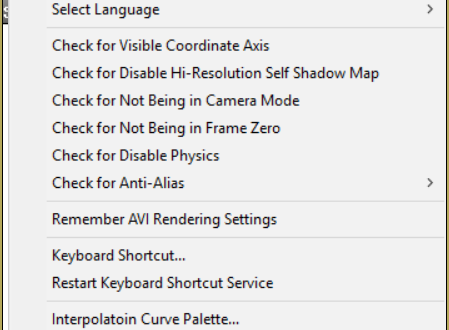
When you click “render”, the plugin will warn you to

  • Disable the coordinate axis
  • Enable self-shadow
  • Return to camera mode
  • Return to frame 0
  • Turn physics back on if it’s off
  • Turn on anti-aliasing (with raycast)

Other things it can do are:

  • Remember your rendering settings
  • Customize keyboard shortcuts
  • Save interpolation curves
  • Giving you a percentage bar and countdown when you render
  • Make the model draw order window bigger
  • Helps MMD read the model data when you drag-and-drop a model or accessory in
  • More functions are still being added to the plugin!

How do I download and install MMPlus?

There’s a preview of the plugin on NicoVideo and the latest version (1.6.2) in English can be downloaded on  lenaantler’s page on DeviantArt.

To get the plugin, first download the zip file from the link on DeviantArt.
Then, make sure you unblock the zip file before extracting by right clicking the Zip, choosing Properties, and then checking Unblock and apply… and OK!
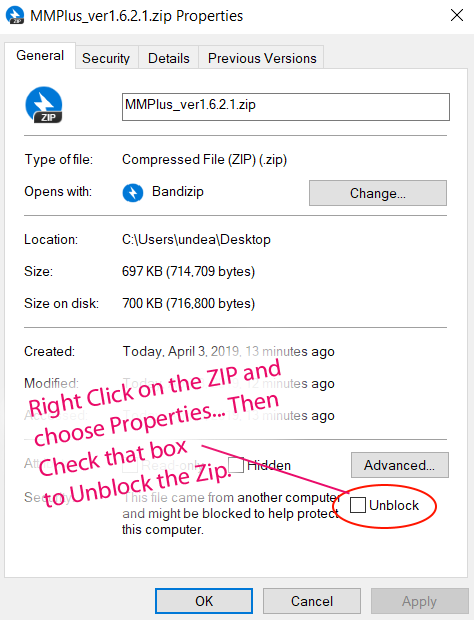
Unblock the Zip before you Extract any files.

Double -click the Zip and choose Extract or Extract All… and OK the defaults to get the MMPlus folder.

Now, drag-and-drop the MMPlus files into your MMD folder, make sure it’s in the same folder as your MikuMikuDance.exe.
-If you’re using the 32bit MMD, use the MSIMG32.dll that’s in the 32bit folder instead and use the same MMPlus.dll!
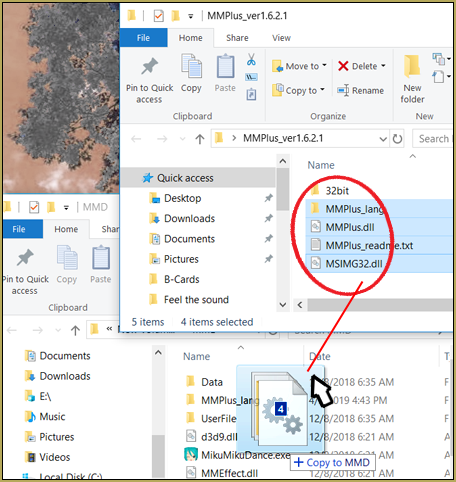
Drag and drop the MMPlus files into your MMD folder.

That Readme.txt file is in Japanese. Learn how to translate that readme into your language.

Finally, open up MMD, and if you’ve done it correctly, there should now be a menu called “MMPlus” on your toolbar on top!
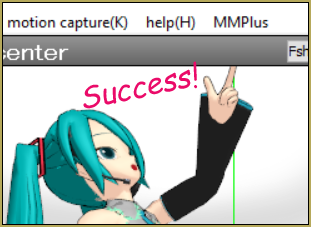
You can disable and enable functions at any time by clicking on the items in this menu!
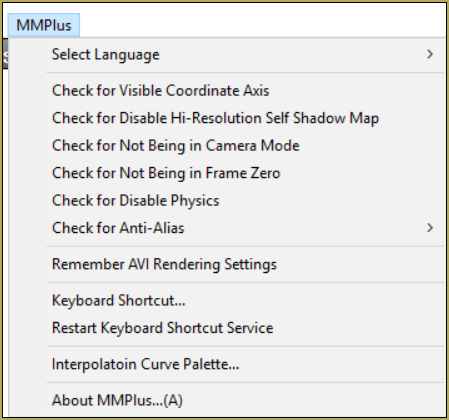
MMPlus has many safeguards that will save you time as you work with MMD.

Have fun with MMPlus…

That’s what MMPlus has to offer now! Hurry and download the plugin and experience it for yourself!


– SEE BELOW for MORE MMD TUTORIALS…


— — —


– _ — –


Visit the LearnMMD.com Homepage! Plenty of Mikumikudance instruction and info!

More MMD Tutorials...

MMAccel - Accelerate your MMD creation!

What is MMAccel? How can I make my own MMD Keyboard shortcuts? Where can I ...read more

MiyukiOhayashi's Pity Party motion download includes WAV

Where can I download the Pity Party motion? How can I use the Pity Party ...read more

Free MMD Cry Baby Motion DL from DA's Smol-Hooman

Where can I find a Cry Baby Motion DL? I want to download MiyukiOhayashi's MMD ...read more

Download MMD Ballet Poses created by ctrlaltdelete999

. Where can I download MMD ballet poses? How can I get ballet poses for my ...read more

MMD Camera Work made the motion fit the song!

Can I use MMD camera work to make my motion file look better? How can ...read more

Crazy Animation Creation yields fun video and good practice!

How can I get inspired to do some animation creation from scratch in MMD? Is ...read more

Animation Resource, Animation Shortcuts, MikuMikuPlus ... MMPlus, UndeadLuciel

Post navigation

Previous Post: RAY-MMD: Using the Time of Night skybox
Next Post: RAY-MMD: Creating your own custom sky box

Related Posts

  • Use PMXEditor INFOfile to optimize MMD models
    PMXEditor PMXInfo Analyzing Optimizing MMD Models Fixing Broken Models
  • My new “Ring Around the Moon” MMD video is on YouTube "the making of" my video
  • Make an MMD Music Video Bo Beep Bo Beep! "the making of" my video
  • Making amazing complicated MMD video requires circle of learning Animation Shortcuts
  • The MMD Pity Partry motion is free to download!
    MiyukiOhayashi’s Pity Party motion download includes WAV "the making of" my video
  • How to Lip-Sync in MMD using MoggProject Face and Lips Animation Shortcuts

More Related Articles

MMD Theater Seats Don’t Have to Sit on the Floor Animation Shortcuts
Make an MMD Music Video Bo Beep Bo Beep! "the making of" my video
Creating Spooky Scenes with MMD Animation Shortcuts
Value of saved poses. Saved Poses get your MMD Animation Started! Animation Shortcuts
Make Smooth Motions using Multiple Keyframes Animation Shortcuts
My new “Ring Around the Moon” MMD video is on YouTube "the making of" my video

Comments (8) on “MMPlus, a New MMD Plugin!”

  1. Angelic_Oceanboy says:
    December 30, 2021 at 9:14 pm

    Is MMPlus malware? I heard ppl talking about something that it’s a trojan. Although I saw an MMDer (kakaiya) have it, and I can assume that their pc is fine.

    Reply
    1. Reggie_Dentmore says:
      December 31, 2021 at 9:47 am

      I have MMPlus… has been used since that article was written in 2019. I have experienced no issues with it.. … It is not a “necessary” plugin. It just warns you if you are about to make a simple mistake… might save you three minutes if you DID make the error it warns about. I have not use all of it’s functions as listed in that tutorial, and I usually ignore the warnings that pop-up. … SO… if you are hesitant, it’s OK to not use this plugin. … I have MINE from 2019… I will download the current version and report back.
      — Reggie

      Reply
    2. Reggie_Dentmore says:
      December 31, 2021 at 10:13 am

      I just downloaded the latest version from 07/2019… my originale version was from 04-2019… and the main DLL was about twice the size of the original verison… 1MB… I replaced my old files with the new download… and it works fine… I see no issues. … When I downloaded the ZIP, my computer security DID WARN ME about it being a dangerous… This download includes DLL files (the ones you want)… but computer security gets alarmed at DLL’s.
      … ANYWAY… I feel that this download and the files IS safe.
      — Reggie

      Reply
      1. Angelic_Oceanboy says:
        January 14, 2022 at 11:43 pm

        Alright, thanks for letting me know! I now lost interest of downloading the plugin.

        Reply
    3. Angelic_Oceanboy says:
      January 14, 2022 at 11:42 pm

      *she instead of they

      Reply
  2. octaita says:
    March 19, 2020 at 3:23 pm

    This looks amazing!! Just downloaded. If it works well would be great for me! :D Hugs

    Reply
  3. Darketernal says:
    April 23, 2019 at 6:05 am

    I was just wondering, i made a comment in here and i posted a youtube video link in it as a reference, do comments with links in them get automatically rejected by the website software? If so how do i post a useful link in here?

    Reply
    1. Reggie_Dentmore says:
      April 23, 2019 at 7:30 am

      Generally, the “system” holds a comment with a link in it as “pending”… and one of us humans checks those pending comments, approving those that deal with our subject matter and trashing those that do not fit. Sorry if your comment got lost. THANK YOU for checking back. I will send you an email so we can communicate.

      Reply

Leave a Reply Cancel reply

Your email address will not be published. Required fields are marked *

Download the latest version of MikuMikuDance!
See the MMD Step-by-Step instructions page!
Learn how to make your own MMD motions!
LearnMMD.com
  • New version of ffmpeg cover
    FFMPEG – Final Frontier For Video and Audio File Processing Background AVI
  • create credible characters for your projects
    How to create credible characters for your projects. MMD Tutorials
  • MMD Augmented Reality AR on Android Devices Random Thoughts & Visions
  • Make your own stage for MikuMikuDance using SketchUp Models Google SketchUp and MMD
  • The FILE Menu Options MENU Option Descriptions
  • Copy and Paste for Repetitive Motion in MikuMikuDance Functions-Copy-Paste-Expand
  • MikuMikuDance 15th Anniversary Celebration Video is on NicoNico!
    MikuMikuDance 15th Anniversary celebration video posted on NicoNico! MMD Basics
  • Import Daz models with Bones using Blender, Noesis, Xnalara Blender

Copyright © 2022 Learn MikuMikuDance – MMD Tutorials – Free 3D Animation Software and Instructions..

Powered by PressBook Premium theme

Go to mobile version