

Skip to content
Learn MikuMikuDance – MMD Tutorials – Free 3D Animation Software

Learn MikuMikuDance – MMD Tutorials – Free 3D Animation Software

Download Free Animation Software – Let's Learn How to Do Everything!

  • Step-by-Step MMD instructions
  • DOWNLOADS
  • Troubleshoot, Fix MMD
  • Site Contents
  • Reggie Replies Q&A
  • Homework!
  • What IS MMD?
    • Download MikuMikuDance Newest Latest Version of MMD
  • “HOW TO”
    • Raycast RAY-MMD Effect Tutorials
  • BONUS PAGES
    • Why convert PMD models to PMX?
  • HALL of CHAMPIONS
  • Tutorial Categories
  • About
    • Privacy Policy
  • Toggle search form
  • LearnMMD Video Dojo Expo competition: open to all MMDers!
    Voting is closed – You Chose the Winners! CONTESTS
  • Strong Soundtrack Offers 3-D Animation Shortcuts! "the making of" my video
  • Load Camera Motion Data VMD files using the File Menu in MMD ARIZONA
  • Posing MMD Models Using Reference Images Animation Shortcuts
  • Staging and the 12 Principles of Animation. Accessory Manipulation/Adjust
  • Keep The Faith MMD
    Growing Concerns Amongst Japanese MMDers Downloading New Models
  • Yukari's Gap Portal Style.
    The In’s and Out’s of Yukari’s Gap for MikuMikuDance. ARIZONA
  • Animate MMD ballet pirouette motion Creating Motions

MikuMikuDance Unbridled Creativity Starts with an Empty GUI

Posted on May 24, 2014July 3, 2024 By Reggie_Dentmore 2 Comments on MikuMikuDance Unbridled Creativity Starts with an Empty GUI

A Feature Article by Reggie Dentmore on LearnMMD.com

MikuMikuDance Unbridled Creativity Starts
with an Empty GUI …

It’s fun to make an animation from scratch!


Any writer will tell you that the most chilling sight that threatens your creativity is a blank piece of paper … or the bright-white of an empty WORD screen.

In MikuMikuDance … it’s the blank GUI:
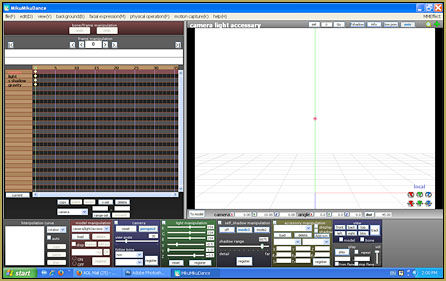
MikuMikuDance Unbridled Creativity can be squahed by the empty, blank GUI.

You have an inspiration, you can “see” the project in your mind’s eye … you sit down and double-click the MMD icon … and then you are faced with the reality of “a blank piece of paper”. “Hmm … Uhhh … Gee … I wonder what’s on TV?”

For my newest video …

My inspiration was this image that I found while cruising through images on DeviantArt.com,
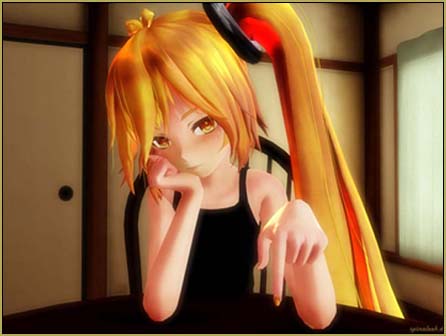
My latest video was inspired by dA's spinaleek's beautiful Neru image.

… an image created by dA’s spinaleek … of a sultry,  bored Neru … just waiting for something, anything, to happen.

I wanted to see if I could recreate a similar scene using Miku … and animate a few minutes of boredom. “:o).An image of the infamous "blank" window ...

I opened-up MikuMikuDance and was faced with that blank screen.

–
I decided to push-ahead and start with finding a “room” to “set-up” in. I looked through my earliest attempts at creating stage-sets using Google Sketchup and I found that I had one that was just the right colors for the sombre mood that I wanted.

… and I had a table and chair, also from Sketchup. I loaded the various pieces and then had my project looking like this …
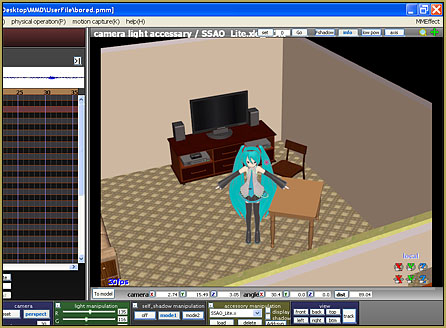
I had collected together the various "bits" that I needed ...

I decided to add a table-lamp as a way to add some interest to the scene … so I went into Sketchup’s 3D-Warehouse and found a model that I could modify to become the lamp that I was looking for. I imported that existing model and made a few changes … and “repainted” the shade with a nice fabric texture …
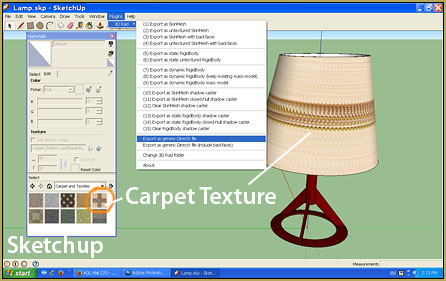
Google Sketchup is great for quickly generating custom MMD accessories!

… I painted the lamp-base a deep red color … converted the Sketchup model into a DirectX model … and I had all of the pieces that I needed for my scene.

The Empty GUI gave way to my completed scene!

I just love success!

It was actually thrilling to watch the setting develop into the scene that I had envisioned.

After loading Miku and the various accessories … I adjusted the brightness and color of the ambient light … moving the overhead lights so as to create the shadows that I wanted to see. I added the SSAO_lite effect to enrichen the colors and add depth to the shadows. I spent quite a while positioning Miku “just so” … the elbows, the sleeves, the slant of the shoulders, the eyes, the eye-lids, the eye-brows, the “mouse” (mouth) settings, the tilt of the head, the curl of the fingers (one-by-one), the rotation of the arms and wrists … all the while keeping an eye on my Neru-inspiration picture.

The final set-up was perfect …
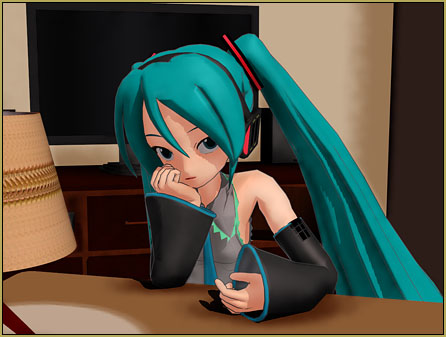
Came out great ... CLICK to watch the video on YouTube!

… I got just exactly the “look” that I had envisioned.

inspiration

I am afraid that my Miku doesn’t have “the fire” evident in spinaleek’s Neru image … but I feel that the setting and the attitude is just right.

Why the “basic” Miku model??

Models available for MikuMikuDance have come a long way Happy Singing Miku in MikuMikuDance 7.39from those, like my Miku (Animasa’s ver. 2), which are included in the basic MMD download. I mean, just LOOK at her … the simple coloring and those faceted “curves” … but, for me, the original models ARE MikuMikuDance. I have newer models … but the look, the feel, the challenge of MMD revolves, for me, around those original models. My association with LearnMMD.com calls for me to use the older Miku model “just because” she is the model included in everyone’s original MMD folder. As I envision a new scene … it’s the old models that I see.

 MikuMikuDance Unbridled Creativity Starts with an Empty GUI …

… and it’s great fun to see what develops as you put your mind to the test!

Watch the video I created … “Bored.”


– SEE BELOW for MORE MMD TUTORIALS…


— — —


– _ — –


Visit the LearnMMD.com Homepage! Plenty of Mikumikudance instruction and info!

More MMD Tutorials...

Starting-out Using MMD Reader discovers missing elements.

A reader commented: Is it against any rules to sell an All-in-1 software pack in different ...read more

Different MMD models react differently to pose and motion data

My MMD motion data doesn't work! My MMD models react differently to pose and motion ...read more

Scrambled first frame of video must be Voodoo!

Why is the first frame of my new video scrambled? What causes that first frame ...read more

Written Credits aid YouTube MMDer search results

Why should I have written credits in my MMD video's description? ... I have them ...read more

Making amazing complicated MMD video requires circle of learning

How do I make a complicated MMD video with AVI backgrounds and scene fades? How ...read more

MMD Theater Seats Don't Have to Sit on the Floor

When setting the stage for your animation... You have to "do" what you have to do! MMD ...read more

MMD Basics, Random Thoughts & Visions, Reggie Dentmore

Post navigation

Previous Post: Import models from Source engine based games (HL2, Portal, TF2 etc.)
Next Post: Painted Table Accessory Download Available Now

Related Posts

  • MMD uses your computer to the max! Intro to MikuMikuDance
  • Use the Half-Lambert Shader effect for point-source lighting.
    MME Half-Lambert Shader Point-Source Lighting Effects Half-Lambert Shader
  • Download MMD Pokeball Accessory and Learn Accessory Manipulation Accessory Manipulation/Adjust
  • Create and Post 1 or 2 videos a day? VocaloidAnime1924 does! Downloading New Models
  • Gakupo sings "Trick Bag" - VDE-3 Entry!
    Step 1: VDE-3 “Gotta Sing… Gotta Dance!” Entry Creation… YouTube Music Approval CONTESTS
  • Hatsune Miku type N model download
    Download Hatsune Miku type N models from 2010… a set of 6! Downloading New Models

More Related Articles

Raycast / Ray-MMD First Steps MMD Tutorials
ikUnderwater Effect submerges your MMD animation! ikUnderwater Effect
Recommended Software Library for MMDers Animation Shortcuts
"Say cheese!" Setting up the camera moves in MMD 7.39 takes some thought. Credits: MMD Little Town by Harner Productions, Chibi Miku Yamato Style 1.35 by Koshitsuki, Chibi NC DT SeeU by HousekineMinto, Video Camera by Dark Konata Camera Motion Instructions 1 – MMD Basics ARIZONA
MMD smoke clouds are easy to make with Beamman's Breath effect. MMD Smoke Clouds and a Smoke Filled Room… Beamman's Breath Effect
MikuMikuDance FREE Animation Software & Instructions MMD Tutorials

Comments (2) on “MikuMikuDance Unbridled Creativity Starts with an Empty GUI”

  1. BleCat says:
    March 10, 2016 at 3:36 pm

    It’s usually music that inspires me :D Mostly dubsteps or something really bwoop bwop wap wap
    I believe when the idea comes to you, they’ll come as brutally as a storm. Let them naturally flow into you and you’ll be even more amazed at what you might be able to make.
    Thanks for the great article! It really inspires me!

    Reply
    1. Reggie says:
      March 11, 2016 at 10:12 am

      Thank you for that! … the “human creativity” MikuMikuDance brings to the surface is a big part of my enjoyment of MMD… the videos, the art, the fandom… awesome!

      Reply

Leave a Reply Cancel reply

Your email address will not be published. Required fields are marked *

Download the latest version of MikuMikuDance!
See the MMD Step-by-Step instructions page!
Learn how to make your own MMD motions!
LearnMMD.com
  • Make MMD Model Hands from scratch in Blender Blender
  • LearnMMD.com: The Instruction Sheet you've been searching for!
    Use Google SketchUp to make DirectX Accessories in MMD Dummy Bones
  • MMD model 1052C China Qipao Miku download
    Introducing MMD model 1052C China Qipao Miku "the making of" my video
  • Video Dojo Expo 2 Champion: blazeraptor Video Dojo Champions
  • Typical MikuMikuDance MMD Download Project: Lucky! "the making of" my video
  • GaussianVariable MME Effect Blurs your entire scene! GaussianVariable
  • Creating Spooky Scenes with MMD Animation Shortcuts
  • New MMD Video Taught Awareness of Camera Angles and Motion Quirks! "the making of" my video

Copyright © 2022 Learn MikuMikuDance – MMD Tutorials – Free 3D Animation Software and Instructions..

Powered by PressBook Premium theme

Go to mobile version