



What do I first with MikuMikuDance? Why would I play the sample dance in Miku Miku Dance? How do I make a new model dance the MMD sample dance?
Use Tricks to Study the MikuMikudance Sample Dance
MMD has many tools available that will help us. We can learn about them from a careful examination of the included Sample.pmm file.
Today I want to copy the Sample Dance to a new, clean screen and substitute the model Meiko for Miku … because Meiko is a more simple character and it will be easier to see each of her moves. I also want to slow the dance way down so that I can more easily absorb what is going on in there.
Here are the steps we will take:
- Open the Sample Dance
- Copy and Save the motion data as a Motion File
- Open a new Dance with a new character
- Add the Sample motions to our new character
- Use the Expand function to slow down the Dance
- Save our new version of the Sample dance
- Watch and describe the actions in our new dance
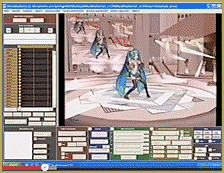
First, Open the Sample dance. Select Miku instead of Camera/Accessory because we want to work with the model’s actions. Next, I played that dance and examined the frame counter and decided that 750 frames  would encompass all of the action. Enter a Range of 0 – 750 into the Range Counter under the Frame area. See that “All Frame” is selected. Click Range-Sel and then click COPY. That puts all of that frame data into the computer’s clipboard memory.
Now go to the File menu and choose Save Motion Data. A window will ask you to name the new file. I called mine Sample_Dance. All of that frame data is now written down as a file: Sample_Dance, in the Motion Data file folder.
Next, Click File and NEW. A window asks if you are OK … click yes.
Load the character you want … I chose Meiko. Go to File and click Load Motion Data and open the file you just created. You will observe that Meiko suddenly assumes the Zero-frame position for the Sample dance. Push Play and watch her go to work! Man … those are some fast moves!
 Let’s slow that dance down using the EXPAND button. First … Be sure that we are on Frame Zero. Now select a range of 0 – 750 and click Range-Sel to select the entire animation. Click Expand and a small window pops up. The number in the window is 1.0 … that number is a multiplyer that will be applied to our selected data’s timeline. If we leave that number 1 and click OK … Nothing will happen … one times one = one. If we put in a decimal number like .5 … our dance will be compressed into only half of the time of the original dance. We want to stretch the dance out longer so that we can see the details … so I entered a number 2.0 and clicked OK.
You have to watch out when you use EXPAND … it pastes the new data starting from the current Frame number. So … if you select a range of 0 – 750 and Expand while  the frame counter is on frame 75 … the new data from Expand will start on frame 75.
Now play the dance. Even at half speed, things happen quickly. Check the MODEL box right there above the Play button. That keeps the model centered on your screen so that you can see all of the action without chasing her around the stage. Let’s slow her down some more …
Set the Range window for double the length: 0-1500 … because we know our dance is already twice as long as it originally was! Click Range-Sel and click EXPAND. Now enter a 2.0 and click OK. That doubles the length of our already lengthened dance.
Click Play now and watch those moves in slow motion. Watch and learn! See how the feet, hips, and arms are set from one action into the next. Keep an eye on the Frame Counter and see where the diamonds are located as a way to help sort out the movements. Make a note of some things that you’d like to try for yourself.
Finally … remember that you can edit this dance anyway you’d like! You can even compress it to full speed, again, by setting Expand to a value of 0.25 … or just reload that Motion File we created back at the start.
Practice, Practice! … Have fun!
– SEE BELOW for MORE MMD TUTORIALS…
— — —
– _ — –



Thanks, Reggie! How would you expand the facials manually? Is it this: after expanding everything you can to slow down the motions, go to each diamond in the Facial row in the Frame Manipulation grid, select it, Copy it, Delete it, then Paste it to the frame that is doubled from the original (e.g. the one in frame 35 would go to frame 70).
Yup … I guess that’s what I mean … but after the first couple of copy/paste, you’d be totally confused; “which is original and which did you just replace” … plus many times, I bet, you’d want to paste right on top of another that you’d want to save and copy, later … that method will not work.
You are correct … looks like the facials do not “expand”. I have always known that the facials behave a little differently from regular bones. I just experimented with it, myself … and yup … you can expand the model’s motions … but the facials will have to be done manually.
— Reggie
I am on frame 0 and “all frame” is selected. I hit range-select, expanded to 2, and now everything on Meiko slowed down except for her face; her facial movements remained at the same speed. Do you know what might be causing this? Thank you!
I finished through the whole tutorial and I forgot to click range-sel and I expanded it to 100.0 and I clicked play and it was super slow and it was very short! I reset it back to 0.25 and it was slower and shorter and I cant fix it!!!! Help! ):
Did you lose the original Sample Dance file? I can email it to you …let me know: reggiedentmore@aol.com