


 I want to do an MMD animation project. How can I learn to use MikuMikuDance? I need something more challenging than an MMD meme.
MMD Animation Project:
“Where My Demons Hide”
Still learning how to use MikuMikuDance?
Already done a few memes?
Need something more challenging…
…something that will stretch your skills to the max!
…and teach you a few new tricks?
… Keep Reading!
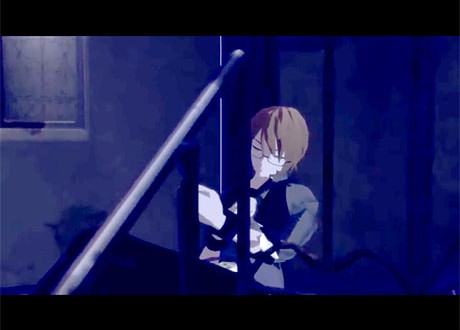
Zazi … one of our writers on LearnMMD.com … created this MMD animation and video “Where My Demons Hide”:
… and he provides a link for a download RAR folder containing four stages, an mp3 of the music, and motion files for two persons and a camera motion file.
… This is NO meme!
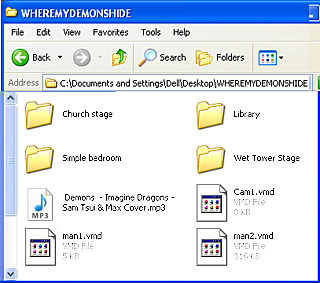 It’s a crazy package of stuff … plenty of pieces … but only a skeleton of what you will need as you work to create your own version of this animation.
An MMD meme will practically “fall together” as you load the supplied files. You simply open MMD, Load a model, Load the motion file and Load the WAV file … and push Play … and enjoy.
… This is an
Animation Project!
… that requires a lot of work on your part … but the supplied files and stages are a good head-start on creating this animation.
To get started…
SEE THE VIDEO on YouTube. Click the link he provides there to go to the MediaFire downlaods page. Click the Green Download Button … it’s like 18.58MB … so it will take a while to download.
Unzip the folder on your desktop. It’s a RAR file folder … so you will want 7-ZIP to open it. Get 7-Zip from Sourceforge.
This download includes several stages as well as the mp3 and VMD files. The VMD files are minimal, so be ready to “do” some of your own motions … and for use in MMD, you’ll need to convert that mp3 into a WAV.
I left everything all in the one folder… the stages, the motions, and the mp3 and WAV files … and I dropped that folder into the USERS folder inside my MMD folder on my desktop.
OPEN/START MMD…
I wanted a wide screen look … could have gone for 1080 pixels wide, but I also wanted a small video-file to upload to YouTube … so I figured a 16×9 “widescreen” frame size based upon 800 pixels wide … 800 divided by 16 times 9 equals 450. I set my Screen Size (under the View tab) to 800 x 450. YOU will want to decide for yourself the best size to go with.
Remember to click the “30 fps max” setting at the bottom of the View tab.
Let’s play with the MODELS first … Man1 and Man2
Model selection is very important.The motion data requires that you use models with Motherbones … and, even then, I found that some of my 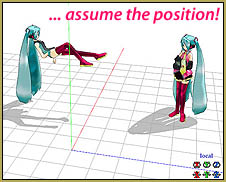 models did not “assume the position” when the motion data was applied. So … experiment to find the model you like that will cooperate with the motion data.
You will know when you have the correct models because they will be in this position when you load the data for Man1 (reclining) and Man2 (standing).
Taller models will make your job easier as the dance-model motions and the camera VMD file were created for a tall model. The animation I made using Len on the bed … I had to slide him towards the wall to get his pose to look correct; a taller model would already have been in the right place.
A reader, Dat Lynn, left this advice for fixing the Motherbone on models that do not “assume the position”:
Maybe I know the reason your models didn’t “assume the position”.
It’s probably because your model’s motherbone is still named by the default name given by PMDE (AllParents or something along those line)
To deal with this, open the PMDEditor. And then open the model. Open the bone tab, select the motherbone and paste this on the “name” box(PMD) or “Name” box on jap tab (PMXE):
全ての親
Save the model and you’re done!
Assuming you add the motherbone yourself, this is probably the cause.
Thanks, man! … Great info!
Going through stages…
BEFORE LOADING ANY STAGES … you have to rename them. On my computer system those files came in with scrambled file names … and the files seem to work fine, but upon my first attempt to SAVE and then OPEN my animation, MMD could not find some of the stage models. I fixed that by renaming the .PMD or .PMX files with names I could read … Church … Bedroom … etc. … AND … that solved my problem. Still can’t see the name in the MMP area … but I know what they are. XD
The animation Zazi created uses all four of the enclosed stages … starting with the Bedroom stage from frame zero. These stages are all PMD or PMX models … so LOAD them from the brown MMP (model manipulation panel) area, as you would any dance model … and load ALL of them while 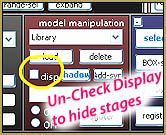 still in frame zero.
We want the Bedroom stage to display in frame zero so leave the Display check-box checked. Each of the other stages should not dislay at this time, so un-check the Display check-box for each of them. … Be sure to REGISTER your settings for everything you do.
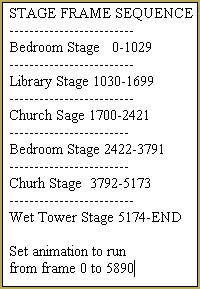 Each stage needs to appear and disappear at the proper moments … see the chart.
I did this step by following that chart … alternately checking or un-checking the Display box (and clicking Register) for each of those frame locations.
I cheated, a little, like in frame 1030 … I unchecked the Bedroom and checked the Library BOTH in frame 1030 … don’t know why … just rebellious, I guess … but it seems to work fine.
“Music, maestro!”
LOAD your WAV file.
Camera!
Get into your Camera/Accessory mode and load the Camera VMD file.
PLAY.
SEE…
… that we have a lot of work to do!
The first thing I saw was that Zazi’s video includes his little “Zazi the Angel” film clip … four seconds long … that we do not have. It would not be a problem except that the Camera VMD starts us in the wrong position as it waits for that clip to be over. So, I went out to that four-second camera diamond, highlighted and copied it … and pasted it into frame zero. Now our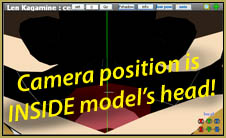 video starts with a scene of our model’s knees and pans up to his/her head.
Moving through the video, I found that several camera positions were INSIDE THE MODEL’S HEAD! … These are supposed to be like POV shots (point of view) and so you will need to go to each of the existing Camera diamonds for each trouble spot, and move the camera forward to pass through the front of the model’s face. Don’t add new diamonds 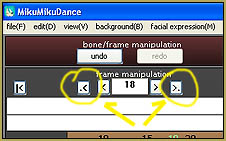 unless you feel you simply HAVE to.
I did a review of every registered Camera position, jumping from diamond to diamond using those little “jump-to next” buttons. I moved the camera, ever so slightly, to better find the faces of my models, push through those “inside the head” shots, and maneuver so as to get a better view of the model’s face through the Library stair railings … stuff like that.
I turned my light sliders down low to make my scene darker … trying to get closer to Zazi’s original video.
SEE what I have, so far…
https://youtu.be/e-Xsp0gjcog
… still far to go!
NOW I can start adding my own fine-tuning and a few MME effects to customize and claim this video as my own … giving proper credits to Zazi and the models and stages, of course!
– – –
Adding Lip-sync for the Ghost…
Our friend, Bloody Doll Productions on YouTube, created a tutorial video to show you how to give the Ghost, Man2, the lip-sync motion as sung by Man1.
GIVE IT A TRY!
Go get Zazi’s download, open it up … and go for it!
– SEE BELOW for MORE MMD TUTORIALS…
— — —
– _ — –





And this is off topic, but maybe I know the reason your models didn’t “assume the position”
It’s probably because your model’s motherbone is still named by the default name given by PMDE (AllParents or something along those line)
To deal with this, open the PMDEditor. And then open the model. Open the bone tab, select the motherbone and paste this on the “name” box(PMD) or “Name” box on jap tab (PMXE):
全ての親
Save the model and you’re done!
Assuming you add the motherbone yourself, this is probably the cause. If not, then I’m sorry ^^:
That’s awesome advice … Thank you!
Alright!! Another project!
Is the motion editable? I probably WILL use my own motion (And maybe stages, and other stuff…yeah.. I’m much more rebellious than you, I think ^^)
absolutely feel free to edit the motion i prefer to spark creativity rather than take it away ^_^
-zazi