
Skip to content
Learn MikuMikuDance – MMD Tutorials – Free 3D Animation Software

Learn MikuMikuDance – MMD Tutorials – Free 3D Animation Software

Download Free Animation Software – Let's Learn How to Do Everything!

  • Step-by-Step MMD instructions
  • DOWNLOADS
  • Troubleshoot, Fix MMD
  • Site Contents
  • Reggie Replies Q&A
  • Homework!
  • What IS MMD?
    • Download MikuMikuDance Newest Latest Version of MMD
  • “HOW TO”
    • Raycast RAY-MMD Effect Tutorials
  • BONUS PAGES
    • Why convert PMD models to PMX?
  • HALL of CHAMPIONS
  • Tutorial Categories
  • About
    • Privacy Policy
  • Toggle search form
  • You cannot use Box-Sel to select a portion of a model. You must selectthe entire MMD model.
    BOX-sel lets you select an entire model in MikuMikuDance ARIZONA
  • Enable Physics in MMD 7.96 MMD Basics
  • Create Bouncing Ball using MMD Physics Engine Making Models
  • Change the Edge Line Color and Shadowing of your Models KibaSan
  • Select the Center Bone if your MMD Model Doesn’t Feel the Floor Bones
  • Toon Shader modifies shadows and highlights! GloriaTheAnimator
  • New Getting Started with MMD Video on YouTube! Intro to MikuMikuDance
  • The Falling Heart Effect is just a wonderful effect ... gorgeous!
    Playing with MME Effects – Using MikuMikuEffects for MMD Blizzard Effect

MMD 8.06 Low Power button allows you to Multi-task

Posted on November 15, 2013July 30, 2015 By Reggie_Dentmore No Comments on MMD 8.06 Low Power button allows you to Multi-task

A Feature Article by Reggie Dentmore on LearnMMD.com

Trying to run Excel, Photoshop and MMD
at the same time?

Click the Low Power Button to Multi-task!

I often have multiple programs open on my PC … internet, WORD, Photoshop. In the past, everything else almost stopped once I opened MikuMikuDance. MMD 7.39 really USED the CPU chip as it constantly The Low Power button frees your CPU to run other tasks while you MMD!recalculated the in-between frames in your animation … making other open programs unusable.
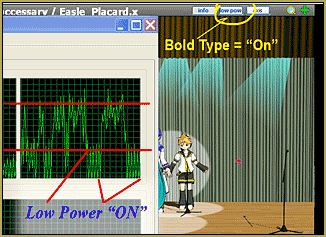
That’s in the past as MMD 8.06 offers a Low Power button!

Clicking it cuts MMD’s CPU usage in a measurable way … freeing-up your CPU to be able to run other programs … even with the MMD program open. The picture, here, shows my CPU activity with the Low Power clicked  ON and Off while MMD is just idle.

The Low Power button has two states: “On” and “Off”. You will know that the Low Power is ON when you see the name of the button in BOLD: Low Power … Not bold indicates that MMD is back to using your CPU full-time.

I have been running MMD 8.06 … sometimes with the Low Power ON … and sometimes OFF … and I have not noticed the difference! I cannot think of a down-side if you just leave it ON (bold)… so that your computer’s background functions can run at full speed.

The Low Power button is a welcome upgrade from MMD 7.39!


– SEE BELOW for MORE MMD TUTORIALS…


— — —


– _ — –


Visit the LearnMMD.com Homepage! Plenty of Mikumikudance instruction and info!

More MMD Tutorials...

MikuMikuDance 15th Anniversary celebration video posted on NicoNico!

Did you know that the first version of MikuMikuDance was released in 2008? MMD is ...read more

Use YouTube Video Analytics Attract Maintain Viewers

How can I use YouTube Video Analytics to learn how to make popular MMD videos? ...read more

Create 450-Frame MMD animation from scratch!

How do I create a 450-Frame MMD animation from scratch? How do I start making ...read more

No more boring MMD Camerawork - Keep it moving!

MMD Camerawork can be so boring. How can I add life to my MMD animations? ...read more

Download Halloween Costume TDA Miku edit by dA's Shiro-NekoVocaloid

Where can I get Halloween Costume TDA Miku? Download a gang of five MMD models ...read more

Create MMD Abstract Art from Low-Res Videos!

This is an idea I have been playing with for the last few months... Create MMD ...read more

MMD Basics, Reggie Dentmore Tags:mikumikudance

Post navigation

Previous Post: New Getting Started with MMD Video on YouTube!
Next Post: Why MMD cannot open the models in a saved PMM file

Related Posts

  • Sometimes you need a “motion scratchpad” while animating in MMD Animation Shortcuts
  • MMD Download Japanese Models for MikuMikuDance Downloading New Models
  • How do I use MikuMikuDance Make A Music Video with MMD Intro to MikuMikuDance
  • MMD MME Rhinestone effect adds sparkle to your models! MMD Tutorials
  • Getting Started with MMD MikuMikuDance Intro to MikuMikuDance
  • “The making of ” any of my videos starts with these considerations… "the making of" my video

More Related Articles

How To Recolor MikuMikuDance Models Without PMDE! Keep the Faith-MMD Credits/Sharing
Create MMD Abstract Art from Low-Res Videos! MMD Tutorials
Change the Edge Line Color and Shadowing of your Models KibaSan
Try Reggie’s Evil Eye Effect for an Anime-style effect MMD Tutorials
Enable Physics in MMD 7.96 MMD Basics
Tips for how to create complicated MMD dance motions. Making more complicated MMD dance motions – Some new notes… Making Smooth Motions

Leave a Reply Cancel reply

Your email address will not be published. Required fields are marked *

Download the latest version of MikuMikuDance!
See the MMD Step-by-Step instructions page!
Learn how to make your own MMD motions!
LearnMMD.com
  • Vocaloids and MMD: It’s all about the Music!! Random Thoughts & Visions
  • MME Balloon Effect (And what I found out) Balloon Effect
  • No Diamonds Appear in Frame Chart in MMD and How to Fix It Mae Blythe
  • Set up Kinect 360 motion capture for MMD! Kazuki Matsuoka
  • MMD Light Manipulation Panel helps set the mood Global Lighting
  • Model eye-mesh texture VS Photographic eye-mesh in Blender.Blender
    Photos make realistic eye textures for your MMD models Blender
  • Build your own stage for MMD using Blender 2.69 Blender
  • Enable Physics in MMD 7.96 MMD Basics

Copyright © 2022 Learn MikuMikuDance – MMD Tutorials – Free 3D Animation Software and Instructions..

Powered by PressBook Premium theme

Go to mobile version