Skip to content
Learn MikuMikuDance – MMD Tutorials – Free 3D Animation Software

Learn MikuMikuDance – MMD Tutorials – Free 3D Animation Software

Download Free Animation Software – Let's Learn How to Do Everything!

  • Step-by-Step MMD instructions
  • DOWNLOADS
  • Troubleshoot, Fix MMD
  • Site Contents
  • Reggie Replies Q&A
  • Homework!
  • What IS MMD?
    • Download MikuMikuDance Newest Latest Version of MMD
  • “HOW TO”
    • Raycast RAY-MMD Effect Tutorials
  • BONUS PAGES
    • Why convert PMD models to PMX?
  • HALL of CHAMPIONS
  • Tutorial Categories
  • About
    • Privacy Policy
  • Toggle search form
  • Creating Inspirational Pictures in MMD MMD Fine Art
  • Translate Japanese Model Names into English File Management / Organization
  • Using the AdultShader Effect In MikuMikuDance Adult Shader effect
  • Darkening the stage lighting makes the floorlight look very bright! MMD 7.39, LearnMMD.com
    MMD Camera Motions: The Camera’s Gotta Keep Moving! Camera Motion
  • Otome, CannonParticle, and Heaven Effects in all their glory!
    Using Some Cool Effects in MikuMikuDance. CannonParticle
  • Mahlazer’s Walking Motion vmd file download for MMD Make a Smooth Walking Motion
  • With some practice, Rin can dance the sample dance as well as Miku!
    There Can Be Frame Data Ghosts remaining after Deletion Making Smooth Motions
  • Staging and the 12 Principles of Animation. Accessory Manipulation/Adjust

Graphic Design Skills enhance MMD Pictures

Posted on May 4, 2015July 24, 2015 By Zazi No Comments on Graphic Design Skills enhance MMD Pictures

See all the articles written by Zazi on LearnMMD.comOkay… so you want to learn how to use MMD to create  stunning 3D graphic designs?

Yes?…

Graphic Design Skills enhance MMD Pictures

Follow Steps A-G for a perfect Render!

A. Load Model Into MMD
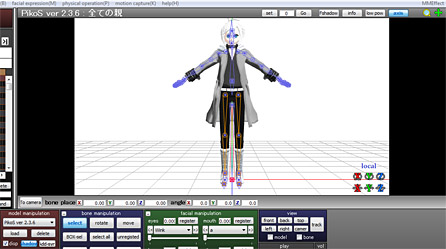
TUT1

B. Add background picture

TUT2

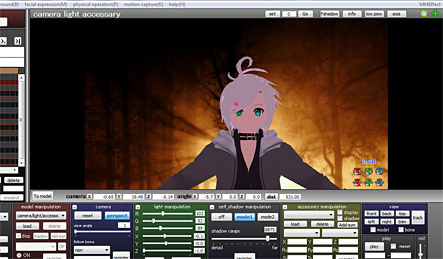
C. Adjust  lighting  and camera angel to match

Note: sometimes this will mean aligning the axis with the ground.

D. Edit facials and pose of model
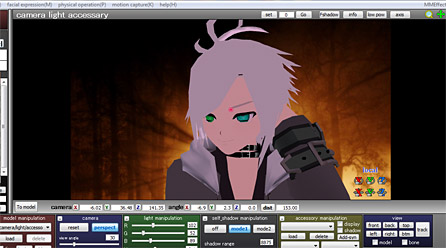
TUT3

Note: make sure to have your Facial Skills mastered and your Basic Poses down … practice, practice, practice.

E. Add Pre effects With MME
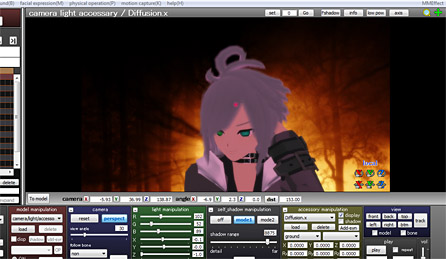
TUT4

Note: If you don’t Have MMD or need help, please refer to the copious amount of tutorials on our home page.

F. Render in 1280-720 into JPG
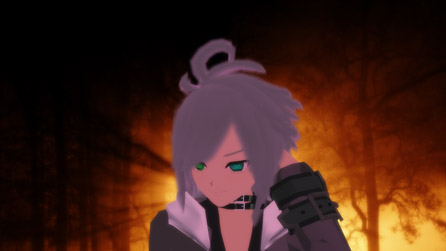
TUT5

Note: Why 1280-720?… cause its the best for all formats

G.  Edit Photo With Any Kind of Photo Editor

Note: here’s a free great one online  http://www.gimp.org/
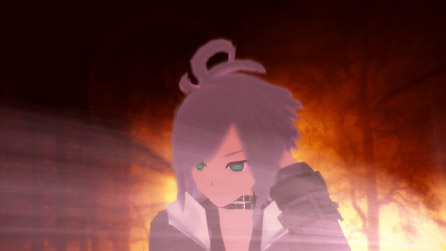
TUT7

And… “Voila!”
A semi Decent Photo… though this one was rushed!

With time and patience they can look like this in the end:
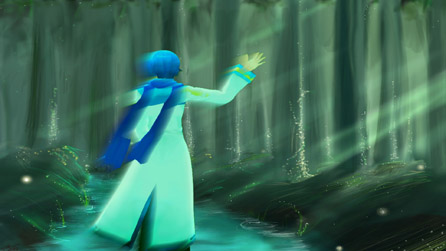
SwampKaito

Have fun with MikuMikuDance!


– SEE BELOW for MORE MMD TUTORIALS…


— — —


– _ — –


Visit the LearnMMD.com Homepage! Plenty of Mikumikudance instruction and info!

More MMD Tutorials...

Reader asks how to create MMD artwork... stuff like posing, camerawork?

A reader asks... Is there a tutorial on how to create MMD artwork, like those you ...read more

Learn MikuMikuDance in Small Steps! New LearnMMD Video Series

Learn MikuMikuDance in Small Steps. Where can I find easy-to-follow MMD instructions on YouTube? How ...read more

Apply Multiple Effects on an Entire MMD Model Using M4Layer Effect

How can I apply multiple effects to an MMD model? Can I use more than ...read more

MMD Plugin Manager... I Found a Treasure!

What sorts of MMD Plugins are there? MMD Plugin Manager? MMD Plugins. Plugin MMD. More ...read more

2025: Hatsune Miku is 18... but she is designed to be always 16 Years. Old by design and in reality!

Finally, in 2023, Hatsune Miku is 16 years old! but in August of 2025, she ...read more

SEARCH LearnMMD.com... it's Easy!

Search LearnMMD.com to find your answers! With the posting of this article, LearnMMD.com has 758 tutorials ...read more

MMD Basics, MMD Tutorials, Zazi

Post navigation

Previous Post: Professionally made models FOUND!
Next Post: Assemble your stages from .x type components

Related Posts

  • Let’s Go Learn Hatsune Miku Model Names Downloading New Models
  • The new Getting Started with MMD video spends some time on the Sample Dances.
    Use Tricks to Study the MikuMikudance Sample Dance Functions-Copy-Paste-Expand
  • Easily Create Walk-in-Place Motion in MMD Animation Shortcuts
  • Raycast / Ray-MMD First Steps MMD Tutorials
  • An MMD town stage: Making Kerorin Town Great Again – Part 2 MMD Stages
  • create credible characters for your projects
    How to create credible characters for your projects. MMD Tutorials

More Related Articles

MMD AnimationSmoother Tool does just that! AnimationSmoother Tool
Sexiest MMD Model Dance Motion you can Download "the making of" my video
MMD CameraSmoother Tool smooths camera motions! CameraSmoother Tool
Easy Fun MMD Music Video Mahlazer Motion Download “Feel the Sound” MMD Basics
An MMD town stage: Making Kerorin Town Great Again – Part 3 MMD Stages
The Making of: Sleepover Gone Wrong (REMAKE) "the making of" my video

Leave a Reply Cancel reply

Your email address will not be published. Required fields are marked *

Download the latest version of MikuMikuDance!
See the MMD Step-by-Step instructions page!
Learn how to make your own MMD motions!
LearnMMD.com
  • New Interpolation Curve Video was fun to make! "the making of" my video
  • Easy Fun MMD Music Video Mahlazer Motion Download “Feel the Sound” MMD Basics
  • MMD MME Rhinestone effect adds sparkle to your models! MMD Tutorials
  • Miku wishes for a peaceful birthday!
    Happy Birthday Miku! ARIZONA
  • Recent MikuMikuDance Updates may become collectible, who knows?! Download MikuMikuDance
  • MMD Dance Motions start with making your own motions.
    How to make smooth motions in MikuMikuDance animations Animation Shortcuts
  • Rediscover your old MMD animations... Love them again!
    Rediscover your old MMD Animations: Love them again! "the making of" my video
  • Running MikuMikuDance in Linux using Wine and DXVK Linux running MMD

Copyright © 2022 Learn MikuMikuDance – MMD Tutorials – Free 3D Animation Software and Instructions..

Powered by PressBook Premium theme

Go to mobile version