Skip to content
Learn MikuMikuDance – MMD Tutorials – Free 3D Animation Software

Learn MikuMikuDance – MMD Tutorials – Free 3D Animation Software

Download Free Animation Software – Let's Learn How to Do Everything!

  • Step-by-Step MMD instructions
  • DOWNLOADS
  • Troubleshoot, Fix MMD
  • Site Contents
  • Reggie Replies Q&A
  • Homework!
  • What IS MMD?
    • Download MikuMikuDance Newest Latest Version of MMD
  • “HOW TO”
    • Raycast RAY-MMD Effect Tutorials
  • BONUS PAGES
    • Why convert PMD models to PMX?
  • HALL of CHAMPIONS
  • Tutorial Categories
  • About
    • Privacy Policy
  • Toggle search form
  • VDE-3 Champion: CyanKuriboh Video Dojo Champions
  • MMD Starry Winds Effect Makes Amazing Night Time Scenes! MMD Tutorials
  • The Cheaplens Effect is easy to use and very powerful!
    MME CheapLens Effect controls the “Look” of your MMD video CheapLens Effect
  • You cannot use Box-Sel to select a portion of a model. You must selectthe entire MMD model.
    BOX-sel lets you select an entire model in MikuMikuDance ARIZONA
  • LearnMMD.com _ MikuMikuDance MMD Tutorials
    Almost Photo-realistic renders in MMD using Shaders and Effects Advanced Shader Technique
  • My “O Canada” MMD video confused Japanese viewers! "the making of" my video
  • Fia Phoenix’s Deviantart Spotlight Downloading New Models
  • New “LearnMMD Wars” Video Posted to YouTube! Google SketchUp and MMD

Mahlazer’s Walking Motion vmd file download for MMD

Posted on December 9, 2014July 11, 2019 By Reggie_Dentmore No Comments on Mahlazer’s Walking Motion vmd file download for MMD

A Feature Article by Reggie Dentmore on LearnMMD.comHow do I make a walking motion in MikuMikuDance? How do I move the body to make walking motions in MMD? Can I make my model walk in place?

Can’t talk-the-talk if you can’t walk-the-walk!
Analyzing Mahlazer’s MMD Walking Motion…

I just saw Mahlazer’s new video posted to YouTube that included a link to the motion and See Mahlazer.'s Marie Rose video on YouTube!WAV files used in the video …  I had to have ’em!
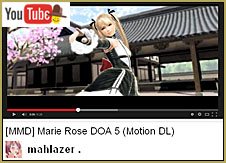
After unzipping the files and starting a new MMD animation, and trying out the new VMD motion files, I could see that I probably wouldn’t be using them for anything I’d be going to do.
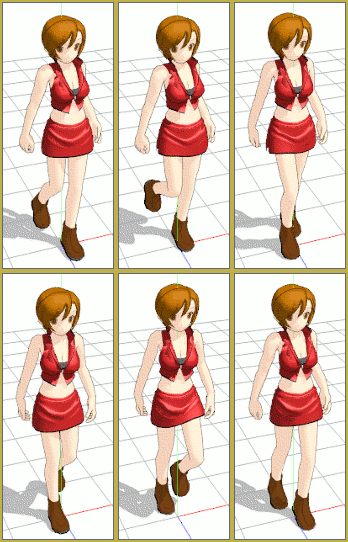
Mahlazer_walking_opti… but … I noticed the nice walking motion Mahlazer had created for the opening seconds of the animation.

With a little bit of copy/pasting I was able to make a continuous walk! Mahlazer’s walking cycle repeats itself using frames 15 thru 54. I kept it going until I got the walking motion to include nearly 1000 frames.

DOWNLOAD the walking-motion zip!

You can see that the model is walking-in-place … walking with a will, like she’s on a mission … shoulders back and a solid, confident stance. The only change I made to the basic pose in Mahlazer’s set-up was to bring the models left arm forward … my downloaded vmd file had the model’s arm and left hand behind her back.

I liked this motion because it’s more complicated than my OWN walking motions; the body has an up and down motion with the shoulders swinging and body twisting, walkinwhile the head is almost still; the eyes remain focused “on target”… there’s a lot going on in that motion.
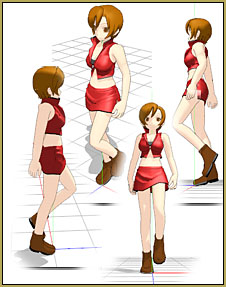
Take a close look …

Download the vmd file  I made from Mahlazer’s motion file and try it out on your own models.

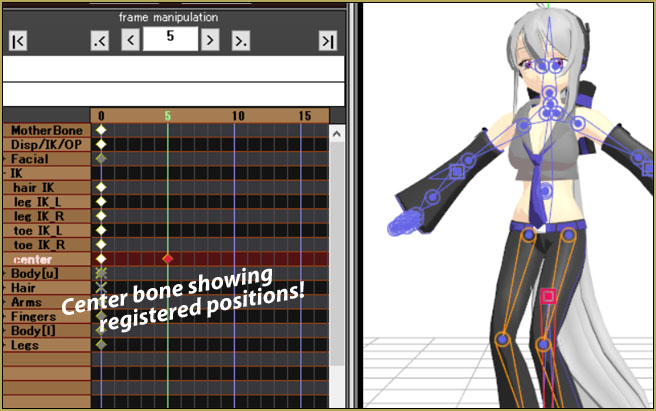
Check on it from all angles … look closely at the cycle and at the frame-chart diamonds to see the register points … and look at the interpolation curves (used to control the acceleration of the various aspects of the walking motion).

Little things make a big difference … like the way the Center bone is up-and-down with each cycle … “down” when one foot is flat on the ground and “up a bit” when she is on her toes. … Notice, too, the effect of the interpolation curve as the rearward foot lifts off the ground and accelerates with good speed and then slows as it drops to the floor, out ahead of the model.

Watch how the upper-body rotates with the stride … and how the head does not do so.

This is not a casual walk…

… she is going the distance!

Thank you, Mahlazer, for giving us your motion files! We have a lot to learn.


– SEE BELOW for MORE MMD TUTORIALS…


— — —


– _ — –


Visit the LearnMMD.com Homepage! Plenty of Mikumikudance instruction and info!

More MMD Tutorials...

Enjoy the "camera Angles WEIRD in Anime" meme...

Enjoy the "camera Angles WEIRD in Anime" meme... This image is from The Slayers - NEXT, ...read more

Reader asks how to create MMD artwork... stuff like posing, camerawork?

A reader asks... Is there a tutorial on how to create MMD artwork, like those you ...read more

Learn MikuMikuDance in Small Steps! New LearnMMD Video Series

Learn MikuMikuDance in Small Steps. Where can I find easy-to-follow MMD instructions on YouTube? How ...read more

Apply Multiple Effects on an Entire MMD Model Using M4Layer Effect

How can I apply multiple effects to an MMD model? Can I use more than ...read more

MMD Plugin Manager... I Found a Treasure!

What sorts of MMD Plugins are there? MMD Plugin Manager? MMD Plugins. Plugin MMD. More ...read more

2025: Hatsune Miku is 18... but she is designed to be always 16 Years old, by design and in reality!

Finally, in 2023, Hatsune Miku is 16 years old! but in August of 2025, she ...read more

Make a Smooth Walking Motion, MMD Tutorials, Reggie Dentmore

Post navigation

Previous Post: Try Reggie’s Evil Eye Effect for an Anime-style effect
Next Post: How to Use the Ghost Effect for MME!

Related Posts

  • MMD Animating SAVE AS multiple versions as you go! MMD Basics
  • MME fireintheskies effect
    MME FireintheSkiesEffect gives floating flame and embers! FireintheSkiesEffect
  • Create 450-Frame MMD Animation from scratch!
    Create 450-Frame MMD animation from scratch! "the making of" my video
  • New LearnMMD Stage Instructions just posted! MMD Tutorials
  • Download Jomomonogm's Snow Miku 2019
    Download Jomomonogm’s Snow Miku 2019 for MMD, a most unusual model! "the making of" my video
  • Use M4Layer Effect to add multiple effects onto your MMD model.
    Apply Multiple Effects on an Entire MMD Model Using M4Layer Effect M4Layer Effect

More Related Articles

Painted Table Accessory Download Available Now Downloading New Models
MMD Bone Reference Charts make MMD Model-making Easier! Mae Blythe
MMD has an EXPAND function that lets you adjust a motion's speed. EXPAND function modifies MMD motion tempo EXPAND a motion
MMD NyaReimu dances to Miku’s “The World is Mine” "the making of" my video
Adjust the Shadows in MikuMikuDance KillerBeer
More Motion Interpolation Curve Instruction for MMDers Creating Motions

Leave a Reply Cancel reply

Your email address will not be published. Required fields are marked *

Download the latest version of MikuMikuDance!
See the MMD Step-by-Step instructions page!
Learn how to make your own MMD motions!
LearnMMD.com
  • Play games within MMD using MMD as a Game Engine! Creating Motions
  • Follow My Learnmmd on Facebook for latest LearnMMD.com MMD tutorials! MMD Tutorials
  • MMD Theme Video “Let’s Dance NOW!” Describes Why We Love MMD Intro to MikuMikuDance
  • Editing MMD Model Eye Textures enhances Ray-MMD Effect Eien Kiseki-P (Reika)
  • Cycles materials for textures model and nodes
    Cycles Materials For Textures in Blender: Nice Textures for MMD Fast! Blender
  • Using Raycast MMD like a pro! "the making of" my video
  • Formatting Captions With MMM MikuMikuMoving Bullwood
  • Making MikuMikuDance Pictures Render to Picture File Tutorial Camera Motion

Copyright © 2022 Learn MikuMikuDance – MMD Tutorials – Free 3D Animation Software and Instructions..

Powered by PressBook Premium theme

Go to mobile version