Skip to content
Learn MikuMikuDance – MMD Tutorials – Free 3D Animation Software

Learn MikuMikuDance – MMD Tutorials – Free 3D Animation Software

Download Free Animation Software – Let's Learn How to Do Everything!

  • Step-by-Step MMD instructions
  • DOWNLOADS
  • Troubleshoot, Fix MMD
  • Site Contents
  • Reggie Replies Q&A
  • Homework!
  • What IS MMD?
    • Download MikuMikuDance Newest Latest Version of MMD
  • “HOW TO”
    • Raycast RAY-MMD Effect Tutorials
  • BONUS PAGES
    • Why convert PMD models to PMX?
  • HALL of CHAMPIONS
  • Tutorial Categories
  • About
    • Privacy Policy
  • Toggle search form
  • Halloween Costume TDA Miku on LearnMMD.com
    Download Halloween Costume TDA Miku edit by dA’s Shiro-NekoVocaloid "the making of" my video
  • Let’s Go Learn Hatsune Miku Model Names Downloading New Models
  • MMD Camera Work makes motions fit the song.
    MMD Camera Work made the motion fit the song! "the making of" my video
  • Translate Japanese Models to English with Google Translate and PMDE Bones
  • New MMD ACCESSORY MODE allows Easy Object Positioning Accessory Manipulation/Adjust
  • Go to my DOWNLOADS PAGE to get your free Cropping/Transition Panel!
    New Cropping-Transition Panel Ready to Download! Transition Panel (it's not an effect)
  • Change the Edge Line Color and Shadowing of your Models KibaSan
  • Animation Styles: Park and Bark vs. Choreography Creating Motions
The MME Oppai Effect adjusts the breast size of your MME models!

MME Oppai Effect enhances MMD Model’s figure… one for the boys!

Posted on March 31, 2021February 17, 2023 By Reggie_Dentmore 7 Comments on MME Oppai Effect enhances MMD Model’s figure… one for the boys!

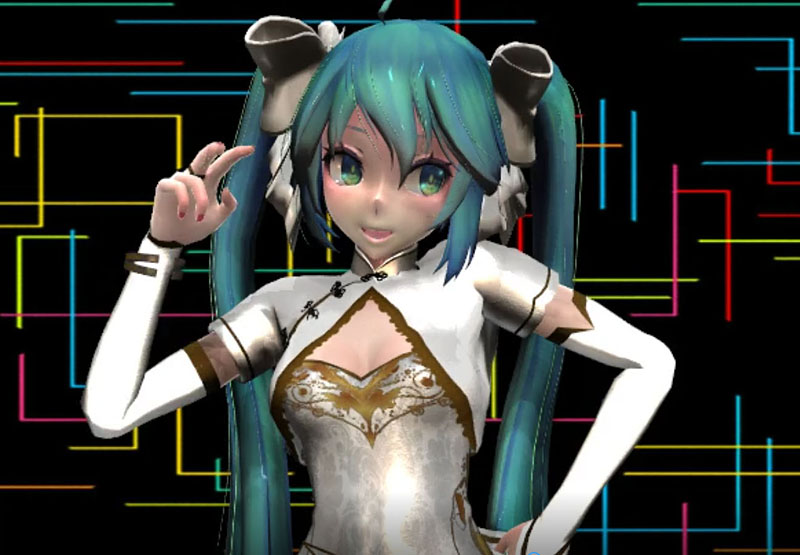
A Feature Article by Reggie Dentmore on LearnMMD.comHow can I give my MMD model larger “Oppai”? Where can I download the Oppai Effect? Do I have to edit the Oppai Effect in order to make it work? I cannot find the .x file in the Oppai Effect.
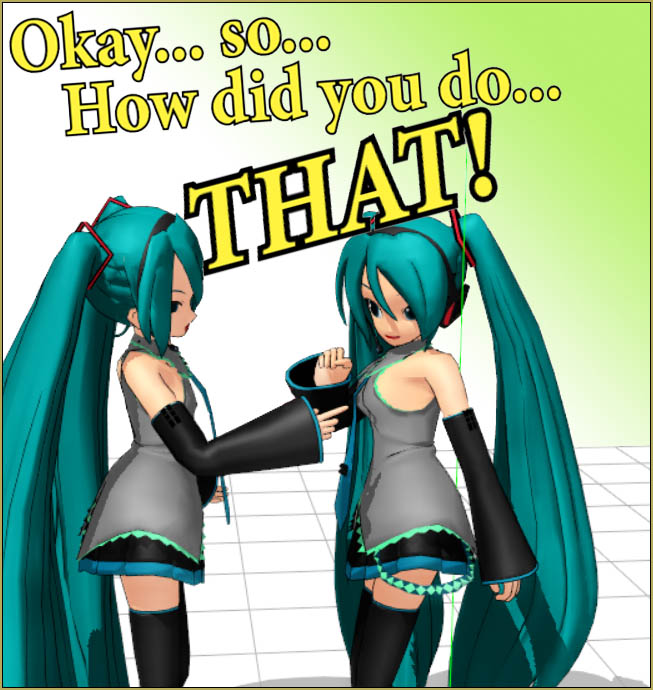
The MME Oppai Effect adjusts the breast size of your MME models!

The MME Oppai Effect
enhances an MMD Model’s figure…
…one for the boys!

This is a crazy idea for an MME effect… but it is an OLD one from 2012.

It is easy to use!

You can DOWNLOAD THE OPPAI EFFECT. You have to login on that page… it’s free. When you do login, that full page will be there. You can click the tiny “Download” at the top to get the entire lot of effects or you can download just the one you want. Unzip it and add it to your Effects folder… and… you are almost done! SEE, on that effects page, that there are MANY effects. You can go back, later, to try out some of the other ones.

NOTE: 04/19/2022… A reader discovered that the page will not let him download this zip folder, or any other single zip. BUT, if you will click the DOWNLOAD link in the top Left of the page, you will download a 15MB folder of ALL of the effects zip-folders on that page. You may then unzip any of the effects you wish. The Oppai Effect is one of those folders and… it works!

Load your MMD model. There is no .x file to load: you attach the effect to your model in MME Effect Mapping.
Just go to the MME Effect Mapping screen, select your model, and Set Effect… then navigate to your Oppai Effect folder and select that single .fx file. … When you click OK on Effect Mapping, your model’s chest will suddenly enlarge.

You can EDIT the .fx File…

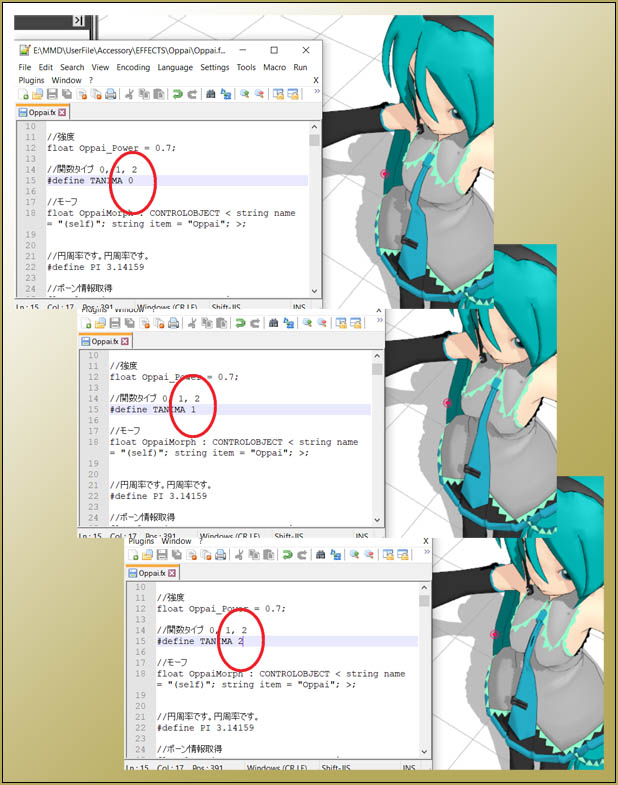
The standard effect yields a bit of enlargement… but you can do MORE… or less! Open the FX file in a text editor like Notepad++. There are only TWO user adjustments… “Oppai Power” and “Tanima”. .. The “Power” is the size and seems to work within a numeric range of 0.1 through 1.0, with 0.5 being the default… and the “Tanima” is the shape with a setting of your choice of 0, 1, or 2
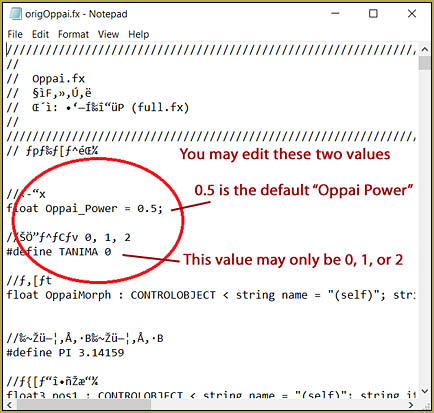
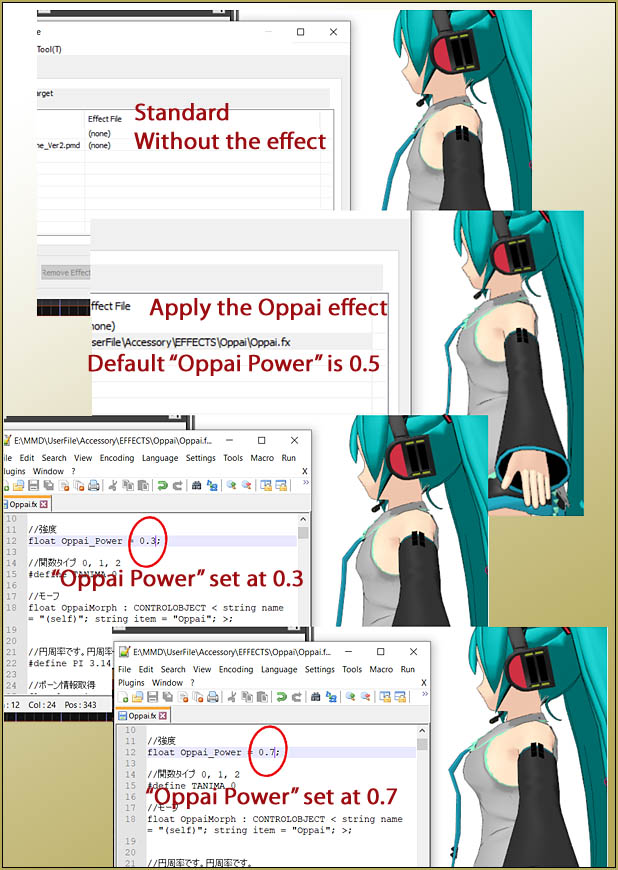
You can edit the Oppai Effect to modify the effect... giving your model larger or smaller breasts in a choice of shapes!

The OPPAI POWER setting controls the size of the models Oppai.

The "Tanima" adjustment controls the shape of the Oppai in the Oppai Effect.

One of the interesting things about editing that file, when you click SAVE, the MMD model will jump to the new shape you requested. You can do it “live” with the Notepad screen on top of the MMD screen as per my images, above. When you SAVE the text screen, the model will require a few seconds and then she assumes the new shape. I found that sometimes I can hurry the process by clicking SAVE, again.

Stupid fun…

What can I say… ? Enjoy!

Have fun with MikuMikuDance!


– SEE BELOW for MORE MMD TUTORIALS…


— — —


– _ — –


Visit the LearnMMD.com Homepage! Plenty of Mikumikudance instruction and info!

More MMD Tutorials...

Reader asks how to create MMD artwork... stuff like posing, camerawork?

A reader asks... Is there a tutorial on how to create MMD artwork, like those you ...read more

Learn MikuMikuDance in Small Steps! New LearnMMD Video Series

Learn MikuMikuDance in Small Steps. Where can I find easy-to-follow MMD instructions on YouTube? How ...read more

Apply Multiple Effects on an Entire MMD Model Using M4Layer Effect

How can I apply multiple effects to an MMD model? Can I use more than ...read more

MMD Plugin Manager... I Found a Treasure!

What sorts of MMD Plugins are there? MMD Plugin Manager? MMD Plugins. Plugin MMD. More ...read more

2023: Hatsune Miku is 16 Years Old by design and in reality!

Finally, in 2023, Hatsune Miku is 16 years old! When did Miku make her first ...read more

SEARCH LearnMMD.com... it's Easy!

Search LearnMMD.com to find your answers! With the posting of this article, LearnMMD.com has 758 tutorials ...read more

MMD Tutorials, Oppai Effect, Reggie Dentmore

Post navigation

Previous Post: Beamman’s SimpleMagic creates Explosions, Fire-Balls and Swirling Flames!
Next Post: MME FireLight Effect adds spooky dancing firelight and shadows

Related Posts

  • Sometimes you need a “motion scratchpad” while animating in MMD Animation Shortcuts
  • Passion VS Work – Making Videos for your Fanbase MMD Tutorials
  • mikumati NXDE G-IDLE models dance "No Thanks" by Hyolyn - Download Links
    mikumati NXDE G-IDLE models dance “No Thanks” by Hyolyn – Download Links "the making of" my video
  • Beamman Effects Page MMD Newbies Guide MMD Tutorials
  • Understanding MME Render Targets for Miku Miku Dance Effects Adult Shader effect
  • "Departures" meme for MMD is a beauty! Memes are like KITS for MMD!
    A Beginner’s Guide to Enjoying MikuMikuDance Intro to MikuMikuDance

More Related Articles

Cycles materials for textures model and nodes Cycles Materials For Textures in Blender: Nice Textures for MMD Fast! Blender
Learn How to Dress the LearnMMD Stage – Instructions Dummy Bones
PMXE weight painting tools and deformation types for new MMD models Bandages
Rio Carnival Miku TDA edit by shiro-nekovocaloid is a beautiful model for the MMD Model Adoration Slideshow video. Rio Carnival Miku is my latest MMD Model Adoration Slideshow video "the making of" my video
MMD Elektrika Motion gets new life! Ancient MMD Elektrika Motion Gets NEW Life! "the making of" my video
Half-Lambert Shader. How to Use the Half-Lambert Shader in MMD Half-Lambert Shader

Comments (7) on “MME Oppai Effect enhances MMD Model’s figure… one for the boys!”

  1. AnonbecauseIdontwanttobeidentified says:
    April 3, 2023 at 3:56 pm

    So do I put the effects folder into PmxEditor or something?

    Reply
    1. Reggie_Dentmore says:
      April 3, 2023 at 7:24 pm

      No. The effect happens within MMD as you animate. Read that tutorial carefully. Follow the step by step instructions in that tutorial.

      Reply
  2. Lewdsmare says:
    February 17, 2023 at 3:55 am

    The Onedrive download link is completely empty (?)

    Reply
    1. Reggie_Dentmore says:
      February 17, 2023 at 9:06 am

      You have to login on that page… it’s free. When you do login, that full page will be there.

      I am adding that info to that tutorial.
      — Reggie

      Reply
      1. Lewdsmare says:
        February 17, 2023 at 1:53 pm

        Ah ok, thanks for the quick reply~!

        Reply
  3. NX-00XWV says:
    April 19, 2022 at 12:56 am

    It says that there is a problem downloading the file.

    Reply
    1. Reggie_Dentmore says:
      April 19, 2022 at 7:54 am

      You are correct… but if you click the DOWNLOAD link in the top left corner of the page, you will download the whole PAGE of ZIPS in a single 10MB download. I just did that… and now I have ALL of the effect zip folders on that page. You can then unzip whichever effects you wish… I DID unzip the Oppai Effecta and, there it was!
      — Reggie

      Reply

Leave a Reply Cancel reply

Your email address will not be published. Required fields are marked *

Download the latest version of MikuMikuDance!
See the MMD Step-by-Step instructions page!
Learn how to make your own MMD motions!
LearnMMD.com
  • Import models from Source engine based games (HL2, Portal, TF2 etc.) Blender
  • The UT Video Codec Suite works well with Render to AVI in MMD.
    UT Video Codec Suite v22.2.0 creates simple AVI video for MMD background AVI Reggie Dentmore
  • L_EdgeShader_Ver 1.00
    How to Use the L EdgeShader Effect for MikuMikuDance. ARIZONA
  • Video Dojo Expo 2 Champion: MMDv Video Dojo Champions
  • Be a responsible MMDer … “Keep the Faith!” Welcome to LearnMMD.Com!
  • Keep the Center-Bone when adding Mother-Bone to an older model MMD Tutorials
  • Try Reggie’s Evil Eye Effect for an Anime-style effect MMD Tutorials
  • Fixing Missing Facial Manipulation Tabs in MikuMikuDance. Fixing Broken Models

Copyright © 2022 Learn MikuMikuDance – MMD Tutorials – Free 3D Animation Software and Instructions..

Powered by PressBook Premium theme

Go to mobile version