
Skip to content
Learn MikuMikuDance – MMD Tutorials – Free 3D Animation Software

Learn MikuMikuDance – MMD Tutorials – Free 3D Animation Software

Download Free Animation Software – Let's Learn How to Do Everything!

  • Step-by-Step MMD instructions
  • DOWNLOADS
  • Troubleshoot, Fix MMD
  • Site Contents
  • Reggie Replies Q&A
  • Homework!
  • What IS MMD?
    • Download MikuMikuDance Newest Latest Version of MMD
  • “HOW TO”
    • Raycast RAY-MMD Effect Tutorials
  • BONUS PAGES
    • Why convert PMD models to PMX?
  • HALL of CHAMPIONS
  • Tutorial Categories
  • About
    • Privacy Policy
  • Toggle search form
  • Select the Center Bone if your MMD Model Doesn’t Feel the Floor Bones
  • Cry Baby Motion DL featured image
    Free MMD Cry Baby Motion DL from DA’s Smol-Hooman "the making of" my video
  • Download MMD 9.32 MikuMikuDance latest version Download MikuMikuDance
  • MMD Animation Project Resource Ushimitsu Toki Animation Resource
  • My VDE-3 Entry has Music, Camera, Dancers… Now for the HARD part. "the making of" my video
  • The Making of “Oubliette” "the making of" my video
  • Our “Ring Around the Moon” Project for MMDers CONTESTS
  • MMAccel – Accelerate your MMD creation! Animation Shortcuts
KiraKira-sparkleV2 beautiful colored sparkles.

KiraKira-sparkleV2 MME Effect adds COLOR to KiraKira!

Posted on August 11, 2020July 15, 2022 By Reggie_Dentmore No Comments on KiraKira-sparkleV2 MME Effect adds COLOR to KiraKira!

A Feature Article by Reggie Dentmore on LearnMMD.comHow can I get colored sparkles in the KiraKira effect? Where can I download the new KiraKira-sparkleV2 effect? How do I use the controller in the new KiraKira effect?
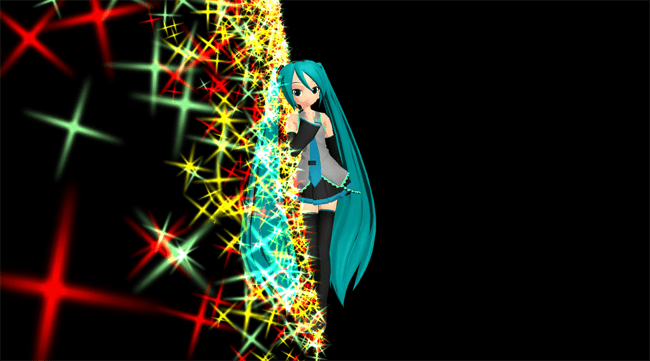
Use the various morphs of the KiraKira-sparkleV2 MME Effect's controller to get amazing color!

Beamman’s old KiraKira Sparkle effect now has COLOR!

KiraKira-sparkleV2

Deviant Art’s chestnutscoop has released her latest edit of the old KiraKira effect… now with a selection of colors available… including pastels!… click that link to find the download page for this effect.

You will want my English translated Controller model…

When you download that effect… and EXTRACT it, you will see a Controller_0.pmd … obviously the controller for this effect, but THAT one has no English labels. I tried to translate it and then Save As a PMX model… but that didn’t work. I then used old PMXE 0139 to do the job and a Save As a PMD with a new name… THAT didn’t work. It turns out that  the controller must keep the same, original file name. … I have that controller with English Labels and the original file name HERE for you to download… be sure to rename your old original controller model so that you can use my new one and still keep that old one safe.

Lots of color and lots of colors!
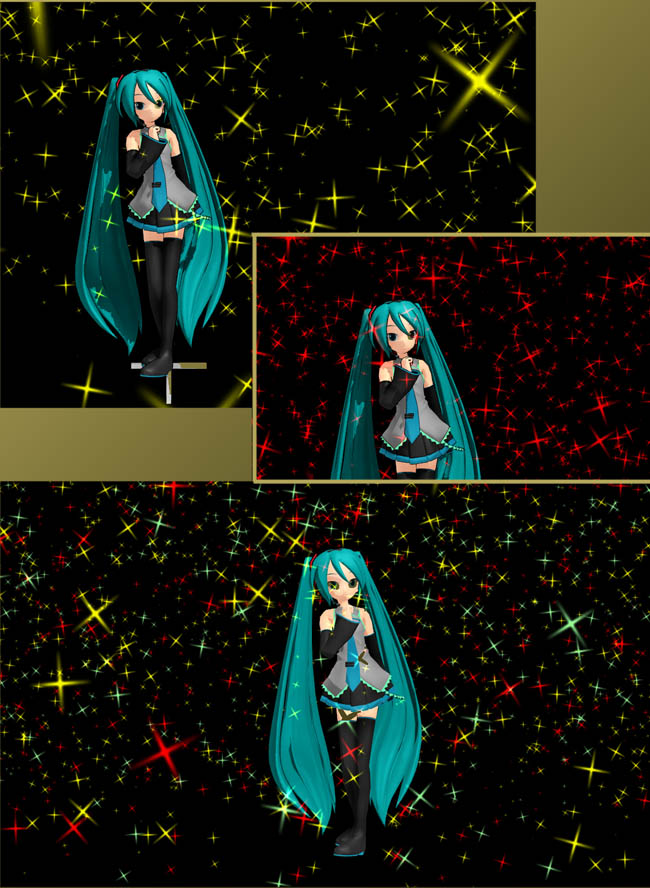
The KiraKira-sparkleV2 effect... many colors... so much color!

Only a few minutes of playing around will make you a master of this effect. You can load any one color of the .x effect… and load the controller_0.pmd … and be in business!

If you load TWO colors at the same time, they sit right on top of each other… but you can fix that by changing the Si SIZE of one or both of the .x effects. That lower image has three colors going: red (sized at 1.0), yellow (sized at .8), and pastel green (sized at 1.10). You can play with the Si size and the Tr transparency of the sparkles as well as the many morphs of that Controller model.

Read the ReadMe files…
… ALWAYS read the Readme files…

Be sure to read the two English README files… one by the editor of this effect and the other is the original Beamman ReadMe.

Full animation of your controller settings…

The various morphs available from that controller can be animated so that you can change the settings in various frames and watch the incredible beauty as your sparkles dance to your instructions.

This one is pretty cool: you can use one of the Y morphs to move the effect to the floor… dancing on sparkles!The KiraKira-sparkleV2 effect moved to the floor... Dancing on sparkles!
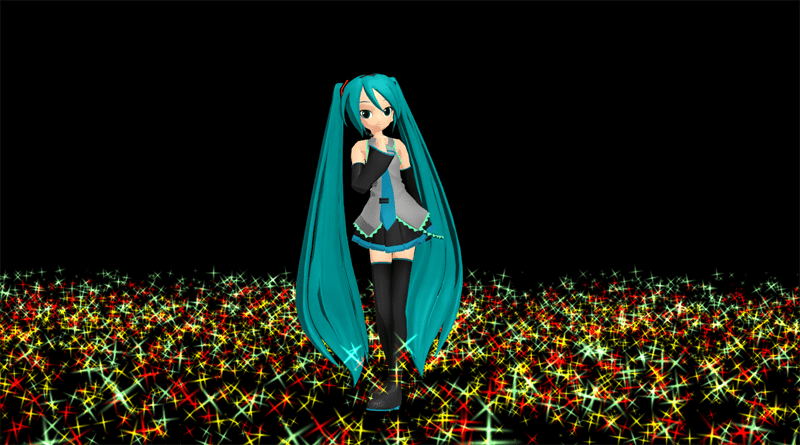
Of course, these are “still” images… just wait until you see the sparkles in motion!

Have fun with MikuMikuDance!


– SEE BELOW for MORE MMD TUTORIALS…


— — —


– _ — –


Visit the LearnMMD.com Homepage! Plenty of Mikumikudance instruction and info!

More MMD Tutorials...

Enjoy the "camera Angles WEIRD in Anime" meme...

Enjoy the "camera Angles WEIRD in Anime" meme... This image is from The Slayers - NEXT, ...read more

Reader asks how to create MMD artwork... stuff like posing, camerawork?

A reader asks... Is there a tutorial on how to create MMD artwork, like those you ...read more

Learn MikuMikuDance in Small Steps! New LearnMMD Video Series

Learn MikuMikuDance in Small Steps. Where can I find easy-to-follow MMD instructions on YouTube? How ...read more

Apply Multiple Effects on an Entire MMD Model Using M4Layer Effect

How can I apply multiple effects to an MMD model? Can I use more than ...read more

MMD Plugin Manager... I Found a Treasure!

What sorts of MMD Plugins are there? MMD Plugin Manager? MMD Plugins. Plugin MMD. More ...read more

2025: Hatsune Miku is 18... but she is designed to be always 16 Years old, by design and in reality!

Finally, in 2023, Hatsune Miku is 16 years old! but in August of 2025, she ...read more

KiraKira-SparkleV2, MMD Tutorials, Reggie Dentmore

Post navigation

Previous Post: MMD Fill Lights Part 2 – (Ray-MMD)
Next Post: Translate Japanese Models Using PMXEditor’s Batch Name Editor

Related Posts

  • MMD Outside Parent Setting Enables Bone Connecting Animation Shortcuts
  • Rio Carnival Miku TDA edit by shiro-nekovocaloid is a beautiful model for the MMD Model Adoration Slideshow video.
    Rio Carnival Miku is my latest MMD Model Adoration Slideshow video "the making of" my video
  • RAY-MMD: Creating your own custom sky box MMD Tutorials
  • Most important MikuMikuDance instruction: Track your sources! Keep the Faith-MMD Credits/Sharing
  • Bandizip® keeps Japanese file names intact when Extracting ZIP folders Bandizip
  • MMD Animation Project Where My Demons Hide "the making of" my video

More Related Articles

Stationary Motion Creation rights and wrongs Creating Motions
MMD Model Noodle smiles while carrying the weight of the modern world on her shoulders! Download MMD Model NOODLE by vasilnatalie Downloading New Models
With some practice, Rin can dance the sample dance as well as Miku! There Can Be Frame Data Ghosts remaining after Deletion Making Smooth Motions
Using Texture Transparency hides MMD model problem areas MMD Tutorials
The Zombie Song download for MMD is a lot of fun! Zombie Song download easily makes spooky MMD videos! "the making of" my video
Our “Ring Around the Moon” Project for MMDers CONTESTS

Leave a Reply Cancel reply

Your email address will not be published. Required fields are marked *

Download the latest version of MikuMikuDance!
See the MMD Step-by-Step instructions page!
Learn how to make your own MMD motions!
LearnMMD.com
  • ObjectLuminous Haku and Teto
    Using The ObjectLuminous Effect in MikuMikuDance Accessory Manipulation/Adjust
  • REM Hatsune Miku 10th model links on LearnMMD.com
    Reintroducing cute REM Hatsune Miku 10th in Hello, how are you? "the making of" my video
  • Attach an item or accessory to a Bone in PMDEditor - Weighting for a weighted model in MMD.
    Attach an item or accessory to a Bone in PMDEditor – Weighting in MMD Accessory Manipulation/Adjust
  • Free AVIUTL Video Editing software adds animated titles to MMD Videos! Animated Titles
  • Beamman’s MME DropShadow effect for MikuMikuDance Beamman's DropShadow effect
  • VDE-4 Champion: YamiMori Video Dojo Champions
  • Create and save a sexy, natural pose for your MikuMikuDance 7.39 models.
    Create, Save a Natural, Sexy Pose you can load in MikuMikuDance Functions-Copy-Paste-Expand
  • Paper Crowd model delivers instant huge audience Paper Crowd model

Copyright © 2022 Learn MikuMikuDance – MMD Tutorials – Free 3D Animation Software and Instructions..

Powered by PressBook Premium theme

Go to mobile version