
Skip to content
Learn MikuMikuDance – MMD Tutorials – Free 3D Animation Software

Learn MikuMikuDance – MMD Tutorials – Free 3D Animation Software

Download Free Animation Software – Let's Learn How to Do Everything!

  • Step-by-Step MMD instructions
  • DOWNLOADS
  • Troubleshoot, Fix MMD
  • Site Contents
  • Reggie Replies Q&A
  • Homework!
  • What IS MMD?
    • Download MikuMikuDance Newest Latest Version of MMD
  • “HOW TO”
    • Raycast RAY-MMD Effect Tutorials
  • BONUS PAGES
    • Why convert PMD models to PMX?
  • HALL of CHAMPIONS
  • Tutorial Categories
  • About
    • Privacy Policy
  • Toggle search form
  • Visit Krystal-Sakura on Deviant Art to get "Sparkly Eyes" for MMD 7.39
    Change a Model’s Eyes Using MMD Eye Packs in MikuMikuDance NOKO2
  • NCHLShader2 adds realistic depth to MMD models Advanced Shader Technique
  • Adult Shader on a LAT model – it’s possible! Adult Shader effect
  • You Are My Senpai MMD Meme Project Download MMD Memes
  • MMD Smooth Criminal video project download "the making of" my video
  • LearnMMD.com _ MikuMikuDance MMD Tutorials
    MMD Quits after a few minutes? You are not alone! Reggie Dentmore
  • MMD Camerawork sets the mood, enhances the animation, and showcases your models!
    MMD Camerawork sets mood enhances animation showcases models "the making of" my video
  • Easily Make Realistic Hair Texture for MMD Models Mae Blythe

Ray-MMD LED widget replaces MMD screen capture widget

Posted on October 8, 2020April 7, 2021 By Trackdancer 4 Comments on Ray-MMD LED widget replaces MMD screen capture widget

The Ray-MMD LED widget will give you bright background capture screens... and you an control the brightness!

How to use the Ray-MMD LED widget…

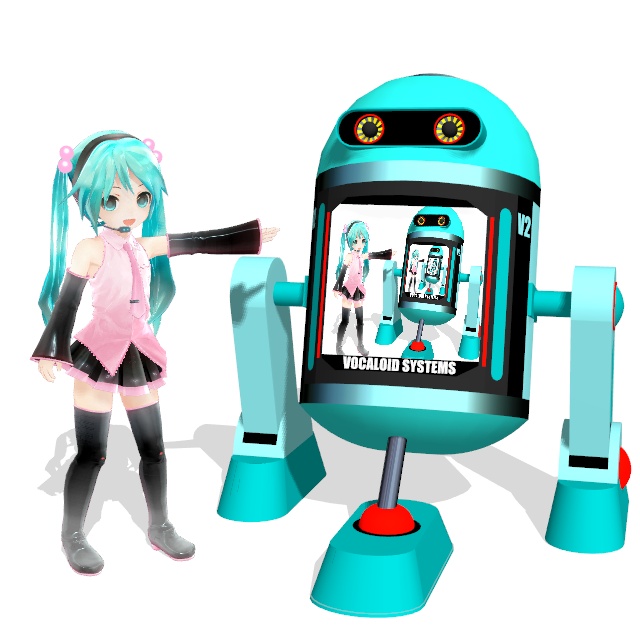
Chibi Miku’s Old V2 Droid

Ever since MMD was first available it always had a screen capture widget. The first stage model that featured this widget is the default stage that comes with all versions of MMD. But, the screen widget is really easy to model so a lot of stage model makers used to include some version of this widget as a part of the stage design. By default, the widget can either be set to capture whatever is visible though the MMD view port or it can be made to actually play a video.

The image above shows a model droid that I originally built back in 2012 which featured this widget and I have revamped it to illustrate the process in this article. If you want the model, a link is provided at the end of the article.

If you do not know how to turn on MMD’s screen capture modes, please refer the image below:

Ray-MMD essentially killed the default screen capture widget

Ray-MMD has not been kind to stages that are built without texture maps. This is probably why most MMD videos that uses Ray-MMD do not use the older style of stages which largely do not use texture maps. But there are plenty of stages that do use texture maps which work fantastically with Ray-MMD. Especially when normal maps are added, many of these can look almost photo-real. The downside is that these newer stages, for the most part, do not use the capture screen widget. And even when they do, they run into the issue shown in the image below. The capture screens become very dull and don’t look very nice.
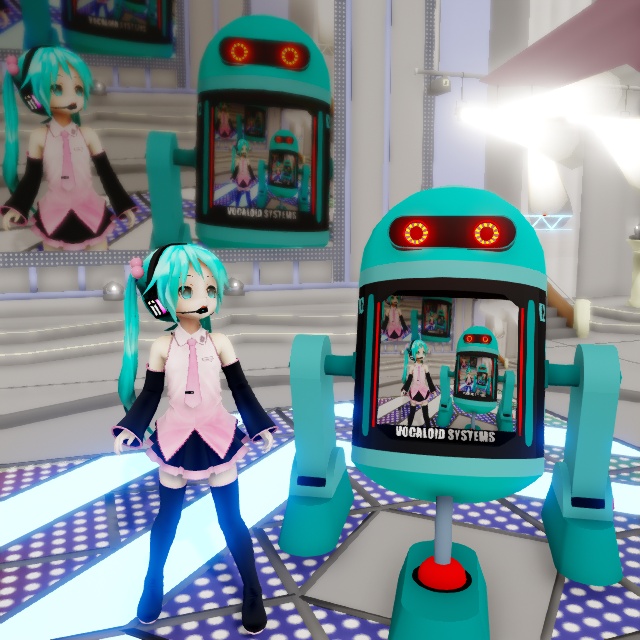
Without using the Ray-MMD LED widget, the basic MMD screen capture panels will look dark.

There is actually a fairly simple fix for this and that is to simply to add a sub-surface or emissive modifier to the screen material and it will brighten up fine. However, although it looks much better, it can be negatively impacted by the global lighting setting up. But, fortunately there is a fix for this issue too…
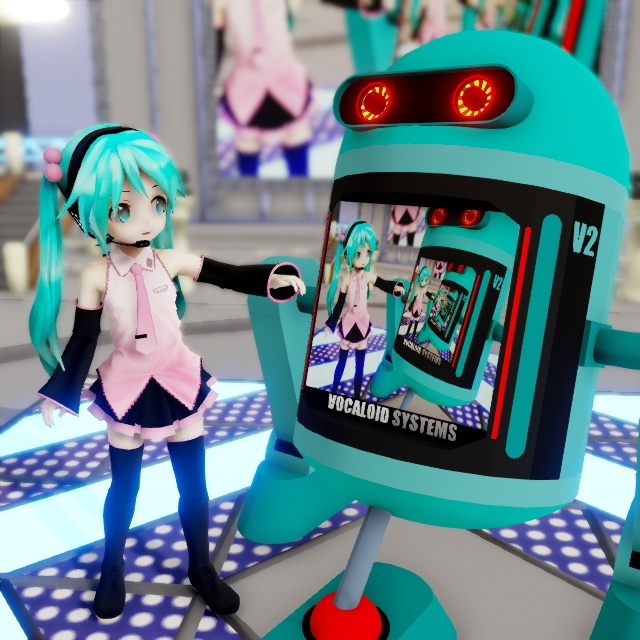
Ray-MMD offers a replacement screen capture widget

Inside the Lighting folder you will find LED.pmx. This is Ray-MMD’s own version of the screen capture widget and it is user configurable which makes it really useful. So Chibi Miku is going to demonstrate this on V2 version 2 which is also a PMX model. However, PMX models do not inherently have the ability to use the screen capture functions. This still requires a .X format screen; but Ray-MMD has a solution for that too.

To demonstrate the difference between the default widget and the Ray-MMD version; I’ll leave the stage to use the default and the V2 droid will use the new widget.

Step-By-Step

  1. Load LED.pmx
  2. Add main.fx to this model under the Main tab in the MME window. The widget will turn black.
  3. Under the LightMap tab, select a lighting regime for this widget. Eg. rectangle_lighting_with_shadow_medium.fx
  4. From the Ray-MMD Extensions>DummyScreen folder, load DummyScreen.x. If you have one of MMD’s screen capture modes active, the widget will immediately function. If not turn on one of the screen capture modes.
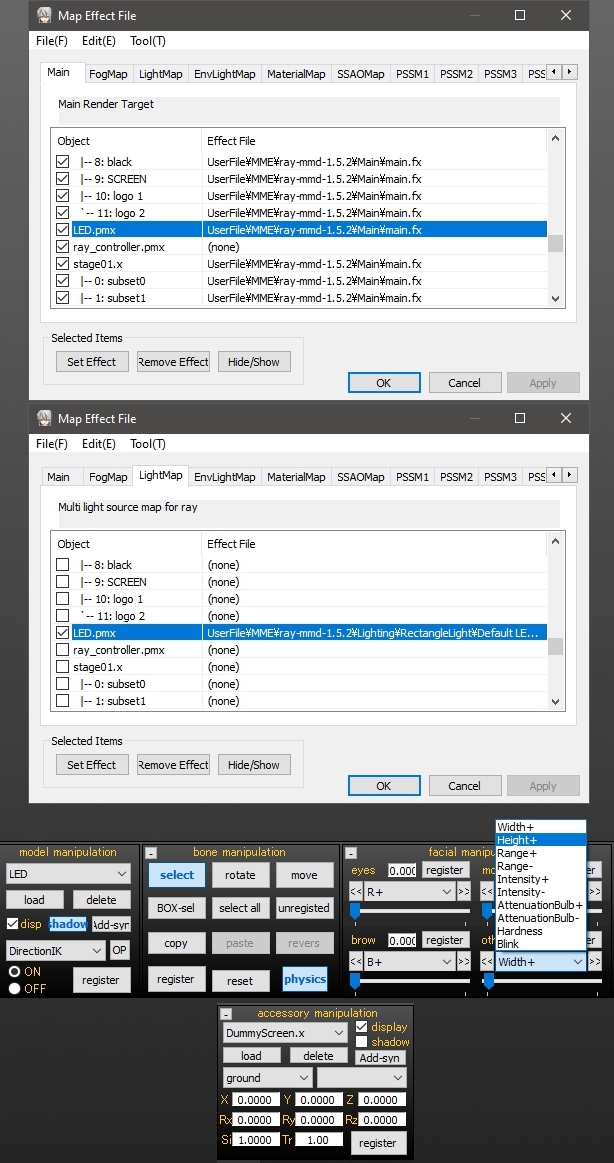
To fit the screen to the droid, these were the steps used. If you’re not using the droid, just extrapolate to fit your project.

  1. Attach the LED.pmx model to the droid model using the OP function. Use the center/root bones on both models.
  2. Move the LED.pmx screen into place on the droid.
  3. Use the height and width sliders to fit the widget into the space reserved for the screen on the droid. 0.028 were the values I used.
  4. Use the other sliders to configure the widget to suit your set up.

WARNING: The LED.pmx sliders can be buggy. If you run into issues, disable the RGB sliders by setting them to “0”.

The neat thing about the Ray-MMD LED widget is that it is a light emissive object. It gives off light which makes this screen especially valuable in low lighting environments.
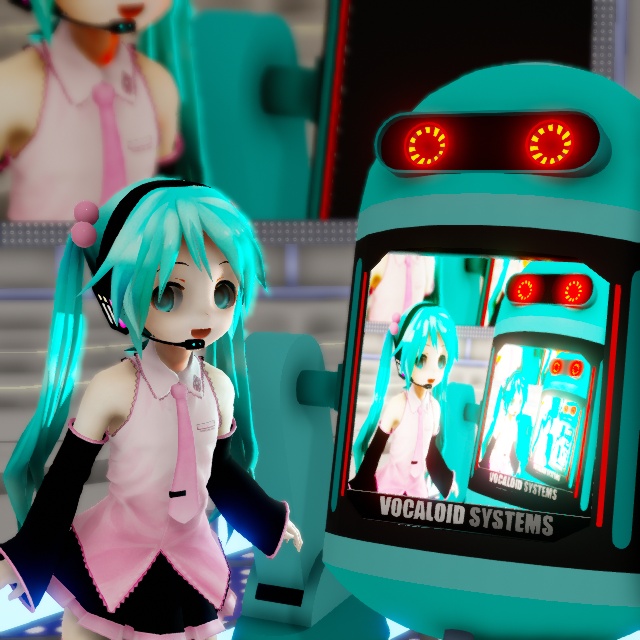
The Ray-MMD LED widget is light emissive... meaning it can cast light onto other models.

Will this widget play videos?

Absolutely it will but it defers this function to MMD so the some restrictions apply. Most AVI / MPEG video will not play. There are only two formats that seems to be supported.

Please read this tutorial for further info: MMD Video Playback

IMPORTANT: The tutorial linked above suggests that you can download FormatFactory to use as a format converter. DO NOT DOWNLOAD THIS SOFTWARE; it is now bundled with malware which is a real pain to remove.

CREDITS

Chibi Appearance Miku – Mamama / Ok_Ky
Miku Hatsune © Crypton Future Media Inc.

MMD 9.32
Ray-MMD 1.5.2
Default MMD stage

PMXeditor EN v2.0
Trimble SketchUp

GIMP 2.10.6
IrfanView64

VROID model download [ click here ]


– SEE BELOW for MORE MMD TUTORIALS…


— — —


– _ — –


Visit the LearnMMD.com Homepage! Plenty of Mikumikudance instruction and info!

More MMD Tutorials...

Editing MMD Model Eye Textures enhances Ray-MMD Effect

How does editing MMD model eye textures make my model look better when I use ...read more

Loading Background AVI Files into MMD (2021 Edition)

How do I load background AVI files into MMD?  What does it mean when MMD ...read more

PMXE Plugin adds Arm IK bones allowing automatic MMD model interaction

The simplest interactions between people in real life can be very difficult to animate; especially ...read more

Ray-MMD environment controls create MMD dreamscape

Ray-MMD Nocturne... Ray-MMD environment controls create MMD dreamscape... One of the wonderful things about Ray-MMD is its ...read more

Using BeamMan's fluid2D Creates Fabulous MMD Under Water Scenes

There are some rather nice MMD assets around that can be used to create really ...read more

Translate Japanese Models Using PMXEditor's Batch Name Editor

Many of the models that you download for MMD do not have comprehensive translated labels ...read more

Add Background Pictures and AVI, Raycast Ray-MMD, Trackdancer2015

Post navigation

Previous Post: PMXE Plugin adds Arm IK bones allowing automatic MMD model interaction
Next Post: Older MME Shaders rival Ray-MMD Raycast results and are easy to use!

Related Posts

  • Build Your Own Stage For MMD Using SketchUp Google SketchUp and MMD
  • Ray-MMD Painting with light!
    Ray-MMD: The Art of painting with Light MMD Tutorials
  • Ray-MMD demonstration of MMD ships
    Ray-MMD Demonstration “Battle stations … all hands on deck!!!” Battleship Models - MMD
  • Featured-translate-japanese-models
    Translate Japanese Models Using PMXEditor’s Batch Name Editor Trackdancer2015
  • Once there was a war… the making of my “Paint it black” MMD video "the making of" my video
  • Learn to Edit MMD Effects by Editing Raycast Materials Bandages

More Related Articles

RAY-MMD demonstration featuring texture and environmental lighting MME Effects Tutorials
Raycast / Ray-MMD First Steps MMD Tutorials
MMD rotating 3D objects 360-degrees MMD Rotating objects 360-degrees -Miku’s Guide to the Galaxy (Part One) Making Smooth Motions
Ray-MMD shading Mech-Girls! Ray-MMD Shading Mech Girls brings those beauties to life! MMD Tutorials
Free AVIUTL Video Editing software adds animated titles to MMD Videos! Animated Titles
Modifying model texture color compensates Raycast color desaturation MMD Tutorials

Comments (4) on “Ray-MMD LED widget replaces MMD screen capture widget”

  1. Kyoso says:
    December 19, 2020 at 8:09 am

    Uh, question, has the FormatFactory software always carried malware?? Cause I’ve been using this for a long time now and didn’t have any problems. I downloaded my version a long time ago though. Also the article was very helpful, thank you.

    Reply
  2. SodaWave says:
    November 20, 2020 at 3:20 pm

    Is not necessary to use a LED Screen. You can just play with the settings of the materials to have an emmisive texture that uses the dummy screen. The dull effect is because the material is using the dummy screen information as albedo, not emissive

    Reply
  3. jaida says:
    November 9, 2020 at 11:26 am

    hi can i be part of the mmd can you help me to work on my project so i can make my own motion i was trying to do the yandere simulator and myb own thing and black butler so i can be one of you

    Reply
  4. John says:
    October 25, 2020 at 5:34 am

    Thank you for the great tutorial as always! By the way, please take a look at my latest work in Ray-mmd.
    https://i.ibb.co/ZL6xrQ5/Fuhrer-Bismarck-Uber-Alles.png
    https://i.ibb.co/1Rsrsbt/Fur-Fuhrer-Bismarck-2.png
    https://i.ibb.co/xHDz4BB/Nelson.png
    https://www.youtube.com/watch?v=uU-tLfNMcKw

    Reply

Leave a Reply Cancel reply

Your email address will not be published. Required fields are marked *

Download the latest version of MikuMikuDance!
See the MMD Step-by-Step instructions page!
Learn how to make your own MMD motions!
LearnMMD.com
  • Let your MMD model breathe and move while standing still! Creating Motions
  • Neru Jams to the Background Music
    Downloading Background Music for MikuMikuDance Videos. ARIZONA
  • Public Domain and Ethical Release for MMD Bandages
  • Download/Install DirectX 9 Update to fix the Missing DLL Error Dealing with the Missing DLL Error
  • Once there was a war… the making of my “Paint it black” MMD video "the making of" my video
  • Hatsune Miku “LIVE” on David Letterman’s ‘The Late Show’ Random Thoughts & Visions
  • LearnMMD Video Dojo Expo competition: open to all MMDers!
    MMD Contest: Video Dojo Expo 1! CONTESTS
  • RAY-MMD: Creating your own custom sky box MMD Tutorials

Copyright © 2022 Learn MikuMikuDance – MMD Tutorials – Free 3D Animation Software and Instructions..

Powered by PressBook Premium theme

Go to mobile version