

Skip to content
Learn MikuMikuDance – MMD Tutorials – Free 3D Animation Software

Learn MikuMikuDance – MMD Tutorials – Free 3D Animation Software

Download Free Animation Software – Let's Learn How to Do Everything!

  • Step-by-Step MMD instructions
  • DOWNLOADS
  • Troubleshoot, Fix MMD
  • Site Contents
  • Reggie Replies Q&A
  • Homework!
  • What IS MMD?
    • Download MikuMikuDance Newest Latest Version of MMD
  • “HOW TO”
    • Raycast RAY-MMD Effect Tutorials
  • BONUS PAGES
    • Why convert PMD models to PMX?
  • HALL of CHAMPIONS
  • Tutorial Categories
  • About
    • Privacy Policy
  • Toggle search form
  • This picture was taken as a "Render to Picture File" command from the FILE Menu.
    MMD Screen Capture Tool makes taking pictures a Snap! Making Videos - Rendering to AVI
  • The 966_ Otogibanashi Toon effect recolors your models!
    966_ Otogibanashi Toon “Fairy Tale” shader effect recolors your models 966_ Otogibanashi Toon
  • Using Raycast MMD like a pro! "the making of" my video
  • Announcing The 2013 Momi Cup Celebration. ARIZONA
  • Metronome successfully marks the beat in Dueling Banjos MMD Metronome
  • Post Effect cannot be specified
    Fix the “Post Effect cannot be specified” error Chris no Akumu
  • The VDE-5 Champions are chosen!
    The CHAMPIONS of Video Dojo Expo FIVE Video Dojo Competition
  • Extreme S Curve 02.
    Using the Interpolation Curve in MikuMikuDance. ARIZONA

MMD Wooden Stool Accessory from LearnMMD.com

Posted on October 10, 2013June 26, 2018 By Reggie_Dentmore No Comments on MMD Wooden Stool Accessory from LearnMMD.com

The New MMD Wooden Stool Accessory
is ready for Download
from LearnMMD’s Downloads page!
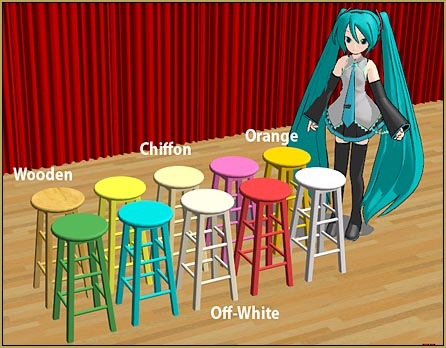
Get the set of TEN MMD Wooden Stools from the LearnMMD.com Downloads Page!

Download Reggie’s MMD Wooden Stool Accessory!

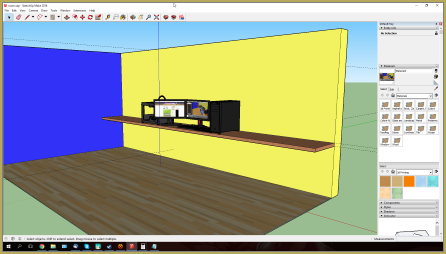
I scoured the Sketchup 3D Warehouse to find just the right classic wooden stool that I could use to create my MMD wooden stool accessory. These work great … and remember that you can adjust their size by using the Si field in the AMP.

The READ ME file in the zip folder gives credit to the original Sketchup artist who created the stool model. When I found the original model, it had a random “cork” texture finish. I “painted it” with a one of the Sketchup “wood” textures, customizing that texture in Photoshop by rotating the texture for vertical grain and lightening the color so that when converted to a DirectX .x The new MMD Stool Accessory looks great alone or in groups. They really add life to the scene.model using the 3D-RAD Sketchup plugin, the finished model wouldn’t be to dark a color. After that wooden stool was a success, I then painted and repainted the model to save them in the various colors. They are nice …
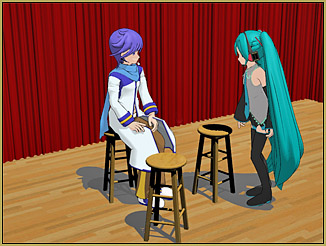
So … have a seat!


– SEE BELOW for MORE MMD TUTORIALS…


— — —


– _ — –


Visit the LearnMMD.com Homepage! Plenty of Mikumikudance instruction and info!

More MMD Tutorials...

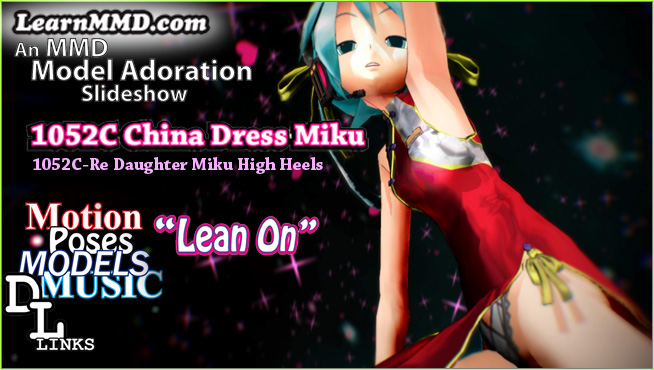
Introducing MMD model 1052C China Qipao Miku

Where can I download MMD model 1052C dancers? I want the 1052C China Qipao Miku ...read more

Download Jomomonogm's Snow Miku 2019 for MMD, a most unusual model!

Where can I download Jomomonogm's Snow Miku 2019? What is so unusual about this Snow ...read more

MMD animation made-from-scratch Forgotten Vocaloid Mew Rags on Reggie's MMD Videos

How do I make my own MMD animation from scratch? How do I start my ...read more

Rediscover your old MMD Animations: Love them again!

Rediscover your old MMD Animations: Love them again! https://youtu.be/P4b3todZMUI A labor of love... Remember how it was when ...read more

MMD Boobs too Big yields Too Funny Really Bad Boy video!

Can MMD boobs too big get in the way of a downloaded motion file? What ...read more

Download Hatsune Miku type N models from 2010... a set of 6!

Can I still download Hatsune Miku type N models? Where can I download a few ...read more

Google SketchUp and MMD, Reggie Dentmore

Post navigation

Previous Post: Using Subset-Extract to Customize Your Models.
Next Post: Introduction to Vocaloid: a short tutorial

Related Posts

  • Beamman’s MME SelfFreeze Effect for MikuMikuDance 7.39 MME Effects Tutorials
  • Create 450-Frame MMD Animation from scratch!
    Create 450-Frame MMD animation from scratch! "the making of" my video
  • New “LearnMMD Wars” Video Posted to YouTube! Google SketchUp and MMD
  • The 966_ Otogibanashi Toon effect recolors your models!
    966_ Otogibanashi Toon “Fairy Tale” shader effect recolors your models 966_ Otogibanashi Toon
  • Free Download MikuMikuDance MMD
    Free Download MikuMikuDance 3D animation software Intro to MikuMikuDance
  • Show the Love: Melanie’s “Ring Around the Moon” CONTESTS

More Related Articles

Download ARROW Lip-Sync Soundtrack Zip Folder "the making of" my video
MMD Lip-sync is fun to do... just do it! MMD Lip-sync is fun to do… just do it! Animation Shortcuts
Making stages/accessories for MMD using Sketchup Google SketchUp and MMD
Pose characters in PMX Editor and export as OBJs for Poser .OBJ Object Files
Download these 1052C-Re0710 MMD Models and enjoy! Download Early Miku 1052C-Re0710 MMD Models from 2010! Downloading New Models
LearnMMD.com is back online after SIX days off! LearnMMD.com is BACK ONLINE, again! Reggie Dentmore

Leave a Reply Cancel reply

Your email address will not be published. Required fields are marked *

Download the latest version of MikuMikuDance!
See the MMD Step-by-Step instructions page!
Learn how to make your own MMD motions!
LearnMMD.com
  • Barbarians disregarding creative rights destroy MMD for all of us. Keep the Faith-MMD Credits/Sharing
  • You cannot use Box-Sel to select a portion of a model. You must selectthe entire MMD model.
    BOX-sel lets you select an entire model in MikuMikuDance ARIZONA
  • How To Make Global Lighting Work with Game-Rips Fixing Broken Models
  • MME Balloon Effect (And what I found out) Balloon Effect
  • REM Hatsune Miku 10th model links on LearnMMD.com
    Reintroducing cute REM Hatsune Miku 10th in Hello, how are you? "the making of" my video
  • MMD Rotate object 360-degrees part 2
    MMD Rotating Objects 360-degrees -Miku’s Guide to the Galaxy (Part 2) Making Smooth Motions
  • Adjust downloaded motions to fit your MMD models Animation Shortcuts
  • Rendering in 4K video at 60FPS with MMD 4k video

Copyright © 2022 Learn MikuMikuDance – MMD Tutorials – Free 3D Animation Software and Instructions..

Powered by PressBook Premium theme

Go to mobile version