

Skip to content
Learn MikuMikuDance – MMD Tutorials – Free 3D Animation Software

Learn MikuMikuDance – MMD Tutorials – Free 3D Animation Software

Download Free Animation Software – Let's Learn How to Do Everything!

  • Step-by-Step MMD instructions
  • DOWNLOADS
  • Troubleshoot, Fix MMD
  • Site Contents
  • Reggie Replies Q&A
  • Homework!
  • What IS MMD?
    • Download MikuMikuDance Newest Latest Version of MMD
  • “HOW TO”
    • Raycast RAY-MMD Effect Tutorials
  • BONUS PAGES
    • Why convert PMD models to PMX?
  • HALL of CHAMPIONS
  • Tutorial Categories
  • About
    • Privacy Policy
  • Toggle search form
  • Breathing “SOUL” into MMD models and scenes using Fine Art Techniques Advanced Shader Technique
  • YouTube Audio Library supplies Free music Copyrighted Music
  • With some practice, Rin can dance the sample dance as well as Miku!
    Let’s Play the Sample Dances and Learn About MikuMikuDance Intro to MikuMikuDance
  • You can enlarge or reduce and Accessory by adjusting the Si value in MikuMikuDance.
    Use Accessory Manipulation fields to position/adjust Accessories Accessory Manipulation/Adjust
  • MME DiscoLightEX v003 effect now hosted by LearnMMD.com! Disco Lighting Effect
  • Darkening the stage lighting makes the floorlight look very bright! MMD 7.39, LearnMMD.com
    MMD Camera Motions: The Camera’s Gotta Keep Moving! Camera Motion
  • Fix Model Ambient Light Problems Using PMDE/PMXE GloriaTheAnimator
  • PMDE Parts Links help you create your MMD Selfie NOKO2
ShapeMosaic effect distorts naughty bits and faces.

MME ShapeMosaic effect counters Wardrobe-malfunctions and more!

Posted on February 27, 2021 By Reggie_Dentmore No Comments on MME ShapeMosaic effect counters Wardrobe-malfunctions and more!

A Feature Article by Reggie Dentmore on LearnMMD.comHow do I use the ShapeMosaic effect? Where can I download ShapeMosaic effect? How do they put a checkerboard pattern over the naughty bits in some videos?
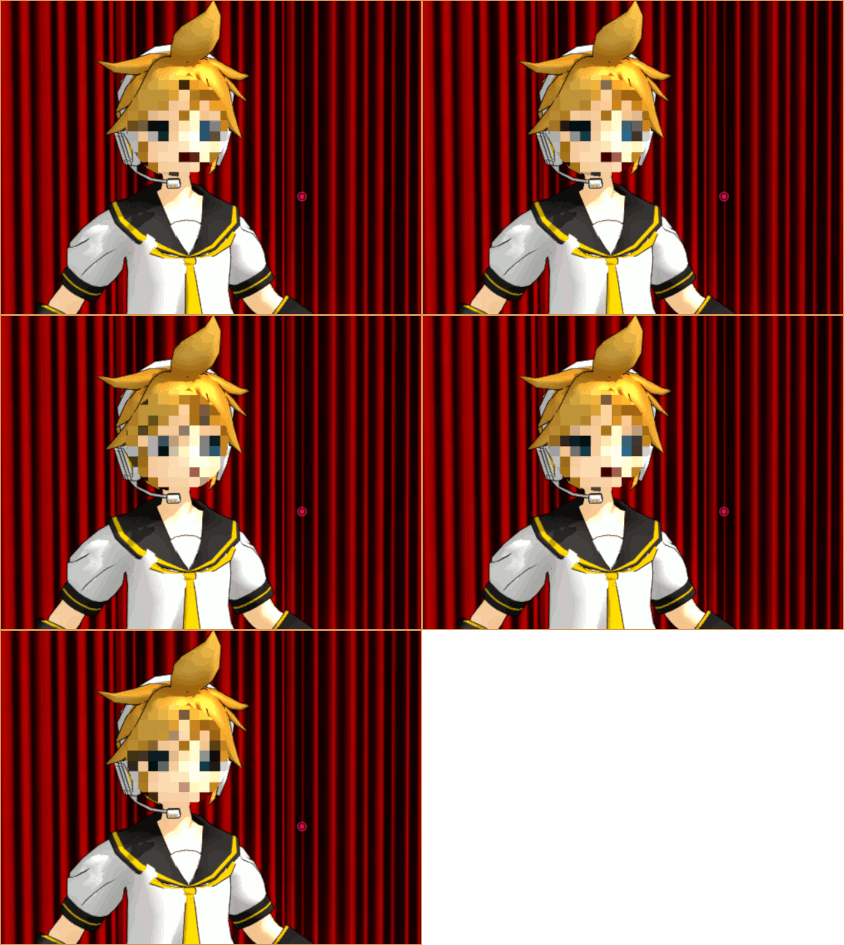
MosaicShape effect by Soboro lets you hide faces, wardrobe malfunctions, and more!

The ShapeMosaic effect counters Wardrobe-malfunctions, hides identity, and more!

I came across this MME effect… the ShapeMosaic effect by Soboro. It’s simple to use and your creativity will immediately “know what to do” with this effect.
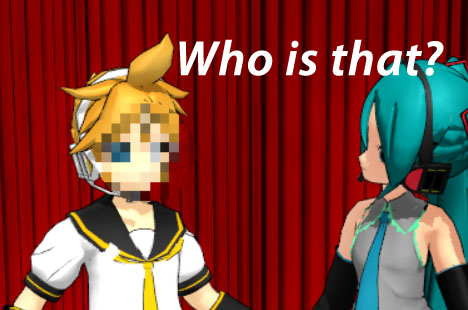
I chose to disguise the fellow who had just pinched Miku… and, of course, Miku isn’t bright enough to see through that disguise!

DOWNLOAD ShapeMosaic effect from THIS PAGE.

Don’t go crazy! … There are MANY effects on that page… just download the one or two you want… and know that you can always go back for more.

Unzip and Extract that ZIP folder to see your new folder.


Always read the README file.

Inside that folder is the README… in Japanese. It translates to say:

Mosaic effect for MikuMikuEffect

Production: Soboro

This effect applies a mosaic to the screen.
You can specify the mosaic range by the shape of the x-file.
The default one is spherical. A cylinder accessory is also included as a sample.
If you make the accessory huge, you can make it full screen.

Mosaic roughness can be controlled from MMD with the accessory Tr

— Normal usage
-Read ShapeMosaic.x with MMD and set it at the beginning of the drawing order.
-Associate ShapeMosaic.x with the part you want to mosaic.

–Notes
-Because it is a post effect, be sure to set the drawing order before the normal object.

Use Si, Tr, and “Accessory” mode…

I found that, as it says, above, this effect is controlled by the Si size and the Tr Transparency. The Si adjustment controls the diameter of the effect… I think I used a Si of 0.3 and a Tr of .7 in my test GIF. The Tr controls the size of the “particles”.

I used the ACCESSORY mode to roll the XYZ rollers as I positioned the effect over Len’s face.

Experiment… it’s not complicated! 

Whenever you need to “hide” or distort something… remember the simple ShapeMosaic effect.

Have fun with MikuMikuDance!


– SEE BELOW for MORE MMD TUTORIALS…


— — —


– _ — –


Visit the LearnMMD.com Homepage! Plenty of Mikumikudance instruction and info!

More MMD Tutorials...

Enjoy the "camera Angles WEIRD in Anime" meme...

Enjoy the "camera Angles WEIRD in Anime" meme... This image is from The Slayers - NEXT, ...read more

Reader asks how to create MMD artwork... stuff like posing, camerawork?

A reader asks... Is there a tutorial on how to create MMD artwork, like those you ...read more

Learn MikuMikuDance in Small Steps! New LearnMMD Video Series

Learn MikuMikuDance in Small Steps. Where can I find easy-to-follow MMD instructions on YouTube? How ...read more

Apply Multiple Effects on an Entire MMD Model Using M4Layer Effect

How can I apply multiple effects to an MMD model? Can I use more than ...read more

MMD Plugin Manager... I Found a Treasure!

What sorts of MMD Plugins are there? MMD Plugin Manager? MMD Plugins. Plugin MMD. More ...read more

2025: Hatsune Miku is 18... but she is designed to be always 16 Years old, by design and in reality!

Finally, in 2023, Hatsune Miku is 16 years old! but in August of 2025, she ...read more

MMD Tutorials, Reggie Dentmore, ShapeMosaic - Soboro

Post navigation

Previous Post: MME CheapLens Effect controls the “Look” of your MMD video
Next Post: MME effect Kamitachi – Night breeze silhouette shader of Kama

Related Posts

  • PMDE Q&A – Making clothes follow model motions Fixing Broken Models
  • Best Way to Run MMD on a Mac Kazumi
  • MME Lighting Effect, PanelLight by Soboro, is easy to use!
    Add MME Lighting Effect illuminates model against dark stages MMD Tutorials
  • Sweet Home 3D Creates Custom MMD Interiors as .x or .pmd MMD Tutorials
  • Behind the Scenes insights into my newest video "the making of" my video
  • Update previous MMD to MMD 9.32 with no tears … Download MikuMikuDance

More Related Articles

MMD Animation Project Where My Demons Hide "the making of" my video
Japanese MMD mod allows Automatic Breathing action in MMD models MMD Tutorials
NCH VideoPad Video Editor VideoPad Video Editor Free Download from NCH Software "the making of" my video
Creating an animation using MMD, MikuMikuDance! "the making of" my video
Learn to Edit MMD Effects by Editing Raycast Materials Bandages
The Making of: Sleepover Gone Wrong (REMAKE) "the making of" my video

Leave a Reply Cancel reply

Your email address will not be published. Required fields are marked *

Download the latest version of MikuMikuDance!
See the MMD Step-by-Step instructions page!
Learn how to make your own MMD motions!
LearnMMD.com
  • First Steps for the Beginner MMD MikuMikuDance artist Welcome to LearnMMD.Com!
  • MMD Stages Source Featured
    Great MMD Stages Source: Deviant Art MMD Basics
  • MMD Dummy Bones may be your most important models! Dummy Bones
  • Raycast Ray-MMD Toon Shader
    Ray-MMD Toon Shading Basics MMD Tutorials
  • Use M4Layer Effect to add multiple effects onto your MMD model.
    Apply Multiple Effects on an Entire MMD Model Using M4Layer Effect M4Layer Effect
  • Raycast / Ray-MMD First Steps MMD Tutorials
  • Let the model itself help you to align its bones!
    Rig a Model: Adding and weighting bones with PMDE Bones
  • MikuMikuDance Unbridled Creativity Starts with an Empty GUI MMD Basics

Copyright © 2022 Learn MikuMikuDance – MMD Tutorials – Free 3D Animation Software and Instructions..

Powered by PressBook Premium theme

Go to mobile version