Skip to content
Learn MikuMikuDance – MMD Tutorials – Free 3D Animation Software

Learn MikuMikuDance – MMD Tutorials – Free 3D Animation Software

Download Free Animation Software – Let's Learn How to Do Everything!

  • Step-by-Step MMD instructions
  • DOWNLOADS
  • Troubleshoot, Fix MMD
  • Site Contents
  • Reggie Replies Q&A
  • Homework!
  • What IS MMD?
    • Download MikuMikuDance Newest Latest Version of MMD
  • “HOW TO”
    • Raycast RAY-MMD Effect Tutorials
  • BONUS PAGES
    • Why convert PMD models to PMX?
  • HALL of CHAMPIONS
  • Tutorial Categories
  • About
    • Privacy Policy
  • Toggle search form
  • The Zombie Song download for MMD is a lot of fun!
    Zombie Song download easily makes spooky MMD videos! "the making of" my video
  • Free AVIUTL Video Editing software adds animated titles to MMD Videos! Animated Titles
  • Rio Carnival Miku TDA edit by shiro-nekovocaloid is a beautiful model for the MMD Model Adoration Slideshow video.
    Rio Carnival Miku is my latest MMD Model Adoration Slideshow video "the making of" my video
  • Customize the MMD interface: Change the colors of the GUI Fia Phoenix
  • PMDE Parts Links help you create your MMD Selfie NOKO2
  • Posing MMD Models Using Reference Images Animation Shortcuts
  • Animation Styles: Park and Bark vs. Choreography Creating Motions
  • No Diamonds Appear in Frame Chart in MMD and How to Fix It Mae Blythe

Scrambled first frame of video must be Voodoo!

Posted on September 3, 2016November 18, 2016 By Reggie_Dentmore No Comments on Scrambled first frame of video must be Voodoo!

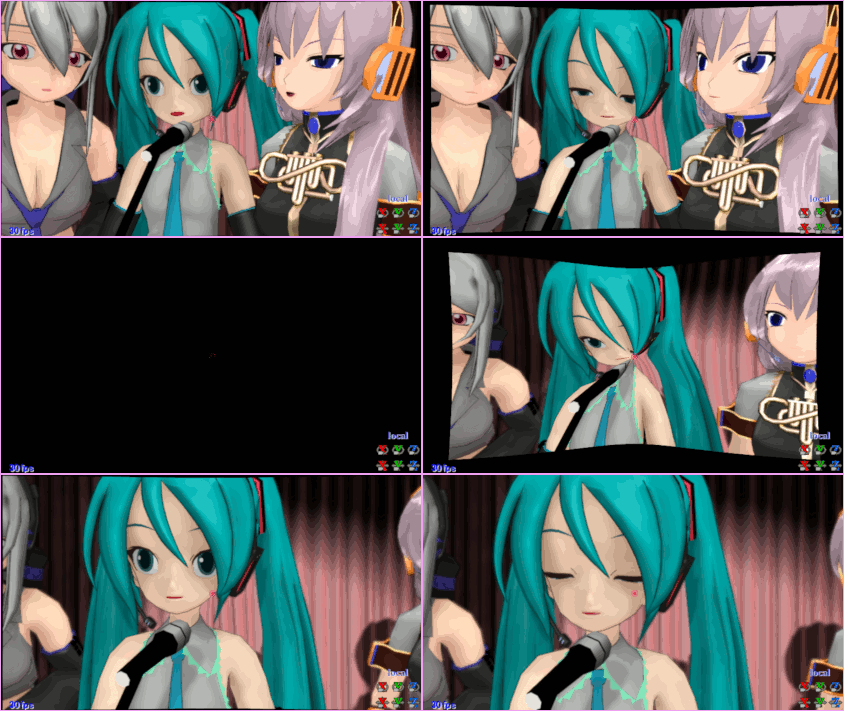
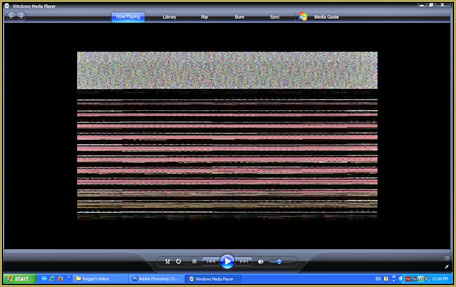
A Feature Article by Reggie Dentmore on LearnMMD.comWhy is the first frame of my new video scrambled? What causes that first frame of video to be full of static? Is there a fix for it? Why is it “sometimes” and not ALL the time?

Scrambled first frame of video…
… must be Voodoo!

It drives me crazy when I “Render to AVI”, anticipating that THIS is the final step… a beautiful new MMD video… only to find that the first frame of video is scrambled… full of static!

That scrambled first frame of video always ticks me off... I wonder what causes it?

How can I beat that static… where does it come from?

I have no real idea!
… but I have been trying a technique that seems to work, more often than not:

You might avoid that scrambled first frame of video by moving slowly as you click-through your options.

Seems too simple…
… and how could this work?

I’ve got no idea how this can work… but I do seem to have success in avoiding that scrambled first frame. Could it be that my system starts to engage that compressor selection even before I click “OK”… and it’s not ready, yet, if I click “OK” to soon? For a little added insurance, I also hold down that OK button for a few moments before I release it. … I guess I feel that moving slowly rather than quickly tends to help to avoid that scramble. Like I said… Voodoo, not science!

Got a solution?
… Please let me know!

Please leave a comment if you have your OWN method for avoiding that scrambled first frame.

Thanks!


– SEE BELOW for MORE MMD TUTORIALS…


— — —


– _ — –


Visit the LearnMMD.com Homepage! Plenty of Mikumikudance instruction and info!

More MMD Tutorials...

Reader asks how to create MMD artwork... stuff like posing, camerawork?

A reader asks... Is there a tutorial on how to create MMD artwork, like those you ...read more

Introducing MMD model 1052C China Qipao Miku

Where can I download MMD model 1052C dancers? I want the 1052C China Qipao Miku ...read more

Download Jomomonogm's Snow Miku 2019 for MMD, a most unusual model!

Where can I download Jomomonogm's Snow Miku 2019? What is so unusual about this Snow ...read more

MMD animation made-from-scratch Forgotten Vocaloid Mew Rags on Reggie's MMD Videos

How do I make my own MMD animation from scratch? How do I start my ...read more

Rediscover your old MMD Animations: Love them again!

Rediscover your old MMD Animations: Love them again! https://youtu.be/P4b3todZMUI A labor of love... Remember how it was when ...read more

MMD Boobs too Big yields Too Funny Really Bad Boy video!

Can MMD boobs too big get in the way of a downloaded motion file? What ...read more

MMD Basics, Random Thoughts & Visions, Reggie Dentmore, Rendering to AVI Video

Post navigation

Previous Post: Fixing white models and accessories that don’t follow in PMXE
Next Post: o_ShaderCustomSet_v0_3 effect applies gentle color modification

Related Posts

  • Make an MMD Music Video Bo Beep Bo Beep! "the making of" my video
  • Download Reggie’s MMD DeckPanel when you just need a place to sit or stand! Make your own Accessories
  • Translate Japanese Model Names into English File Management / Organization
  • The Art of Moe and the genre’s backstory. Random Thoughts & Visions
  • A New Challenge for MikuMikuDance Modelers – The Textures from Your Room Challenge! CONTESTS
  • MME FishEye Lens effect also gives nice scene transitions!
    MMD MME Fisheye Lens effect offers Scene Transitions & Cropping Fisheye Lens effect

More Related Articles

Make an MMD Music Video Bo Beep Bo Beep! "the making of" my video
Making my new “Rin Needs a Hug” Zero-to-450 Challenge Video "the making of" my video
MMD Animating SAVE AS multiple versions as you go! MMD Basics
Proper Computer DPI Scaling Setup Stops Text Cut Off in PMXE Mae Blythe
Switch Models without Physics Glitches Accessory Manipulation/Adjust
Smooth camera moves and soft focus make for smooth scene transitions in MMD 7.39 . LearnMMD.com Smooth Scene Transitions featured in new MMD Departures video "the making of" my video

Leave a Reply Cancel reply

Your email address will not be published. Required fields are marked *

Download the latest version of MikuMikuDance!
See the MMD Step-by-Step instructions page!
Learn how to make your own MMD motions!
LearnMMD.com
  • Use Stage Changes in MMD to Make an Interesting Video Koneko the MMD Fairy
  • Different Eye Textures in one model using PMXE JuneTarzan
  • Modifying model texture color compensates Raycast color desaturation MMD Tutorials
  • create credible characters for your projects
    How to create credible characters for your projects. MMD Tutorials
  • Yukari's Gap Portal Style.
    The In’s and Out’s of Yukari’s Gap for MikuMikuDance. ARIZONA
  • VDE-4 Champion: Kazumi "the making of" my video
  • Use The Background AVI to Make Realistic Animations in MMD ARIZONA
  • MMD Camera Work makes motions fit the song.
    MMD Camera Work made the motion fit the song! "the making of" my video

Copyright © 2022 Learn MikuMikuDance – MMD Tutorials – Free 3D Animation Software and Instructions..

Powered by PressBook Premium theme

Go to mobile version