
Skip to content
Learn MikuMikuDance – MMD Tutorials – Free 3D Animation Software

Learn MikuMikuDance – MMD Tutorials – Free 3D Animation Software

Download Free Animation Software – Let's Learn How to Do Everything!

  • Step-by-Step MMD instructions
  • DOWNLOADS
  • Troubleshoot, Fix MMD
  • Site Contents
  • Reggie Replies Q&A
  • Homework!
  • What IS MMD?
    • Download MikuMikuDance Newest Latest Version of MMD
  • “HOW TO”
    • Raycast RAY-MMD Effect Tutorials
  • BONUS PAGES
    • Why convert PMD models to PMX?
  • HALL of CHAMPIONS
  • Tutorial Categories
  • About
    • Privacy Policy
  • Toggle search form
  • Beamman’s MME SelfBurning Effect Sets your MMD models Ablaze! MME Effects Tutorials
  • Making stages/accessories for MMD using Sketchup Google SketchUp and MMD
  • Troubleshoot MMD models– or anything else– with four techniques! Bandages
  • pmothair Effect Makes Hair Actually Look like hair MMD Tutorials
  • The K Lite Mega Codec Pack 995 – The Ultimate HD Video compressor! HD Videos in MMD
  • Using the OP function in an animation MMD Tutorials
  • Chrysanthemums are lovely with the Fireworks effect!
    Using the Fireworks Effect In MikuMikuDance ARIZONA
  • Adjust downloaded motions to fit your MMD models Animation Shortcuts

Reset Your Computer to Japanese Locale for perfect Japanese

Posted on September 18, 2012July 2, 2024 By Stella the Alchemist 7 Comments on Reset Your Computer to Japanese Locale for perfect Japanese

Is it OK to reset your computer to Japanese locale? I don’t see Japanese characters when I open Japanese models in MMD. How can I make my computer show Japanese characters?A Feature Article by Stella The Alchemist on LearnMMD.com!

Consider Resetting Your Computer to Japanese Locale for perfect Japanese downloads!

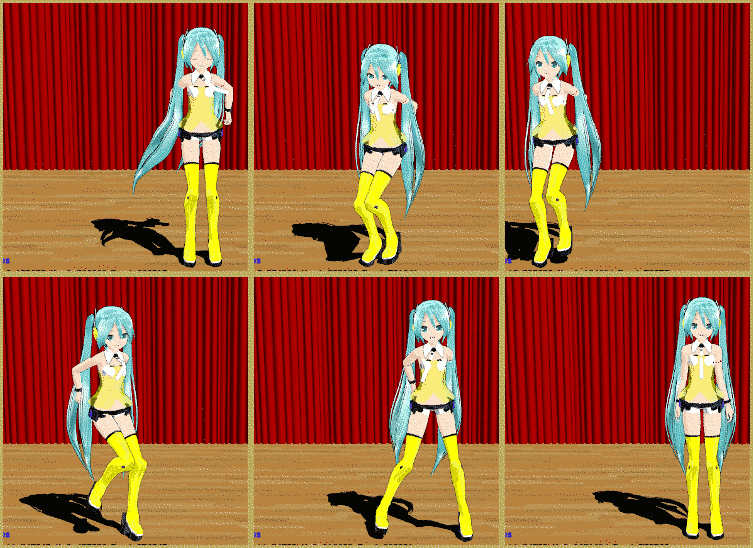
I’ve been using MMD for quite a while now, over a year at least. One of the things I noticed that bothered me was that whenever I downloaded a file that was in Japanese, the names and any text would show up as random gibberish. This was annoying, since it made it difficult to tell what was what. I still have a model named “‹¾‰¹ƒŒƒ“_DIVA•—…’… .PMD” that I’m pretty sure is swimsuitResetting you computer to Japanese Locale allows perfect Japanese downloads. Japanese model "Lat Miku Yellow EDIT VER.pmd" dances a bit of the MMD Sample Dance on the LearnMMD Stage from the Downloads page. Len, but who knows? With a name like that, it could be absolutely anything.
Fortunately, I’ve found a solution to this problem, and I’m going to share it with all of you. By setting your computer to Japanese locale, any newly downloaded Japanese files will display in Japanese, instead of random characters. Previously downloaded files will not be changed, but anything new will be fixed.

Japanese locale means that any non-unicode files will display in Japanese. I actually have pretty much no idea what that means. But what I do know is that nothing that isn’t Japanese will be affected. Your Windows will still be in English, and so will all your programs and files. Only Japanese files and programs that you download will be in Japanese as they were intended.

Consider setting your
computer’s environment to
Japanese Locale …

To set your computer to Japanese locale, click the start menu button. Now go to your control panel, and click “Clock, Language, and Region”. (Note: I’m using Windows 7. The process will probably be somewhat different for other operating systems.)

EDITOR’S NOTE: I am intrigued with this approach: resetting your computer to Japanese locale as a method of ensuring perfect Japanese downloads. The Author says she has been running her USA Windows 7 computer in the Japanese mode for at least 6 months and has noticed no problems … no downside.
An alternative solution to the scrambled Japanese characters might be to see that you have the East Asian Language Support installed … giving your computer the fonts it needs to show Japanese.


Editor’s
Note: 5/28/2016

Another method for keeping the Japanese file names as you open a Japanese model zip folder is to use the free Bandizip software
with the Code Page dropdown set to Japanese.
See the Bandizip article.

Now click “Region and Language”. Go to the administrative tab, and click the big “Change System Locale” button. Select Japanese, and click ok. It may ask you to restart your computer.And that’s it! Now all Japanese files that you download from that point on will look the way they should … and your other programs do not appear to be affected …. Convenient, huh?

If you try this out … be sure to leave comments here or email LearnMMD@aol.com – Let us know how it’s working for you!


– SEE BELOW for MORE MMD TUTORIALS…


— — —


– _ — –


Visit the LearnMMD.com Homepage! Plenty of Mikumikudance instruction and info!

More MMD Tutorials...

MMD Download Japanese Models for MikuMikuDance

Where can I download Japanese models? How can I download Japanese models for MMD? Why ...read more

Add Shadows to MMD .X Accessories Tutorial

How do I add shadows to my MMD animation? Is there a switch to turn shadows ...read more

Pose MMD Models Naturally Using Reference Pictures

How do I pose MMD models to look natural? Natural poses are easier to make ...read more

Add a Motherbone for Easy Model Manipulation in MMD 7.39

How do I add a motherbone to my MMD models? Why would I add a ...read more

Making a Long Video Animation in MMD 7.39 Can Be Done!

As Arizona mentioned, the 2013 MOMI Cup has been announced. Now, if you're anything like ...read more

MME Beamman's Grass Effect Creates Realistic MMD Landscapes

Where can I download Beamman's Grass effect for MME in Miku Miku Dance 7.39? LearnMMD ...read more

Stella The Alchemist Tags:Japanese locale

Post navigation

Previous Post: Add Background Pictures and AVI’s to MikuMikudance MMD
Next Post: How to use Beamman’s Bomb Effect in MMD 7.39 MME

Related Posts

  • MME Beamman’s Grass Effect Creates Realistic MMD Landscapes Beamman's Grass Effect
  • PMD Editor Basics, now in English – Modify Your MMD Models! Nuts & Bolts
  • Pose MMD Models Naturally Using Reference Pictures Bones
  • Add a Motherbone for Easy Model Manipulation in MMD 7.39 Mother Bones
  • Add Shadows to MMD .X Accessories Tutorial MMD Basics
  • .spa VS .sph sphere texture file types in PMDE / MikuMikuDance MMD.
    PMD Editor Basics: .SPH and .SPA Files Add Sparkle! PMDE/PMXE tutorials

More Related Articles

Pose MMD Models Naturally Using Reference Pictures Bones
MME Beamman’s Grass Effect Creates Realistic MMD Landscapes Beamman's Grass Effect
Add Shadows to MMD .X Accessories Tutorial MMD Basics
.spa VS .sph sphere texture file types in PMDE / MikuMikuDance MMD. PMD Editor Basics: .SPH and .SPA Files Add Sparkle! PMDE/PMXE tutorials
Add a Motherbone for Easy Model Manipulation in MMD 7.39 Mother Bones
MMD Download Japanese Models for MikuMikuDance Downloading New Models

Comments (7) on “Reset Your Computer to Japanese Locale for perfect Japanese”

  1. Milly says:
    December 22, 2024 at 7:03 am

    tôi không hiểu tiếng Nhật , xin lỗi o_o
    ====Milly===

    Reply
  2. hamza noor says:
    March 24, 2018 at 11:31 pm

    thankyou

    Reply
  3. An says:
    December 12, 2016 at 4:31 am

    Well I try it >,<

    Reply
  4. rosechaaan says:
    December 15, 2014 at 8:06 am

    iiiYAAAY! I can do colors now! XD

    Reply
    1. Reggie_Dentmore says:
      December 15, 2014 at 2:24 pm

      Wonderful!

      Reply
  5. Arizona says:
    September 19, 2012 at 7:35 pm

    “Japanese locale means that any non-unicode files will display in Japanese. I actually have pretty much no idea what that means.” LOL
    I have no clue what that means either. O_o

    Reply
  6. Arizona says:
    September 19, 2012 at 7:28 pm

    Good article Stella!

    Reply

Leave a Reply Cancel reply

Your email address will not be published. Required fields are marked *

Download the latest version of MikuMikuDance!
See the MMD Step-by-Step instructions page!
Learn how to make your own MMD motions!
LearnMMD.com
  • Kaito Sees Rotating Stars Thanks to the Accessory Manipulation Panel.
    More on Accessory Manipulation in MikuMikuDance Accessory Manipulation/Adjust
  • Step-By-Step Instructions for MikuMikuDance on LearnMMD.com Welcome to LearnMMD.Com!
  • Motion is LOCAL, per the Model's orientation, or GOBAL, per the Program's Grid. (Meiko Sakine from MMD 7.39)
    Local and Global Mode Bone Movement MMD: Miku’s Mode Swings ARIZONA
  • Different MMD models react differently to pose and motion data MMD Basics
  • Next Level in MMD Video Evolution
    Post-Production Editing Yields Next Step in MMD Video Quality Making Videos - Rendering to AVI
  • Installing old DirectX 9c solves many MMD Missing DLL Errors Dealing with the Missing DLL Error
  • RAY-MMD Technique: of Battleships and Fleet Girls Battleship Models - MMD
  • Darkening the stage lighting makes the floorlight look very bright! MMD 7.39, LearnMMD.com
    MMD Camera Motions: The Camera’s Gotta Keep Moving! Camera Motion

Copyright © 2022 Learn MikuMikuDance – MMD Tutorials – Free 3D Animation Software and Instructions..

Powered by PressBook Premium theme

Go to mobile version