

Why is my new model white in MikuMikuDance? New models do not download correctly in MMD. The clothes are the wrong color are white. LearnMMD Tutorials. My new model not right is broken has white has no color not showing working mmd.
Opening Japanese Models in MikuMikuDance
– Sometimes they don’t work!
The Japanese have been into MMD for years and they  have created and shared thousands of models online. Of course they name their files in Japanese! … and our computers, in the USA, use a different character set … don’t speak Japanese … with the result being scrambled file names. We need to use a new “program set” to open those Japanese zip files while keeping the original file names.
I found a solution to share with you: https://learnmmd.com/Applocale7zip/. Following the instructions, there, you will download a zip-file software, 7-Zip, and a Microsoft program: AppLocale. Read and follow the instructions carefully, like I did, and you will have no problems.
| Editor’s Note: 5/28/2016 Another method for keeping the Japanese file names as you open a Japanese model zip folder is to use the free Bandizip software
with the Code Page dropdown set to Japanese. See the Bandizip article. |
The only place I hada question was about saving a batch file that we will use in the future to open that Zip program. We want to make a simple icon button for our desktop that we can double-click when we want to use 7-Zip in combination with AppLocale to open a new model. The author gives us the command line:
C:\WINDOWS\AppPatch\AppLoc.exe “C:\Program Files\7-Zip\7zFM.exe” “/L0411”
and he assumesthat we know what to do with it … but it has been a long time since I have thought about DOS! What you do is open NOTEPAD on your computer; copy/paste that line of type into an empty NOTEPAD screen and SAVE AS … as a “.bat” file. Your SAVE AS window should look like this:
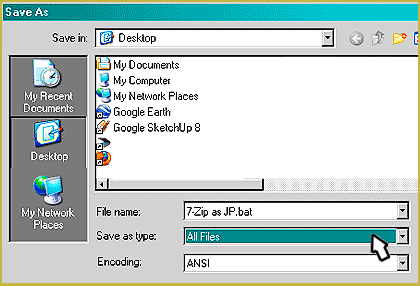
At the bottom of the save window the drop-down will show “Text Document .txt” … you change that to “All Files” … designate your Desktop, and name your file like he did: 7-Zip as JP.bat and SAVE. A “gear” icon will appear on your desktop. Double click the icon and 7-Zip will open.  You use 7-Zip to extract your downloaded model’s zip file.
That’s all there is to it “:o).
– SEE BELOW for MORE MMD TUTORIALS…
— — —
– _ — –








I ran into this exact issue last week with a model that just refused to show up properly, and the scrambled file names made it impossible to tell which texture was which. It took me a while to realize the encoding was the culprit, not the model itself. For anyone stuck on the character set problem, I found that LiteralKit has a quick symbol translator at https://literalkit.com/shakespeare-translator that helped me identify some odd characters in the filenames, which pointed me in the right direction for fixing the extraction. It is not a full solution, but it saved me from guessing.
Hello! I approved your comment, even with that link in it.
I followed the link. I̜̚ e̘̜n̜̂j̟̱o̥̅y̨̐e̝̫d̝̫ t̥̏h̢̄ê̜ Ḇ́u̙̕b̟̃b̢̄l̥̏ẻ̱ t̨̚ě̜x̜̀t̝̱ ǎ̜n̨̚d̫̑ t̥̃h̢̘e̖̜ G̢̚l̜̀i̞̖t̜̊c̨̚h̜̀y̒ t̫̏é̟x̟̕t̖̒.
How did you use the tools on that page to straghten-out your MMD model?
— Reggie
You can use Info-ZIP, which other programs might even be using since it’s open-source. https://en.wikipedia.org/wiki/Info-ZIP
A Japanese person, actually, submitted a patch to it to add options to specify character encoding; this is in the output from –help, but not in the manual pages.
On the command line, you would navigate to the directory you want to decompress the files to (it can be easier if the zip file is there too), and run one of the following:
unzip -O cp932 archive.zip
OR
unzip -O sjis archive.zip
It’s important the ‘-O’ is capitalized. sjis means the Shift-JIS character encoding; cp932 is the more advanced one that can do circled numbers and some other stuff that Shift-JIS can’t. Chinese computers often use the gb2312 character set.
Advanced unzipping: https://superuser.com/questions/1319606/zipfile-character-encoding-challenge https://superuser.com/questions/1309341/how-to-convert-this-string-to-japanese-using-gnu-linux-tools
I have windows ten so regular aplocale doesn’t work on my computer so i dont know what to do because im sure some of the steps are different. can i get help?
You can use Bandizip instead.
After hours trying to make applocale working with win 8.1 (is difficult because everythink is changed in this “tablet”-like Operative System) I’ve foud the definitive solution:
-Download BANDZIP
( Is a free zipper very similiar to 7zip, but supports Japanese )
-During installation you can choose if making it your default zipper. You can set “NO”, there no need to replace your 7zip
-Once installed, every time you want to extract a Japanese model go on your file, right-click and “open with…” BANDZIP
-There is a “green word” icon on the right. Select “Japanese”, then extract, and you are done. Japanese names will be correctly exctracted.
see you!
I followed the instructions, however Z-zip won’t open up. Only Applocale and cmd (cmd is the coding program) pop up. What might I be doing wrong?
I do not know… this routine has worked in the past… what Windows are you running? … XP, 7, 8, 10?
?
halp! I can not open zip files MMD! What to do?
Turns out I installed AppLocale incorrectly. The batch file works now, but when I extract a zip file of a japanese model it still comes out as gibberish.
For starters, add ‘pause’ to the end of your batch file. It’ll allow you to see what error message you get and find out the reason.
I’ve tried making the batch file but whenever I try to run it a command window quickly pops up and then closes. I’ve checked to see that I did everything right but I still can’t get it to work. I’m using 7-zip on windows 8
I did as shown but only actual 7-zip zip files seem to be unscrambled. Regular zip files, the ones that look like a folder with a zipper, still have all the names of japanese files scrambled. :(
Just to double-check: you created the Batch-File .bat for your desktop … and when you double-click it, a little advisory window pops up saying that Applocale is only a temporary fix and you click “OK” …? Is your install working like that? Send me an email if you need help: ReggieDentmore@aol.com
what option of the language list I must to choose to extract it?
Nadeshiko … I sent you an email so that I can get more info to help solve your problem. Thank you for asking … and thank you for reading LearnMMD.com!
We worked through it! Nadeshiko simply downloaded 7-Zip and found that it worked well in the Vista environment. Success!
I tried several zip utilities and none worked even with applocale. I finally found out about Bandizip which is FREE! Just set the codepage (greeen globe) to Japanese and it will work fine. Much easier that way.
Hmmm … I have no answer. I have set this up on three computers and it has worked each time. Did you read the article on Mikudance.info? I started there … and then wrote this article to make His instructions more clear. Email me if you still have trouble … reggiedentmore@aol.com
Make sure the elements indicated in the BAT line are actually pointing to your programs … everything is on the C drive of your computer and the programs and folders have names that match the BAT line. Yes??
I did EXACTLY what you did, and I clicked on it twice (the gear) and it popped up, and then closed! What did I do wrong?