Skip to content
Learn MikuMikuDance – MMD Tutorials – Free 3D Animation Software

Learn MikuMikuDance – MMD Tutorials – Free 3D Animation Software

Download Free Animation Software – Let's Learn How to Do Everything!

  • Step-by-Step MMD instructions
  • DOWNLOADS
  • Troubleshoot, Fix MMD
  • Site Contents
  • Reggie Replies Q&A
  • Homework!
  • What IS MMD?
    • Download MikuMikuDance Newest Latest Version of MMD
  • “HOW TO”
    • Raycast RAY-MMD Effect Tutorials
  • BONUS PAGES
    • Why convert PMD models to PMX?
  • HALL of CHAMPIONS
  • Tutorial Categories
  • About
    • Privacy Policy
  • Toggle search form
  • Magician Miku pulls a magic trick and reverses her motion data!
    How to Reverse Motion Data in MikuMikuDance ARIZONA
  • MikuMikuDance FREE Animation Software & Instructions MMD Tutorials
  • Introduction to Vocaloid: a short tutorial NOKO2
  • New MMD ACCESSORY MODE allows Easy Object Positioning Accessory Manipulation/Adjust
  • MMD MME Rhinestone effect adds sparkle to your models! MMD Tutorials
  • The MMD Pity Partry motion is free to download!
    MiyukiOhayashi’s Pity Party motion download includes WAV "the making of" my video
  • FFMPEG – Final Frontier For Video and Audio File Processing Background AVI
  • Written Credits aid YouTube MMDer search results Keep the Faith-MMD Credits/Sharing

Translate PMX models to English using a PMX editor

Posted on February 12, 2014August 15, 2020 By xxbodger 6 Comments on Translate PMX models to English using a PMX editor

Feature articles by LearnMMD's xxbodger!How do I translate PMX models into English? All my new model’s bones are named Null! How can I fix the bone names in my Japanese model? I need to change the Null names into real bone names.

Translate PMX model bone names into English!
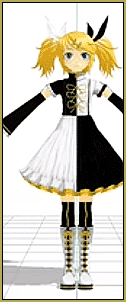
Poor Rin has Null bones ... ! You can Translate PMX Models into English! ... LearnMMD.comA few months ago I made a video tutorial about translating PMD models from Japanese to English. This makes using your Japanese models so much easier! Everything from attaching an accessory to a model to selecting a particular bone on a model is much less of a chore when you can read the bone names in English. And saving your work to a PMM file that wont crash MMD when you try to open it later is just one more of the benefits. Translating your model into English is a very good thing to do.

But what about those PMX models? How do I sort out all those Nulls and missing facials? Am I stuck with them that way? … No!
As it turns out… there is a PMX editor.

ZoidsFanatic’s article on fixing missing facials gives us a link for a PMX editor download. COOL!!

http://ibozo.deviantart.com/art/PMDEditor-0139-and-0219-english-translation-375517501

Thank You Zoids!

So I immediately set out to figure out how to use my new PMX editor.

Here is the video tutorial on how to translate a PMX model into English:
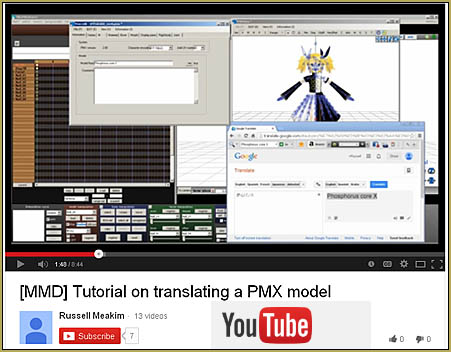
See my YouTube video showing how to translate PMX models into English using a PMX editor! ... LearnMMD.com

Enjoy!


– SEE BELOW for MORE MMD TUTORIALS…


— — —


– _ — –


Visit the LearnMMD.com Homepage! Plenty of Mikumikudance instruction and info!

More MMD Tutorials...

Subtex slot for MMD models in PMXE

What is subtexture?  What is subtex?  How do I use subtex for MMD models?  How ...read more

Creating and Editing UV Morphs for MMD Models

How can I make UV morphs in MMD? What can you do with UV morphs? ...read more

Fixing white models and accessories that don't follow in PMXE

Why do imported objects turn white?  Why don't imported accessories move right?  How can I ...read more

PMXE weight painting tools and deformation types for new MMD models

What is weight painting? What is skinning? How can I paint weights in PMXE? What ...read more

Understanding PMXE Materials: Ambient, Diffuse, Specular, Reflect and More!

What are PMXE materials? What is ambient, diffuse, and specular? Where can I find PMXE ...read more

Use the PMXE Transform Window to edit your MMD models!

How can I edit models?  How can I make my selfie model for MMD? What ...read more

Fixing Broken Models, Fixing Facial Names, MMD Tutorials, PMX Editor, Translate Japanese Models, xxbodger Tags:PMX Editor

Post navigation

Previous Post: How to make a Portal in MMD: blast a hole in the wall!
Next Post: How to make multi-part videos in MikuMikuDance

Related Posts

  • MMD Fill Lights Part 1 (Half-Lambert Shader) Half-Lambert Shader
  • Beamman’s MME DropShadow effect for MikuMikuDance Beamman's DropShadow effect
  • Open MikuMikuDance and enjoy it for the fun of it!
    Open MikuMikuDance… just for the fun of it! MMD Basics
  • MME Quartz Effect Refracts Reflections All Around! MMD Tutorials
  • My new MMD Action Video was fun to make! "the making of" my video
  • Fixed version of the PluginManager featured image. Well, slightly fixed.
    MMD Plugin Manager… I Found a Treasure! MMD Tutorials

More Related Articles

Teto replies! Fixing white models and accessories that don’t follow in PMXE Bandages
PMXEditor Quickly Edits MMD Model using Downloaded Parts BigPerryman
MME FishEye Lens effect also gives nice scene transitions! MMD MME Fisheye Lens effect offers Scene Transitions & Cropping Fisheye Lens effect
MMD Starry Winds Effect Makes Amazing Night Time Scenes! MMD Tutorials
Easily Transfer an Accessory to a Dummy Bone from Model’s Hand in MMD Accessory Manipulation/Adjust
Learn to Edit MMD Effects by Editing Raycast Materials Bandages

Comments (6) on “Translate PMX models to English using a PMX editor”

  1. John says:
    October 8, 2020 at 7:03 am

    Is it possible to translate and save a pmd model using the pmx editor?

    Reply
    1. Reggie_Dentmore says:
      October 8, 2020 at 7:33 am

      In the new 0524F version, it can save only as a PMX… if you DO want to keep it PMD, use the 0139 version. It was our recommended version before this newer version. The 0139 version let’s you save as PMD.
      — Reggie

      Reply
      1. John says:
        October 8, 2020 at 8:02 am

        I need to keep the PMD because some effects like KiraKira have a PMD controller and the controller doesn’t work if I save it as PMX. And I can’t use PMD Editor 0139 because it doesn’t work on Windows 10. Is there a way to make a a translated PMX controller work for the effect?

        Reply
        1. KillerBeer says:
          October 8, 2020 at 10:14 am

          It is possible. You need to open the .fx file of the effect in a text editor that correctly recognizes Japanese symbols (Notepad++ is my choice, though if you have your own preference, it’s all right), find the controller’s file name, and replace “pmd” with “pmx”.

          float3 ControllerPos : CONTROLOBJECT < string name = "Controller_0.pmd“; string item = “センター”; >;

          Reply
          1. John says:
            October 8, 2020 at 10:26 am

            Thank you. Cheers

            Reply
          2. Reggie_Dentmore says:
            October 8, 2020 at 3:54 pm

            Thanks, KB… that was new to me.

            Reply

Leave a Reply Cancel reply

Your email address will not be published. Required fields are marked *

Download the latest version of MikuMikuDance!
See the MMD Step-by-Step instructions page!
Learn how to make your own MMD motions!
LearnMMD.com
  • Download Reggie Dentmore's "Hand Pose Collection" on LearnMMD.com
    MMD Hand Poses make Animation Easier Animation Shortcuts
  • Beamman’s Water v5 Effect needs Editing before you can use it! Beamman's Water v5
  • Best Way to Run MMD on a Mac Kazumi
  • .spa VS .sph sphere texture file types in PMDE / MikuMikuDance MMD.
    PMD Editor Basics: .SPH and .SPA Files Add Sparkle! PMDE/PMXE tutorials
  • Take full control of MME Effects by editing .fx files Beamman's Burner effect
  • Move the 3 .dll files from the MME Download folder into the main MMD Folder.
    Download MME v037 in English MMEffects for MMD MikuMikuDance MMD Tutorials
  • MME fireintheskies effect
    MME FireintheSkiesEffect gives floating flame and embers! FireintheSkiesEffect
  • Animate MMD ballet pirouette motion Creating Motions

Copyright © 2022 Learn MikuMikuDance – MMD Tutorials – Free 3D Animation Software and Instructions..

Powered by PressBook Premium theme

Go to mobile version