


Skip to content
Learn MikuMikuDance – MMD Tutorials – Free 3D Animation Software

Learn MikuMikuDance – MMD Tutorials – Free 3D Animation Software

Download Free Animation Software – Let's Learn How to Do Everything!

  • Step-by-Step MMD instructions
  • DOWNLOADS
  • Troubleshoot, Fix MMD
  • Site Contents
  • Reggie Replies Q&A
  • Homework!
  • What IS MMD?
    • Download MikuMikuDance Newest Latest Version of MMD
  • “HOW TO”
    • Raycast RAY-MMD Effect Tutorials
  • BONUS PAGES
    • Why convert PMD models to PMX?
  • HALL of CHAMPIONS
  • Tutorial Categories
  • About
    • Privacy Policy
  • Toggle search form
  • MMD Credit Helper and PMMLookupper File Management / Organization
  • Otome, CannonParticle, and Heaven Effects in all their glory!
    Using Some Cool Effects in MikuMikuDance. CannonParticle
  • Ray-MMD demonstration of MMD ships
    Ray-MMD Demonstration “Battle stations … all hands on deck!!!” Battleship Models - MMD
  • Beamman’s MME SelfFreeze Effect for MikuMikuDance 7.39 MME Effects Tutorials
  • Select Japanese Shift JIS from the Convert dropdown in Notepad++.
    Read Japanese READ ME Text Files with Notepad++, Google Translate Navigating Japanese Pages
  • Download Table Lamp Accessory ON and OFF Downloading New Models
  • Customized Skydome replace stages, enhance MMD animations MMD Tutorials
  • Find New MMD Models – MMD Resources Hunting! Downloading New Models

How to sign up and Upload to Piapro!

Posted on September 12, 2014July 30, 2015 By HollyLawliet 2 Comments on How to sign up and Upload to Piapro!

A feature article by HollyLawliet on LearnMMD!“Uwahh~ mamama and C’mell have so many cool models! But How and where do I download them?” How do I sign-up with Piapro? “I finally downloaded a model but it’s just an X file! Help!”

–

Visit Piapro ... kind of a Japanese Deviant Art page ... related to Nico Nico Douga. ... Use your Nico Nico login!

How to sign up and Upload to Piapro!

Piapro is a Japanese site built for distributing or showing off artwork of vocaloids, whether it’s 3D or just a drawing. Many famous model makers upload their works to Piapro. Yet, the whole site is Japanese. Anyone who’s english will have a hard time finding out what everything means. So here’s a tutorial on how to sign up to piapro, how to upload to piapro, and how to understand the rules for everyone’s models!

Get signed-up!

First, let’s sign up here is the sign up page your going to see a lot of text, that is the user agreement. You can just scroll down and click the green button to continue. On the next page you will see a blank box and a small warning about gmail. In the blank box, type in your email, the warning about gmail is just saying the verification email might end up in your spam folder. After typing in your email, click the green button.

The next window will be telling you it’s sent you a verification email, you can close this tab. Just go to your email and click the link … it will continue the registration.

Your going to see a page that looks somewhat like this:

ご希望のピアプロID *:  Type in what you want your username to be here

パスワード *: password goes here

パスワード確認 *: password conformation (type in your password again_

Twitter ID: (This is optional)

アイコン画像 *:  This is asking about your avatar, you can upload a file of your own or use one they already have uploaded

生まれ年/月 *:

tableA

The first one asks for your birth-year,

The second box asks for your birth-month

ニックネーム:  Nickname, what someone calls you for short

プロフィール: Bio for your profile

あなたの創作分野 *: This is asking what your specialty is, select the one that says 3D

The next page is just asking for conformation, click the green button. The next page asks for your phone number for security purposes. It won’t properly accept foreign phone numbers. this can be skipped.

Now we’ve signed up to Piapro! Yay!

Uploading to Piapro

After signing up you should be able to click 作品一覧 and go to your uploads, you don’t have any yet. You’ll see a yellow bar at the top with 8 buttons on it. Click the second button. I’d like to point out here, that I’m talking about Uploading MODELS to Piapro. I don’t know how to upload plain artwork.

You should see this:
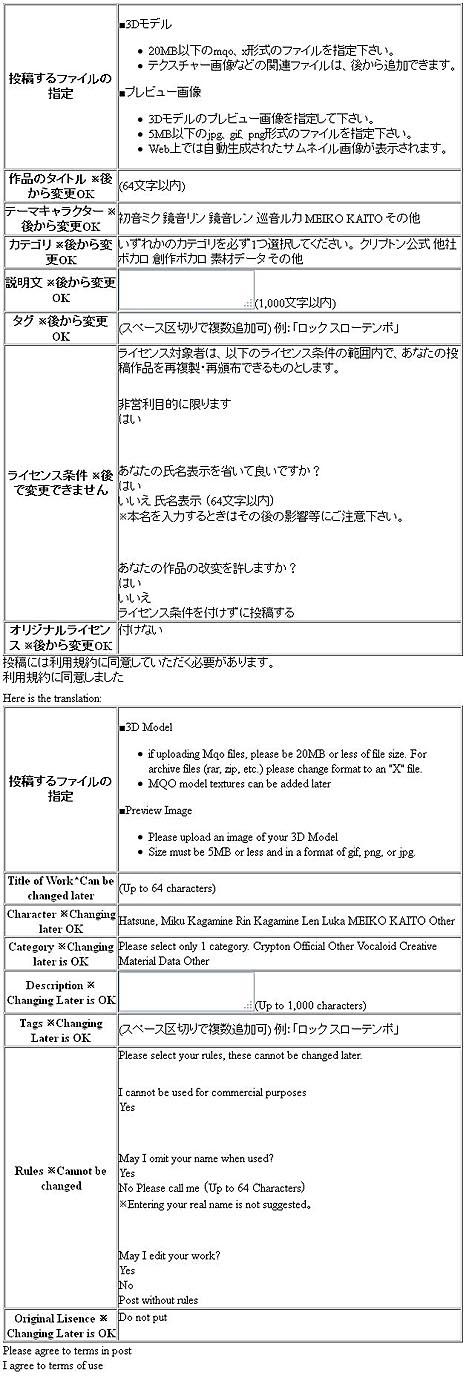
TableB1

—
Great! You’ve uploaded your first work!

Now lets explain X files…

“X” files are replacements of ZIP or RAR files. They can’t be opened unless you change the file extension to .zip or .rar (whichever you use). You can do this by clicking rename and removing the X and replacing it with zip or rar, whichever you use.

Enjoy Piapro!

Miku by Mamama

Now, lets explain how to find Models. Do you see the search bar up at the top? You can click in vocaloid names there to find models of them. Most of the time, you’ll have to click
3Dモデル which means 3D model. You also might have to type in the vocaloid’s name in Japanese!
You can copy and paste the names from this little list I’ve made:

Miku – 初音ミク
Luka – ルカ>
Gumi – グミ>
Meiko – メイコ
Rin – りん
Ren/Len – レん


EDITOR’S NOTE: You might try translating Japanese pages using Google Translate. It usually does a poor job of translating Japanese to English … but you can often see some key-words that help you to grasp the meaning. You can copy/paste blocks of text into the Translate window … or you can paste the Japanese page’s URL and then click that URL on the English side to see the whole page translated. On Piapro, this last method did not work well. Just copy/paste blocks of text for a better translation.


– SEE BELOW for MORE MMD TUTORIALS…


— — —


– _ — –


Visit the LearnMMD.com Homepage! Plenty of Mikumikudance instruction and info!

More MMD Tutorials...

Enjoy the "camera Angles WEIRD in Anime" meme...

Enjoy the "camera Angles WEIRD in Anime" meme... This image is from The Slayers - NEXT, ...read more

Reader asks how to create MMD artwork... stuff like posing, camerawork?

A reader asks... Is there a tutorial on how to create MMD artwork, like those you ...read more

Learn MikuMikuDance in Small Steps! New LearnMMD Video Series

Learn MikuMikuDance in Small Steps. Where can I find easy-to-follow MMD instructions on YouTube? How ...read more

Apply Multiple Effects on an Entire MMD Model Using M4Layer Effect

How can I apply multiple effects to an MMD model? Can I use more than ...read more

MMD Plugin Manager... I Found a Treasure!

What sorts of MMD Plugins are there? MMD Plugin Manager? MMD Plugins. Plugin MMD. More ...read more

2025: Hatsune Miku is 18... but she is designed to be always 16 Years. Old by design and in reality!

Finally, in 2023, Hatsune Miku is 16 years old! but in August of 2025, she ...read more

HollyLawliet, MMD Tutorials, Piapro - a Japanese art page

Post navigation

Previous Post: A Discussion of unloved Vocaloids
Next Post: Creating an animation using MMD, MikuMikuDance!

Related Posts

  • Making stages/accessories for MMD using Sketchup Google SketchUp and MMD
  • Learn to Edit MMD Effects by Editing Raycast Materials Bandages
  • LearnMMD.com _ MikuMikuDance MMD Tutorials
    DO NOT reduce AVI file sizes that go up to YouTube HD Videos in MMD
  • Professionally made models FOUND! Downloading New Models
  • Beginner’s Guide: Using Ray-MMD ver 1.5.0 – Latest version of Raycast MMD Tutorials
  • Keep the Center-Bone when adding Mother-Bone to an older model MMD Tutorials

More Related Articles

Miku Short Film Featured Anime Shorts – Five minutes worth of animation, maybe three! Animation Shortcuts
MMD EVERGLOW – Adios【Motion by Ureshiiiiii】- Free Download Motion and WAV "the making of" my video
Cry Baby Motion DL featured image Free MMD Cry Baby Motion DL from DA’s Smol-Hooman "the making of" my video
Quick-Start Basics of MMD to get you started! GloriaTheAnimator
Post Effect cannot be specified Fix the “Post Effect cannot be specified” error Chris no Akumu
The Making of: Sleepover Gone Wrong (REMAKE) "the making of" my video

Comments (2) on “How to sign up and Upload to Piapro!”

  1. Satotheneko says:
    November 10, 2023 at 8:42 pm

    for some odd reson it keeps saying “Please enter in single-byte alphanumeric characters.”
    Does ANYONE know how to fix this? :(

    Reply
    1. Reggie_Dentmore says:
      November 10, 2023 at 8:52 pm

      Google it. “single byte alphamumeric characters”

      Reply

Leave a Reply Cancel reply

Your email address will not be published. Required fields are marked *

Download the latest version of MikuMikuDance!
See the MMD Step-by-Step instructions page!
Learn how to make your own MMD motions!
LearnMMD.com
  • MME Quartz Effect Refracts Reflections All Around! MMD Tutorials
  • MMD Dummy Bones may be your most important models! Dummy Bones
  • A MikuMikuDance Beginner’s Easy First Dance Intro to MikuMikuDance
  • The TrueCamera Effect enhances the 3D look of your MMD animation.
    MME TrueCamera Effect enhances 3D appearance Reggie Dentmore
  • What!
    How to Load Models, Motion, and Music Data into MikuMikuDance ARIZONA
  • MMD CameraSmoother Tool smooths camera motions! CameraSmoother Tool
  • "Gothic Teto" by Nigamon and "Mouse Cursor" by SachiShirakawa
    Collecting MMD Models, Music and Accessories for Beginners ARIZONA
  • LearnMMD Video Dojo Expo competition: open to all MMDers!
    Voting is closed – You Chose the Winners! CONTESTS

Copyright © 2022 Learn MikuMikuDance – MMD Tutorials – Free 3D Animation Software and Instructions..

Powered by PressBook Premium theme

Go to mobile version