Skip to content
Learn MikuMikuDance – MMD Tutorials – Free 3D Animation Software

Learn MikuMikuDance – MMD Tutorials – Free 3D Animation Software

Download Free Animation Software – Let's Learn How to Do Everything!

  • Step-by-Step MMD instructions
  • DOWNLOADS
  • Troubleshoot, Fix MMD
  • Site Contents
  • Reggie Replies Q&A
  • Homework!
  • What IS MMD?
    • Download MikuMikuDance Newest Latest Version of MMD
  • “HOW TO”
    • Raycast RAY-MMD Effect Tutorials
  • BONUS PAGES
    • Why convert PMD models to PMX?
  • HALL of CHAMPIONS
  • Tutorial Categories
  • About
    • Privacy Policy
  • Toggle search form
  • Rin is excited about the MomiCup
    How to enter The MomiCup and other YouTube MMD Contests and Parties. ARIZONA
  • Download instant fight scene motion by Mahlazer Animation Shortcuts
  • Knock-out the Background as you Render to Picture in MMD Add Background Pictures and AVI
  • Animation Lag may “blur” your playback in MikuMikuDance Animation Lag
  • MMD Augmented Reality AR on Android Devices Random Thoughts & Visions
  • Import models from Source engine based games (HL2, Portal, TF2 etc.) Blender
  • Download these 1052C-Re0710 MMD Models and enjoy!
    Download Early Miku 1052C-Re0710 MMD Models from 2010! Downloading New Models
  • LearnMMD.com _ MikuMikuDance MMD Tutorials
    A Discussion on the subject of Bone Deformation Hierarchy Bandages

Creating an animation using MMD, MikuMikuDance!

Posted on September 14, 2014August 14, 2016 By LoverofVocaloid No Comments on Creating an animation using MMD, MikuMikuDance!

See all of the Feature Articles by LearnMMD's LoverOfVocaloid!Where do I get the inspiration to make a animation? How do I start?

Creating an animation using MMD…

Creating an animation is difficult. Everyone knows that. The worst part is when Miku looking alert ... Creating an animation is a challenge!you open up MMD… And you are greeted by that blank, empty screen. Yup, totally inspirational stuff right there!
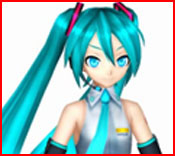
Recently, I created an animation, and it was less than a minute long. It took me about 3 hours to make, with over 1000 frames. Where I got the inspiration? I was looking at some MMD videos on YouTube, and came across one where it was Black Rock Shooter vs Miku Hatsune. I thought that maybe I could create something like that, so I opened up MMD. That was the first time the blank screen didn’t put me down! I set to work.

https://youtu.be/nI4FdAXyRG8

To start with an animation, you need to think about what’s the objective/what is going to happen. I wanted a fight scene, so I loaded up my Miku Hatsune model and my Miku Zatsune model.

I used Miku Zatsune because she looks more like the evil/devilish type. Originally, I set the scene in a dark world with little background. But since my computer was too laggy (I blame Windows Vista) I had to stick with a white background. But that doesn’t mean you have to do Zatsune is expecting Miku ... the pose trys to carry the emotion. Remeber the power of the pose as you create an animation.the same! Hopefully your computer/laptop doesn’t ‘NOPE’ out of every situation!
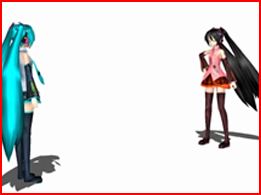
I wanted it to look like Zatsune was ‘expecting’ Miku, in that ‘I was expecting your arrival’ kind of way. So I made her figure more relaxed and closed her eyes, to give her ‘the look’. In return, I made Miku look prepared and alert, using her facial expressions. It turned out quite well, in my opinion. Remember, the facial expressions can say a lot about what the person is feeling or what their next action is going to be. The same goes for the poses.

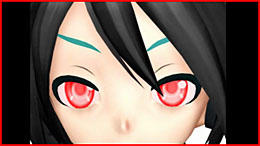
After Miku asked Zatsune why she was here, I Zatsune's close-up says it all!zoomed in on her eyes to give a tension effect – to tell the watchers that something was going to happen. For Zatsune flying, I used her center bone to lift her into her air, making it look like she was floating. For her walking, I used my walking motion.
The fight scene was by far the hardest part – I had to try and give the right atmosphere, the right camera space and make it look like Hatsune could fight Zatsune off. It would have been a bit better if I had timed Hatsune’s movements a bit after Zatsune’s, but I left it.

Finally, I managed to finish the animation with Hatsune getting beaten Miku's down! ... Will Zatsune triumph??down to the ground, and Zatsune looking down at her in triumph. In the fight scene Hatsune’s expression was scared, showing that she had the lower side in the battle. Zatsune still had the angry expression.
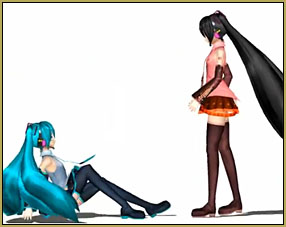
Throughout all of this, I still had one problem that I was unable to fix – Zatsune’s hair. The hair kept on getting in the way of the small fight scene, and I coudln’t do anything about it. It would have been nice if the hair had bones, but it didn’t so I had to make do.

And that’s it! Yes, I had some difficulties along the way, but in the end I managed to make a successful small MMD video. It turned out just how I wanted it to look like. It didn’t have the same feel as the other MMD video did, but it still had a good atmosphere.

So, what are you waiting for? Get creative!


– SEE BELOW for MORE MMD TUTORIALS…


— — —


– _ — –


Visit the LearnMMD.com Homepage! Plenty of Mikumikudance instruction and info!

More MMD Tutorials...

Reader asks how to create MMD artwork... stuff like posing, camerawork?

A reader asks... Is there a tutorial on how to create MMD artwork, like those you ...read more

Learn MikuMikuDance in Small Steps! New LearnMMD Video Series

Learn MikuMikuDance in Small Steps. Where can I find easy-to-follow MMD instructions on YouTube? How ...read more

Apply Multiple Effects on an Entire MMD Model Using M4Layer Effect

How can I apply multiple effects to an MMD model? Can I use more than ...read more

MMD Plugin Manager... I Found a Treasure!

What sorts of MMD Plugins are there? MMD Plugin Manager? MMD Plugins. Plugin MMD. More ...read more

2025: Hatsune Miku is 18... but she is designed to be always 16 Years. Old by design and in reality!

Finally, in 2023, Hatsune Miku is 16 years old! but in August of 2025, she ...read more

SEARCH LearnMMD.com... it's Easy!

Search LearnMMD.com to find your answers! With the posting of this article, LearnMMD.com has 758 tutorials ...read more

"the making of" my video, Intro to MikuMikuDance, LoverOfVocaloid, MMD Basics, MMD Tutorials, Random Thoughts & Visions

Post navigation

Previous Post: How to sign up and Upload to Piapro!
Next Post: My new MMD Action Video was fun to make!

Related Posts

  • How to subtitle MMD videos MMD Tutorials
  • Japanese Maid Cafe poster you can make!
    Making your own Japanese Maid Cafe poster Random Thoughts & Visions
  • LearnMMD.com _ MikuMikuDance MMD Tutorials
    Convert SFM/GMOD Models Into MMD Flawlessly! Haztract
  • The Making of “Boum Boum Boum”: Everything is More Sophisticated in French "the making of" my video
  • A better MMD followcam in PMXE with physics and IK bones Animation Shortcuts
  • The Cheaplens Effect is easy to use and very powerful!
    MME CheapLens Effect controls the “Look” of your MMD video CheapLens Effect

More Related Articles

Once there was a war… the making of my “Paint it black” MMD video "the making of" my video
Different Eye Textures in one model using PMXE JuneTarzan
Make Your YouTube Channel Popular with Engrossing Introductions MMD Basics
LearnMMD’s MikuMikuDance Animated GIFs Now Collected as a Bonus Page! Random Thoughts & Visions
My Top 6 Favorite Shader Effects for MikuMikuDance GloriaTheAnimator
MMD has an EXPAND function that lets you adjust a motion's speed. EXPAND function modifies MMD motion tempo EXPAND a motion

Leave a Reply Cancel reply

Your email address will not be published. Required fields are marked *

Download the latest version of MikuMikuDance!
See the MMD Step-by-Step instructions page!
Learn how to make your own MMD motions!
LearnMMD.com
  • Getting Re-Excited about MikuMikuDance … Happy Birthday Miku! Intro to MikuMikuDance
  • Keyboard Shortcuts to the Menus Functions-Copy-Paste-Expand
  • Video Dojo Expo 2 Champion: MMDv Video Dojo Champions
  • MMD Model Noodle smiles while carrying the weight of the modern world on her shoulders!
    Download MMD Model NOODLE by vasilnatalie Downloading New Models
  • Video Dojo Expo 1 Champion
    Video Dojo Expo 1 Winner: EmberAce216 EmberAce216
  • DropShadow_dual Creates Two DropShadow Effects at Once! Chestnutscoop
  • Zelda09pokemon's Miku with dark shades and black jacket.
    Download New MMD Model of Miku by Zelda09pokemon Downloading New Models
  • Formatting Captions With MMM MikuMikuMoving Bullwood

Copyright © 2022 Learn MikuMikuDance – MMD Tutorials – Free 3D Animation Software and Instructions..

Powered by PressBook Premium theme

Go to mobile version