Skip to content
Learn MikuMikuDance – MMD Tutorials – Free 3D Animation Software

Learn MikuMikuDance – MMD Tutorials – Free 3D Animation Software

Download Free Animation Software – Let's Learn How to Do Everything!

  • Step-by-Step MMD instructions
  • DOWNLOADS
  • Troubleshoot, Fix MMD
  • Site Contents
  • Reggie Replies Q&A
  • Homework!
  • What IS MMD?
    • Download MikuMikuDance Newest Latest Version of MMD
  • “HOW TO”
    • Raycast RAY-MMD Effect Tutorials
  • BONUS PAGES
    • Why convert PMD models to PMX?
  • HALL of CHAMPIONS
  • Tutorial Categories
  • About
    • Privacy Policy
  • Toggle search form
  • Gotta Sing... Gotta Dance! LearnMMD's Video Dojo Expo-3!
    Gotta SING… Gotta DANCE! LearnMMD’s Video Dojo Expo-3! CONTESTS
  • Keyboard Shortcuts and Easy Moves Keyboard Shortcuts
  • You can enlarge or reduce and Accessory by adjusting the Si value in MikuMikuDance.
    Use Accessory Manipulation fields to position/adjust Accessories Accessory Manipulation/Adjust
  • A better MMD followcam in PMXE with physics and IK bones Animation Shortcuts
  • Barbarians disregarding creative rights destroy MMD for all of us. Keep the Faith-MMD Credits/Sharing
  • Hitogata Brings Face Tracking to MMD Animation Resource
  • No Diamonds Appear in Frame Chart in MMD and How to Fix It Mae Blythe
  • Use the Silhouette Effect to create White Silhouettes!
    Creating White Silhouette Models in MikuMikuEffects ARIZONA

Animation Fade helps MMD scene transitions

Posted on June 15, 2015July 24, 2015 By Zazi 1 Comment on Animation Fade helps MMD scene transitions

See all the articles written by Zazi on LearnMMD.comHow do I make an Animation Fade scene transition? What is an animation fade? Why would I want to fade one scene into another?

The power of the Animation Fade…

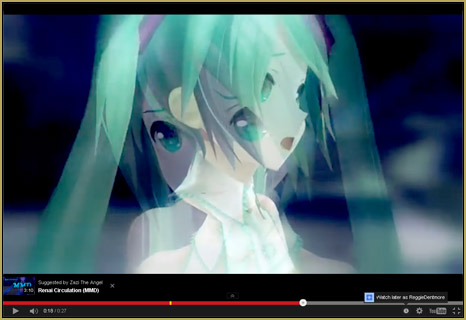
There is great power in an animation fade. It can imply action or a look Animation Fade lets you join scenes seemlessly indicationg a transition of image or of thought.into the past of the singer, or a look into their minds as a glimpse of what they’re talking/singing about.
How do you do this… Lets say you have a sweet fight scene you’d like to incorporate into your animation…  but you’ve already done the lip sync and animation for a PV (a long, uninterrupted single-scene shot, as most MMD music videos are)… just render the original scene as one video and the fight scene as a second video, and, using a video-editing program like Sony Vegas or Microsoft MovieMaker, find good spots in that video to cross fade-in the fight-scene (key here is to make sure its an emotional or climactic part of the song) see the below videos for references:

 Fade onto yourself??

Now lets say you want the animation to have a sort of fade-effect but to fade-in and -out on itself. It’s the same process; though you’d have to fix up the lip-sync a bit. As with this video preview, here, which I have been working on…

The key with this type of thing is going to be to have many camera angles to choose from as you edit.  I recommend that you render at least 2 versions of the same animation using a few different camera angles.

A final note… a little off-topic!

After you have made your video and posted it to YouTube, try to get the best possible image to be your thumbnail image on YouTube. I like to stress the idea that you could have the best video ever… but if your thumbnail doesn’t look artistic, you won’t get many views. ^ _^

Have fun with MMD… try out this Animation Fade idea!

<


– SEE BELOW for MORE MMD TUTORIALS…


— — —


– _ — –


Visit the LearnMMD.com Homepage! Plenty of Mikumikudance instruction and info!

More MMD Tutorials...

Enjoy the "camera Angles WEIRD in Anime" meme...

Enjoy the "camera Angles WEIRD in Anime" meme... This image is from The Slayers - NEXT, ...read more

Reader asks how to create MMD artwork... stuff like posing, camerawork?

A reader asks... Is there a tutorial on how to create MMD artwork, like those you ...read more

Learn MikuMikuDance in Small Steps! New LearnMMD Video Series

Learn MikuMikuDance in Small Steps. Where can I find easy-to-follow MMD instructions on YouTube? How ...read more

Apply Multiple Effects on an Entire MMD Model Using M4Layer Effect

How can I apply multiple effects to an MMD model? Can I use more than ...read more

MMD Plugin Manager... I Found a Treasure!

What sorts of MMD Plugins are there? MMD Plugin Manager? MMD Plugins. Plugin MMD. More ...read more

2025: Hatsune Miku is 18... but she is designed to be always 16 Years old, by design and in reality!

Finally, in 2023, Hatsune Miku is 16 years old! but in August of 2025, she ...read more

Animation Shortcuts, Making Videos - Rendering to AVI, MMD Tutorials, Zazi

Post navigation

Previous Post: Storyboards organize your MMD animation
Next Post: Beamman’s MME DropShadow effect for MikuMikuDance

Related Posts

  • MME effect Kamitachi – Night breeze silhouette shader of Kama Kamitachi - Silhouette
  • Crazy Animation Creation yields fun video and good practice! "the making of" my video
  • Applause for Miku!
    MikuMikuDance turns Six. ARIZONA
  • The Making Of my “I Know Those Eyes / This Man Is Dead MMD” video "the making of" my video
  • An MMD town stage: Making Kerorin Town Great Again – Part 3 MMD Stages
  • Cycles materials for textures model and nodes
    Cycles Materials For Textures in Blender: Nice Textures for MMD Fast! Blender

More Related Articles

Let your MMD model breathe and move while standing still! Creating Motions
MME Collapse Effect requires PMDE model edit Collapse Effect
Make MMD Background AVI using WAV and AviUtl Make MMD Background AVI Using AviUtl WMV Files "the making of" my video
Ray-MMD: Lost in the Fog Ray-MMD Localized Fog Effects for stunning MMD scenes MMD Tutorials
Enjoy the “camera Angles WEIRD in Anime” meme… Animation Shortcuts
Understanding MME Render Targets for Miku Miku Dance Effects Adult Shader effect

Comment (1) on “Animation Fade helps MMD scene transitions”

  1. Elizabeth says:
    September 2, 2025 at 10:07 am

    I saw “Miku”, possibly misspelled? I’ve used spellingreport.com myself for quick confirmations.

    Regards,
    Elizabeth Williams

    Reply

Leave a Reply Cancel reply

Your email address will not be published. Required fields are marked *

Download the latest version of MikuMikuDance!
See the MMD Step-by-Step instructions page!
Learn how to make your own MMD motions!
LearnMMD.com
  • LearnMMD Video Dojo Expo competition: open to all MMDers!
    Voting is closed – You Chose the Winners! CONTESTS
  • Different Eye Textures in one model using PMXE JuneTarzan
  • The MMD 7.39 FRAME MENU Options MENU Option Descriptions
  • Download Previous Versions of MikuMikuDance from LearnMMD.com! Download MikuMikuDance
  • Import models from Source engine based games (HL2, Portal, TF2 etc.) Blender
  • KiraKira-sparkleV2 beautiful colored sparkles.
    KiraKira-sparkleV2 MME Effect adds COLOR to KiraKira! KiraKira-SparkleV2
  • Chrysanthemums are lovely with the Fireworks effect!
    Using the Fireworks Effect In MikuMikuDance ARIZONA
  • Keep The Faith MMD
    Use proper MMD Etiquette when Downloading Models for MMD Intro to MikuMikuDance

Copyright © 2022 Learn MikuMikuDance – MMD Tutorials – Free 3D Animation Software and Instructions..

Powered by PressBook Premium theme

Go to mobile version