Skip to content
Learn MikuMikuDance – MMD Tutorials – Free 3D Animation Software

Learn MikuMikuDance – MMD Tutorials – Free 3D Animation Software

Download Free Animation Software – Let's Learn How to Do Everything!

  • Step-by-Step MMD instructions
  • DOWNLOADS
  • Troubleshoot, Fix MMD
  • Site Contents
  • Reggie Replies Q&A
  • Homework!
  • What IS MMD?
    • Download MikuMikuDance Newest Latest Version of MMD
  • “HOW TO”
    • Raycast RAY-MMD Effect Tutorials
  • BONUS PAGES
    • Why convert PMD models to PMX?
  • HALL of CHAMPIONS
  • Tutorial Categories
  • About
    • Privacy Policy
  • Toggle search form
  • Raycast Ray-MMD Toon Shader
    Ray-MMD Toon Shading Basics MMD Tutorials
  • Make a “Dream Fighter” MMD Music Video "the making of" my video
  • Making MMD Pictures: JPG vs PNG – which is better? MMD Tutorials
  • MMD Fill Lights Part 2 – (Ray-MMD) MMD Tutorials
  • Update previous MMD to MMD 9.32 with no tears … Download MikuMikuDance
  • Fixed the MMD 8.05 Configuration Error Failed to Start MikuMikudance Reggie Dentmore
  • MMD Batokin Island stage is MORE than a beach MMD Basics
  • The Making of “We Are Broken” Full Length Animation "the making of" my video

Beamman’s MME DropShadow effect for MikuMikuDance

Posted on June 20, 2015July 24, 2015 By NicoleNakanoMMD 1 Comment on Beamman’s MME DropShadow effect for MikuMikuDance

See all of the articles by LearnMMD's NicoleNakanoMMD!How do I use the Beamman’s DropShadow effect? Where can I download the MME DropShadow effect? How do I make it work?

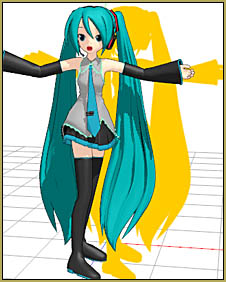
Beamman's DropShadow effect for MME and MikuMikuDance.Using Beamman’s DropShadow effect…

Have you downloaded the Drop Shadow effect and don’t know how to use it ?
Today I’ll teach you how to apply Beamman’s drop shadow effect!

1.) Download it on : http://ux.getuploader.com/BeamMan2/download/4/DropShadow_0_3.zip

When you get there, it’s a bit confusing… just click the button shown in the image below:

Download Beamman's DropShadow Effect for MME and MikuMikuDance.

Another page will open… but don’t click anything…  just wait a moment and your download will begin.

2.) Unzip the file by using Winzip or WinRAR (It’s up to you, but I recommend using WinRAR)

3.) Open MMD and load your model, make sure you have MMEffect. (If you don’t have MME, you can download it from our downloads page ^^)

4.) Click Load in the accessory tab and navigate to your drop-shadow folder, click the DropShadow.x file.

5.) At the accessory tab,  set the X coordinate to 4.0000

And… guess what ? You’re done ! Yay !

If you don’t see the bright yellow effect, you will need to click the MME in the upper right corner of MMD and click Effect Mapping… and click on the effect, select Set Effect, and click on the DropShadow.fx file. Now you should be in business!

Search online for more info about using this effect!


– SEE BELOW for MORE MMD TUTORIALS…


— — —


– _ — –


Visit the LearnMMD.com Homepage! Plenty of Mikumikudance instruction and info!

More MMD Tutorials...

Enjoy the "camera Angles WEIRD in Anime" meme...

Enjoy the "camera Angles WEIRD in Anime" meme... This image is from The Slayers - NEXT, ...read more

Reader asks how to create MMD artwork... stuff like posing, camerawork?

A reader asks... Is there a tutorial on how to create MMD artwork, like those you ...read more

Learn MikuMikuDance in Small Steps! New LearnMMD Video Series

Learn MikuMikuDance in Small Steps. Where can I find easy-to-follow MMD instructions on YouTube? How ...read more

Apply Multiple Effects on an Entire MMD Model Using M4Layer Effect

How can I apply multiple effects to an MMD model? Can I use more than ...read more

MMD Plugin Manager... I Found a Treasure!

What sorts of MMD Plugins are there? MMD Plugin Manager? MMD Plugins. Plugin MMD. More ...read more

2025: Hatsune Miku is 18... but she is designed to be always 16 Years. Old by design and in reality!

Finally, in 2023, Hatsune Miku is 16 years old! but in August of 2025, she ...read more

Beamman's DropShadow effect, MMD Tutorials, NicoleNakanoMMD

Post navigation

Previous Post: Animation Fade helps MMD scene transitions
Next Post: Top-10 Best “motion-maker” MMDers on YouTube

Related Posts

  • My Top 6 Favorite Shader Effects for MikuMikuDance GloriaTheAnimator
  • An MMD Walking Motion: Creating it is easy! LoverOfVocaloid
  • The K Lite Mega Codec Pack 995 – The Ultimate HD Video compressor! HD Videos in MMD
  • create easy dance motions in MikuMikuDance... beginner tutorial
    Create MMD Dance Motion from Scratch – a beginners guide Creating Motions
  • YouTube thumbnail image is so important!
    Create your Most Attractive YouTube Thumbnail image "the making of" my video
  • Blackout Effect offers Fade-to-Black and fade-to-white!
    MME Blackout Effect offers Fade-to-Black and Fade-to-White Blackout Effect

More Related Articles

No Diamonds Appear in Frame Chart in MMD and How to Fix It Mae Blythe
Using BeamMan’s fluid2D Creates Fabulous MMD Under Water Scenes BeamMan's fluid2D
Exporting VSQX to VSQ for MMD! Kazuki Matsuoka
Use M4Layer Effect to add multiple effects onto your MMD model. Apply Multiple Effects on an Entire MMD Model Using M4Layer Effect M4Layer Effect
Ghost Effect for MME How to Use the Ghost Effect for MME! ARIZONA
Multiply of Bone Frame Position-Angle Resizes Motions to fit your Model CommanderZoey

Comment (1) on “Beamman’s MME DropShadow effect for MikuMikuDance”

  1. Ruru says:
    November 9, 2016 at 12:35 am

    I’m still having trouble. The screen just turns bright yellow

    Reply

Leave a Reply Cancel reply

Your email address will not be published. Required fields are marked *

Download the latest version of MikuMikuDance!
See the MMD Step-by-Step instructions page!
Learn how to make your own MMD motions!
LearnMMD.com
  • Optimise computer assets by culling unseen MMD model parts Chestnutscoop
  • Position stage near MMD coordinate axis center-line Accessory Manipulation/Adjust
  • Learnmmd.com hosts MMD Panel at San Japan 8 bit. ARIZONA
  • LearnMMD.com _ MikuMikuDance MMD Tutorials
    No need to “re-download” again and again… Random Thoughts & Visions
  • The Making of “Viva La Vida MMD” by Zazi The Angel "the making of" my video
  • Using the Blood Effect in MMD MikuMikuDance Accessory Manipulation/Adjust
  • When you add background AVI files, you can motion trace!
    Loading Background AVI Files into MMD (2021 Edition) Add Background Pictures and AVI
  • Easily Make Realistic Hair Texture for MMD Models Mae Blythe

Copyright © 2022 Learn MikuMikuDance – MMD Tutorials – Free 3D Animation Software and Instructions..

Powered by PressBook Premium theme

Go to mobile version