





Is there an easy first dance? How do I move Miku in MikuMikuDance? How do I make a smooth motion in Miku Miku Dance? LearnMMD MikuMikuDance Tutorials. What do I do first? What can I do first? Easy dance.
A Little Beginner’s “Jump Dance” to get you started …
When you open MikuMikuDance for the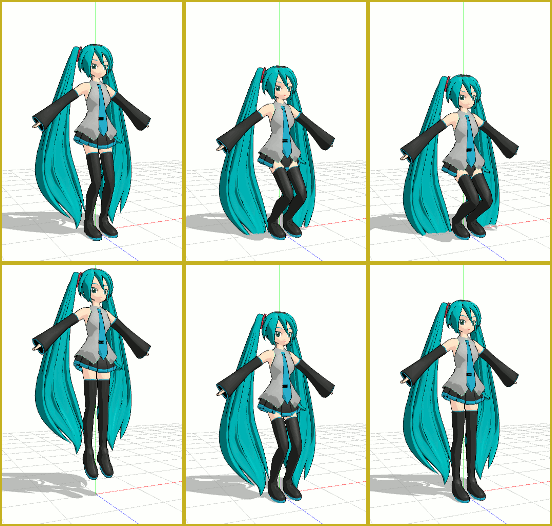 first time, you want to “do something” right away … and this simple jump dance is an easy first dance!
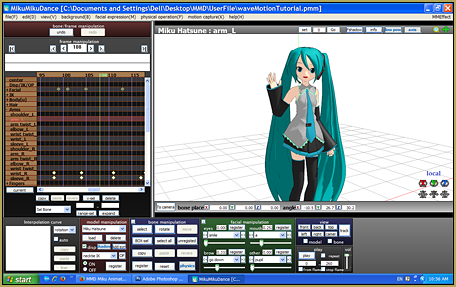
Select “New” from the File drop down. Then, from the small brown Model Manipulation Panel, choose LOAD … and pick a character … Miku Hatsune ? “:o). Click OK on the pop-up and see Miku standing there simply aglow with red and blue bones! See that the one bone that is RED is already selected for you. That is the Center bone … a key bone in controlling most characters. See on the Bone Chart … on the far left upper area of the screen … that CENTER is highlighted. At any time you can select any bone you wish by clicking its name on that chart.

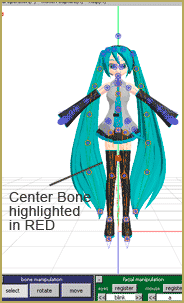
With the Center bone selected on the chart, go to the blue Bone Manipulation screen, click the MOVE button. Note that 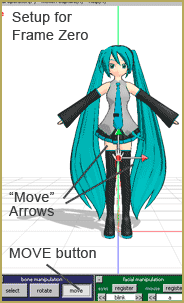 all the bones disappear and you have direction arrows on Miku. At this time we are only going to use the Green arrowhead. Click and drag that arrowhead and see how your character automatically bends at the knees or seems ready to fly as you move her up and down.
CLICK for large image
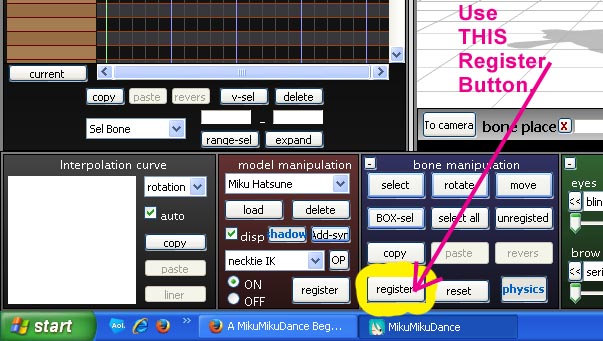
Set up the starting position with Miku standing at ease. See that the frame counter is at Zero. See that the Center bone is still highlighted and click Register to finish that frame. You will see the white Diamond by Center turn RED when it registered. Advance the frame counter to about frame 20. Move the green arrow down to make Miku crouch  until her knees are just above her ankles. Click Register. Advance the frame counter to 30 and move the center bone up until Miku is a foot, or two, above the floor and click Register. Advance the frame counter to 40 and lower Miku into a half-crouch and click Register. Move the frame counter to 45 and raise Miku to stand on her tip-toes and click Register. Advance the frame counter to 50 and place Miku in about the same position as frame zero. Click Register.
On the lower right of the main screen is the Play button. Try it out. Check the Repeat check box next to that Play button and watch the nice motion. SAVE the file with a name you choose … FirstDance ?
Below Play is a range window. This determines how many frames are in your animation. We only animated out to Frame 50 … but we can enter a bigger number to add a pause after that last Registered movement. Set the range to 75 and play … and play with repeat to see the effect of those extra frames. Set the range to 50 and the animation will look as it did. Click SAVE. Practice … practice … to learn how to do everything!


<
– SEE BELOW for MORE MMD TUTORIALS…
— — —
– _ — –

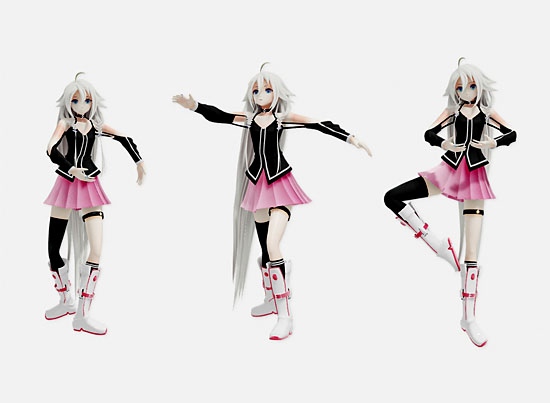



After you save your MMD Project how can you put it on YouTube or a website, etc.?
Under FILE is RENDER TO AVI. See this page for a quick intro: https://learnmmd.com/StartHere/Steps2.html
You will want to get a user account on YouTube … Easy and Free. Then … Upload your video. It can take hours, depending upon your connection speed and the size of your file. (MMD Video files are HUGE!) Be ready to write a description of your video and be ready to list your sources. Before you do it the first time, it’s scary! … but it’s easy and you will enjoy the experience! — Reggie
Its very choppy when she jumps!
Make the lines disappear … Under the VIEW menu is Display Coordinate Axis(G) … turn that off.
how do all the lines disappear exactly?Doesn’t work!
It still not working…:(
thx for the tutorial now i will send it on youtube
Thanks! Send it to YouTube? Be sure to give us the link! I subscribed to your channel today … looking forward to seeing what you do with MMD!
thanks alot now i how to load a model but don”t know why it does not show up on the scrren.
^_^
thank you!!! i think i will be able to figure this out :) this is my first time and im only 12!!! :D im excited ^.^ thank you so much!
Thank you for your question! Before you start collecting, make sure you have Winrar or 7zip. Getting models has gotten a little easier than even a year ago. Vocamix2684 wrote an article about mikudance.info; that would be my starting point. The site is organized by character and association. So look under Megurine Luka and you’ll see how many different models of there are. They are listed by the model maker (MMoDler- my term). It’s important to document and credit their work.
Another site I’ve used is MikuMikuDance Resource. What I like about these two sites is that you can preview the model before you download.
I hope I have given you a good basic starting point. If you have any more questions please look through the LMMD site there’s probably an article about it. If not, please don’t hesitate to contact us.
Have fun with this.
how can i get luka or any other characters? O.o
it worked thanx! x
whenever I do it she stays still and her hair just shakes about?
Try adjusting the gravity settings under the “Physical Operations(P)” tab … Click No Calculation. Search LearnMMD for gravity to see our articles about using gravity settings.
Thank you … Have fun with MMD! If we can help you, please ask!
i’m just start to learn MMD ~
so happy~