Skip to content
Learn MikuMikuDance – MMD Tutorials – Free 3D Animation Software

Learn MikuMikuDance – MMD Tutorials – Free 3D Animation Software

Download Free Animation Software – Let's Learn How to Do Everything!

  • Step-by-Step MMD instructions
  • DOWNLOADS
  • Troubleshoot, Fix MMD
  • Site Contents
  • Reggie Replies Q&A
  • Homework!
  • What IS MMD?
    • Download MikuMikuDance Newest Latest Version of MMD
  • “HOW TO”
    • Raycast RAY-MMD Effect Tutorials
  • BONUS PAGES
    • Why convert PMD models to PMX?
  • HALL of CHAMPIONS
  • Tutorial Categories
  • About
    • Privacy Policy
  • Toggle search form
  • mikumati NXDE G-IDLE models dance "No Thanks" by Hyolyn - Download Links
    mikumati NXDE G-IDLE models dance “No Thanks” by Hyolyn – Download Links "the making of" my video
  • Go to my DOWNLOADS PAGE to get your free Cropping/Transition Panel!
    New Cropping-Transition Panel Ready to Download! Transition Panel (it's not an effect)
  • LearnMMD.com's Video Dojo Expo FIVE
    Video Dojo Expo Five Entries… The VOTING is Done! Video Dojo Competition
  • Beamman Effects Page MMD Newbies Guide MMD Tutorials
  • Learn to resize PMD models
    How to resize PMD models (and what to do when they don’t) KillerBeer
  • I don't have an Alice model... but at least Neru seems to like it!"
    Create Simple Accessories Using PMD Editor KyokiDoesMMD
  • How to make AutoLuminous work on a PMX Model AutoLuminous MME / PMDE
  • The story of Portal Turret "Bang Bang" video
    The making of: “Bang Bang” Portal video "the making of" my video

Delete Miku and Learn About the Sample Dance Stage Lights

Posted on April 5, 2016March 24, 2018 By Reggie_Dentmore No Comments on Delete Miku and Learn About the Sample Dance Stage Lights

How do I use the stage lights. Use Dummy Bones to move A Feature Article by Reggie Dentmore on LearnMMD.comthe stage lights. Use Dummy bones to animate accessories. Using Dummy Bones. Opening multiple dummy bones.

Delete Miku and Learn About the Sample Dance Stage Lights

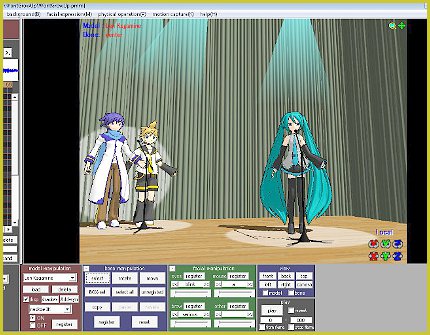
The MikuMikuDance Sample.pmm dance is busy with plenty of examples of what can be done and how to “do” Miku Miku Dance! My latest discovery was learned by deleting Miku from the dance. Once deleted, you can carefully watch the stage light manipulations. See things you may have missed before … like the big circles of “white light” that are moving about on the stage floor. Those are “floorlight01.x” accessories.
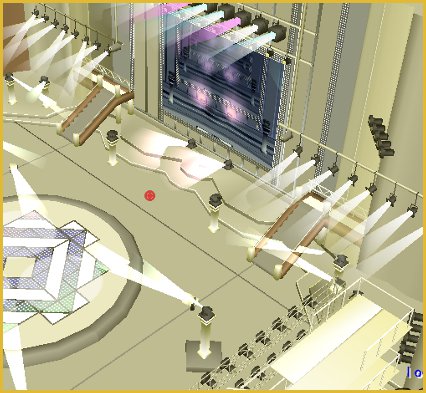
Delete Miku and learn about stage lights from the Sample Dance Sample.pmm

I added the “floorlights” to my stage floor by attaching them to dummy bones and moving them into position. I also added a couple of other lights: “light02.x” and a “light03.x”. I attached them to dummy bones and raised them up into the overhead of my stage. The effect is very nice:
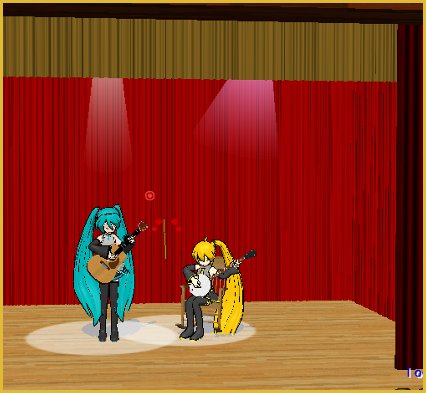
I added floorlights01.x to my stage floor and a couple of lights added into the overhead.

Visit the Downloads page to download your own LearnMMD Auditorium Stage.

When dealing with the lights, you might want to load another Dummy Bones (Dammy Bones “:o) just for use with the lights. You will see in the Sample.pmm dance that there IS a second set of dummy bones in there.

I study the search phrases that readers use to find LearnMMD.com and the use of Dummy Bones is a popular search term. Many newbies do not realize the power of the dummy bones … they can be used to animate, or at least give motion to any of the accessories. You can even mount the stage, itself onto a dummy bone so that you can fine-tune its position.


– SEE BELOW for MORE MMD TUTORIALS…


— — —


– _ — –


Visit the LearnMMD.com Homepage! Plenty of Mikumikudance instruction and info!

More MMD Tutorials...

Rediscover your old MMD Animations: Love them again!

Rediscover your old MMD Animations: Love them again! https://youtu.be/P4b3todZMUI A labor of love... Remember how it was when ...read more

Create MMD Abstract Art from Low-Res Videos!

This is an idea I have been playing with for the last few months... Create MMD ...read more

Loading Background AVI Files into MMD (2021 Edition)

How do I load background AVI files into MMD?  What does it mean when MMD ...read more

Running MikuMikuDance in Linux using Wine and DXVK

How do I run MMD on Linux? Does MikuMikuDance run on Linux? How do I ...read more

Recoloring MMD's Control Panel GUI Interface

Hi and welcome to your personal MMD care and color service, where I give you ...read more

Culling unseen MMD model parts optimises computer assets (PART 2)

How can I make my MMD run faster? What if removing parts using Subset-Extract isn’t ...read more

Dummy Bones, Let's Play the Sample Dances, Nuts & Bolts, Random Thoughts & Visions Tags:beginner, dummy bone, learnmmd, mikumikudance, new to MMD, stage lights

Post navigation

Previous Post: PMDE Q&A – Making clothes follow model motions
Next Post: How to resize PMD models (and what to do when they don’t)

Related Posts

  • Making it Personal MMD MMD Basics
  • PMD Editor Basics, now in English – Modify Your MMD Models! Nuts & Bolts
  • Make Your YouTube Channel Popular with Engrossing Introductions MMD Basics
  • My personal Jopurney through the many MMD memes.
    Personal Journey MMD Leekspin, Nyan Cat, Levan Polkka, more! Random Thoughts & Visions
  • Meiko showing her "Bones"
    Add Songs to MikuMikuDance: All you need is a WAV file! Music and WAV Files
  • Creating Inspirational Pictures in MMD MMD Fine Art

More Related Articles

What kind of laptop should I buy for running MMD? Random Thoughts & Visions
New MMD ACCESSORY MODE allows Easy Object Positioning Accessory Manipulation/Adjust
Making good MMD lip-syncs! Creating Motions
Different MMD models react differently to pose and motion data MMD Basics
Create and Post 1 or 2 videos a day? VocaloidAnime1924 does! Downloading New Models
Haku and Fireworks 02 Add Background Pictures and AVI’s to MikuMikudance MMD Add Background Pictures and AVI

Leave a Reply Cancel reply

Your email address will not be published. Required fields are marked *

Download the latest version of MikuMikuDance!
See the MMD Step-by-Step instructions page!
Learn how to make your own MMD motions!
LearnMMD.com
  • Learn How to Make Transparent Parts Work: Visit YouTube to watch this video. LearnMMD MMD 7.39
    Make Window Glass and Transparent Parts Work Correctly MMD 7.39 Accessory Manipulation/Adjust
  • My personal Jopurney through the many MMD memes.
    Personal Journey MMD Leekspin, Nyan Cat, Levan Polkka, more! Random Thoughts & Visions
  • Build your own stage for MMD using Blender 2.69 Blender
  • What!
    How to Load Models, Motion, and Music Data into MikuMikuDance ARIZONA
  • New MMD ACCESSORY MODE allows Easy Object Positioning Accessory Manipulation/Adjust
  • Adult Shader on a LAT model – it’s possible! Adult Shader effect
  • Using Beamman Particle-styled MME effects Beamman's AuraParticle
  • Create and Post 1 or 2 videos a day? VocaloidAnime1924 does! Downloading New Models

Copyright © 2022 Learn MikuMikuDance – MMD Tutorials – Free 3D Animation Software and Instructions..

Powered by PressBook Premium theme

Go to mobile version