
Skip to content
Learn MikuMikuDance – MMD Tutorials – Free 3D Animation Software

Learn MikuMikuDance – MMD Tutorials – Free 3D Animation Software

Download Free Animation Software – Let's Learn How to Do Everything!

  • Step-by-Step MMD instructions
  • DOWNLOADS
  • Troubleshoot, Fix MMD
  • Site Contents
  • Reggie Replies Q&A
  • Homework!
  • What IS MMD?
    • Download MikuMikuDance Newest Latest Version of MMD
  • “HOW TO”
    • Raycast RAY-MMD Effect Tutorials
  • BONUS PAGES
    • Why convert PMD models to PMX?
  • HALL of CHAMPIONS
  • Tutorial Categories
  • About
    • Privacy Policy
  • Toggle search form
  • Render your MMD Video in 1080p HD Using Windows Live Movie Maker HD Videos in MMD
  • New Getting Started with MMD Video on YouTube! Intro to MikuMikuDance
  • RAY-MMD: Haku’s crazy light show [PART 2] MME Effects Tutorials
  • MMD PostAnalogTV effect gives easy scene transitions and more! MME Effects Tutorials
  • Import Daz models with Bones using Blender, Noesis, Xnalara Blender
  • Reader asks how to create MMD artwork… stuff like posing, camerawork? MMD Basics
  • Chrysanthemums are lovely with the Fireworks effect!
    Using the Fireworks Effect In MikuMikuDance ARIZONA
  • Beamman’s BeamCharge MME Effect Beamman's BeamCharge
The MMD Circles Halloween animation is fun to make! Free Download

MMD Circles haunts Halloween Visions download links

Posted on October 15, 2022December 18, 2023 By Reggie_Dentmore No Comments on MMD Circles haunts Halloween Visions download links

Is MMD Circles an easy Halloween animation? Where can I download MMD motion files for a Halloween animation? How can I make MMD Circles into a scary, spooky MMD animation?

The MMD Circles animation creates Halloween visions!

I went searching on YouTube to find an MMD Halloween animation with download links. I found THIS one by Spade D.MMD Circles original motion source video on YouTube by Spade D. Click to visit YouTube.
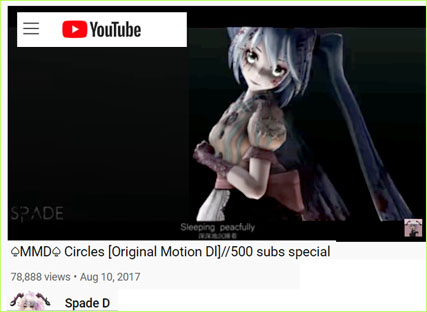
This MMD Circles animation makes use of one model playing TWO rolls… The scene opens with the model looking “normal” and then she “goes too deep” as a zombie? That original video uses a yandere model that goes form kind of injured to kind of undead! DOWNLOAD the Motion Files and WAV from that video, above.

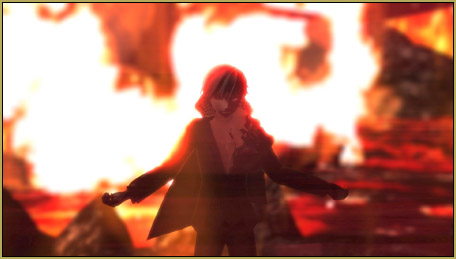
My model goes from “witchy” to Full Demon!

See that original video in order to get the timing; the moments in which you display/not-display the two models.
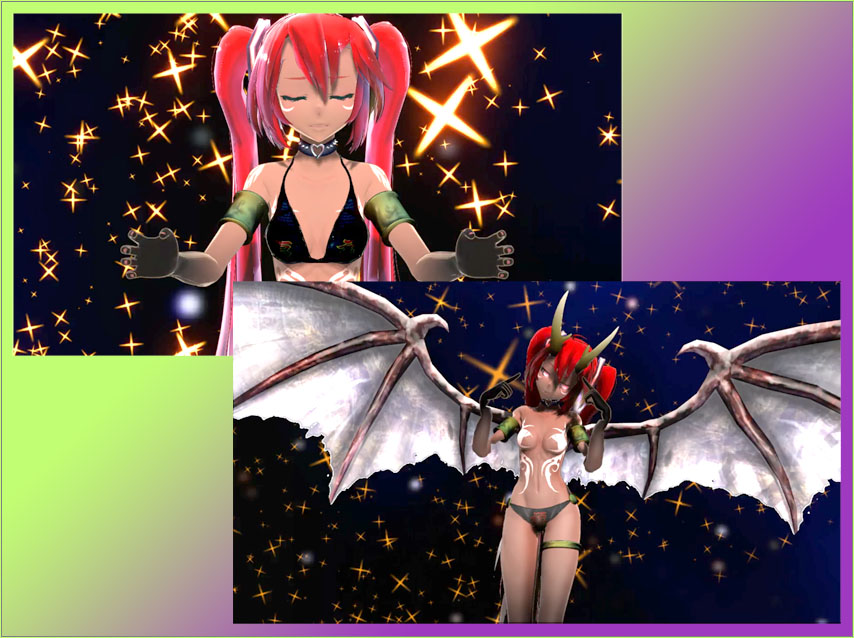
I am sorry that I cannot share that model. She was gifted to me by an MMDer who does not wish the link to be made public.

Effects: Yes… but no stage!

I used the skydome “Spacedome” from the LearnMMD Stage by Trackdancer. This dome is a blue and black night sky with large soft star blurs.

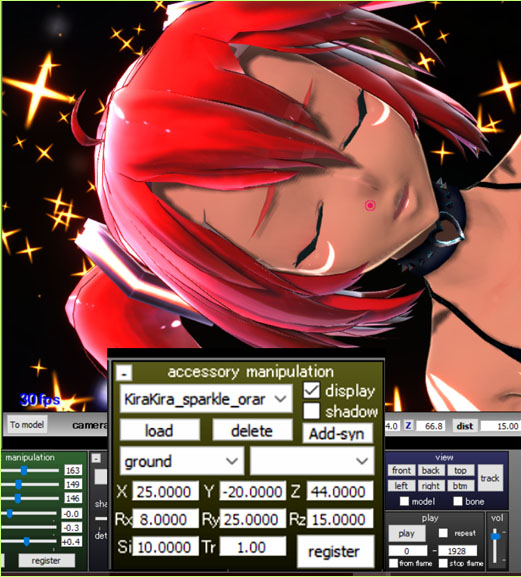
I used KirtaKira Sparkle to put a lot of confusing action into my scene. I set it to Si 10 and adjusted the settings so as to have the sparkles flying in from below and off-center.
Real Figure and Real Material Shaders…

Last year I wrote about using Real Figure Shader and Real Material Shader. Real Figure was created in order to make your model look like it was a porcelain or plastic figurine, but I find it works great on a model’s bare skin; especially the face.

Real Material shader does a great job of boosting the natural textures of clothing, hair and accessories. But when used on “skin”, the look is harsh and edges look sharpened. So that is why I use both of these shaders on a model.

I this case, on both versions of the model, I applied Real Figure Shader to the entire model and then went into Subset-Extract to apply Real Material Shader only to the bikini and metal parts.

SSAO, Autoluminous, and BlackOut3

SSAO adds a nice depth of color to the entire scene. In this animation, I used the SSAO-Lite option. Autoluminous was added to make the best use of the TDA model. TDAs often have luminous elements. I used BlackOut3 to get a quick Fade-from-Black at the start and a nicer Fade-to-Black a the close of the video.

Customized the motion and WAV, a little!

The original motion file and WAV file “wanted” to end at about frame 1885. At the closing moment of the animation, the model shifts back into “normal” and makes a quick heart shape with her hands. As created, that “heart” moment comes and goes-by in only a couple of frames. I modified the motion to make the model hold-that-pose for over 15 frames so, at least, we could see that heart happen. And then I wanted my video to fade-to-black, but that WAV file instantly cuts into a second verse, or something. I opened the Audacity audio editing program and copy/pasted that final note into something that was over a second long, giving me time to fade-to-black. My new final frame count is 1928 frames.

Have some spooky fun with the MMD Circles animation!


– SEE BELOW for MORE MMD TUTORIALS…


— — —


—- — —


Visit the LearnMMD.com Homepage! Plenty of Mikumikudance instruction and info!

More MMD Tutorials...

Introducing MMD model 1052C China Qipao Miku

Where can I download MMD model 1052C dancers? I want the 1052C China Qipao Miku ...read more

Download Jomomonogm's Snow Miku 2019 for MMD, a most unusual model!

Where can I download Jomomonogm's Snow Miku 2019? What is so unusual about this Snow ...read more

MMD animation made-from-scratch Forgotten Vocaloid Mew Rags on Reggie's MMD Videos

How do I make my own MMD animation from scratch? How do I start my ...read more

Rediscover your old MMD Animations: Love them again!

Rediscover your old MMD Animations: Love them again! https://youtu.be/P4b3todZMUI A labor of love... Remember how it was when ...read more

MMD Boobs too Big yields Too Funny Really Bad Boy video!

Can MMD boobs too big get in the way of a downloaded motion file? What ...read more

Download MMD CyberMiku Black ver1.5 with Glowing Wings and an attitude!

Download MMD CyberMiku Black ver1.5 with Glowing Wings and an attitude to match! A treasure... Yesterday I ...read more

"the making of" my video, Reggie Dentmore

Post navigation

Previous Post: Make LearnMMD Masthead Art for the world to see!
Next Post: Download Halloween Costume TDA Miku edit by dA’s Shiro-NekoVocaloid

Related Posts

  • MMD PostAnalogTV effect gives easy scene transitions and more! MME Effects Tutorials
  • MME effect Kamitachi – Night breeze silhouette shader of Kama Kamitachi - Silhouette
  • Mahlazer’s Walking Motion vmd file download for MMD Make a Smooth Walking Motion
  • dull-VS-alive-animation-environment
    MMD animation environment… MORE than just a model on a stage! "the making of" my video
  • MMD model 1052C China Qipao Miku download
    Introducing MMD model 1052C China Qipao Miku "the making of" my video
  • o_ShaderCustomSet_v0_3 effect applies gentle color modification MMD Tutorials

More Related Articles

MMD animation made-from-scratch MMD animation made-from-scratch Forgotten Vocaloid Mew Rags on Reggie’s MMD Videos "the making of" my video
MMD smoke clouds are easy to make with Beamman's Breath effect. MMD Smoke Clouds and a Smoke Filled Room… Beamman's Breath Effect
Mouthing words requires sudden motions without drifting in MikuMikudance 7.39 Short sharp sudden motions require MikuMikudance skill Making Smooth Motions
Making my new “Rin Needs a Hug” Zero-to-450 Challenge Video "the making of" my video
MME Lighting Effect, PanelLight by Soboro, is easy to use! Add MME Lighting Effect illuminates model against dark stages MMD Tutorials
Download Reggie Dentmore's "Hand Pose Collection" on LearnMMD.com MMD Hand Poses make Animation Easier Animation Shortcuts

Leave a Reply Cancel reply

Your email address will not be published. Required fields are marked *

Download the latest version of MikuMikuDance!
See the MMD Step-by-Step instructions page!
Learn how to make your own MMD motions!
LearnMMD.com
  • Rendering HD 60 FPS MMD video and YouTube Upload HD Videos in MMD
  • YouTube serves video playback quality to best suit your viewing-screen HD Videos in MMD
  • A girl named Miku Hatsune… Random Thoughts & Visions
  • Staging and the 12 Principles of Animation. Accessory Manipulation/Adjust
  • Make WAV files for MikuMikuDance Using Your Music Files Music and WAV Files
  • Kaito Sees Rotating Stars Thanks to the Accessory Manipulation Panel.
    More on Accessory Manipulation in MikuMikuDance Accessory Manipulation/Adjust
  • Make Smooth Motions using Multiple Keyframes Animation Shortcuts
  • Follow My Learnmmd on Facebook for latest LearnMMD.com MMD tutorials! MMD Tutorials

Copyright © 2022 Learn MikuMikuDance – MMD Tutorials – Free 3D Animation Software and Instructions..

Powered by PressBook Premium theme

Go to mobile version