
Skip to content
Learn MikuMikuDance – MMD Tutorials – Free 3D Animation Software

Learn MikuMikuDance – MMD Tutorials – Free 3D Animation Software

Download Free Animation Software – Let's Learn How to Do Everything!

  • Step-by-Step MMD instructions
  • DOWNLOADS
  • Troubleshoot, Fix MMD
  • Site Contents
  • Reggie Replies Q&A
  • Homework!
  • What IS MMD?
    • Download MikuMikuDance Newest Latest Version of MMD
  • “HOW TO”
    • Raycast RAY-MMD Effect Tutorials
  • BONUS PAGES
    • Why convert PMD models to PMX?
  • HALL of CHAMPIONS
  • Tutorial Categories
  • About
    • Privacy Policy
  • Toggle search form
  • Re-size PMD Models and Keep the Bones and Physics! Adjust PMD Model Size
  • LearnMMD.com is back online after SIX days off!
    LearnMMD.com is BACK ONLINE, again! Reggie Dentmore
  • Keyboard Shortcuts Aplenty in MikuMikuDance 7.39 by ClintImTired Accessory Manipulation/Adjust
  • MMD Fill Lights Part 1 (Half-Lambert Shader) Half-Lambert Shader
  • PMXE 0254f a Newer PMXE in English – More Complete Translation – Tools Reconfigured KillerBeer
  • The Making of “Viva La Vida MMD” by Zazi The Angel "the making of" my video
  • Video Dojo Expo 4 CHAMPIONS are CHOSEN! Video Dojo Competition
  • Learn How to Make Transparent Parts Work: Visit YouTube to watch this video. LearnMMD MMD 7.39
    Make Window Glass and Transparent Parts Work Correctly MMD 7.39 Accessory Manipulation/Adjust

Download MMD Pokeball Accessory and Learn Accessory Manipulation

Posted on April 29, 2013July 20, 2018 By Reggie_Dentmore 4 Comments on Download MMD Pokeball Accessory and Learn Accessory Manipulation

How can I put an MMD Pokeball accessory into my A Feature Article by Reggie Dentmore on LearnMMD.commodel’s hand. Where do I attach an accessory to an MMD model’s hand. How can I make my MikuMikuDance model hold an object?

Download my MMD Pokeball Accessory and
Learn to use the
Accessory Manipulation Panel …

Download a Pokeball, a Pose file, and the Sample Dance VMD file!

Sometimes you want to attach an accessory directly to your model’s hand … a Dummy Bone just will not do the trick. So … which finger do you attach the item to? If you load the Negi (the famous green onion “Leek”) … how can Miku hold it in a realistic way? As a newbie, I just wanted to find the right bone and be done with it … middle finger 2? … nope.  Middle Finger 3? … definitely not.  Thumb 1? … nope. Eventually I’d find some position that looked OK as long as no one looked too closely.

Then I got into using the settings in the AMP … the Accessory Manipulation Panel. Now I can attach an item to a particular finger or the wrist bone … and adjust the item’s position in relation to that bone.
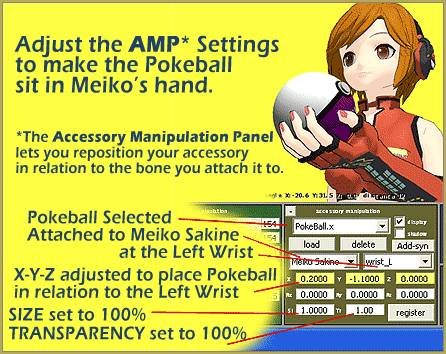
Learn to use the settings in the AMP as you place the MMD Pokemon Accessory into the correct position.

It is a bit of trial and error. Attach the item to the bone of your choice. Then, in the XYZ boxes in the AMP, choosing one box at a time, enter a number and hit your tab key. Did the item move in the right direction? No? … Maybe try a negative number to move the item the other way. Woops! … Too far! … so enter a decimal number to move less than a whole number. As our Stella the Alchemist once pointed out: Decimals are your friends … especially when it comes to adjusting the AMP settings! Keep on guessing … working one direction against the other … until you have the item placed right where you want it.


EDITOR’S NOTE:

Since the release of MMD 8.03 in 2013, there is an Accessory Mode that allows you to use the XYZ rollers to position your accessory. Read the Article about using Accessory Mode.


A little Exercise …

The files included along with your MMD Pokeball Accessory in the little download. Give it a try! Download my little zip file. It contains one Pokeball, a Pose file, and the Motion data from the MMD Sample Dance that you can use to see how well the ball fits into the model’s hand.

First, unzip the folder and drop the bits into the appropriate folders inside your Users folder: The Pokeball.x can drop into your Accessory folder*, The .VPD Pose File can drop into your Pose folder, and the Miku_SampleDance .VMD Motion File can drop into your Motions folder.

Now … Open MikuMikuDance. Be sure you are in Frame Zero. Load the original Meiko_Sakine. The pose file is specially made just for that model. Switch to the Camera/Lights/Accessory mode and load the Pokeball. See that it arrives between Meiko’s feet. See where it says “Ground” … you want to When you position the MMD Pokeball Accessory onto Meiko's wrist, it looks awful!change that to Meiko Sakine … and then choose LEFT WRIST. See how awful it looks to have that ball attached to that bone. We will fix that! REGISTER that setting there, in the AMP.

Go to FILE and Load Pose Data. Load the new pose that came in my download. Meiko should snap into position with her left hand held high.

Now we are ready to begin the trial-and-error of adjusting the AMP settings to place the Pokeball into Meiko’s hand. See the picture, above, for the settings that worked for me. They should be the same for you.

Once you get the ball placed where you like it … REGISTER it, there in the AMP.

Now it’s time to run Meiko through some motions to see if the ball is really in the right Add the Miku_SampleDance.VMD and PLAY to see if the MMD Pokeball Accessory looks to be located correctly. place. Switch the Model Manipulation mode to Meiko Sakine (not Camera/Light/Accessory) and FILE – LOAD MOTION DATA … and choose the Miku_SampleDance.VMD that came in my download. OK the error note. Push PLAY and watch Sakine dance … keep an eye on the ball … does it seem to be in the right place? … Success!

* In most cases, when you download an accessory, KEEP IT IN ITS FOLDER. Do not remove the .x file from its related files inside that folder. Drop the WHOLE FOLDER into your Accessory folder. In THIS case, I know that the Pokeball can stand alone … it has no related files … so it is OK to move that one .x file, by itself.


– SEE BELOW for MORE MMD TUTORIALS…


— — —


– _ — –


Visit the LearnMMD.com Homepage! Plenty of Mikumikudance instruction and info!

More MMD Tutorials...

Reader asks how to create MMD artwork... stuff like posing, camerawork?

A reader asks... Is there a tutorial on how to create MMD artwork, like those you ...read more

Introducing MMD model 1052C China Qipao Miku

Where can I download MMD model 1052C dancers? I want the 1052C China Qipao Miku ...read more

Download Jomomonogm's Snow Miku 2019 for MMD, a most unusual model!

Where can I download Jomomonogm's Snow Miku 2019? What is so unusual about this Snow ...read more

MMD animation made-from-scratch Forgotten Vocaloid Mew Rags on Reggie's MMD Videos

How do I make my own MMD animation from scratch? How do I start my ...read more

Rediscover your old MMD Animations: Love them again!

Rediscover your old MMD Animations: Love them again! https://youtu.be/P4b3todZMUI A labor of love... Remember how it was when ...read more

MMD Boobs too Big yields Too Funny Really Bad Boy video!

Can MMD boobs too big get in the way of a downloaded motion file? What ...read more

Accessory Manipulation/Adjust, MMD Basics, Reggie Dentmore

Post navigation

Previous Post: MMD Dummy Bones may be your most important models!
Next Post: Pose MMD Models Naturally Using Reference Pictures

Related Posts

  • Bandizip® keeps Japanese file names intact when Extracting ZIP folders Bandizip
  • MMD The Zombie Song meme
    I’d never eat your brain – The Zombie Song download links "the making of" my video
  • Using the Blood Effect in MMD MikuMikuDance Accessory Manipulation/Adjust
  • MMD Model Adoration Slideshow features your model!
    MMD Model Adoration Slideshow video, a new type of MMD video! "the making of" my video
  • Dramatically Decrease AVI File size before uploading YouTube videos MMD Tutorials
  • "Say cheese!" Setting up the camera moves in MMD 7.39 takes some thought. Credits: MMD Little Town by Harner Productions, Chibi Miku Yamato Style 1.35 by Koshitsuki, Chibi NC DT SeeU by HousekineMinto, Video Camera by Dark Konata
    Camera Motion Instructions 1 – MMD Basics ARIZONA

More Related Articles

"Say cheese!" Setting up the camera moves in MMD 7.39 takes some thought. Credits: MMD Little Town by Harner Productions, Chibi Miku Yamato Style 1.35 by Koshitsuki, Chibi NC DT SeeU by HousekineMinto, Video Camera by Dark Konata Camera Motion Instructions 1 – MMD Basics ARIZONA
Assemble your stages from .x type components Accessory Manipulation/Adjust
Lexasio's Steampunk Teto & Miku star in "Kiss me" MMD video! Lexasio’s Steampunk Teto & Miku star in MMD “Kiss Me” animation "the making of" my video
Downloading MMD 9.32 is Quick and Easy! Download MikuMikuDance 9.32 Download MikuMikuDance
Staging and the 12 Principles of Animation. Accessory Manipulation/Adjust
Why MMD Does not run on Apple Computers Kazuki Matsuoka

Comments (4) on “Download MMD Pokeball Accessory and Learn Accessory Manipulation”

  1. bodgerxx says:
    December 2, 2014 at 11:14 pm

    Decimals may be your friends but the Z Y Z widgets in the lower right corner of the work area are like your best friend. Just click on it untill it says accessory then use the X Y Z widgets to move your accessory up down in out and rotate it till it is perfect. Then click register.

    Reply
  2. Jarek says:
    September 4, 2014 at 3:37 pm

    How do you make a pmd model hold another pmd model (because it has moving parts) such as a mini harp?

    Reply
    1. Reggie_Dentmore says:
      December 2, 2014 at 10:03 am

      Jarek … Use the OP “Outside Parent” setting. I think that’ll do it. https://learnmmd.com/http:/learnmmd.com/outside-parent-setting/

      Reply
  3. Arizona says:
    April 30, 2013 at 5:03 am

    “Decimals are your friends.” We’ll always be quoting Stella won’t we? Good stuff Reg!

    Reply

Leave a Reply Cancel reply

Your email address will not be published. Required fields are marked *

Download the latest version of MikuMikuDance!
See the MMD Step-by-Step instructions page!
Learn how to make your own MMD motions!
LearnMMD.com
  • Make your own stage for MikuMikuDance using SketchUp Models Google SketchUp and MMD
  • Click to see FULL SIZE my original model setup for my "Dueling Banjos".
    Planning a MikuMikuDance 7.39 Dueling Banjos Animation Google SketchUp and MMD
  • Most important MikuMikuDance instruction: Track your sources! Keep the Faith-MMD Credits/Sharing
  • MMD MME Rhinestone effect adds sparkle to your models! MMD Tutorials
  • The Cheaplens Effect is easy to use and very powerful!
    MME CheapLens Effect controls the “Look” of your MMD video CheapLens Effect
  • Using Subset-Extract to Customize Your Models. ARIZONA
  • Squash and Stretch Ball
    The 12 Principles of Animation for MikuMikuDance. ARIZONA
  • VOCALOID 3 Tutorial – The whole interface on a basic level Kazuki Matsuoka

Copyright © 2022 Learn MikuMikuDance – MMD Tutorials – Free 3D Animation Software and Instructions..

Powered by PressBook Premium theme

Go to mobile version