Skip to content
Learn MikuMikuDance – MMD Tutorials – Free 3D Animation Software

Learn MikuMikuDance – MMD Tutorials – Free 3D Animation Software

Download Free Animation Software – Let's Learn How to Do Everything!

  • Step-by-Step MMD instructions
  • DOWNLOADS
  • Troubleshoot, Fix MMD
  • Site Contents
  • Reggie Replies Q&A
  • Homework!
  • What IS MMD?
    • Download MikuMikuDance Newest Latest Version of MMD
  • “HOW TO”
    • Raycast RAY-MMD Effect Tutorials
  • BONUS PAGES
    • Why convert PMD models to PMX?
  • HALL of CHAMPIONS
  • Tutorial Categories
  • About
    • Privacy Policy
  • Toggle search form
  • Chimera Teto Emerging into the Light.
    Looking Good with the MME Mirror Water Effect in MMD ARIZONA
  • Making amazing complicated MMD video requires circle of learning Animation Shortcuts
  • A short animation of the Eared Robot blinking its eyes
    ALMorphMaker Adds AutoLuminous Morphs to your Model! ALMorphMaker
  • Download the latest version of MikuMikuDance - MMD 9.32
    NEW MMD 9.32 and 9.32×64… Latest version of MMD! Download MikuMikuDance
  • Top Two (and a fraction) Probable Reasons Your MMD Doesn’t Run KillerBeer
  • Different MMD models react differently to pose and motion data MMD Basics
  • Download Reggie’s MMD DeckPanel when you just need a place to sit or stand! Make your own Accessories
  • The Art of Moe and the genre’s backstory. Random Thoughts & Visions
MMD smoke clouds are easy to make with Beamman's Breath effect.

MMD Smoke Clouds and a Smoke Filled Room…

Posted on March 26, 2020May 4, 2024 By Reggie_Dentmore No Comments on MMD Smoke Clouds and a Smoke Filled Room…

A Feature Article by Reggie Dentmore on LearnMMD.comHow can I make MMD smoke Clouds? How can I make clouds of smoke in MMD. What’s an easy way to add cigarette smoke to my MMD scene? How can Beamman’s Breath Effect make big MMD Smoke Clouds?

Create MMD Smoke Clouds and a Smoke Filled Room…
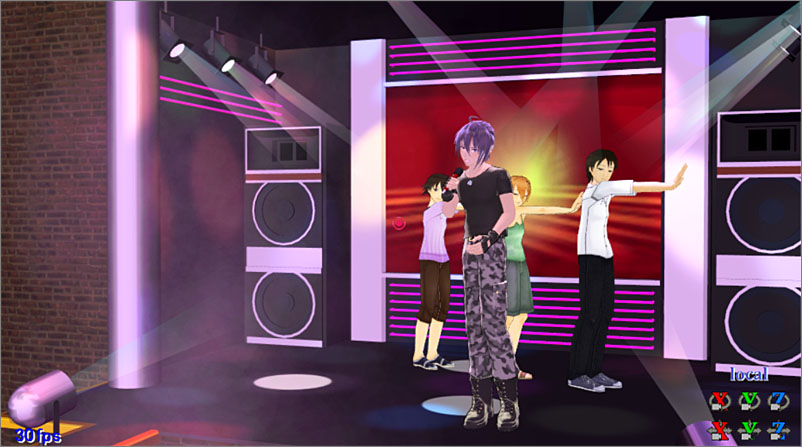
MMD smoke clouds create a smoky nightclub scene in MMD.
See the MMD smoke clouds building-in from the lower left. Those “Light” accessories included in the basic MMD download seem to be shining through that hazy atmosphere.

The LearnMMD Accessory folder contains “lights”…

I have often used the “light.x” accessories included in the MMD download… and they DO look good… but they DO look like they are shining through a thick atmosphere. … and in my latest animation, Gakupo sings Robert Palmer’s “Trick Bag”, I wanted to create that smoky atmosphere.

Beamman’s Breath Effect is just the ticket!
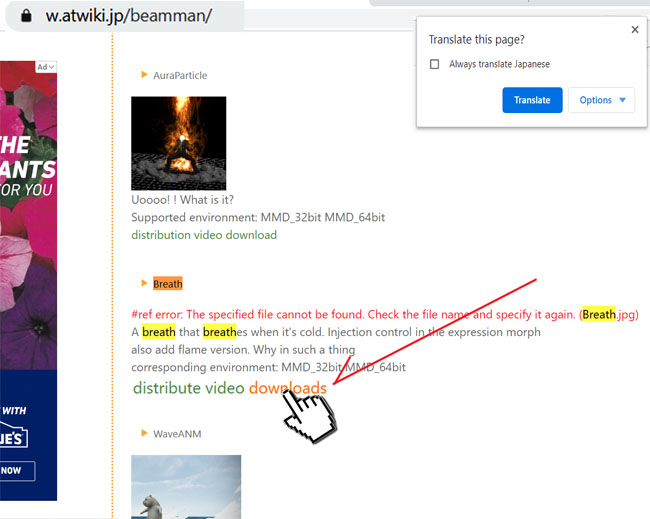
Download the effect…

Beamman's Effects page...

Clicking that DOWNLOADS takes you to this page… click the download button to start your download.
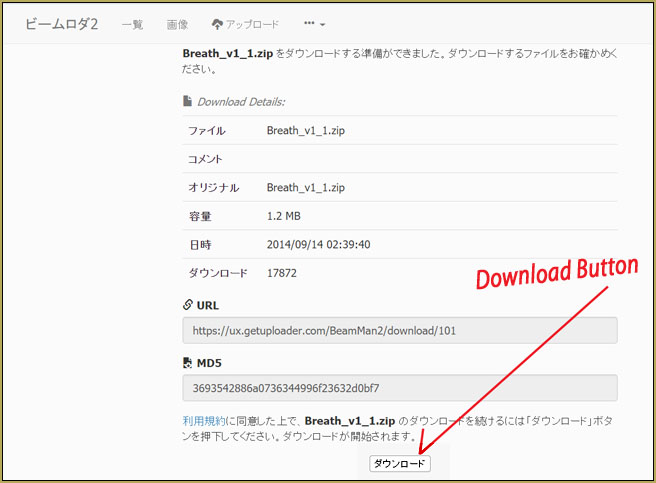
Click the DOWNLOAD button to get the effect.

Use BANDIZIP to unzip your downloaded ZIP and RAR files…

So… how does the Breath Effect work? … it’s EASY!

This effect is kind of funny. You load your favorite model… Miku, of course,  and then load the effect Breath.x… and then set that effect to attach it to Miku’s head bone… and Register.
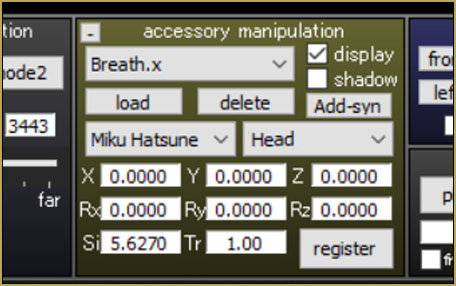
That’s it… get ready to Breath… say A!

This simple effect is triggered by opening your model’s mouth. At the basic setting, you will need a black background or a dark stage to see the slight vapor that puffs out of your model’s open mouth. … but you can set the Si Size for as large a number as you wish so that you get a huge volume of “smoke”.
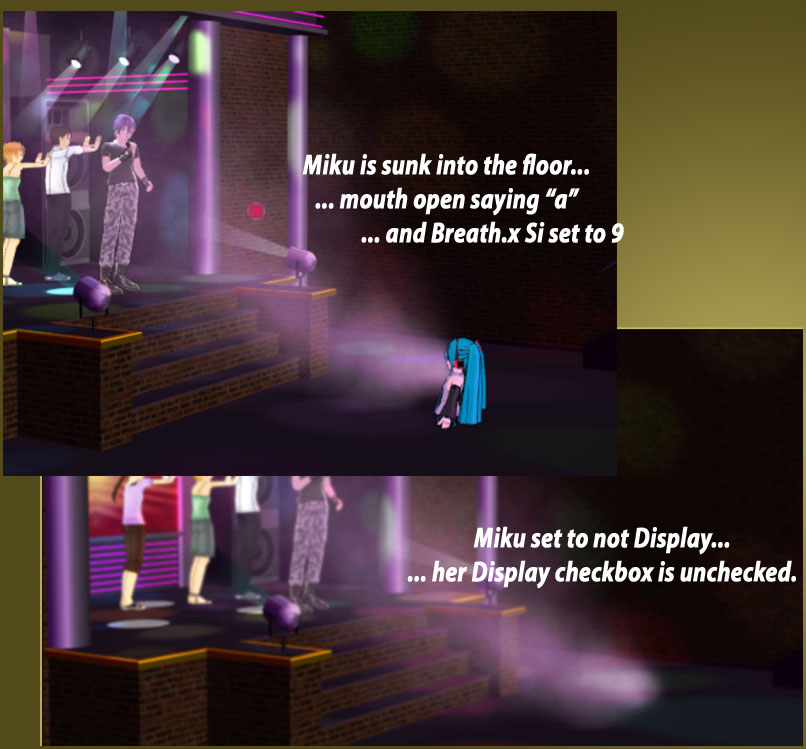
Use a model to make MMD smoke clouds... and it's OK to make the model invisible!

Get the smoke started… set the Si that you like… place your model anywhere that puts the smoke in the right place… and then go to your model and uncheck the model’s DISPLAY checkbox (right there under the LOAD button)… Register, right there in that same Model Manipulation box. … Adjust your camera so that you do not see the dense cloud near the model’s mouth… move the camera… or move the model away from your “live area”… so that you get just the effect you want to see. You can adjust the direction of the “breath” by adjusting the model’s rotation… or you can click into Accessory mode and use the XYZ rollers to aim the smoke cloud.

Use Beamman’s Breath effect whenever you need to
see “Smoke!” against a dark background.

Have fun with MikuMikuDance!


– SEE BELOW for MORE MMD TUTORIALS…


— — —


– _ — –


Visit the LearnMMD.com Homepage! Plenty of Mikumikudance instruction and info!

More MMD Tutorials...

Enjoy the "camera Angles WEIRD in Anime" meme...

Enjoy the "camera Angles WEIRD in Anime" meme... This image is from The Slayers - NEXT, ...read more

Reader asks how to create MMD artwork... stuff like posing, camerawork?

A reader asks... Is there a tutorial on how to create MMD artwork, like those you ...read more

Learn MikuMikuDance in Small Steps! New LearnMMD Video Series

Learn MikuMikuDance in Small Steps. Where can I find easy-to-follow MMD instructions on YouTube? How ...read more

Apply Multiple Effects on an Entire MMD Model Using M4Layer Effect

How can I apply multiple effects to an MMD model? Can I use more than ...read more

MMD Plugin Manager... I Found a Treasure!

What sorts of MMD Plugins are there? MMD Plugin Manager? MMD Plugins. Plugin MMD. More ...read more

2025: Hatsune Miku is 18... but she is designed to be always 16 Years old, by design and in reality!

Finally, in 2023, Hatsune Miku is 16 years old! but in August of 2025, she ...read more

Beamman's Breath Effect, MMD Tutorials, Reggie Dentmore

Post navigation

Previous Post: My VDE-3 Entry has Music, Camera, Dancers… Now for the HARD part.
Next Post: MMD animation environment… MORE than just a model on a stage!

Related Posts

  • MMD EVERGLOW – Adios【Motion by Ureshiiiiii】- Free Download Motion and WAV "the making of" my video
  • MME fireintheskies effect
    MME FireintheSkiesEffect gives floating flame and embers! FireintheSkiesEffect
  • modified MMD effects can yield NEW surprises!
    Modified MME Effects Files yield NEW Effects for MMD! Customize MME effects
  • Enjoy the “camera Angles WEIRD in Anime” meme… Animation Shortcuts
  • Use Center Position Bias to Move Models in MMD ARIZONA
  • Reader asks how to create MMD artwork… stuff like posing, camerawork? MMD Basics

More Related Articles

The Making of: Sleepover Gone Wrong (REMAKE) "the making of" my video
Hatsune Miku is 16 years old in 2023! 2025: Hatsune Miku is 18… but she is designed to be always 16 Years old, by design and in reality! MMD Tutorials
Speech Synthesizer gives MMD Models a voice! Making Soundtracks
Fixed the MMD 8.05 Configuration Error Failed to Start MikuMikudance Reggie Dentmore
The Cheaplens Effect is easy to use and very powerful! MME CheapLens Effect controls the “Look” of your MMD video CheapLens Effect
Use Accessory Manipulation Panel Settings to Position Props Accessory Manipulation/Adjust

Leave a Reply Cancel reply

Your email address will not be published. Required fields are marked *

Download the latest version of MikuMikuDance!
See the MMD Step-by-Step instructions page!
Learn how to make your own MMD motions!
LearnMMD.com
  • Make a “Dream Fighter” MMD Music Video "the making of" my video
  • Use the Half-Lambert Shader effect for point-source lighting.
    MME Half-Lambert Shader Point-Source Lighting Effects Half-Lambert Shader
  • MMD Dummy Bones may be your most important models! Dummy Bones
  • MMD Wooden Stool Accessory from LearnMMD.com Google SketchUp and MMD
  • Japanese Mode Opens Hidden Model Features in MMD 8.06 Japanese Mode
  • LearnMMD Stage Lit with AutoLuminous Lights MMD Tutorials
  • Once there was a war… the making of my “Paint it black” MMD video "the making of" my video
  • Creating Black Model Silhouettes in MikuMikuDance ARIZONA

Copyright © 2022 Learn MikuMikuDance – MMD Tutorials – Free 3D Animation Software and Instructions..

Powered by PressBook Premium theme

Go to mobile version