Skip to content
Learn MikuMikuDance – MMD Tutorials – Free 3D Animation Software

Learn MikuMikuDance – MMD Tutorials – Free 3D Animation Software

Download Free Animation Software – Let's Learn How to Do Everything!

  • Step-by-Step MMD instructions
  • DOWNLOADS
  • Troubleshoot, Fix MMD
  • Site Contents
  • Reggie Replies Q&A
  • Homework!
  • What IS MMD?
    • Download MikuMikuDance Newest Latest Version of MMD
  • “HOW TO”
    • Raycast RAY-MMD Effect Tutorials
  • BONUS PAGES
    • Why convert PMD models to PMX?
  • HALL of CHAMPIONS
  • Tutorial Categories
  • About
    • Privacy Policy
  • Toggle search form
  • Total Success Running MMD on Win 10 64-bit! MikuMikuDance Random Thoughts & Visions
  • KiraKira-sparkleV2 beautiful colored sparkles.
    KiraKira-sparkleV2 MME Effect adds COLOR to KiraKira! KiraKira-SparkleV2
  • What kind of laptop should I buy for running MMD? Random Thoughts & Visions
  • MMD vs MMM Bullwood
  • New to MikuMikuDance? LearnMMD is The Instruction Manual for MMD! MMD Tutorials
  • Miku Expo 2014 New York – learnmmd.com coverage NeKo MANiac aMMDy
  • Video Dojo Expo 2 Champion: MMDv Video Dojo Champions
  • Public Domain and Ethical Release for MMD Bandages

pmothair Effect Makes Hair Actually Look like hair

Posted on April 12, 2015May 24, 2016 By Zazi 4 Comments on pmothair Effect Makes Hair Actually Look like hair

See all the articles written by Zazi on LearnMMD.comWhere can I get the pmothair effect? How can I make my MMD model’s hair look more realistic? How can I make softer looking hair in MikuMikuDance? How do I use the pmothair effect?

The pmothair Effect
Makes Hair Actually Look like hair!

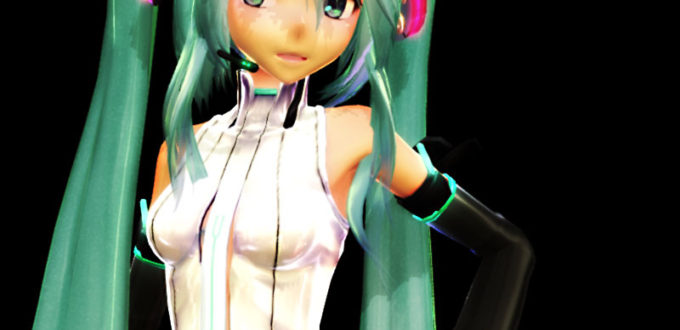
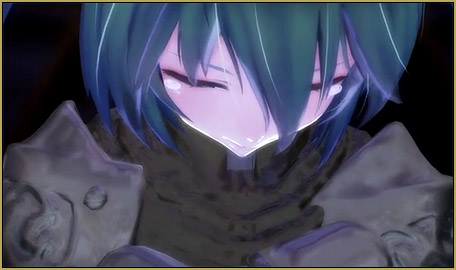
Okay so you ever wanted your model to actually have realistic feeling hair? Well now you can… by using the pmothair effect… an effect which if used properly can give an interesting hair-like effect  as seen here.
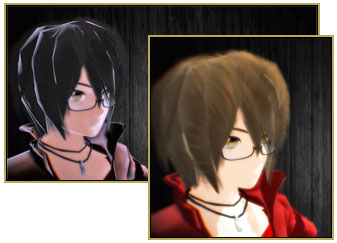
The pmothair Effect gives your MMD model softer, fluffier hair!

Download the effect here: https://bowlroll.net/file/17049

To achieve fluffier hair simply follow these steps:

  1. Open a model in MMDGo to the MMEffect Button in the upper right corner of the MMD screen.
  2. Go to MME effects and look at your model
  3. Go to edit
  4. Go to subset extract and click it
  5. Locate your hair subsets
  6. Load set effect on that subset
  7. Adjust lighting and background to match your models fluff

Have fun trying out different settings in the AMP window.

— Enjoy!


– SEE BELOW for MORE MMD TUTORIALS…


— — —


– _ — –


Visit the LearnMMD.com Homepage! Plenty of Mikumikudance instruction and info!

More MMD Tutorials...

Enjoy the "camera Angles WEIRD in Anime" meme...

Enjoy the "camera Angles WEIRD in Anime" meme... This image is from The Slayers - NEXT, ...read more

Reader asks how to create MMD artwork... stuff like posing, camerawork?

A reader asks... Is there a tutorial on how to create MMD artwork, like those you ...read more

Learn MikuMikuDance in Small Steps! New LearnMMD Video Series

Learn MikuMikuDance in Small Steps. Where can I find easy-to-follow MMD instructions on YouTube? How ...read more

Apply Multiple Effects on an Entire MMD Model Using M4Layer Effect

How can I apply multiple effects to an MMD model? Can I use more than ...read more

MMD Plugin Manager... I Found a Treasure!

What sorts of MMD Plugins are there? MMD Plugin Manager? MMD Plugins. Plugin MMD. More ...read more

2025: Hatsune Miku is 18... but she is designed to be always 16 Years. Old by design and in reality!

Finally, in 2023, Hatsune Miku is 16 years old! but in August of 2025, she ...read more

MMD Tutorials, MME Effects Tutorials, pmothair Effect, Zazi

Post navigation

Previous Post: Stationary Motion Creation rights and wrongs
Next Post: MME Balloon Effect (And what I found out)

Related Posts

  • Fix MikuMikuDance Missing DLL and Side-by-Side Configuration Errors d3dx9_32.dll error
  • Ray-MMD Godrays… argggh!!! MMD Tutorials
  • Create Motion Data – So you think you can’t dance? Creating Motions
  • MMD Animation Project Where My Demons Hide "the making of" my video
  • Adjust downloaded motions to fit your MMD models Animation Shortcuts
  • MMD Starry Winds Effect Makes Amazing Night Time Scenes! MMD Tutorials

More Related Articles

An MMD Walking Motion: Creating it is easy! LoverOfVocaloid
Free Download MikuMikuDance MMD Free Download MikuMikuDance 3D animation software Intro to MikuMikuDance
Kaito and the SpotLight Effect. Using the SpotLight Effect in MikuMikuEffects ARIZONA
Adding Sound Effects to existing MMD animations Making Soundtracks
Making MMD Models Complicated Task with much to know! Making Models
Adjusting the Physical Operation Tab settings in MMD 9.10 Functions-Copy-Paste-Expand

Comments (4) on “pmothair Effect Makes Hair Actually Look like hair”

  1. ミク センス says:
    March 3, 2018 at 1:47 am

    It comes up with an error message whenever i try to load it.

    Reply
    1. KillerBeer says:
      March 3, 2018 at 6:11 am

      What error?

      Reply
  2. NTA65bz says:
    June 29, 2015 at 3:32 pm

    I can’t find “edit” there :\

    Reply
    1. Zazi says:
      July 26, 2015 at 10:36 am

      in miku miku efects it’s the second tab over to the left of file

      Reply

Leave a Reply Cancel reply

Your email address will not be published. Required fields are marked *

Download the latest version of MikuMikuDance!
See the MMD Step-by-Step instructions page!
Learn how to make your own MMD motions!
LearnMMD.com
  • Widescreen MMD “Kiss Me” animation too long but I wanted More! "the making of" my video
  • Make MMD Model Hands from scratch in Blender Blender
  • Learn How to Dress the LearnMMD Stage – Instructions Dummy Bones
  • MMAccel – Accelerate your MMD creation! Animation Shortcuts
  • How To Make Global Lighting Work with Game-Rips Fixing Broken Models
  • MMD Project “I WANNA PARTY!” features great motion files by o Savvy o "the making of" my video
  • My “O Canada” MMD video confused Japanese viewers! "the making of" my video
  • Gakupo sings "Trick Bag" - VDE-3 Entry!
    Step 1: VDE-3 “Gotta Sing… Gotta Dance!” Entry Creation… YouTube Music Approval CONTESTS

Copyright © 2022 Learn MikuMikuDance – MMD Tutorials – Free 3D Animation Software and Instructions..

Powered by PressBook Premium theme

Go to mobile version