Skip to content
Learn MikuMikuDance – MMD Tutorials – Free 3D Animation Software

Learn MikuMikuDance – MMD Tutorials – Free 3D Animation Software

Download Free Animation Software – Let's Learn How to Do Everything!

  • Step-by-Step MMD instructions
  • DOWNLOADS
  • Troubleshoot, Fix MMD
  • Site Contents
  • Reggie Replies Q&A
  • Homework!
  • What IS MMD?
    • Download MikuMikuDance Newest Latest Version of MMD
  • “HOW TO”
    • Raycast RAY-MMD Effect Tutorials
  • BONUS PAGES
    • Why convert PMD models to PMX?
  • HALL of CHAMPIONS
  • Tutorial Categories
  • About
    • Privacy Policy
  • Toggle search form
  • How to tame unruly skirts: fix fluttering parts in MMD 9.xx+ Fixing Broken Models
  • Making POV Camera Shots in MikuMikuDance 8.03+ Camera Motion
  • Raycast Ray-MMD Toon Shader
    Ray-MMD Toon Shading Basics MMD Tutorials
  • 3D For Cheapskates: Making stereo MMD videos without special equipment 3D Stereo Video MMD
  • Creating Black Model Silhouettes in MikuMikuDance ARIZONA
  • Workin’ on my VDE-4 Animation: The Easy Part is Complete! "the making of" my video
  • Download ARROW Lip-Sync Soundtrack Zip Folder "the making of" my video
  • ikUnderwater Effect submerges your MMD animation! ikUnderwater Effect

Learn How to Dress the LearnMMD Stage – Instructions

Posted on June 24, 2014March 31, 2016 By Reggie_Dentmore No Comments on Learn How to Dress the LearnMMD Stage – Instructions

Visit LearnMMD's Video Channel on YouTube: Videos from LearnMMD's team of writers!So, I downloaded the LearnMMD Stage from the Downloads page … What do I do with it? How do I dress the LearnMMD stage? The stage is brightly colored, can I tone it down? Are there instructions for using the LearnMMD Stage? What do I do with all of those curtains that are included with the LearnMMD Stage?

Let’s learn how to…
Dress the LearnMMD Stage!
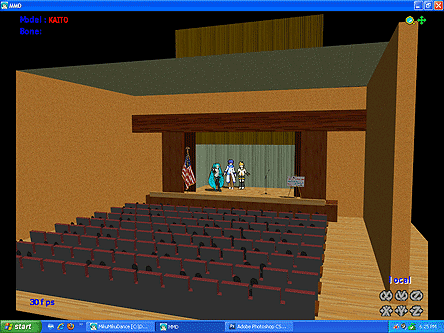
Let's learn how to dress the LearnMMD Stage!

Our LearnMMD Stage set gets downloaded about 30 times a week! … yet I rarely see it on YouTube. I figured I’d write some instructions to help you dress the LearnMMD Stage.

First … set the Background to Black; this keeps the “white” from shining through around the foot of the curtains at the back of the stage.
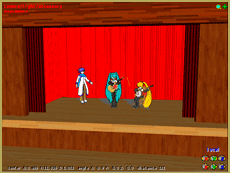
The LearnMMD Stage has bright colors!

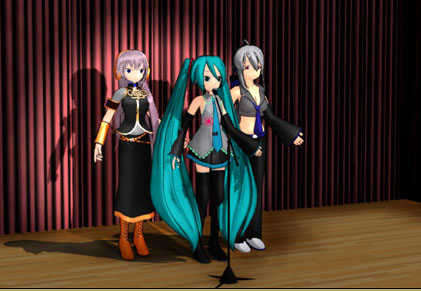
The Stage has bright red curtains. As shown in this picture, it can over-power your scene.

The most simple way to tame that bright red is to move the overhead lights until that glare goes away.
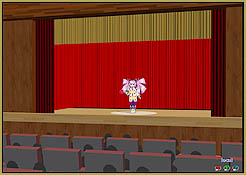
I have made many animations using the basic red stage.I have made a bunch of videos using this stage … and the red drapes work well as long as you adjust your light positions to dull the bright red.

The other way to get away from the red drapes … is to cover them with any of the extra drapes included with your download.
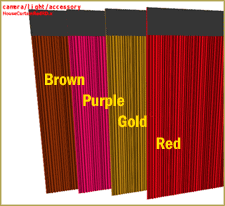
The download includes 4 colors of curtains.

A bunch of different colors of curtains are included with your stage. This picture shows a few of them. Many are reversible with a second color on the flip-side.

To dress the stage in new curtains, LOAD the curtain of your choice several times. Attach each one to a different dummy bone … and use the bones to maneuver each curtain into place on your stage … put it just a hair this-side of the old Red Curtain, to hide the red one.
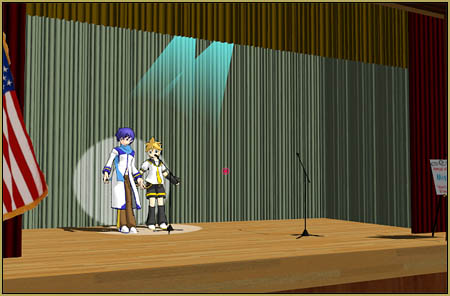
MossCurtains

Above is the stage dressed with the Moss-colored curtains … the change in color makes it look like a different stage!Mount your curtains to dummy bones and move them into place to cover the old red drapes.
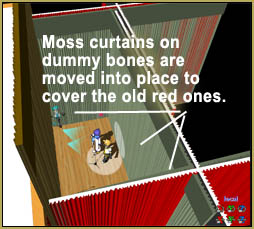
This image shows the same stage as seen from above … you can see how those new drapes simply cover the old ones … you put one in back and another one on each side of the stage.

That picture ALSO shows a Gold curtain that I slide up and down to be the stage curtain … “Curtain going up!”


Attach a drape to a dummy bone and use it to "Open the Curtain!"These pictures also show another feature that works well … I use the Floorlights accessory both on the floor … and on the curtain wall. To make it stick to the wall, I attach the Floorlight to a dummy bone … and then move that light disc into place, upright against the curtains.

Along with those floorlights, I use the colored “light03_b” lights, attached to dummy bones … moved up into the overhead to shine down as if they are the source of those floorlights. You can pivot them to follow any of the moving floorlights that you might create as you follow your model onstage.

The LearnMMD Stage comes with the TheaterSeatsInPlacetheater seats as a separate piece. You attach it to a dummy bone and move it out into the room … and set it where you want it.
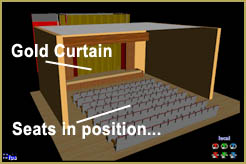
The seats were created as a separate model to allow a bit of flexibility in their positioning. You can put the front row of seats right up front … or leave some floor-space in front of the front row so someone can stand there to introduce the show!

You can set the stage with the rest of your accessory/props. I have a flag, an easel, some microphones … potted plants, tables, chairs … you name it!

You can see my “Moss-Colored Stage” in action in this short video…

See how the props and the floorlights … and those overhead lights … make the scene come alive.

Get your LearnMMD Stage from the LearnMMD Downloads page.

Have fun with it!


– SEE BELOW for MORE MMD TUTORIALS…


— — —


– _ — –


Visit the LearnMMD.com Homepage! Plenty of Mikumikudance instruction and info!

More MMD Tutorials...

Enjoy the "camera Angles WEIRD in Anime" meme...

Enjoy the "camera Angles WEIRD in Anime" meme... This image is from The Slayers - NEXT, ...read more

Reader asks how to create MMD artwork... stuff like posing, camerawork?

A reader asks... Is there a tutorial on how to create MMD artwork, like those you ...read more

Learn MikuMikuDance in Small Steps! New LearnMMD Video Series

Learn MikuMikuDance in Small Steps. Where can I find easy-to-follow MMD instructions on YouTube? How ...read more

Apply Multiple Effects on an Entire MMD Model Using M4Layer Effect

How can I apply multiple effects to an MMD model? Can I use more than ...read more

MMD Plugin Manager... I Found a Treasure!

What sorts of MMD Plugins are there? MMD Plugin Manager? MMD Plugins. Plugin MMD. More ...read more

2025: Hatsune Miku is 18... but she is designed to be always 16 Years old, by design and in reality!

Finally, in 2023, Hatsune Miku is 16 years old! but in August of 2025, she ...read more

Dummy Bones, MMD Stages, MMD Tutorials, New Stage Accessory, Reggie Dentmore

Post navigation

Previous Post: Using the KeyScreen Effect in MikuMikuEffects (MME)
Next Post: Using the Interpolation Curve in MikuMikuDance.

Related Posts

  • Crazy Animation Creation yields fun video and good practice! "the making of" my video
  • Rotate stage to allow ground shadows MMD MikuMikuDance Accessory Manipulation/Adjust
  • How to subtitle MMD videos MMD Tutorials
  • modified MMD effects can yield NEW surprises!
    Modified MME Effects Files yield NEW Effects for MMD! Customize MME effects
  • MMD First Steps Make your own motions from scratch Making Smooth Motions
  • MMD Camerawork sets the mood, enhances the animation, and showcases your models!
    MMD Camerawork sets mood enhances animation showcases models "the making of" my video

More Related Articles

Dramatically Decrease AVI File size before uploading YouTube videos MMD Tutorials
Use Accessory Manipulation Panel Settings to Position Props Accessory Manipulation/Adjust
Darkening the stage lighting makes the floorlight look very bright! MMD 7.39, LearnMMD.com MMD Camera Motions: The Camera’s Gotta Keep Moving! Camera Motion
Everything is loaded and ready to "Play!" ... Happy Hands MMD Meme. Create an MMD Video using the “Happy Hands” Meme Making Videos - Rendering to AVI
Rendering HD 60 FPS MMD video and YouTube Upload HD Videos in MMD
MikuMikuDance Tutorials MMD Tutorials on LearnMMD.com MMD Tutorials

Leave a Reply Cancel reply

Your email address will not be published. Required fields are marked *

Download the latest version of MikuMikuDance!
See the MMD Step-by-Step instructions page!
Learn how to make your own MMD motions!
LearnMMD.com
  • An MMD town stage: Making Kerorin Town Great Again – Part 3 MMD Stages
  • How to use Raycast MMD MME Shader Effect Advanced Shader Technique
  • Making MikuMikuDance Pictures Render to Picture File Tutorial Camera Motion
  • Congratulations Dolly Strawberry!
    Video Dojo Expo 2 Champion: Dolly Strawberry (MacaronTeaCupBaby) Video Dojo Champions
  • First Steps for the Beginner MMD MikuMikuDance artist Welcome to LearnMMD.Com!
  • Lexasio's Steampunk Teto & Miku star in "Kiss me" MMD video!
    Lexasio’s Steampunk Teto & Miku star in MMD “Kiss Me” animation "the making of" my video
  • Animation Fade helps MMD scene transitions Animation Shortcuts
  • The Champions are Chosen! Video Dojo Expo 3 is Complete. CONTESTS

Copyright © 2022 Learn MikuMikuDance – MMD Tutorials – Free 3D Animation Software and Instructions..

Powered by PressBook Premium theme

Go to mobile version