

Skip to content
Learn MikuMikuDance – MMD Tutorials – Free 3D Animation Software

Learn MikuMikuDance – MMD Tutorials – Free 3D Animation Software

Download Free Animation Software – Let's Learn How to Do Everything!

  • Step-by-Step MMD instructions
  • DOWNLOADS
  • Troubleshoot, Fix MMD
  • Site Contents
  • Reggie Replies Q&A
  • Homework!
  • What IS MMD?
    • Download MikuMikuDance Newest Latest Version of MMD
  • “HOW TO”
    • Raycast RAY-MMD Effect Tutorials
  • BONUS PAGES
    • Why convert PMD models to PMX?
  • HALL of CHAMPIONS
  • Tutorial Categories
  • About
    • Privacy Policy
  • Toggle search form
  • Use Center Position Bias to duplicate a motion Functions-Copy-Paste-Expand
  • Free Download MikuMikuDance MMD
    Download the Latest Version of MikuMikuDance: MMD 9.32 Download MikuMikuDance
  • Translate Japanese Models to English with Google Translate and PMDE Bones
  • MME Collapse Effect requires PMDE model edit Collapse Effect
  • Be a responsible MMDer … “Keep the Faith!” Welcome to LearnMMD.Com!
  • REM Hatsune Miku 10th model links on LearnMMD.com
    Reintroducing cute REM Hatsune Miku 10th in Hello, how are you? "the making of" my video
  • Magician Miku pulls a magic trick and reverses her motion data!
    How to Reverse Motion Data in MikuMikuDance ARIZONA
  • Learn How to Navigate Japanese MikuMikuDance Pages Downloading New Models

Professionally made models FOUND!

Posted on May 2, 2015September 1, 2018 By Kazuki Matsuoka 12 Comments on Professionally made models FOUND!

See all of the articles by LearnMMD's Kurea Urusuta!

Sometimes… we wish that we could have the models in Project DIVA, Mitchie M’s Burenai Ai de, Arcade Future Tone, and use them, for once…
BUT, that’s going to happen right now!

Professionally made models FOUND!

Find the professionally made models, or, at least, models that LOOK like them ... and enjoy!

After months and months of searching and searching, looking for the best riggers and model makers in deviantArt, I have found the best ones that look the best! And the most similar to the professional models! I have been wanting to share with you one of my biggest achievements in finding the best models that are hard or difficult to find.

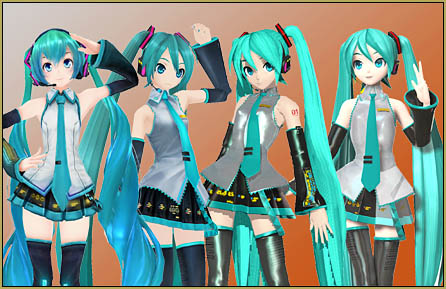
You know models that look like these? Compare the differences and find the ones that look better. Fiddle with their toon files and spa’s and see if they look better, if they don’t, undo the changes.

I have come across the best artist on DA, and it’s Luke-Flame (http://luke-flame.deviantart.com/) for arcade future tonethe best looking Project DIVA Arcade Future Tone models.

He makes not just the default models, but also all of the customized models from Miku, Rin, Len, Meiko, Kaito and Luka, he doesn’t stop!

Just download the model and add a figure shader to it with MME, I recommend this one: http://martinnx.deviantart.com/art/MMD-MME-New-real-Figure-shader-DL-BUG-SOLVED-425004384

Make some adjustments to the lighting and it’ll look just like the game!

burenai Ai deAlso, the Burenai Ai De Model can be found right here! (finding the pass is easy, don’t give up!): http://syazwan133.deviantart.com/art/KasoSato-Miku-DL-500366822

–

Project Diva F MikuYou can find a Project DIVA f2nd Miku here: http://armachamcorp.deviantart.com/art/Project-Diva-F-Hatsune-Miku-456389387


–

DT MikuMy favorite Arcade model I use is from Mikudaven, here: http://mikudaven.deviantart.com/art/PDAFT-Miku-DL-462440149


–

Keep searching, and find the models that you think that look best and make your friends jealous~

There are many artists out there such as, Mikudaven, Pleumschool, Luka-Flame, ManJapanUniverse and so on.

Never give up on searching, look around, ask friends, ask artists, go around and find these things.

Plus, I didn’t forget about stages ^^: http://diemdo-shiruhane.deviantart.com/gallery/36378129/House-Room-Stage-DL
AND ALWAYS REMEMBER~ CREDIT CREDIT CREDIT! ^^


More MMD Tutorials...

Enjoy the "camera Angles WEIRD in Anime" meme...

Enjoy the "camera Angles WEIRD in Anime" meme... This image is from The Slayers - NEXT, ...read more

Reader asks how to create MMD artwork... stuff like posing, camerawork?

A reader asks... Is there a tutorial on how to create MMD artwork, like those you ...read more

Learn MikuMikuDance in Small Steps! New LearnMMD Video Series

Learn MikuMikuDance in Small Steps. Where can I find easy-to-follow MMD instructions on YouTube? How ...read more

Apply Multiple Effects on an Entire MMD Model Using M4Layer Effect

How can I apply multiple effects to an MMD model? Can I use more than ...read more

MMD Plugin Manager... I Found a Treasure!

What sorts of MMD Plugins are there? MMD Plugin Manager? MMD Plugins. Plugin MMD. More ...read more

2025: Hatsune Miku is 18... but she is designed to be always 16 Years. Old by design and in reality!

Finally, in 2023, Hatsune Miku is 16 years old! but in August of 2025, she ...read more

Downloading New Models, Figure Shader, Kazuki Matsuoka, MMD Tutorials

Post navigation

Previous Post: THIS IS TARGET Meme by Zazi on LearnMMD.com
Next Post: Graphic Design Skills enhance MMD Pictures

Related Posts

  • MMD ballet Poses Download on LearnMMD
    Download MMD Ballet Poses created by ctrlaltdelete999 "the making of" my video
  • Enjoy the “camera Angles WEIRD in Anime” meme… Animation Shortcuts
  • MME Lighting Effect, PanelLight by Soboro, is easy to use!
    Add MME Lighting Effect illuminates model against dark stages MMD Tutorials
  • Intentionally Build Dramatic Atmosphere into your MMD Animation MMD Tutorials
  • UV Unwrapping MMD Models in Blender with MMD Tools Bandages
  • Creating Inspirational Pictures in MMD MMD Fine Art

More Related Articles

MMD MME Rhinestone effect adds sparkle to your models! MMD Tutorials
Let’s Go Learn Hatsune Miku Model Names Downloading New Models
Rendering in 4K video at 60FPS with MMD 4k video
Intel Gen 12 Processor puts white screen over the MMD stage. Solved? White screen covers MMD stage Intel Gen 12 Processor blocks MMD stage MMD Tutorials
MMD Project “I WANNA PARTY!” features great motion files by o Savvy o "the making of" my video
Learn to Edit MMD Effects by Editing Raycast Materials Bandages

Comments (12) on “Professionally made models FOUND!”

  1. workfan208 says:
    January 2, 2021 at 12:19 pm

    Okay i need conflict and ruby Lukas but there is no dl anywhere. How to convert models from PDFT? I can’t understand what he’s doing – https://www.youtube.com/watch?v=DfypfITqTFI&ab_channel=CABLEGRACE

    Reply
  2. oceancc says:
    October 8, 2020 at 9:44 pm

    i give up finding the password kaslkasklasd

    Reply
  3. BSG says:
    March 28, 2017 at 9:56 am

    THANK YOU I WAS LOOKING FOR THESE MODELS THANK YOU

    Reply
  4. Kareem Abdo says:
    January 13, 2017 at 9:31 pm

    i wanted to say, how do you load the pdf model? i looked to see if there were any pmd or pmx files. and their weren’t any. HELP ME!!!

    Reply
    1. KillerBeer says:
      January 14, 2017 at 12:55 am

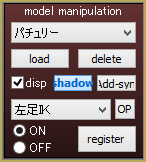
      There’s no such thing as “pdf model” (spellchecker getting bossy, eh?). To load a .pmd/.pmx model, use the “load” button in the Model Manipulation Panel.
      There are few basic .pmd models in MMD’s “UserFile/Model” folder They will do for starters. To download more models (and there are tons of) you’ll have to search for them. Looking through deviantArt for “mmd model download” would be a good beginning point.

      Reply
      1. Kareem Abdo says:
        January 14, 2017 at 8:18 am

        im not talking about spellchecking, im talking about when i download the project diva f model (pdf) i looked in the rar file and i found no pmx or pmd files.

        Reply
        1. KillerBeer says:
          January 14, 2017 at 8:42 am

          OK, sorry for misunderstanding, I see what you mean now. Yes, there’s no .pmd inside this particular archive. Apparently, it’s not a MMD model and it got into the article by mistake. Supposedly, you still *can* convert it for MMD if you import it into Blender using XPS Tools plugin and then from Blender into .pmd using MMD Tools (or some other plugin; AFAIK there’s several). I haven’t tried it for myself, but there’s a fair chance that you’ll have to do a lot of additional editing to the converted model before it’s ready to play; not sure if it’s worth the hassle. There’s always more fish Mikus in the ocean.

          Reply
          1. Kareem Abdo says:
            January 17, 2017 at 4:40 pm

            Im just a beginner. but i can try. hopefully i can play around with this model, im good.

            Reply
          2. Kareem Abdo says:
            January 17, 2017 at 4:45 pm

            ok yeah im not really into blender. and WHAT IS XPS TOOLS?! im confused. im just gonna find another model. and i can’t find the password for the burenai ai de models . and i don’t know anything about malaysia.

            Reply
            1. KillerBeer says:
              January 17, 2017 at 9:12 pm

              XPS Tools is a plugin for Blender for importing and exporting XPS models (such as the one you asked about). The link I provided points to where you can download it and how to use it. I haven’t used it myself, so can’t help much beyond giving a direction.

              As for passwords… look into comments, there can be helpful clues. Usually, people who want their models to be downloaded don’t place passwords too difficult to find by brief googling.

              Reply
  5. Marsya says:
    September 8, 2015 at 4:59 am

    I want ask, I was download kasane teto model in deviant art (link: http://www.deviantart.com/art/DL-Series-Appearance-Teto-Kasane-346307297 ) but, after i download, I cant open the model/the model file… why?? answer please..I’m newbie

    Reply
    1. Reggie_Dentmore says:
      September 8, 2015 at 10:19 am

      I downloaded the folder… it’s a totally Japanese model… need to set you computer to Japanese locale… or use the Applocale/7-Zip routine as explained here:
      https://learnmmd.com/http:/learnmmd.com/opening-japanese-models-in-mikumikudance-7-39-sometimes-they-don%E2%80%99t-work/
      and https://learnmmd.com/Applocale7zip/

      I am sending you an email to get this info to you.

      Reply

Leave a Reply Cancel reply

Your email address will not be published. Required fields are marked *

Download the latest version of MikuMikuDance!
See the MMD Step-by-Step instructions page!
Learn how to make your own MMD motions!
LearnMMD.com
  • Making amazing complicated MMD video requires circle of learning Animation Shortcuts
  • I added laughter and applause tracks using Audacity software.
    Add Life to your MMD soundtrack with Laughter and Applause! VDE-3! Making Soundtracks
  • What kind of laptop should I buy for running MMD? Random Thoughts & Visions
  • Download and Configure the OldTV MME Effect for MikuMikuDance Customize MME effects
  • Let your MMD model breathe and move while standing still! Creating Motions
  • Easily Transfer an Accessory to a Dummy Bone from Model’s Hand in MMD Accessory Manipulation/Adjust
  • Good MMD videos require Inspiration, Vision, Planning: The Lament of Okada’s Ghost MMD Basics
  • Dummy Bones allow you to customize your accessory manipulations!
    Using The Dummy Bone for MikuMikuDance Accessory Manipulation/Adjust

Copyright © 2022 Learn MikuMikuDance – MMD Tutorials – Free 3D Animation Software and Instructions..

Powered by PressBook Premium theme

Go to mobile version