
Skip to content
Learn MikuMikuDance – MMD Tutorials – Free 3D Animation Software

Learn MikuMikuDance – MMD Tutorials – Free 3D Animation Software

Download Free Animation Software – Let's Learn How to Do Everything!

  • Step-by-Step MMD instructions
  • DOWNLOADS
  • Troubleshoot, Fix MMD
  • Site Contents
  • Reggie Replies Q&A
  • Homework!
  • What IS MMD?
    • Download MikuMikuDance Newest Latest Version of MMD
  • “HOW TO”
    • Raycast RAY-MMD Effect Tutorials
  • BONUS PAGES
    • Why convert PMD models to PMX?
  • HALL of CHAMPIONS
  • Tutorial Categories
  • About
    • Privacy Policy
  • Toggle search form
  • Smooth camera moves and soft focus make for smooth scene transitions in MMD 7.39 . LearnMMD.com
    Smooth Scene Transitions featured in new MMD Departures video "the making of" my video
  • Download Table Lamp Accessory ON and OFF Downloading New Models
  • Download Previous Versions of MikuMikuDance from LearnMMD.com! Download MikuMikuDance
  • Raycast Ray-MMD Toon Shader
    Ray-MMD Toon Shading Basics MMD Tutorials
  • How to Switch Models and Stages in MikuMikuDance Accessory Manipulation/Adjust
  • pmothair Effect Makes Hair Actually Look like hair MMD Tutorials
  • See my new YouTube MMD video “She’s So Hot!” Making Soundtracks
  • Create 450-Frame MMD Animation from scratch!
    Zero-to-450.com: REALLY Learn MikuMikuDance! "the making of" my video
ZERO-GRAVITY Day on the beach in MMD!. Use Gravity Settings and Noize to make winds blow.

Using the Gravity Settings in MikuMikuDance

Posted on July 24, 2012August 1, 2015 By Arizona No Comments on Using the Gravity Settings in MikuMikuDance

What are the gravity settings in MMD? How do you use the gravity settings in mmd? What does Noize mean in MikuMikuDance?A Feature Article by contributor ARIZONA on LearnMMD.com

Breaking Wind …
How MMD Gravity Settings  Work

MikuMikuDance is a very strange world. The usual laws of physics don’t apply. Models can fly and move through “solid” objects, each other, and themselves. Because it is an artificial world; artificial means have been created to represent the reality of our world.

Gravity, in MMD, is represented by whatZERO-GRAVITY Day on the beach in MMD!. Use Gravity Settings and Noize to make winds blow. we would call wind. Using a physics engine, called Bullet Physics, allows a budding MMDer to animate without having to move every single element. This is why MikuMikuDance is such a powerful (yet tiny) program.
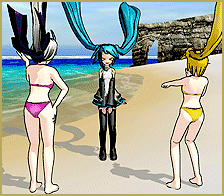
If you want to play with gravity in MMD, first load a model. I would recommend a long-haired model to really see the effects. You’ll notice that nothing’s happening. Now go to the main menu and click on “physical operation” and then click “anytime.” Notice there is a slight motion in the hair and some clothing. This means that the physics engine is active.
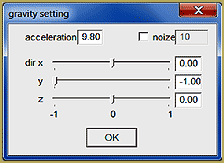
The MikuMikuDance Gravity Settings panel is easy to use ...with powerful effects!To manipulate MikuMikuDance gravity, go back to physical operation and select “gravity setting.” A window with three sliders, a check box, and four input fields will pop up. The sliders are where you adjust the direction of the wind.

Conveniently, they are exactly the same x, y, and z directions used for the Center Position Bias (See: https://learnmmd.com/http:/learnmmd.com/use-center-position-bias/ for a detailed explanation).

Notice that the Y axis slider is set at -1; that is because gravity pulls down. Now move the sliders and watch the hair and clothing react to the different directions. Play around with different combinations of slider positions. Also note, the model stays firmly in Gravity NOIZE "wind" blows across Miku's MMD stage. Adjust Gravity settings and Noize to change the wind.place no matter which way you’re directing the gravity. Even, if you set everything to zero.

A change in the wind … Gravity Settings

You can change velocity; intensity and otherwise fine tune your gravity with the “acceleration” and “noize” fields by adding numerical values to these fields. You may enter anything from a gentle gust to a hurricane wind. These fields don’t seem to have a numeric limit! Although I cannot see any real discernible difference once you go past 10 million. So rest assured, your model will not fly apart or get blown off screen.

Have fun with this.

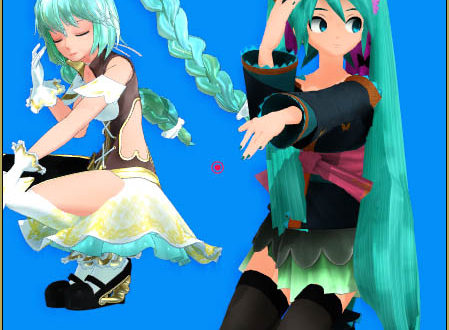
Credits: Default Miku by Animasa, Bikini Neru and Haku by Sosou on Batokin Island by Batokin.

// Post Note:

Sometimes models experience “wardrobe malfunctions” with their skirts. So a slight adjustment to the Y axis of the gravity settings can prevent that. -.01 I find will solve a lot of skirt entrapments.


– SEE BELOW for MORE MMD TUTORIALS…


— — —


– _ — –


Visit the LearnMMD.com Homepage! Plenty of Mikumikudance instruction and info!

More MMD Tutorials...

Reader asks how to create MMD artwork... stuff like posing, camerawork?

A reader asks... Is there a tutorial on how to create MMD artwork, like those you ...read more

MikuMikuDance 15th Anniversary celebration video posted on NicoNico!

Did you know that the first version of MikuMikuDance was released in 2008? MMD is ...read more

Use YouTube Video Analytics Attract Maintain Viewers

How can I use YouTube Video Analytics to learn how to make popular MMD videos? ...read more

Create 450-Frame MMD animation from scratch!

How do I create a 450-Frame MMD animation from scratch? How do I start making ...read more

No more boring MMD Camerawork - Keep it moving!

MMD Camerawork can be so boring. How can I add life to my MMD animations? ...read more

Download Halloween Costume TDA Miku edit by dA's Shiro-NekoVocaloid

Where can I get Halloween Costume TDA Miku? Download a gang of five MMD models ...read more

ARIZONA, MENU Option Descriptions, MMD Basics, Nuts & Bolts Tags:beginner, gravity settings, mikumikudance

Post navigation

Previous Post: MMD Screen Capture Tool makes taking pictures a Snap!
Next Post: Local and Global Mode Bone Movement MMD: Miku’s Mode Swings

Related Posts

  • Good MMD videos require Inspiration, Vision, Planning: The Lament of Okada’s Ghost MMD Basics
  • Use Center Position Bias to duplicate a motion Functions-Copy-Paste-Expand
  • Next Level in MMD Video Evolution
    Post-Production Editing Yields Next Step in MMD Video Quality Making Videos - Rendering to AVI
  • Make your own MMD Accessory Objects in Google Sketchup Google SketchUp and MMD
  • MMD Camerawork makes your video exciting!
    No more boring MMD Camerawork – Keep it moving! Camera Motion
  • Easy Fun MMD Music Video Mahlazer Motion Download “Feel the Sound” MMD Basics

More Related Articles

Translate Japanese Models to English with Google Translate and PMDE Bones
Use The Background AVI to Make Realistic Animations in MMD ARIZONA
"Gothic Teto" by Nigamon and "Mouse Cursor" by SachiShirakawa Collecting MMD Models, Music and Accessories for Beginners ARIZONA
Culling unseen MMD model parts optimises computer assets (PART 2) Chestnutscoop
Why does MMD HAVE to be EXCRUCIATINGLY CONFUSING? MMD Basics
Luka Loves the Rainbow Ring Use MME Rainbow Ring Effect in MikuMikuDance ARIZONA

Leave a Reply Cancel reply

Your email address will not be published. Required fields are marked *

Download the latest version of MikuMikuDance!
See the MMD Step-by-Step instructions page!
Learn how to make your own MMD motions!
LearnMMD.com
  • See LearnMMD’s New Crop-Transition Panel Video Google SketchUp and MMD
  • Win 7 Virtual Machine Runs MMD on MAC and Linux Kazuki Matsuoka
  • Convert VRoid Studio to MMD Header Image
    Convert VRoid Studio to MMD With One Click Mae Blythe
  • Adding Sound Effects to existing MMD animations Making Soundtracks
  • Speech Synthesizer gives MMD Models a voice! Making Soundtracks
  • VDE-4 Champion: Pajamaje135 Video Dojo Champions
  • Download the beautiful LUKA MEGURINE HIPSTERBLACK by PS-2002
    Download the beautiful LUKA MEGURINE HIPSTERBLACK by PS-2002 "the making of" my video
  • mikumati NXDE G-IDLE models dance "No Thanks" by Hyolyn - Download Links
    mikumati NXDE G-IDLE models dance “No Thanks” by Hyolyn – Download Links "the making of" my video

Copyright © 2022 Learn MikuMikuDance – MMD Tutorials – Free 3D Animation Software and Instructions..

Powered by PressBook Premium theme

Go to mobile version