
Skip to content
Learn MikuMikuDance – MMD Tutorials – Free 3D Animation Software

Learn MikuMikuDance – MMD Tutorials – Free 3D Animation Software

Download Free Animation Software – Let's Learn How to Do Everything!

  • Step-by-Step MMD instructions
  • DOWNLOADS
  • Troubleshoot, Fix MMD
  • Site Contents
  • Reggie Replies Q&A
  • Homework!
  • What IS MMD?
    • Download MikuMikuDance Newest Latest Version of MMD
  • “HOW TO”
    • Raycast RAY-MMD Effect Tutorials
  • BONUS PAGES
    • Why convert PMD models to PMX?
  • HALL of CHAMPIONS
  • Tutorial Categories
  • About
    • Privacy Policy
  • Toggle search form
  • MME Balloon Effect (And what I found out) Balloon Effect
  • Adding & Working the Stage Lights with Dummy Bones MMD MikuMikuDance Dummy Bones
  • Passion VS Work – Making Videos for your Fanbase MMD Tutorials
  • MME effect Kamitachi – Night breeze silhouette shader of Kama Kamitachi - Silhouette
  • VDE-4 Champion: YamiMori Video Dojo Champions
  • Convert PMD Models To PMX Models and Chicken-Leg Fix! BigPerryman
  • Cookiefun Channel Camera Crew Model Free Download Downloading New Models
  • MikuMikuDance “Keep the Faith-MMD” MMD Tutorials
A brightly colored .sph sphere file replaced the common gray one with brilliant results! MMD 7.39

Alter Sphere Files for a quick color change in MMD

Posted on August 4, 2012July 20, 2018 By Reggie_Dentmore 1 Comment on Alter Sphere Files for a quick color change in MMD

What are sphere files in MikuMikuDance 7.39? What are .sph files in Miku Miku Dance? How do I alter sphere files in MMD 7.39?A Feature Article by Reggie Dentmore on LearnMMD.com

Make Radical Color Changes with SPHERE Files!

Many MMD models use sphere files to give a shiny, metallic surface to their hair, skin and clothing. The use of a .sph sphere file is what makes “Metal Miku” metal!

If you look inside the MODEL folder, inside the USER FILE folder, you will see, amongst the other loose files, there, one called metal.sph. THAT is Miku’s “metal” file!

This exercise is so easy, I now you are going to enjoy trying it on ALL of your models!

be sure to know that you have peremission to modify and share your modified models: Keep the Faith-MMD!


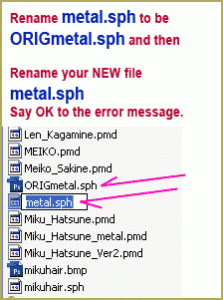
Before anything else … make a copy of your metal.sph file. Rename it ORIGmetal.sph and don’t make any changes to it.
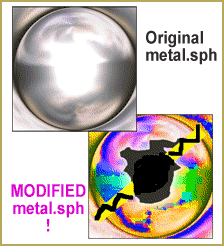
I went crazy with color as I made my new .sph sphere file image. MMD 7.39.You can’t just OPEN the metal.sph file in your art program. The .sph file is an image file, a jpeg or a bitmap … but your paint or GIMP program cannot open the .sph file type … so rename it metal.bmp. Now you can open it in your art program and go crazy with it!

Take a look at mine!

I INVERSEd the colors (white to black, blue to orange) and ran the color saturation to the MAX. Then I drew on it a little just to make it more crazy.

When you have had enough fun, SAVE the file … don’t change the file name when you save it … just leave it metal.bmp

Now open the MODEL file again, locate the metal.bmp … and rename it metal.sph   Click YES or OK to the error message. (You know what you are doing!)Simply make a new art file and call it metal.sph.    Sphere Files in MikuMikuDance 7.39
You’re Done!

When you open your model in MMD, you will see the new colors. Take a look at my new Metal Miku!
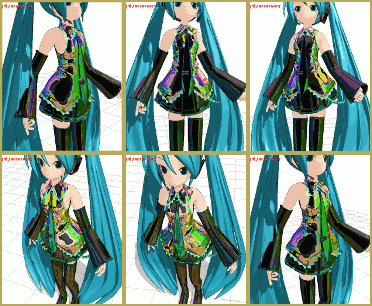
Using that wild ne .sph sphere file, metal Miku gets a shimmery effect!  MikuMikuDance 7.39


That is an amazing iridescent sheen!

I also tried it … that same brilliantly colored piece of  “art” … on my 1958 Chevy Belaire!
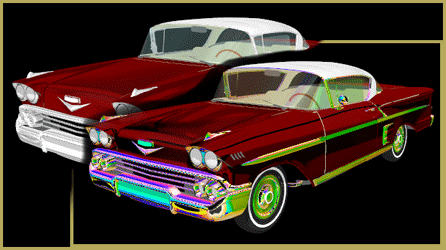
A brightly colored .sph sphere file replaced the common gray one with brilliant results! MMD 7.39

Not only does the chrome gleam with my new colors, but the shading on the hood, sides and glass is all reflecting the new crazy colors.

In the case of that Chevy, the sphere file was named cr.sph … spheres can have all kids of names … not just “metal”.

You can recover the original look of your model by putting the original sphere file image back into place. Just rename your “art” to something else and rename your original sphere file to it’s original name. Easy as pie! – Enjoy!


The 1958 Chevy is one of the cars from the Vehicle download that was available at mmdsekai.com … no longer online… I modified my Chevy by changing its original Yellow paint color file to Red … another easy trick!


– SEE BELOW for MORE MMD TUTORIALS…


— — —


– _ — –


Visit the LearnMMD.com Homepage! Plenty of Mikumikudance instruction and info!

More MMD Tutorials...

Introducing MMD model 1052C China Qipao Miku

Where can I download MMD model 1052C dancers? I want the 1052C China Qipao Miku ...read more

Download Jomomonogm's Snow Miku 2019 for MMD, a most unusual model!

Where can I download Jomomonogm's Snow Miku 2019? What is so unusual about this Snow ...read more

MMD animation made-from-scratch Forgotten Vocaloid Mew Rags on Reggie's MMD Videos

How do I make my own MMD animation from scratch? How do I start my ...read more

Rediscover your old MMD Animations: Love them again!

Rediscover your old MMD Animations: Love them again! https://youtu.be/P4b3todZMUI A labor of love... Remember how it was when ...read more

MMD Boobs too Big yields Too Funny Really Bad Boy video!

Can MMD boobs too big get in the way of a downloaded motion file? What ...read more

Download Hatsune Miku type N models from 2010... a set of 6!

Can I still download Hatsune Miku type N models? Where can I download a few ...read more

Reggie Dentmore, Spheres in MMD Tags:.sph file, mikumikudance, spheres

Post navigation

Previous Post: Adding Parts in PMDEditor is Easier than you think! MMD 7.39
Next Post: Nekomimi: Getting Catty Miku Miku Style MMD

Related Posts

  • Make a “Dream Fighter” MMD Music Video "the making of" my video
  • More Motion Interpolation Curve Instruction for MMDers Creating Motions
  • Rediscover your old MMD animations... Love them again!
    Rediscover your old MMD Animations: Love them again! "the making of" my video
  • Keep the Center-Bone when adding Mother-Bone to an older model MMD Tutorials
  • Download Table Lamp Accessory ON and OFF Downloading New Models
  • Modifying model texture color compensates Raycast color desaturation MMD Tutorials

More Related Articles

Getting Started with MMD MikuMikuDance Intro to MikuMikuDance
MME FunyaFunya Effect adds wavy psychedelia to your MMD scene! FunyaFunya Effect
create easy dance motions in MikuMikuDance... beginner tutorial Create MMD Dance Motion from Scratch – a beginners guide Creating Motions
My new MMD Action Video was fun to make! "the making of" my video
dull-VS-alive-animation-environment MMD animation environment… MORE than just a model on a stage! "the making of" my video
Make a “Dream Fighter” MMD Music Video "the making of" my video

Comment (1) on “Alter Sphere Files for a quick color change in MMD”

  1. Noko2 says:
    August 5, 2012 at 12:51 pm

    I just learned about this! Sphere files are so awesome!

    Reply

Leave a Reply Cancel reply

Your email address will not be published. Required fields are marked *

Download the latest version of MikuMikuDance!
See the MMD Step-by-Step instructions page!
Learn how to make your own MMD motions!
LearnMMD.com
  • MMD Augmented Reality AR on Android Devices Random Thoughts & Visions
  • Use Accessory Manipulation Panel Settings to Position Props Accessory Manipulation/Adjust
  • Hologram Effect gives projected-holograph looking image Hologram Effect
  • Continuation of previous article's dispute!
    Beamman GSW Gauge for Game-like HP Health Points Display Beamman's GSW Gauge
  • Yellow PV LAT Miku downloaded from a MMD Newcomers find on YouTube.
    Source for New MMD Models: MMD Newcomers on YouTube Downloading New Models
  • Codec Problems!
    Updating the Codecs for MikuMikuDance’s Latest Versions ARIZONA
  • Beautiful CyberMiku Black ver1.5 has wings!
    Download MMD CyberMiku Black ver1.5 with Glowing Wings and an attitude! "the making of" my video
  • Free Download MikuMikuDance MMD
    Download the Latest Version of MikuMikuDance: MMD 9.32 Download MikuMikuDance

Copyright © 2022 Learn MikuMikuDance – MMD Tutorials – Free 3D Animation Software and Instructions..

Powered by PressBook Premium theme

Go to mobile version