
Skip to content
Learn MikuMikuDance – MMD Tutorials – Free 3D Animation Software

Learn MikuMikuDance – MMD Tutorials – Free 3D Animation Software

Download Free Animation Software – Let's Learn How to Do Everything!

  • Step-by-Step MMD instructions
  • DOWNLOADS
  • Troubleshoot, Fix MMD
  • Site Contents
  • Reggie Replies Q&A
  • Homework!
  • What IS MMD?
    • Download MikuMikuDance Newest Latest Version of MMD
  • “HOW TO”
    • Raycast RAY-MMD Effect Tutorials
  • BONUS PAGES
    • Why convert PMD models to PMX?
  • HALL of CHAMPIONS
  • Tutorial Categories
  • About
    • Privacy Policy
  • Toggle search form
  • LearnMMD’s MikuMikuDance Animated GIFs Now Collected as a Bonus Page! Random Thoughts & Visions
  • IrfanView captures single-frame images from Video AVI files! Irfanview Media Viewer
  • [MMM] MikuMikuMoving Text Engine Tutorial Video MMM Text Engine
  • Half-Lambert Shader.
    How to Use the Half-Lambert Shader in MMD Half-Lambert Shader
  • What kind of laptop should I buy for running MMD? Random Thoughts & Visions
  • Take full control of MME Effects by editing .fx files Beamman's Burner effect
  • MMD Camera Work makes motions fit the song.
    MMD Camera Work made the motion fit the song! "the making of" my video
  • Background AVI Files require a Baseleine AVI setting.
    MMD Background AVI Files converted using CloudConvert Background AVI

Different MMD models react differently to pose and motion data

Posted on June 26, 2018August 28, 2018 By Reggie_Dentmore No Comments on Different MMD models react differently to pose and motion data

A Feature Article by Reggie Dentmore on LearnMMD.comMy MMD motion data doesn’t work! My MMD models react differently to pose and motion data. Why does my pose data look bad on my model?

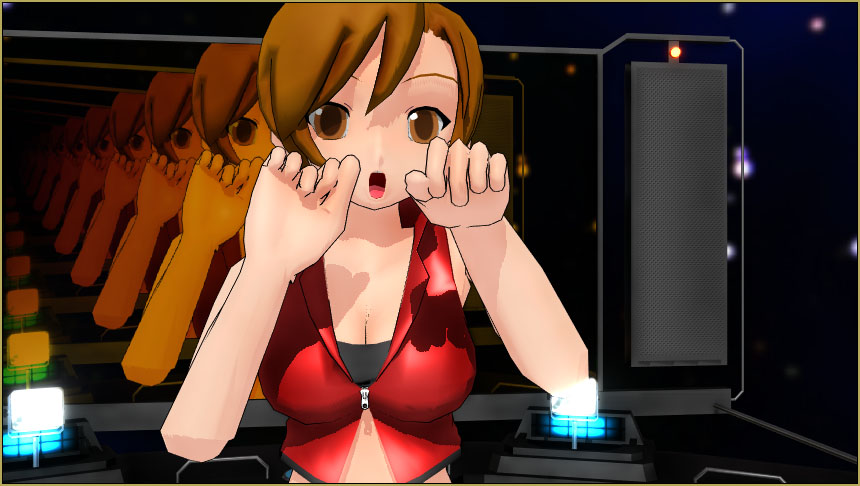
When you load a pose onto an MMD model, you expect that model to strike that pose! … but, as we see in this test, not all models react as you expect. Different models “read” their pose data differently.

You should HOLD AUDITIONS because…
Different MMD models react differently to pose and motion data
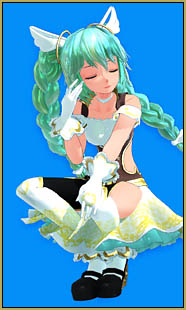
Different MMD models react differently to pose and motion dataI started with my Angelpie model (I can’t give a link because she was a short-time-only promotional model and is no longer available online).

See the details of that pose… the squat position… left hand on left knee… the fingertips by the face… the expression on face and eyes… angle of the head…

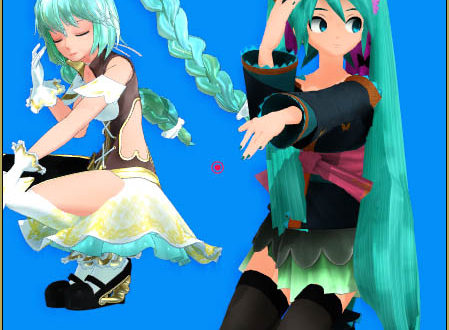
Then I loaded Miku Cagada (model no longer being distributed)… and see how different is her “take” on that pose data; knees on the floor, left arm straight out, and the face didn’t get the message, at all!
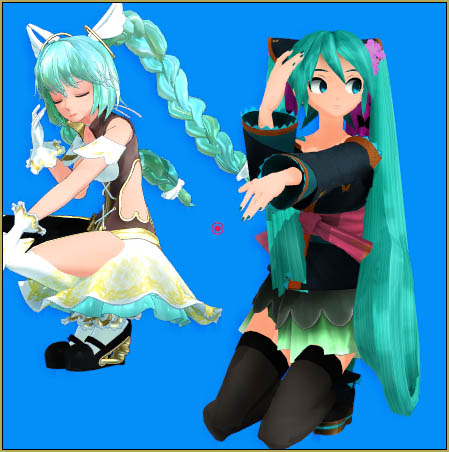

Miku Cagada "reads" her pose data differently from my Angelpie!

My princess took the pose like an Animasa model.Then I added Kisaragi Chihaya Gothic Princess
(model no longer being distributed) and saw that she, too had a different take on that pose.

CuteMiku Ver 2

Then Cute Miku Ver 2
http://lomivoka.
deviantart.com/
gallery/55515175/DL

Cute Miku “saw” the pose data in the same way as Angelpie… looks very similar!

Then…

the Animasa Miku…(who saw the pose as did the Princess) and, finally 2015 May Saboten – Erena Mochizuki\Mochizuki Elena
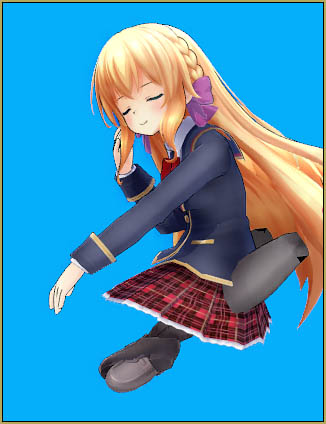
Erena Mochizuki\Mochizuki Elena… a Windows 100% model (I cannot give a link for this model.)
–
THAT model reacted in a bizarre way with those knees splaying-out BEHIND her!

THE LESSON: If you have a motion to try in MMD… you should audition several models to find the one that looks to be just right for your animation.

Note, too, that a motion may rely on your model having a motherbone… and a model, without that bone, may not perform correctly.

Have fun with MikuMikuDance!


– SEE BELOW for MORE MMD TUTORIALS…


— — —


– _ — –


Visit the LearnMMD.com Homepage! Plenty of Mikumikudance instruction and info!

More MMD Tutorials...

Enjoy the "camera Angles WEIRD in Anime" meme...

Enjoy the "camera Angles WEIRD in Anime" meme... This image is from The Slayers - NEXT, ...read more

Reader asks how to create MMD artwork... stuff like posing, camerawork?

A reader asks... Is there a tutorial on how to create MMD artwork, like those you ...read more

Learn MikuMikuDance in Small Steps! New LearnMMD Video Series

Learn MikuMikuDance in Small Steps. Where can I find easy-to-follow MMD instructions on YouTube? How ...read more

Apply Multiple Effects on an Entire MMD Model Using M4Layer Effect

How can I apply multiple effects to an MMD model? Can I use more than ...read more

MMD Plugin Manager... I Found a Treasure!

What sorts of MMD Plugins are there? MMD Plugin Manager? MMD Plugins. Plugin MMD. More ...read more

2025: Hatsune Miku is 18... but she is designed to be always 16 Years old, by design and in reality!

Finally, in 2023, Hatsune Miku is 16 years old! but in August of 2025, she ...read more

MMD Basics, MMD Tutorials, Random Thoughts & Visions, Reggie Dentmore

Post navigation

Previous Post: 15-Second MMD animation “Smash Walkin’ “
Next Post: Analyzing Why some VSQ files make MMD Crash

Related Posts

  • Easily Make Realistic Hair Texture for MMD Models Mae Blythe
  • MMD Model Adoration Slideshow features your model!
    MMD Model Adoration Slideshow video, a new type of MMD video! "the making of" my video
  • MME Collapse Effect requires PMDE model edit Collapse Effect
  • Using the right codec when Rendering to AVI in MMD HD Videos in MMD
  • Starting-out Using MMD starts you on a learning path.
    Starting-out Using MMD Reader discovers missing elements. MMD Basics
  • Once there was a war… the making of my “Paint it black” MMD video "the making of" my video

More Related Articles

Old-Time VOCALOID MMD… a New TAKE and a Look Back! "the making of" my video
With some practice, Rin can dance the sample dance as well as Miku! There Can Be Frame Data Ghosts remaining after Deletion Making Smooth Motions
How To Add Depth and Emotion in an MMD Picture Advanced Shader Technique
Blackout Effect offers Fade-to-Black and fade-to-white! MME Blackout Effect offers Fade-to-Black and Fade-to-White Blackout Effect
Our “Ring Around the Moon” Project for MMDers CONTESTS
Build your own stage for MMD using Blender 2.69 Blender

Leave a Reply Cancel reply

Your email address will not be published. Required fields are marked *

Download the latest version of MikuMikuDance!
See the MMD Step-by-Step instructions page!
Learn how to make your own MMD motions!
LearnMMD.com
  • The MMD 7.39 VIEW MENU Options MENU Option Descriptions
  • Creating a new model using Piron's base and a great new T-shirt! MMD 7.39 PMDE
    Adding Parts in PMDEditor is Easier than you think! MMD 7.39 NOKO2
  • Why MMD cannot open the models in a saved PMM file Downloading New Models
  • Customized Skydome replace stages, enhance MMD animations MMD Tutorials
  • Skirt in the process of being rigged in PMX Editor
    PMXE Skirt Plugin Presets and Other Tips for Awesome Skirts Mae Blythe
  • Using the Blood Effect in MMD MikuMikuDance Accessory Manipulation/Adjust
  • MMD Batokin Island stage is MORE than a beach MMD Basics
  • MME fireintheskies effect
    MME FireintheSkiesEffect gives floating flame and embers! FireintheSkiesEffect

Copyright © 2022 Learn MikuMikuDance – MMD Tutorials – Free 3D Animation Software and Instructions..

Powered by PressBook Premium theme

Go to mobile version