
Skip to content
Learn MikuMikuDance – MMD Tutorials – Free 3D Animation Software

Learn MikuMikuDance – MMD Tutorials – Free 3D Animation Software

Download Free Animation Software – Let's Learn How to Do Everything!

  • Step-by-Step MMD instructions
  • DOWNLOADS
  • Troubleshoot, Fix MMD
  • Site Contents
  • Reggie Replies Q&A
  • Homework!
  • What IS MMD?
    • Download MikuMikuDance Newest Latest Version of MMD
  • “HOW TO”
    • Raycast RAY-MMD Effect Tutorials
  • BONUS PAGES
    • Why convert PMD models to PMX?
  • HALL of CHAMPIONS
  • Tutorial Categories
  • About
    • Privacy Policy
  • Toggle search form
  • Keyboard Shortcuts Aplenty in MikuMikuDance 7.39 by ClintImTired Accessory Manipulation/Adjust
  • Post Effect cannot be specified
    Fix the “Post Effect cannot be specified” error Chris no Akumu
  • Import models from Source engine based games (HL2, Portal, TF2 etc.) Blender
  • Gotta Sing... Gotta Dance! LearnMMD's Video Dojo Expo-3!
    Gotta SING… Gotta DANCE! LearnMMD’s Video Dojo Expo-3! CONTESTS
  • My VDE-3 Entry has Music, Camera, Dancers… Now for the HARD part. "the making of" my video
  • IrfanView captures single-frame images from Video AVI files! Irfanview Media Viewer
  • Easily Make Realistic Hair Texture for MMD Models Mae Blythe
  • Reduce MMD video file size by using HandBrake.
    Reduce MMD Video File Size using FREE HandBrake video converter HandBrake video conversion

My Top 6 Favorite Shader Effects for MikuMikuDance

Posted on April 21, 2017July 7, 2024 By GloriaTheAnimator 2 Comments on My Top 6 Favorite Shader Effects for MikuMikuDance

A feature article by GloriaTheAnimator!Lookin’ for a good shader to make ya models look great?
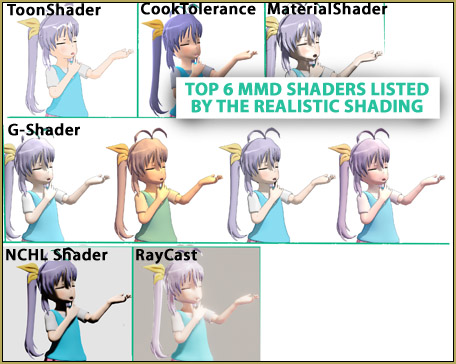
Shaders add nice character to your scene. Enjoy my favorite Shaders!

Well, worry NOT! It is I, the great “GloriaTheAnimator” come to help you to choose the best shader for your MMD creations.

My Top 6 Favorite Shader Effects

Note: these will be rated by the quality of realistic shading

#1 Toon Shader

ToonShader makes your 3D scene look 2D!
Model by icemega5

This is one of my favorite shaders. It gives an amazing anime looking effect, sometimes you can’t even tell if its 3D or 2D. AND its pretty easy to use, like super mega easy to use! Here’s a tutorial and download bowlroll.net/file/22934 and it’s really light for your pc.

#2 Cook Tolerance
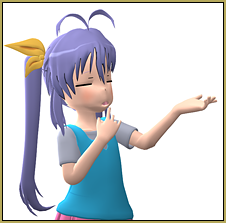
The Cook Tolerance Shader is easy to use!It’s a great nice shader but it doesn’t really give shadows, so it looks weird.

Its easy to apply it: just load the .fx on the model and load lights as .x

Here’s download and here’s a tutorial

#3 Material Shader

Material Shader makes a nice metal effect.It gives a cool metal looking effect. but it’s not good for anything else, only for metal effect.

You can get it from here and this is how to use it

#4 Greener Shader aka G-Shader
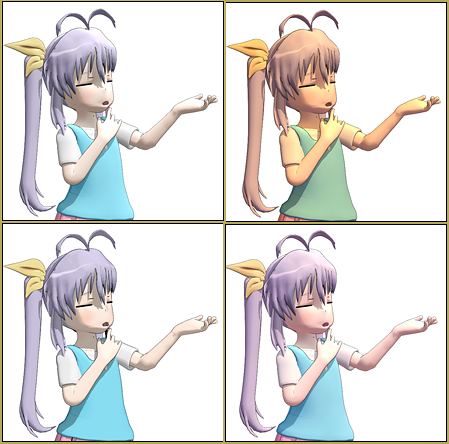
Greener Shader aka G-Shader has several optoins to customizr the effect.This one is really great! It’s easy to apply, is not heavy, and it looks pretty! This is one of my favorites because it has a lot to choose from.

download: bowlroll.net/file/14878, how to use.

#5 NCHL Shader

NCHL Shader is powerfuk and complex.IT CAN GIVE AMAZING RESULTS if you know how to use it properly… but it’s pretty difficult to apply because all the files are .x and not .pmx or .pmd like most controllers are…

… but yea, its pretty good!

download, tutorial,


#6 RayCast

The RayCast effect... O MY MIKU, I JUST LOVE IT!This is the most realistic MMD shader you can find and there is a lot, A LOT of settings when you load the controller, so it fits for any scenery. AND, O MY MIKU, I JUST LOVE IT… everything looks perfect with this effect; just try it out. Here’s the download: github.com/ray-cast/ray-mmd/tree/1.3.0beta and my tutorial on how to use it


Have fun with the Shaders!


– SEE BELOW for MORE MMD TUTORIALS…


— — —


– _ — –


Visit the LearnMMD.com Homepage! Plenty of Mikumikudance instruction and info!

More MMD Tutorials...

Enjoy the "camera Angles WEIRD in Anime" meme...

Enjoy the "camera Angles WEIRD in Anime" meme... This image is from The Slayers - NEXT, ...read more

Reader asks how to create MMD artwork... stuff like posing, camerawork?

A reader asks... Is there a tutorial on how to create MMD artwork, like those you ...read more

Learn MikuMikuDance in Small Steps! New LearnMMD Video Series

Learn MikuMikuDance in Small Steps. Where can I find easy-to-follow MMD instructions on YouTube? How ...read more

Apply Multiple Effects on an Entire MMD Model Using M4Layer Effect

How can I apply multiple effects to an MMD model? Can I use more than ...read more

MMD Plugin Manager... I Found a Treasure!

What sorts of MMD Plugins are there? MMD Plugin Manager? MMD Plugins. Plugin MMD. More ...read more

2025: Hatsune Miku is 18... but she is designed to be always 16 Years old, by design and in reality!

Finally, in 2023, Hatsune Miku is 16 years old! but in August of 2025, she ...read more

GloriaTheAnimator, MMD Tutorials, SHADERS

Post navigation

Previous Post: Cookiefun Channel Camera Crew Model Free Download
Next Post: Download Reggie’s MMD DeckPanel when you just need a place to sit or stand!

Related Posts

  • Ray-MMD advanced lighting techniques for MMD MikuMikuDance
    Ray-MMD Advanced Lighting: A Night on the Town MMD Tutorials
  • Switch Models without Physics Glitches Accessory Manipulation/Adjust
  • Behind the Scenes insights into my newest video "the making of" my video
  • INKSCAPE makes creating MMD Comics Easy Inkscape MMD Comics
  • The K Lite Mega Codec Pack 995 – The Ultimate HD Video compressor! HD Videos in MMD
  • Professionally made models FOUND! Downloading New Models

More Related Articles

MMD Batokin Island stage is MORE than a beach MMD Basics
Raycast / Ray-MMD First Steps MMD Tutorials
Good MMD videos require Inspiration, Vision, Planning: The Lament of Okada’s Ghost MMD Basics
Making JRPG style scenes using MMD MMD Comics
Enjoy the “camera Angles WEIRD in Anime” meme… Animation Shortcuts
Starting-out Using MMD starts you on a learning path. Starting-out Using MMD Reader discovers missing elements. MMD Basics

Comments (2) on “My Top 6 Favorite Shader Effects for MikuMikuDance”

  1. marronluna245 says:
    May 14, 2020 at 1:49 pm

    File Deleted? I wish i have G-Shader like V3.1

    Reply
  2. yman says:
    April 12, 2020 at 8:20 am

    Hi !
    The download of “#4 Greener Shader aka G-Shader” is deleted.
    I didn’t test the others.

    Reply

Leave a Reply Cancel reply

Your email address will not be published. Required fields are marked *

Download the latest version of MikuMikuDance!
See the MMD Step-by-Step instructions page!
Learn how to make your own MMD motions!
LearnMMD.com
  • Video Dojo Expo 1 Winner: Miku Fantasy Video Dojo Champions
  • MMD Download links – Some of my favorite MikuMikuDance Sites Download MikuMikuDance
  • Build Accessories and Stages with PMXE Primitives Make your own Accessories
  • Add a Motherbone for Easy Model Manipulation in MMD 7.39 Mother Bones
  • RAY-MMD demonstration featuring texture and environmental lighting MME Effects Tutorials
  • The Making Of my “I Know Those Eyes / This Man Is Dead MMD” video "the making of" my video
  • DropShadow_dual Creates Two DropShadow Effects at Once! Chestnutscoop
  • Ray-MMD shading Mech-Girls!
    Ray-MMD Shading Mech Girls brings those beauties to life! MMD Tutorials

Copyright © 2022 Learn MikuMikuDance – MMD Tutorials – Free 3D Animation Software and Instructions..

Powered by PressBook Premium theme

Go to mobile version