
Skip to content
Learn MikuMikuDance – MMD Tutorials – Free 3D Animation Software

Learn MikuMikuDance – MMD Tutorials – Free 3D Animation Software

Download Free Animation Software – Let's Learn How to Do Everything!

  • Step-by-Step MMD instructions
  • DOWNLOADS
  • Troubleshoot, Fix MMD
  • Site Contents
  • Reggie Replies Q&A
  • Homework!
  • What IS MMD?
    • Download MikuMikuDance Newest Latest Version of MMD
  • “HOW TO”
    • Raycast RAY-MMD Effect Tutorials
  • BONUS PAGES
    • Why convert PMD models to PMX?
  • HALL of CHAMPIONS
  • Tutorial Categories
  • About
    • Privacy Policy
  • Toggle search form
  • Study MMD Motion Files to SEE and LEARN about creating animations
    Study MMD Motion Files to SEE and LEARN about creating animations Making Smooth Motions
  • Pose MMD Models Naturally Using Reference Pictures Bones
  • Learn to Edit MMD Effects by Editing Raycast Materials Bandages
  • RAY-MMD: Haku’s crazy light show [PART 3] MME Effects Tutorials
  • Troubleshoot MMD models– or anything else– with four techniques! Bandages
  • Create and save a sexy, natural pose for your MikuMikuDance 7.39 models.
    Create, Save a Natural, Sexy Pose you can load in MikuMikuDance Functions-Copy-Paste-Expand
  • VDE-4 Champion: Lluiji Video Dojo Champions
  • MMD Let’s Learn How to Do Everything! Intro to MikuMikuDance
Move the house curtains into place using Dummy Bones.

House Curtains now included in the Auditorium Stage Download

Posted on December 12, 2011August 1, 2015 By Reggie_Dentmore No Comments on House Curtains now included in the Auditorium Stage Download

Where can I get curtains for my LearnMMD Stage?

House Curtains now included in the Auditorium Stage Download ZIP!

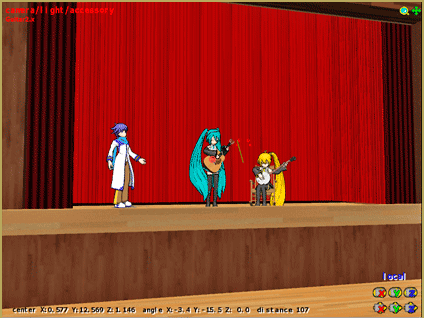
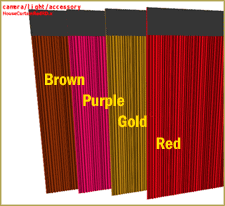
I have added a curtain panel accessory in 4 colors to the LearnMMD Auditorium Stage download. You can add these and manipulate into position by attaching them to Dummy Bones.

UPDATE: 3/25/12: The Auditorium Stage May Need a Fix:

Mount the LearnMMD Stage to a Dummy Bone and set the Y-Value in the Numreic Input (in the Bones menu) to -.2 (minus point 2) to set the stage floor right at ZERO so that the dancer’s feet and the Floorlight accessory will be flat on the floor.
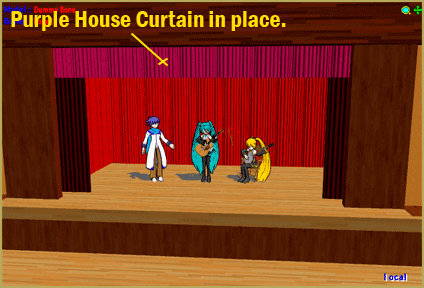
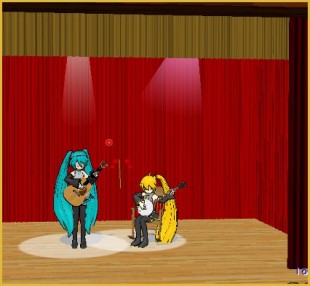
Move the house curtains into place using Dummy Bones.

I have in mind that this new drape will The download includes 4 colors of curtains.be placed, as shown … but you can even load it four times, attaching each to a different dummy bone, and change the color of the whole stage set as you line the walls with the new drapes. You can animate a “curtain going up!” or a curtain call.
Have fun with it!


– SEE BELOW for MORE MMD TUTORIALS…


— — —


– _ — –


Visit the LearnMMD.com Homepage! Plenty of Mikumikudance instruction and info!

More MMD Tutorials...

Download Reggie's Cafeteria Table and Chair accessory!

My school scene needs a cafeteria table and chair accessory. Where can I download an ...read more

Download Reggie's MMD DeckPanel when you just need a place to sit or stand!

How can I use Reggie's MMD Deckpanel accessory for my MikuMikudance animation? My motion starts ...read more

MMD Project Source YouTube's Baster037 provides links!

What's a good MMD project source for motions, models and stages? Where can I download ...read more

LearnMMD Stage Lit with AutoLuminous Lights

How do I light the Lights on the LearnMMD Stage? Where can I download the ...read more

New LearnMMD Stage Instructions just posted!

How do I use the LearnMMD Stage? Why does my new LearnMMD Stage seem incomplete? ...read more

New LearnMMD Stage Download is Ready!

The New... LearnMMD Stage is ready to Download! LearnMMD.com is proud to announce our new LearnMMD Stage created ...read more

New Stage Accessory Tags:dueling banjos, make accessories, mikumikudance, stage accessory

Post navigation

Previous Post: LearnMMD Auditorium Stage Announced Ready for Download
Next Post: Make MMD Animated GIFs using GIMP 2.6 – MikuMikuDance

Related Posts

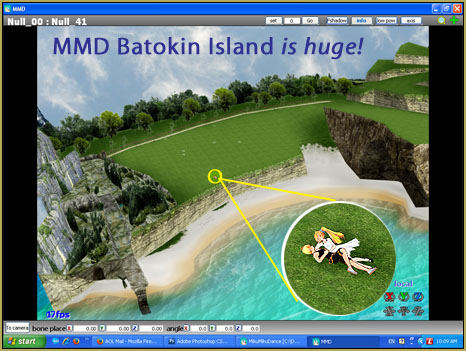
  • MMD Batokin Island stage is MORE than a beach MMD Basics
  • New LearnMMD Stage Instructions just posted! MMD Tutorials
  • After lowering the stage -.2 on the Y axis, the floorlights.x work great!
    Easy Fix for the Auditorium Stage Accessory: Use a Dummy Bone Dummy Bones
  • LearnMMD Stage Lit with AutoLuminous Lights MMD Tutorials
  • See LearnMMD’s New Crop-Transition Panel Video Google SketchUp and MMD
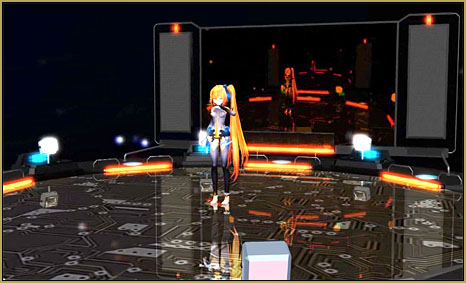
  • The New LearnMMD Stage "in action"!
    LearnMMD Auditorium Stage Announced Ready for Download Downloading New Models

More Related Articles

New LearnMMD Stage Download is Ready! New Stage Accessory
New LearnMMD Stage Instructions just posted! MMD Tutorials
See LearnMMD’s New Crop-Transition Panel Video Google SketchUp and MMD
MMD Batokin Island stage is MORE than a beach MMD Basics
LearnMMD Auditorium Stage now includes 19 Colors of Drapes! Dummy Bones
Download Reggie's collection of Rocking Chair Accessory for MMD7.39 New MMD Rocking Chair Accessory Ready to Download Make your own Accessories

Leave a Reply Cancel reply

Your email address will not be published. Required fields are marked *

Download the latest version of MikuMikuDance!
See the MMD Step-by-Step instructions page!
Learn how to make your own MMD motions!
LearnMMD.com
  • Update previous MMD to MMD 9.32 with no tears … Download MikuMikuDance
  • The story of Portal Turret "Bang Bang" video
    The making of: “Bang Bang” Portal video "the making of" my video
  • New “LearnMMD Wars” Video Posted to YouTube! Google SketchUp and MMD
  • Use the Silhouette Effect to create White Silhouettes!
    Creating White Silhouette Models in MikuMikuEffects ARIZONA
  • RAY-MMD: Using the Time of Night skybox MMD Tutorials
  • Create/Export .x files in Blender 3 using PMXE
    Create/Export .x files in Blender 3 using PMXE (Blender 2.8+) Blender
  • Zelda09pokemon's Miku with dark shades and black jacket.
    Download New MMD Model of Miku by Zelda09pokemon Downloading New Models
  • Add Facial Slider Options Using PMDE Enhance your MMD Models Modify Facial Sliders

Copyright © 2022 Learn MikuMikuDance – MMD Tutorials – Free 3D Animation Software and Instructions..

Powered by PressBook Premium theme

Go to mobile version