Skip to content
Learn MikuMikuDance – MMD Tutorials – Free 3D Animation Software

Learn MikuMikuDance – MMD Tutorials – Free 3D Animation Software

Download Free Animation Software – Let's Learn How to Do Everything!

  • Step-by-Step MMD instructions
  • DOWNLOADS
  • Troubleshoot, Fix MMD
  • Site Contents
  • Reggie Replies Q&A
  • Homework!
  • What IS MMD?
    • Download MikuMikuDance Newest Latest Version of MMD
  • “HOW TO”
    • Raycast RAY-MMD Effect Tutorials
  • BONUS PAGES
    • Why convert PMD models to PMX?
  • HALL of CHAMPIONS
  • Tutorial Categories
  • About
    • Privacy Policy
  • Toggle search form
  • MMD Model Adoration Slideshow features your model!
    MMD Model Adoration Slideshow video, a new type of MMD video! "the making of" my video
  • Happy Birthday Miku (16 Again) … Miku’s Birthday Intro to MikuMikuDance
  • My latest Halloween video is a Scream! "the making of" my video
  • Rin is excited about the MomiCup
    How to enter The MomiCup and other YouTube MMD Contests and Parties. ARIZONA
  • MMD Batokin Island stage is MORE than a beach MMD Basics
  • Try Reggie’s Evil Eye Effect for an Anime-style effect MMD Tutorials
  • Download VMDSpectrum Analyzer to create VMD files MMD Tutorials
  • YouTube Audio Library supplies Free music Copyrighted Music

Ray-MMD LED widget replaces MMD screen capture widget

Posted on October 8, 2020April 7, 2021 By Trackdancer 4 Comments on Ray-MMD LED widget replaces MMD screen capture widget

The Ray-MMD LED widget will give you bright background capture screens... and you an control the brightness!

How to use the Ray-MMD LED widget…

Chibi Miku’s Old V2 Droid

Ever since MMD was first available it always had a screen capture widget. The first stage model that featured this widget is the default stage that comes with all versions of MMD. But, the screen widget is really easy to model so a lot of stage model makers used to include some version of this widget as a part of the stage design. By default, the widget can either be set to capture whatever is visible though the MMD view port or it can be made to actually play a video.

The image above shows a model droid that I originally built back in 2012 which featured this widget and I have revamped it to illustrate the process in this article. If you want the model, a link is provided at the end of the article.

If you do not know how to turn on MMD’s screen capture modes, please refer the image below:

Ray-MMD essentially killed the default screen capture widget

Ray-MMD has not been kind to stages that are built without texture maps. This is probably why most MMD videos that uses Ray-MMD do not use the older style of stages which largely do not use texture maps. But there are plenty of stages that do use texture maps which work fantastically with Ray-MMD. Especially when normal maps are added, many of these can look almost photo-real. The downside is that these newer stages, for the most part, do not use the capture screen widget. And even when they do, they run into the issue shown in the image below. The capture screens become very dull and don’t look very nice.
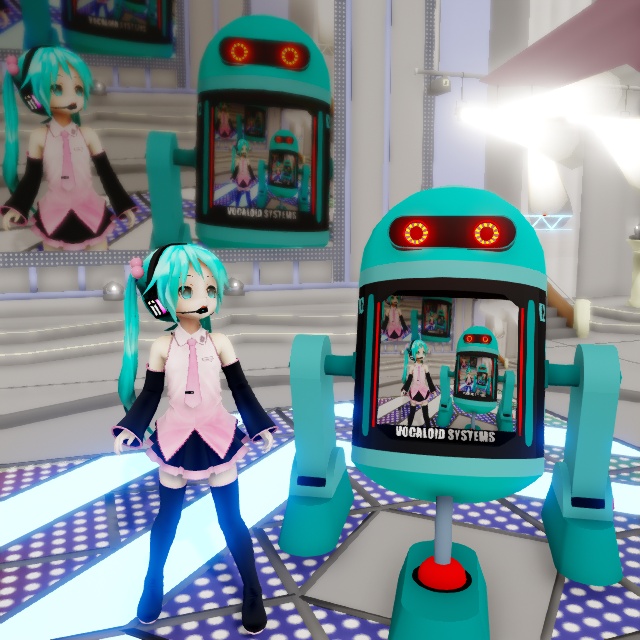
Without using the Ray-MMD LED widget, the basic MMD screen capture panels will look dark.

There is actually a fairly simple fix for this and that is to simply to add a sub-surface or emissive modifier to the screen material and it will brighten up fine. However, although it looks much better, it can be negatively impacted by the global lighting setting up. But, fortunately there is a fix for this issue too…
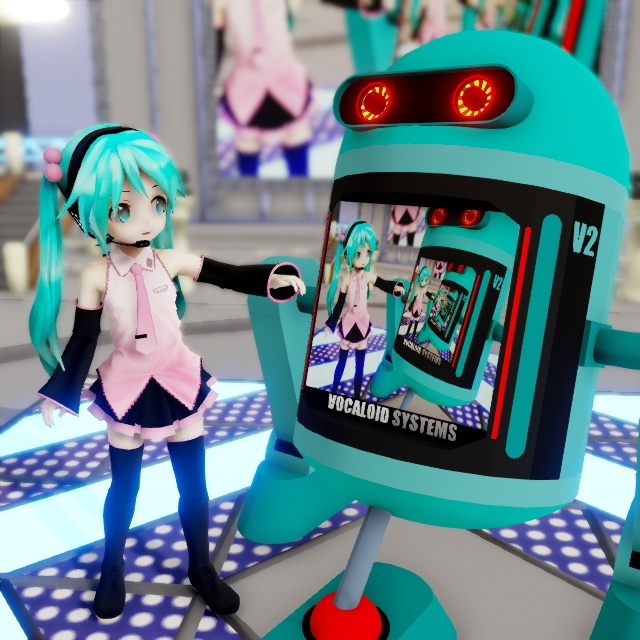
Ray-MMD offers a replacement screen capture widget

Inside the Lighting folder you will find LED.pmx. This is Ray-MMD’s own version of the screen capture widget and it is user configurable which makes it really useful. So Chibi Miku is going to demonstrate this on V2 version 2 which is also a PMX model. However, PMX models do not inherently have the ability to use the screen capture functions. This still requires a .X format screen; but Ray-MMD has a solution for that too.

To demonstrate the difference between the default widget and the Ray-MMD version; I’ll leave the stage to use the default and the V2 droid will use the new widget.

Step-By-Step

  1. Load LED.pmx
  2. Add main.fx to this model under the Main tab in the MME window. The widget will turn black.
  3. Under the LightMap tab, select a lighting regime for this widget. Eg. rectangle_lighting_with_shadow_medium.fx
  4. From the Ray-MMD Extensions>DummyScreen folder, load DummyScreen.x. If you have one of MMD’s screen capture modes active, the widget will immediately function. If not turn on one of the screen capture modes.
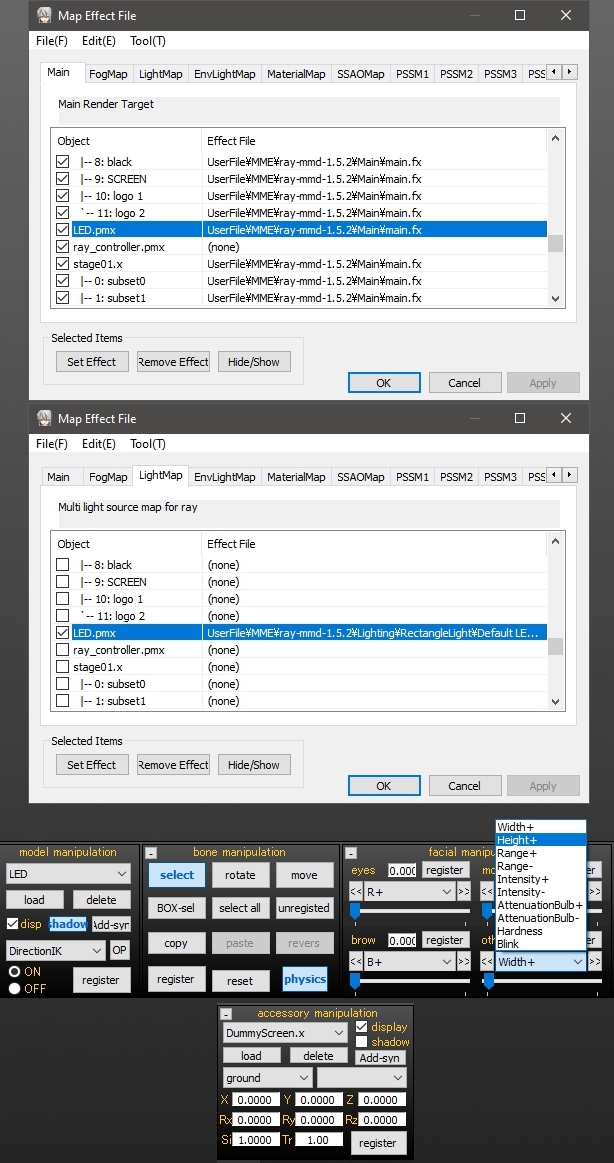
To fit the screen to the droid, these were the steps used. If you’re not using the droid, just extrapolate to fit your project.

  1. Attach the LED.pmx model to the droid model using the OP function. Use the center/root bones on both models.
  2. Move the LED.pmx screen into place on the droid.
  3. Use the height and width sliders to fit the widget into the space reserved for the screen on the droid. 0.028 were the values I used.
  4. Use the other sliders to configure the widget to suit your set up.

WARNING: The LED.pmx sliders can be buggy. If you run into issues, disable the RGB sliders by setting them to “0”.

The neat thing about the Ray-MMD LED widget is that it is a light emissive object. It gives off light which makes this screen especially valuable in low lighting environments.
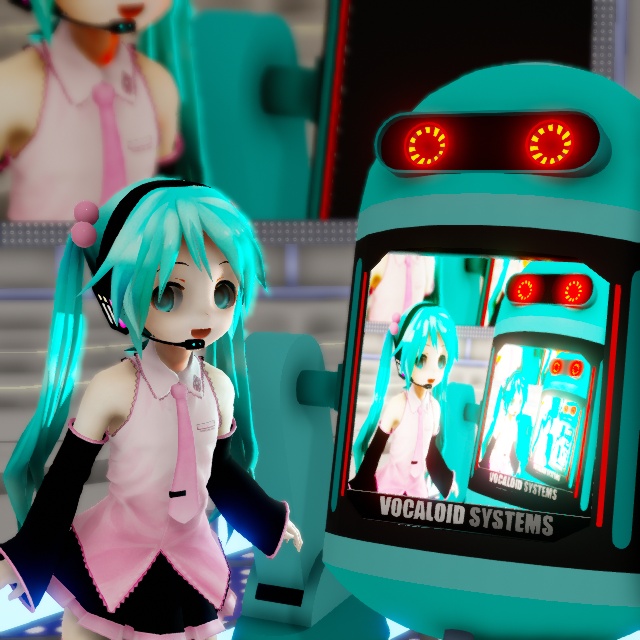
The Ray-MMD LED widget is light emissive... meaning it can cast light onto other models.

Will this widget play videos?

Absolutely it will but it defers this function to MMD so the some restrictions apply. Most AVI / MPEG video will not play. There are only two formats that seems to be supported.

Please read this tutorial for further info: MMD Video Playback

IMPORTANT: The tutorial linked above suggests that you can download FormatFactory to use as a format converter. DO NOT DOWNLOAD THIS SOFTWARE; it is now bundled with malware which is a real pain to remove.

CREDITS

Chibi Appearance Miku – Mamama / Ok_Ky
Miku Hatsune © Crypton Future Media Inc.

MMD 9.32
Ray-MMD 1.5.2
Default MMD stage

PMXeditor EN v2.0
Trimble SketchUp

GIMP 2.10.6
IrfanView64

VROID model download [ click here ]


– SEE BELOW for MORE MMD TUTORIALS…


— — —


– _ — –


Visit the LearnMMD.com Homepage! Plenty of Mikumikudance instruction and info!

More MMD Tutorials...

Editing MMD Model Eye Textures enhances Ray-MMD Effect

How does editing MMD model eye textures make my model look better when I use ...read more

Loading Background AVI Files into MMD (2021 Edition)

How do I load background AVI files into MMD?  What does it mean when MMD ...read more

PMXE Plugin adds Arm IK bones allowing automatic MMD model interaction

The simplest interactions between people in real life can be very difficult to animate; especially ...read more

Ray-MMD environment controls create MMD dreamscape

Ray-MMD Nocturne... Ray-MMD environment controls create MMD dreamscape... One of the wonderful things about Ray-MMD is its ...read more

Using BeamMan's fluid2D Creates Fabulous MMD Under Water Scenes

There are some rather nice MMD assets around that can be used to create really ...read more

Translate Japanese Models Using PMXEditor's Batch Name Editor

Many of the models that you download for MMD do not have comprehensive translated labels ...read more

Add Background Pictures and AVI, Raycast Ray-MMD, Trackdancer2015

Post navigation

Previous Post: PMXE Plugin adds Arm IK bones allowing automatic MMD model interaction
Next Post: Older MME Shaders rival Ray-MMD Raycast results and are easy to use!

Related Posts

  • PocketMQO(with MMD) MikuMikuDance in an Android environment! MMD Tutorials
  • RAY-MMD: Haku’s crazy light show [PART 1] MME Effects Tutorials
  • PMXE Plugin adds Arm IK bone
    PMXE Plugin adds Arm IK bones allowing automatic MMD model interaction Animation Shortcuts
  • RAY-MMD Technique: of Battleships and Fleet Girls Battleship Models - MMD
  • LearnMMD.com _ MikuMikuDance MMD Tutorials
    A Discussion on the subject of Bone Deformation Hierarchy Bandages
  • Miku Short Film Featured
    Anime Shorts – Five minutes worth of animation, maybe three! Animation Shortcuts

More Related Articles

Creating Spooky Scenes with MMD Animation Shortcuts
MME: Less is More… Select only those that you need. Cook Torrence effect
MMD Fill Lights Part 1 (Half-Lambert Shader) Half-Lambert Shader
Using Raycast MMD like a pro! "the making of" my video
Haku and Fireworks 02 Add Background Pictures and AVI’s to MikuMikudance MMD Add Background Pictures and AVI
Using the OP function in an animation MMD Tutorials

Comments (4) on “Ray-MMD LED widget replaces MMD screen capture widget”

  1. Kyoso says:
    December 19, 2020 at 8:09 am

    Uh, question, has the FormatFactory software always carried malware?? Cause I’ve been using this for a long time now and didn’t have any problems. I downloaded my version a long time ago though. Also the article was very helpful, thank you.

    Reply
  2. SodaWave says:
    November 20, 2020 at 3:20 pm

    Is not necessary to use a LED Screen. You can just play with the settings of the materials to have an emmisive texture that uses the dummy screen. The dull effect is because the material is using the dummy screen information as albedo, not emissive

    Reply
  3. jaida says:
    November 9, 2020 at 11:26 am

    hi can i be part of the mmd can you help me to work on my project so i can make my own motion i was trying to do the yandere simulator and myb own thing and black butler so i can be one of you

    Reply
  4. John says:
    October 25, 2020 at 5:34 am

    Thank you for the great tutorial as always! By the way, please take a look at my latest work in Ray-mmd.
    https://i.ibb.co/ZL6xrQ5/Fuhrer-Bismarck-Uber-Alles.png
    https://i.ibb.co/1Rsrsbt/Fur-Fuhrer-Bismarck-2.png
    https://i.ibb.co/xHDz4BB/Nelson.png
    https://www.youtube.com/watch?v=uU-tLfNMcKw

    Reply

Leave a Reply Cancel reply

Your email address will not be published. Required fields are marked *

Download the latest version of MikuMikuDance!
See the MMD Step-by-Step instructions page!
Learn how to make your own MMD motions!
LearnMMD.com
  • Nico Nico MMD Videos, Models, Motions, and Music! Downloading New Models
  • Reggie Dentmore's hand motion animation.
    Introduction to MikuMikuDance Intro to MikuMikuDance
  • Recommended Software Library for MMDers Animation Shortcuts
  • Anticipation is the Second Principle of Animation. Anticipation
  • Download and Configure the OldTV MME Effect for MikuMikuDance Customize MME effects
  • Adding captions in MMM MikuMikuMoving Bullwood
  • Optimise computer assets by culling unseen MMD model parts Chestnutscoop
  • MikuMikuDance Home Page VPVP is worth a visit! Intro to MikuMikuDance

Copyright © 2022 Learn MikuMikuDance – MMD Tutorials – Free 3D Animation Software and Instructions..

Powered by PressBook Premium theme

Go to mobile version