

Skip to content
Learn MikuMikuDance – MMD Tutorials – Free 3D Animation Software

Learn MikuMikuDance – MMD Tutorials – Free 3D Animation Software

Download Free Animation Software – Let's Learn How to Do Everything!

  • Step-by-Step MMD instructions
  • DOWNLOADS
  • Troubleshoot, Fix MMD
  • Site Contents
  • Reggie Replies Q&A
  • Homework!
  • What IS MMD?
    • Download MikuMikuDance Newest Latest Version of MMD
  • “HOW TO”
    • Raycast RAY-MMD Effect Tutorials
  • BONUS PAGES
    • Why convert PMD models to PMX?
  • HALL of CHAMPIONS
  • Tutorial Categories
  • About
    • Privacy Policy
  • Toggle search form
  • Fixed version of the PluginManager featured image. Well, slightly fixed.
    MMD Plugin Manager… I Found a Treasure! MMD Tutorials
  • Miku virtual idol starts our Brave New World Random Thoughts & Visions
  • Keyboard Shortcuts Aplenty in MikuMikuDance 7.39 by ClintImTired Accessory Manipulation/Adjust
  • Making MikuMikuDance Original Animation Videos "the making of" my video
  • Graphic Design Skills enhance MMD Pictures MMD Basics
  • Knock-out the Background as you Render to Picture in MMD Add Background Pictures and AVI
  • Easily Create Walk-in-Place Motion in MMD Animation Shortcuts
  • MMD rotating 3D objects 360-degrees
    MMD Rotating objects 360-degrees -Miku’s Guide to the Galaxy (Part One) Making Smooth Motions

Using The Floor Light Art Effect in MMD.

Posted on December 24, 2012July 30, 2015 By Arizona 1 Comment on Using The Floor Light Art Effect in MMD.

How do you use the Floor Light Art Effect in MMD? What is the Floor Light Art Effect?A Feature Article by contributor ARIZONA on LearnMMD.com Where do you get the Floor Light Art Effect for MikuMikuDance? LearnMMD MME Tutorials. What else can you do with the Floor Art Effect for MMD DirectX9?

 The Floor Light Art Effect
… Simple and Elegant!

I wasn’t originally planning to write about the Floor Light Art Effect until I watched a video by MotionMakerDiva where this was used. I thought it was a simple yet elegant effect. I had no clue what this effect was called. So I contacted her and not only did she tell me that it was called the Floor Light Art Effect but she went above and beyond and hunted down where to get it. So, I’m honored to share credit for this article with her.

The Floor Light Art Effect can be downloaded at: http://harigane.at.webry.info/201209/article_1.html

The site has other effects as well, so bookmark it for future reference. Place the Floor Art
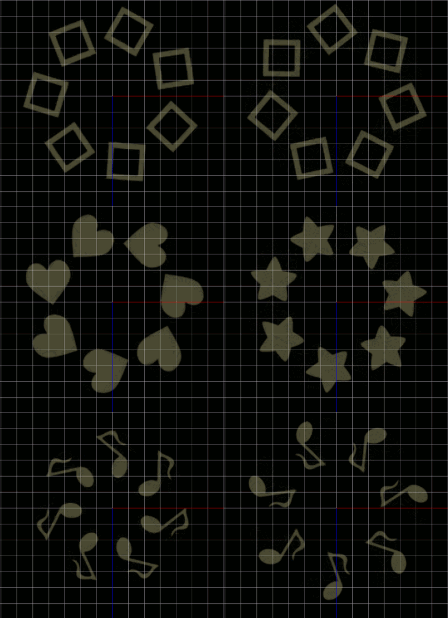
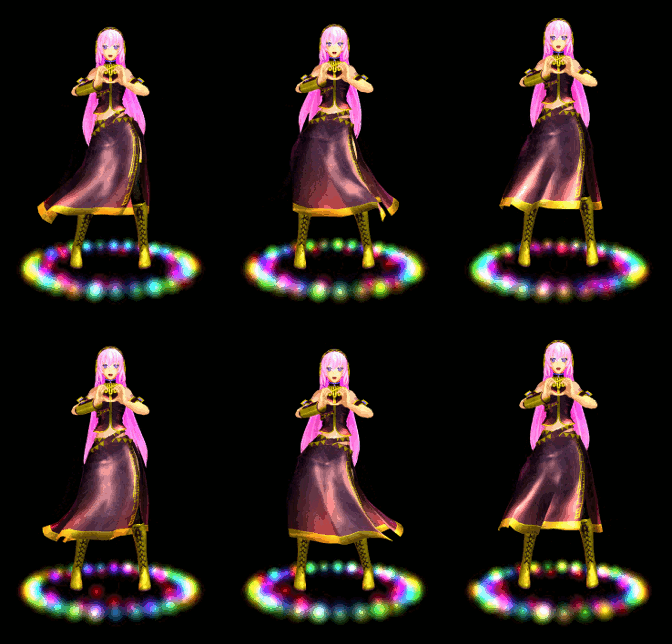
The Floor Light Art Effect for MME / MMD demonstrated by Arizona on LearnMMD.comEffect in effects file of your Accessories folder-as you should have all of your effects stored.

What the Floor Light Art Effect does is create a circle of stars, hearts, squares, and musical notes (reminds me of a box of Lucky Charms ©) that rotate and close in toward the center. Unfortunately, you cannot “lock in” a particular shape in its pattern.

You load the Floor Light Art Effect like you do most effects. You click load in the Accessory Manipulation Panel (AMP); select it from your Accessory file and that’s it. So why is nothing happening? The Floor Light Art Effect requires a dark background. Go to your main menu bar and click on the background tab and check “black background” Ta Dah! There it is.

You can manipulate this effect by changing the size of the shapes in the Si field of the AMP, although, if you go too large, the shapes just meld together into an amorphous blob of light. The drawbacks to this effect are; if you try to move it off the display field it disappears. The other drawback is there are limits to how far you can use the Rx, Ry, and Rz fields before it disappears.

I uploaded a Floor Light Art Effect video at our YouTube Channel:

http://www.youtube.com/watch?v=D506dKHFM9o&feature=youtu.be

Have fun with this.


– SEE BELOW for MORE MMD TUTORIALS…


— — —


– _ — –


Visit the LearnMMD.com Homepage! Plenty of Mikumikudance instruction and info!

More MMD Tutorials...

Loading Background AVI Files into MMD (2021 Edition)

How do I load background AVI files into MMD?  What does it mean when MMD ...read more

Running MikuMikuDance in Linux using Wine and DXVK

How do I run MMD on Linux? Does MikuMikuDance run on Linux? How do I ...read more

MMD Fill Lights Part 1 (Half-Lambert Shader)

MMD and the use of Fill Lights ... Part 1 (Half-Lambert Shader) Fill lights are an important ...read more

Good MMD videos require Inspiration, Vision, Planning: The Lament of Okada's Ghost

The Lament of Okada's Ghost... The secret to making good MMD videos All MMD videos have three ...read more

MME: Less is More... Select only those that you need.

Carefully select only the MMEs that you need for your scene. Control the look of ...read more

Once there was a war... the making of my "Paint it black" MMD video

Once there was a war... I sent Reggie D., this site's owner, a link to a ...read more

ARIZONA, Floor Light Art Effect, Nuts & Bolts, Special Effects, Using MME Effects

Post navigation

Previous Post: Using the AdultShader Effect In MikuMikuDance
Next Post: More Motion Interpolation Curve Instruction for MMDers

Related Posts

  • Keep The Faith MMD
    Use proper MMD Etiquette when Downloading Models for MMD Intro to MikuMikuDance
  • How To Add Depth and Emotion in an MMD Picture Advanced Shader Technique
  • Use Center Position Bias to Move Models in MMD ARIZONA
  • Mouthing words requires sudden motions without drifting in MikuMikudance 7.39
    Short sharp sudden motions require MikuMikudance skill Making Smooth Motions
  • The MMD 7.39 VIEW MENU Options MENU Option Descriptions
  • Keyboard Shortcuts and Easy Moves Keyboard Shortcuts

More Related Articles

MikuMikuDance Keyboard Shortcuts MMD Beginners Guide Intro to MikuMikuDance
Extreme S Curve 02. Using the Interpolation Curve in MikuMikuDance. ARIZONA
Kaito and the SpotLight Effect. Using the SpotLight Effect in MikuMikuEffects ARIZONA
Yukari's Gap Portal Style. The In’s and Out’s of Yukari’s Gap for MikuMikuDance. ARIZONA
How to Switch Models and Stages in MikuMikuDance Accessory Manipulation/Adjust
Set MMD Widescreen Screen Size balance Size VS Quality MMD Basics

Comment (1) on “Using The Floor Light Art Effect in MMD.”

  1. John says:
    May 12, 2015 at 4:36 am

    Thanks for the lecture :D
    I was able to change the color of the light by changing the color of the file named “sample” .Here is my video : using it https://www.youtube.com/watch?v=hKYH5q1zYxQ

    Reply

Leave a Reply Cancel reply

Your email address will not be published. Required fields are marked *

Download the latest version of MikuMikuDance!
See the MMD Step-by-Step instructions page!
Learn how to make your own MMD motions!
LearnMMD.com
  • You can enlarge or reduce and Accessory by adjusting the Si value in MikuMikuDance.
    Use Accessory Manipulation fields to position/adjust Accessories Accessory Manipulation/Adjust
  • Be a responsible MMDer … “Keep the Faith!” Welcome to LearnMMD.Com!
  • Download your free Metronome PMM dance file with accessories.
    Find MMD Tempo using Metronome with AVI Video Background Metronome
  • How to Switch Models and Stages in MikuMikuDance Accessory Manipulation/Adjust
  • Gakupo sings "Trick Bag" - VDE-3 Entry!
    Step 1: VDE-3 “Gotta Sing… Gotta Dance!” Entry Creation… YouTube Music Approval CONTESTS
  • PMXE Plugin adds Arm IK bone
    PMXE Plugin adds Arm IK bones allowing automatic MMD model interaction Animation Shortcuts
  • Video Dojo Expo 4 CHAMPIONS are CHOSEN! Video Dojo Competition
  • Bandizip® keeps Japanese file names intact when Extracting ZIP folders Bandizip

Copyright © 2022 Learn MikuMikuDance – MMD Tutorials – Free 3D Animation Software and Instructions..

Powered by PressBook Premium theme

Go to mobile version