
Skip to content
Learn MikuMikuDance – MMD Tutorials – Free 3D Animation Software

Learn MikuMikuDance – MMD Tutorials – Free 3D Animation Software

Download Free Animation Software – Let's Learn How to Do Everything!

  • Step-by-Step MMD instructions
  • DOWNLOADS
  • Troubleshoot, Fix MMD
  • Site Contents
  • Reggie Replies Q&A
  • Homework!
  • What IS MMD?
    • Download MikuMikuDance Newest Latest Version of MMD
  • “HOW TO”
    • Raycast RAY-MMD Effect Tutorials
  • BONUS PAGES
    • Why convert PMD models to PMX?
  • HALL of CHAMPIONS
  • Tutorial Categories
  • About
    • Privacy Policy
  • Toggle search form
  • Staging and the 12 Principles of Animation. Accessory Manipulation/Adjust
  • Find New MMD Models – MMD Resources Hunting! Downloading New Models
  • Add Shadows to MMD .X Accessories Tutorial MMD Basics
  • MME effect Kamitachi – Night breeze silhouette shader of Kama Kamitachi - Silhouette
  • LearnMMD.com is back online after SIX days off!
    LearnMMD.com is BACK ONLINE, again! Reggie Dentmore
  • Nico Nico MMD Videos, Models, Motions, and Music! Downloading New Models
  • MikuMikuDance Welcomes Luka Megurine to MMD 8.10! Download MikuMikuDance
  • MMD Model Adoration Slideshow features your model!
    MMD Model Adoration Slideshow video, a new type of MMD video! "the making of" my video

o_ShaderCustomSet_v0_3 effect applies gentle color modification

Posted on September 8, 2016April 26, 2017 By Reggie_Dentmore No Comments on o_ShaderCustomSet_v0_3 effect applies gentle color modification

A Feature Article by Reggie Dentmore on LearnMMD.comWhere can I download o_ShaderCustomSet_v0_3? How do I use o_ShaderCustomSet_v0_3? I load the o_ShaderCustomSet_v0_3 effect and nothing happens.
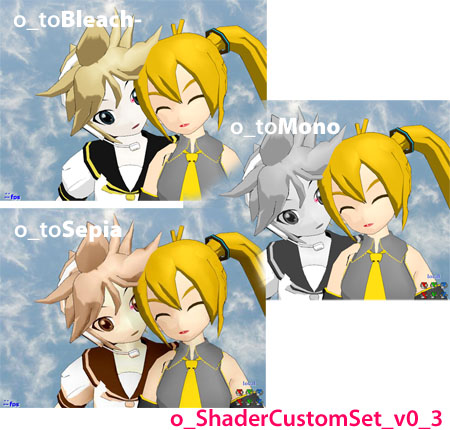
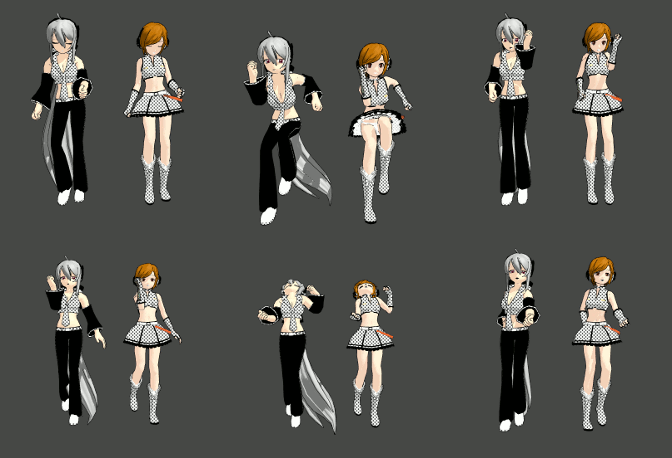
o_toBleach, o_toMono, and o_toSepia are three of the four o_ShaderCustomSet_v0_3 versions.

o_ShaderCustomSet_v0_3 effect
applies gentle color modification

A reader emailed me a question about how to use the o_ShaderCustomSet_v0_3 effect. I had never seen it, before… so I did a search and found its source page.

Wow! There are MANY effects available from that page. I usedGoogle Translate the whole page to find your o_ShaderCustomSet_v0_3 effect... then go back to the Japanese page to use the link. Google Translate to help me read that page… the translation made it easy to find.
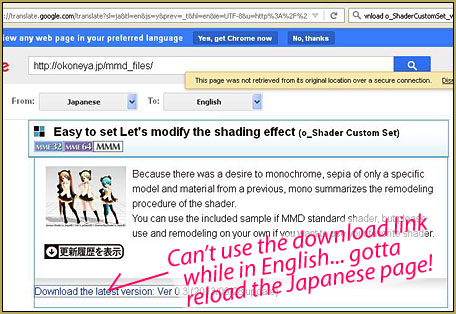
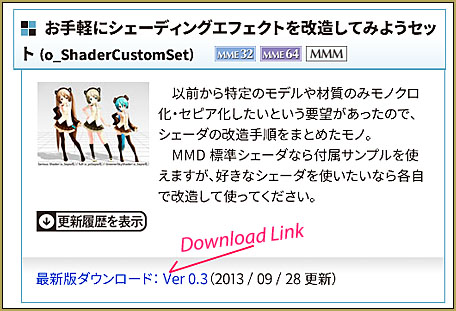
Find the link for the o_ShaderCustomSet_v0_3 effect on the Japanese version of the page.

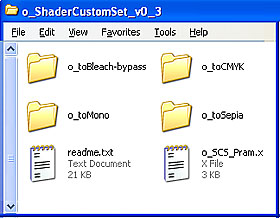
o_ShaderCustomSet_v0_3 has one .x and four folders... each with its own effect version.

When you open the zip folder, you will see that you have a .x file, typical for any MME effect… and four folders. EACH of those folder contains a .fx file.

To use the effect, you load that .x effect file… and see that: nothing happens.

Then you click that MME button on the upper right of MMD’s screen and choose Effect Mapping. You then “set effect” and apply the effect of your choice to your model using one of those .fx files.

o_toBleach-bypass – “Bleaches” the colors of your model

o_toMono – Renders your model in shades of gray

o_toSepia – Renders your model in warm sepia tones

o_toCMYK – Not sure what this does… but I think you can use it to modify OTHER shader effects… see below…

Each of those effects is controlled by the Tr transparency setting in the AMP. A setting of 1.0 is maximum effect… and a setting of zero will effectively turn off the effect. You can register those settings in different frames to cause smooth transitions from “normal” to shaded.

You are ready to go…

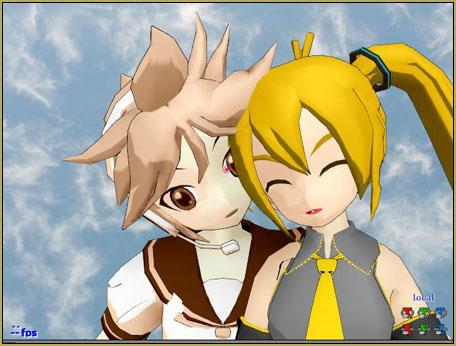
the o_ShaderCustomSet_v0_3 SEPIA effect... applied only to Len.
… but wait, there’s more!

I translated the ReadMe into broken-English using Google Translate and, aside from the basic use of this effect, you can also add elements of it into OTHER shader effects. The instructions mention particular shaders and the exact lines of code to be modified or replaced as you edit them. … I have the translated ReadMe file for you. It’s tough to read, tough to comprehend because the translation is so poor… but looks to hold much promise for those MMDers who enjoy tinkering with effects.

Experiment…

Have fun with
the o_ShaderCustomSet_v0_3 effect!


– SEE BELOW for MORE MMD TUTORIALS…


— — —


– _ — –


Visit the LearnMMD.com Homepage! Plenty of Mikumikudance instruction and info!


More MMD Tutorials...

Enjoy the "camera Angles WEIRD in Anime" meme...

Enjoy the "camera Angles WEIRD in Anime" meme... This image is from The Slayers - NEXT, ...read more

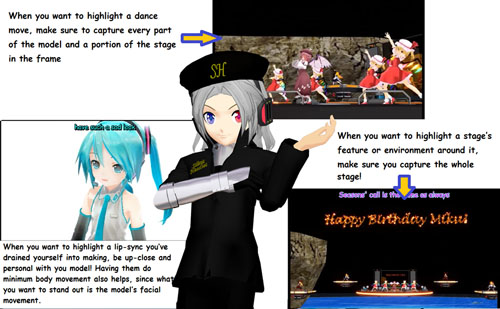
Reader asks how to create MMD artwork... stuff like posing, camerawork?

A reader asks... Is there a tutorial on how to create MMD artwork, like those you ...read more

Learn MikuMikuDance in Small Steps! New LearnMMD Video Series

Learn MikuMikuDance in Small Steps. Where can I find easy-to-follow MMD instructions on YouTube? How ...read more

Apply Multiple Effects on an Entire MMD Model Using M4Layer Effect

How can I apply multiple effects to an MMD model? Can I use more than ...read more

MMD Plugin Manager... I Found a Treasure!

What sorts of MMD Plugins are there? MMD Plugin Manager? MMD Plugins. Plugin MMD. More ...read more

2025: Hatsune Miku is 18... but she is designed to be always 16 Years. Old by design and in reality!

Finally, in 2023, Hatsune Miku is 16 years old! but in August of 2025, she ...read more

MMD Tutorials, MME Effects Tutorials, o_ShaderCustomSet, o_toBleach-bypass, o_toCMYK, o_toMono, o_toSepia, Reggie Dentmore

Post navigation

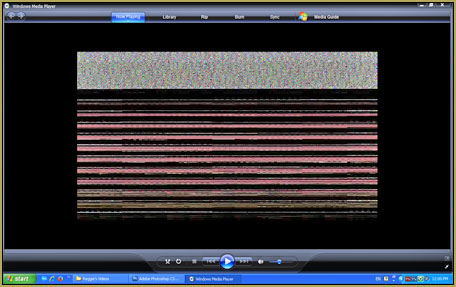
Previous Post: Scrambled first frame of video must be Voodoo!
Next Post: Almost Photo-realistic renders in MMD using Shaders and Effects

Related Posts

  • Use PMDE to Switch On the MME AutoLuminous effect in MMD AutoLuminous MME / PMDE
  • An MMD town stage: Making Kerorin Town Great Again – Part 3 MMD Stages
  • Cycles materials for textures model and nodes
    Cycles Materials For Textures in Blender: Nice Textures for MMD Fast! Blender
  • Chrysanthemums are lovely with the Fireworks effect!
    Using the Fireworks Effect In MikuMikuDance ARIZONA
  • ikUnderwater Effect submerges your MMD animation! ikUnderwater Effect
  • Ray-MMD advanced lighting techniques for MMD MikuMikuDance
    Ray-MMD Advanced Lighting: A Night on the Town MMD Tutorials

More Related Articles

Create Motion Data – So you think you can’t dance? Creating Motions
MMD Lip-sync is fun to do... just do it! MMD Lip-sync is fun to do… just do it! Animation Shortcuts
Creating an animation using MMD, MikuMikuDance! "the making of" my video
Ray-MMD advanced lighting techniques for MMD MikuMikuDance Ray-MMD Advanced Lighting: A Night on the Town MMD Tutorials
Animation Inspiration: Motion Trace but Do your own thing! MMD Tutorials
NCHLShader2 adds realistic depth to MMD models Advanced Shader Technique

Leave a Reply Cancel reply

Your email address will not be published. Required fields are marked *

Download the latest version of MikuMikuDance!
See the MMD Step-by-Step instructions page!
Learn how to make your own MMD motions!
LearnMMD.com
  • LearnMMD.com _ MikuMikuDance MMD Tutorials
    DO NOT reduce AVI file sizes that go up to YouTube HD Videos in MMD
  • Learn MikuMikuDance in Small Steps: a new video series on YouTube by LearnMMD.com!
    Learn MikuMikuDance in Small Steps! New LearnMMD Video Series MMD Tutorials
  • Download these 1052C-Re0710 MMD Models and enjoy!
    Download Early Miku 1052C-Re0710 MMD Models from 2010! Downloading New Models
  • The UT Video Codec Suite works well with Render to AVI in MMD.
    UT Video Codec Suite v22.2.0 creates simple AVI video for MMD background AVI Reggie Dentmore
  • The Cheaplens Effect is easy to use and very powerful!
    MME CheapLens Effect controls the “Look” of your MMD video CheapLens Effect
  • How to use Raycast MMD MME Shader Effect Advanced Shader Technique
  • MMD Dance Motions start with making your own motions.
    How to make smooth motions in MikuMikuDance animations Animation Shortcuts
  • MMD Banjo_RD by Reggie Dentmore for MikuMikuDance 7.39
    LearnMMD’s Dueling Banjos Banjo is avilable for Download! Google SketchUp and MMD

Copyright © 2022 Learn MikuMikuDance – MMD Tutorials – Free 3D Animation Software and Instructions..

Powered by PressBook Premium theme

Go to mobile version