
Skip to content
Learn MikuMikuDance – MMD Tutorials – Free 3D Animation Software

Learn MikuMikuDance – MMD Tutorials – Free 3D Animation Software

Download Free Animation Software – Let's Learn How to Do Everything!

  • Step-by-Step MMD instructions
  • DOWNLOADS
  • Troubleshoot, Fix MMD
  • Site Contents
  • Reggie Replies Q&A
  • Homework!
  • What IS MMD?
    • Download MikuMikuDance Newest Latest Version of MMD
  • “HOW TO”
    • Raycast RAY-MMD Effect Tutorials
  • BONUS PAGES
    • Why convert PMD models to PMX?
  • HALL of CHAMPIONS
  • Tutorial Categories
  • About
    • Privacy Policy
  • Toggle search form
  • New to MikuMikuDance? LearnMMD is The Instruction Manual for MMD! MMD Tutorials
  • Create and Post 1 or 2 videos a day? VocaloidAnime1924 does! Downloading New Models
  • MMD First Steps Make your own motions from scratch Making Smooth Motions
  • Different MMD models react differently to pose and motion data MMD Basics
  • Use the Silhouette Effect to create White Silhouettes!
    Creating White Silhouette Models in MikuMikuEffects ARIZONA
  • "Departures" meme for MMD is a beauty! Memes are like KITS for MMD!
    A Beginner’s Guide to Enjoying MikuMikuDance Intro to MikuMikuDance
  • Boom! Beamman's Bomb Effect is easy and fun! MME MMD 7.39 on LearnMMD.com.
    How to use Beamman’s Bomb Effect in MMD 7.39 MME Beamman's Bomb Effect
  • Workin’ on my VDE-4 Animation: The Easy Part is Complete! "the making of" my video

Beamman’s Water v5 Effect needs Editing before you can use it!

Posted on May 29, 2016April 6, 2017 By Reggie_Dentmore 20 Comments on Beamman’s Water v5 Effect needs Editing before you can use it!

A Feature Article by Reggie Dentmore on LearnMMD.comHow do I get Beamman’s Water v5 effect to work? All I get is a white square. How do you use Beamman’s Water v5 Effect? Is there a trick to making it work?
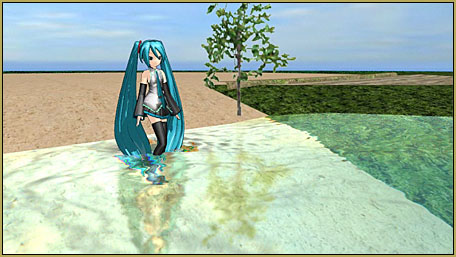
Beamman's Water v5 Effect is beautiful... reflections, color, and automatic water motions!

Beamman’s Water v5 Effect is beautiful…
but you have to fix it before you can use it!

I was asked, today, about the Beamman Water v5 effect… how do you use it? It was new to me… so I downloaded it, used Bandizip to extract the files from the zip while keeping the Japanese file names. I dropped the new folder into my Effects folder.

I opened MMD, loaded the Water effect… taking a guess at the many Japanese file names… and found only a white square on my stage. I noticed there was a Controller.PMX model, so I loaded that like a model and slid the sliders around… with no effect on that white square.

A little online research told me what I needed to know: For my English-speaking computer, I could not allow Japanese file names or gibberish characters in the file names.

I used Google Translate to discover the English names of the main file folders…
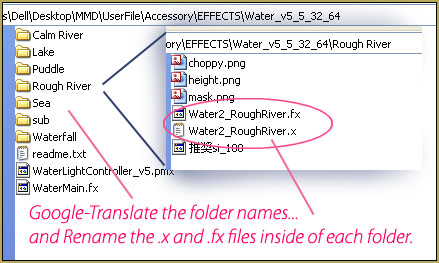
For Beamman's Water v5 effect, you will want to rename all of the folders and files with English names... no Japanese characters or gibberish file names allowed!

… and I went through each of the sub-folders and changed the names of the .x and .fx files.

NOTE: in each of those little folders is a file name telling you the recommended Si size setting for that particular version of the effect… as per above, Si of 100 for the Rough River effect. You do not need to change the name of THOSE little files.

Translate the Controller model…

This effect includes a .pmx controller model… with Japanese names for all of the sliders it uses. In order to translate the bone-names into English, I followed xxBodger’s instructions for translating and renaming the bones of your Japanese models.

Now the Controller looks like this…
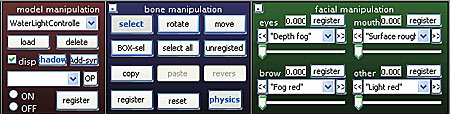
Beammann's Water v5 Controller can be translated into English.

… with several options on those facial sliders.

Okay… We are ready for the water!

The rest is easy… and fun… you load the effect of your choice. I chose Calm River for my little demo video.

Be sure to set the Si size as per the hint given by that odd filename inside the effect you have chosen. … Si value of 200 for the Calm River.

Load the Controller model. Play with the facial sliders to adjust the “Fog” cloudiness of your water… Waterv5_Fogand the color of that fog… as well as the mirror and roughness settings… fun!
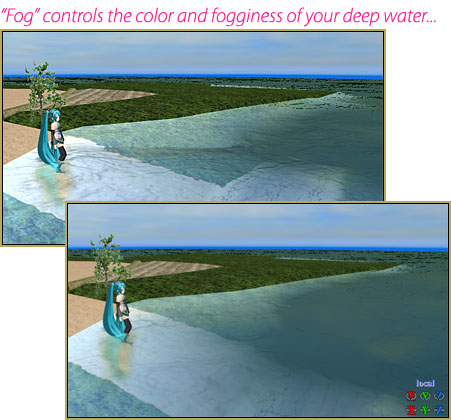
You can raise and lower the water level using the Y setting… and you can change the direction of the flow using the Ry setting… set it for 90 to get a cross-flow… just play with it.

More??

There is probably more to learn about this effect… but figuring it out is half the fun…

Enjoy!


– SEE BELOW for MORE MMD TUTORIALS…


— — —


– _ — –


Visit the LearnMMD.com Homepage! Plenty of Mikumikudance instruction and info!

More MMD Tutorials...

Enjoy the "camera Angles WEIRD in Anime" meme...

Enjoy the "camera Angles WEIRD in Anime" meme... This image is from The Slayers - NEXT, ...read more

Reader asks how to create MMD artwork... stuff like posing, camerawork?

A reader asks... Is there a tutorial on how to create MMD artwork, like those you ...read more

Learn MikuMikuDance in Small Steps! New LearnMMD Video Series

Learn MikuMikuDance in Small Steps. Where can I find easy-to-follow MMD instructions on YouTube? How ...read more

Apply Multiple Effects on an Entire MMD Model Using M4Layer Effect

How can I apply multiple effects to an MMD model? Can I use more than ...read more

MMD Plugin Manager... I Found a Treasure!

What sorts of MMD Plugins are there? MMD Plugin Manager? MMD Plugins. Plugin MMD. More ...read more

2025: Hatsune Miku is 18... but she is designed to be always 16 Years old, by design and in reality!

Finally, in 2023, Hatsune Miku is 16 years old! but in August of 2025, she ...read more

Beamman's Water v5, MMD Tutorials, MME Effects Tutorials, Reggie Dentmore

Post navigation

Previous Post: Bandizip® keeps Japanese file names intact when Extracting ZIP folders
Next Post: MME Blackout Effect offers Fade-to-Black and Fade-to-White

Related Posts

  • My Top 6 Favorite Shader Effects for MikuMikuDance GloriaTheAnimator
  • Making MMD Models Complicated Task with much to know! Making Models
  • The Power of Beamman’s Post Movie Effect Beamman's Post Movie effect
  • MMD smoke clouds are easy to make with Beamman's Breath effect.
    MMD Smoke Clouds and a Smoke Filled Room… Beamman's Breath Effect
  • The MME Oppai Effect adjusts the breast size of your MME models!
    MME Oppai Effect enhances MMD Model’s figure… one for the boys! MMD Tutorials
  • Using the OP function in an animation MMD Tutorials

More Related Articles

Animation Fade helps MMD scene transitions Animation Shortcuts
966_DigitalRipple Effect splashes lots of color into your MMD video! 966_DigitalRipple
MMD First Steps Make your own motions from scratch Making Smooth Motions
dull-VS-alive-animation-environment MMD animation environment… MORE than just a model on a stage! "the making of" my video
Using BeamMan’s fluid2D Creates Fabulous MMD Under Water Scenes BeamMan's fluid2D
MMD Camerawork sets the mood, enhances the animation, and showcases your models! MMD Camerawork sets mood enhances animation showcases models "the making of" my video

Comments (20) on “Beamman’s Water v5 Effect needs Editing before you can use it!”

  1. nina says:
    October 16, 2020 at 3:43 am

    CAn you say, were you take the stage?

    Reply
    1. Reggie_Dentmore says:
      October 16, 2020 at 5:53 pm

      That is a small portion of the Rural Stage… LearnMMD probably needs to offer a full tutorial about this stage!
      Rural Stage Source
      – Rural stage by ねこま >https://bowlroll.net/file/55490

      Password:
      ひっそり堂はデフォ

      I tried that link, above, and it says “FILE DELETED” …so, I guess it’s no longer available.

      This stage is HUGE and has many pieces. I have an English translated README for you to download.

      Maybe you can get some hints about what to search for to help you find that stage somewhere else.

      Reply
  2. Sapphire says:
    January 3, 2020 at 4:35 pm

    It seems to work with other people, I downloaded the english version of this effect, and after everything it’s still white. What can I do?

    Reply
    1. KillerBeer says:
      January 4, 2020 at 4:20 am

      1) Can you run other MME effects successfully, or is Beamman’s Water the first one you tried your luck with?

      2) Did you translate .x, .fx. *and* folder filenames to consist only of English letters?
      (you said “downloaded the English version”? Where from?)

      Reply
  3. Wrapply says:
    July 23, 2018 at 12:22 am

    It just shows a white square! I even loaded up a stage. There is no texture!

    Reply
    1. KillerBeer says:
      July 23, 2018 at 3:26 am

      And did you translate both .x and .fx filenames to English as instructed?

      (Also, does MME work for you at all?)

      Reply
  4. Creeper Queen says:
    April 29, 2018 at 4:53 pm

    Is there a way to make the water flow slower? if there is, I haven’t found it…

    Reply
    1. KillerBeer says:
      April 30, 2018 at 12:05 am

      To adjust water flow (or other parameters) manually, you may load a particular effect’s .fx file (the one in subfolders, not the WaterMain.fx) and edit some of numerical parameters there.

      Reply
  5. MMDAlyCat says:
    April 26, 2018 at 1:10 pm

    My Google Translate won’t translate the file names and it makes me confused. What do these translate to?
    ìréΩé╜É∞
    î╬
    èC
    Éàé╜é▄éΦ
    ë╕éΓé⌐é╚É∞

    Reply
    1. Reggie_Dentmore says:
      April 26, 2018 at 6:16 pm

      That “stuff” is not Japanese, cannot be translated, “as is” … You need to copy it into Notepad++ and choose that proper decoding…
      https://learnmmd.com/http:/learnmmd.com/read-japanese-read-text-files-notepad-google-translate/
      … That should get you going!
      – – ALSO… What did you use to Unzip that ZIP or RAR folder… We recommend Bandizip because Bandizip does not screw-up Japanese unicode. … try THAT before you deal with that Notepad++ routine.

      Reply
      1. MMDAlyCat says:
        May 26, 2018 at 12:16 pm

        Thank you!

        Reply
  6. need help says:
    October 20, 2017 at 11:20 pm

    the water is black why? :(

    Reply
    1. KillerBeer says:
      October 21, 2017 at 12:39 am

      Did you load it into an empty MMD scene? Try to load it when a stage is set in place.

      Reply
  7. Kasumii says:
    August 4, 2017 at 9:12 pm

    I just made an English version of the water. I have a video but is does not show it. The download is there in the description.

    Reply
    1. KillerBeer says:
      August 4, 2017 at 11:07 pm

      Carry on, soldier! (^_^)_b

      Reply
      1. Kasumii says:
        August 5, 2017 at 2:26 am

        The video doesn’t show the water, but the download is there.

        https://www.youtube.com/watch?v=9tD15PT7wZY

        Reply
        1. Queen Potato MMD says:
          December 5, 2019 at 9:46 am

          please make the video not private anymore! I need the translated version and I can’t get to the video anymore!

          Reply
          1. KillerBeer says:
            December 5, 2019 at 12:05 pm

            Considering it’s the comment by a visitor from two years ago, how much expectation from 0 to 10 do you harbor?

            Reply
  8. Airam says:
    July 30, 2017 at 4:30 pm

    Hmmm For some reason, when i open up the controller on pmxe to edit and translate the bones… theres only 1, nothing else, and it translates to “adjust position”. But… thats all?
    I still cant get this to work, despite following exact steps….

    Reply
    1. KillerBeer says:
      July 30, 2017 at 9:25 pm

      The bone isn’t really important (although you can translate it as well if you want). What you need to translate is model’s morphs.

      Reply

Leave a Reply Cancel reply

Your email address will not be published. Required fields are marked *

Download the latest version of MikuMikuDance!
See the MMD Step-by-Step instructions page!
Learn how to make your own MMD motions!
LearnMMD.com
  • Sweet Home 3D Creates Custom MMD Interiors as .x or .pmd MMD Tutorials
  • MMD model 1052C China Qipao Miku download
    Introducing MMD model 1052C China Qipao Miku "the making of" my video
  • Japanese Mode Opens Hidden Model Features in MMD 8.06 Japanese Mode
  • Tips for how to create complicated MMD dance motions.
    Making more complicated MMD dance motions – Some new notes… Making Smooth Motions
  • Using the AdultShader Effect In MikuMikuDance Adult Shader effect
  • How do I use MikuMikuDance Make A Music Video with MMD Intro to MikuMikuDance
  • PMDE Parts Links help you create your MMD Selfie NOKO2
  • Use The Background AVI to Make Realistic Animations in MMD ARIZONA

Copyright © 2022 Learn MikuMikuDance – MMD Tutorials – Free 3D Animation Software and Instructions..

Powered by PressBook Premium theme

Go to mobile version