

Skip to content
Learn MikuMikuDance – MMD Tutorials – Free 3D Animation Software

Learn MikuMikuDance – MMD Tutorials – Free 3D Animation Software

Download Free Animation Software – Let's Learn How to Do Everything!

  • Step-by-Step MMD instructions
  • DOWNLOADS
  • Troubleshoot, Fix MMD
  • Site Contents
  • Reggie Replies Q&A
  • Homework!
  • What IS MMD?
    • Download MikuMikuDance Newest Latest Version of MMD
  • “HOW TO”
    • Raycast RAY-MMD Effect Tutorials
  • BONUS PAGES
    • Why convert PMD models to PMX?
  • HALL of CHAMPIONS
  • Tutorial Categories
  • About
    • Privacy Policy
  • Toggle search form
  • Print a hard copy! Art is fleeting… especially NOW! MMD Tutorials
  • Japanese Mode Opens Hidden Model Features in MMD 8.06 Japanese Mode
  • Using the Beamman’s Digital Ripple Effect Digital Ripple
  • Teto replies!
    Fixing white models and accessories that don’t follow in PMXE Bandages
  • VDE-4 Champion: Kazumi "the making of" my video
  • Kaito and the SpotLight Effect.
    Using the SpotLight Effect in MikuMikuEffects ARIZONA
  • Add Shadows to MMD .X Accessories Tutorial MMD Basics
  • Using Beamman’s SoftSmoke Effect Beamman's Soft Smoke

Convert .PMD Stages to .X Format using PMDE for MMD

Posted on April 13, 2013March 19, 2016 By Noko2 8 Comments on Convert .PMD Stages to .X Format using PMDE for MMD

How do I convert .PMD stages into an Accessory in A Feature Article by LearnMMD Contributing Author, NOKO2MMD? Can I make a  .PMD model into a .x model for use as an accessory in MikuMikuDance? Can I edit .x accessory models in PMD Editor PMDE? Why does my system lag when I use some stages and not others?

Convert .PMD Stages to .X Format using PMDE

Stages are wonderful. They can add a realistic atmosphere to any MMD animation or picture. However (and you may or may have not had this problem before) some stages are in the .pmd format. When you open these stages up in MMD, the whole system lags TONS. Especially when it’s a large and detailed stage. Yikes! I really hate when my system lags, so I fooled around a bit with PMDEditor and found the answer to my problem.

Yes, you will need PMDEditor. Any version will do, but I’m using the English version. Download it here: http://showmo456.deviantart.com/art/Limited-English-PMD-Editor-2-201972632

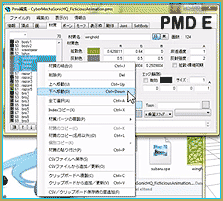
Take your .pmd stage and load it to PMDEditor. Choose the stage/item that you want to convert. After loading the model, go into the Edit tab on the main window. (Not PMDView, in case that’s what you’re thinking.) There will be a tab labeled file. (You should know this tab well. After all, it is where you save models!) Find the button that says Export (X). Click Accessory. Save it in whatever folder you want, and open it as an accessory in MMD. You’re done!

You can also import .X files and edit them in PMDEditor. Take the same steps, but instead of clicking Export, click Import X file.

Believe it or not, I did not know how to do this when I first got PMDEditor. When you explore it, you can find out so many cool things. (I admit it…usually I find out stuff like this from tutorials!)


– SEE BELOW for MORE MMD TUTORIALS…


— — —


– _ — –


Visit the LearnMMD.com Homepage! Plenty of Mikumikudance instruction and info!

More MMD Tutorials...

Create MMD model color morphs using PMXE

How can I add my own color-changing morphs to an MMD model? How do I ...read more

ALMorphMaker Adds AutoLuminous Morphs to your Model!

What is the ALMorphMaker plugin? How can I put AutoLuminous morphs on a model? How can ...read more

Keep the Center-Bone when adding Mother-Bone to an older model

I added a mother bone to my model but where did the Center bone go? ...read more

PMXEditor PMXInfo Analyzing Optimizing MMD Models

Have you ever downloaded or made your own model and opened it up, only to ...read more

Convert SFM/GMOD Models Into MMD Flawlessly!

How do I convert SFM/GMOD models to MMD? From where do I get SFM/GMOD models? Is it ...read more

Build Accessories and Stages with PMXE Primitives

A New Table for SeeU... YES, YOU CAN BUILD MODELS WITH THE PMXeditor Build Accessories and Stages ...read more

Accessory Manipulation/Adjust, Animation Lag, NOKO2, PMDE/PMXE tutorials

Post navigation

Previous Post: Creating Black Model Silhouettes in MikuMikuDance
Next Post: Use MME Rainbow Ring Effect in MikuMikuDance

Related Posts

  • Add a Motherbone for Easy Model Manipulation in MMD 7.39 Mother Bones
  • Dummy Bones allow you to customize your accessory manipulations!
    Using The Dummy Bone for MikuMikuDance Accessory Manipulation/Adjust
  • Staging and the 12 Principles of Animation. Accessory Manipulation/Adjust
  • Making MikuMikuDance Pictures Render to Picture File Tutorial Camera Motion
  • Teto replies!
    Fixing white models and accessories that don’t follow in PMXE Bandages
  • Keep the Center-Bone when adding Mother-Bone to an older model MMD Tutorials

More Related Articles

Keyboard Shortcuts Aplenty in MikuMikuDance 7.39 by ClintImTired Accessory Manipulation/Adjust
Learn to resize PMD models How to resize PMD models (and what to do when they don’t) KillerBeer
Making MikuMikuDance Pictures Render to Picture File Tutorial Camera Motion
Luka with Body Pane with Vignette Hair Falling through the Body in MMD Models and How to Fix It Fixing Broken Models
Understanding PMXE Materials: Ambient, Diffuse, Specular, Reflect and More! Bandages
Nyaa! Nekomimi: Getting Catty Miku Miku Style MMD Accessory Manipulation/Adjust

Comments (8) on “Convert .PMD Stages to .X Format using PMDE for MMD”

  1. Coffy says:
    February 24, 2018 at 6:21 pm

    Thank you! I was looking for this.

    Reply
  2. Lilyvocalover says:
    December 11, 2015 at 8:46 am

    ketokea’s New Year stage crashes both MMD and PMDE :(

    Reply
  3. KillerBeer says:
    April 21, 2015 at 11:34 pm

    soffirechange: Not sure what do you mean by “separate the stage archive of the folder”, but you can move the archive somewhere else where you can retrieve it again from, and try to load the stage from the folder into MMD. If it works, you’re good.

    Reply
  4. KillerBeer says:
    April 21, 2015 at 9:31 pm

    ‘Error.
    This is not an x_file.’

    This happens when there’s an error in the source model that MMD overlooks in .pmd format but cries alarm at .x. Open the .x in a text editor like Notepad and search for lines containing tokens like #QNAN and #IND. Replace these lines with their healthy neighbors (it may possibly create minor glitches in mapping if your model contains textures, but not anythimg crucial) and save the file again.

    Reply
  5. soffirechange says:
    April 20, 2015 at 12:54 pm

    Thanks for the lesson, I didn’t know anything of this! Very clear!
    But I have a question:
    I downloaded the stage and I decompressed it, and now it’s a folder. I’m afraid of separate the stage archive of the folder. What should I do??

    Reply
  6. Somebody says:
    December 26, 2014 at 9:48 am

    I tried this, but when I attempted to open the x file in MMD it said
    ‘Error.
    This is not an x_file.’
    But the thing is, it IS an X file! :( Help!

    Reply
  7. kirito says:
    October 6, 2013 at 2:26 pm

    thanks a lot this really helped a lot very clear and useful
    thank you again :)

    Reply
  8. Arizona says:
    April 30, 2013 at 4:47 am

    This is really good info! Great job!

    Reply

Leave a Reply Cancel reply

Your email address will not be published. Required fields are marked *

Download the latest version of MikuMikuDance!
See the MMD Step-by-Step instructions page!
Learn how to make your own MMD motions!
LearnMMD.com
  • MikuMikuDance 15th Anniversary Celebration Video is on NicoNico!
    MikuMikuDance 15th Anniversary celebration video posted on NicoNico! MMD Basics
  • MMD Models with a Mother Bone are easy to move on your stage.
    MMD Mother Bones Allow Easy Dancer Model Movement From Stage Center ARIZONA
  • Smooth camera moves and soft focus make for smooth scene transitions in MMD 7.39 . LearnMMD.com
    Smooth Scene Transitions featured in new MMD Departures video "the making of" my video
  • Close Up of Sph File with Text
    Create Sph Files in Blender Without Drawing Anything! Blender
  • The Easiest Way To Add Hair Physics in PMX Editor! BigPerryman
  • MMD First Steps Make your own motions from scratch Making Smooth Motions
  • Creating Spooky Scenes with MMD Animation Shortcuts
  • Rediscover your old MMD animations... Love them again!
    Rediscover your old MMD Animations: Love them again! "the making of" my video

Copyright © 2022 Learn MikuMikuDance – MMD Tutorials – Free 3D Animation Software and Instructions..

Powered by PressBook Premium theme

Go to mobile version